OSGi
The Open Service Gateway Initiative (OSGi) is a specification defining a Java-based component framework for developing and deploying modular software programs and libraries.
The framework uses modular components called bundles, which can be installed to run services or processes. Bundles are JAR files containing a manifest.mf file which defines names of the classes which are exported, imported, a name and version data amongst other things.
Each bundle can have an internal classpath, so that it can serve as an independent unit, isolating its implementation from other bundles.
A typical OSGi application consists with multiple bundles which share and hide packages in a consistent manner.
Manifest Headers
Thie MANIFEST.MF file contains a set of manifest headers that indicate OSGi meta data. All these headers are defined in the section 3.2.1 of the OSGi specification. Most important headers which are frequently used are described below:
| Almost all the Manifest Headers defined in the specification are optional. If some header is mandatory, it is mentioned under the particular header description below. |
Bundle-Classpath
This is a comma separated list of directories and jar file path names which exist within the bundle itself. Bundle class loader can see the resources located in these specified locations. The period ('.') is the default value which indicates the entire root directory of the bundle and is also the default value.
Bundle-Classpath: org.wso2.cabon.example, example.jar
Bundle-SymbolicName
This is the unique name give for the bundle. This is a mandatory header that must be set by the bundle author. Name should be based on the reverse domain name convention.
Bundle-SymbolicName: org.wso2.carbon.example
Bundle-Version
This header specifies the version of this bundle. The default value is 0.0.0 . Using versions is important when different versions of the same bundle exist in the system. OSGi specification[9] defines a set of version rules under sections 3.2.4 and 3.2.5.
Bundle-Version: 1.0.0
Export-Package
This header lists all the packages exported to the OSGi environment for this bundle. These packages either exist within bundle packages or inside some other jar file which is embedded within this bundle. Once this bundle is activated within the OSGi environment (In our case the Carbon framework), other bundles can use these exported packages by importing them. Each package can be exported with a version (optional) which is specific to that particular package. This version should be specified in front of the package and a semi colon (';') is used to separate the package and the version. Using versions is important when different versions of the same package exist in the system at the same time. All exported packages should be given as a comma separated list.
Export-Package: org.wso2.carbon.foo;version="1.4.0", org.wso2.carbon.bar;version="1.2.1"
Import-Package
This is also a comma separated list of packages with versions (optional). This is the list of packages which are needed by this bundle from other bundles of the OSGi environment. Those packages should be exported from some other bundle before it can be imported. If all the imported packages are not found, this particular bundle will not be activated properly once it is dropped into the OSGi environment.
Import-Package: org.wso2.carbon.foo;version="1.1.0", org.wso2.carbon.bar;version="1.1.6"
Although this is the default behaviour, you can make the resolution of a particular package optional. In that case, even if that package is not found in the OSGi environment, bundle will be running.
Import-Package: org.wso2.carbon.foo; resolution:=optional; version="1.1.0"
DynamicImport-Package
This header contains a comma-separated list of package names that should be dynamically imported when needed while the bundle is active within the OSGi environment. These packages are not needed to start the bundle. But at run time these are loaded when needed.
DynamicImport-Package: org.wso2.carbon.example
It is a best practice to use this header for all dynamically needed packages (indicated by '*') when you are writing complex bundles as you may forget to import some packages using Import-Package header.
DynamicImport-Package: *
Private-Package
This header also contains a comma separated list of packages which are not exported to the outside. Those packages are private to the bundle.
Private-Package: org.wso2.carbon.example.internal
Fragment-Host
A bundle can be included into the OSGi environment as an extension to an already existing bundle. In this case, the existing bundle is called the host bundle and the attached bundle is called the fragment bundle. So if your bundle should be a fragment to some other bundle, you have to specify the host bundle under this Fragment-Host header. Resources in the fragment bundle are added to the host bundle class path.
Fragment-Host: org.wso2.carbon.ui
Require-Bundle
If your bundle needs all exports made by some other bundle, you can specify that bundle under this header. If this header is set, your bundle can’t be started if the other bundle doesn’t exist in the system. It’s not a good practice to use this header and best method is to import the needed packages using Import-Package header or DynamicImport-Package.
Require-Bundle: org.wso2.carbon.example
Embed-Dependency
If and external JAR should be embeded within the bundle jar, this header should be set. This is a pipe ('|') separated list of artifact ids of the jars to embedded.
Embed-Dependency: org.apache.foo | org.wso2.bar
Bundle-Activator
This header specifies the class used to start and stop the bundle within the OSGi framework. This activator class must implement the BundleActivator interface which has a start method and a stop method. The start method is called by the OSGi framework when the bundle starts after installing it in an environment. If you have any particular logic to be executed at start time, you can include it in this start method. Similarly, stop method is executed when the bundle is uninstalled from the OSGi environment.
It is important to remember that a bundle Activator class is optional for an OSGi bundle. If you don’t have any specific logic to be executed on bundle startup or shutdown, you don’t have to write an activator class and omit the Bundle-Activator header.
Bundle-Activator: org.wso2.carbon.example.Activator
Services
To provide the interaction between bundles, services are used. Services are specified by Java interface. Bundles can implement this interface and register the service with the Service Registry. Clients of the service can find it in the registry.
OSGi services can be published/looked up using two ways.
Life Cycles
OSGi structure provides the necessary mechanisms to control the life cycle of the bundles.
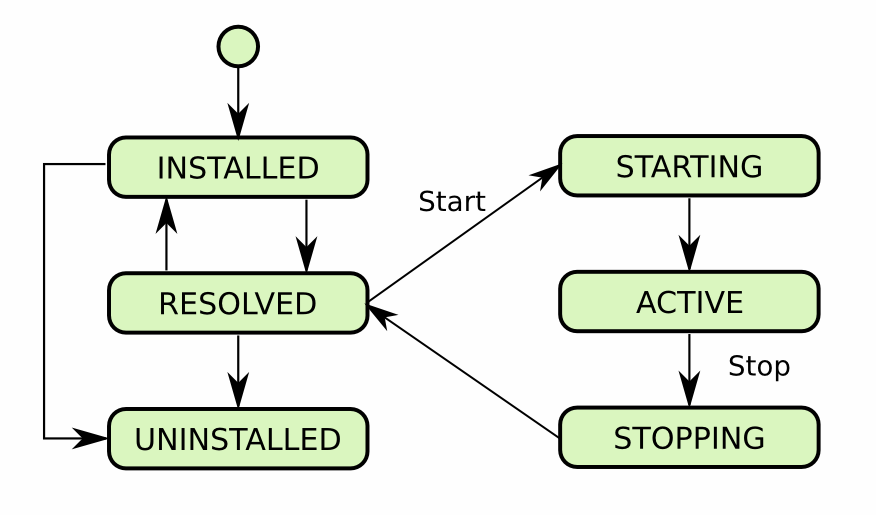
INSTALLED
This state indicates that the installation step has been successfully completed. In this case, neither dependency analysis nor the class loading is made. Only required steps are performed, such as defining bundle properties analysing its Manifest file.
RESOLVED
Bundle is found in this state when OSGi resolves and satisfies all of its dependencies and makes class loading operations. This is the state that comes before starting and after stopping.
STARTING
This is the state that bundle is found when the “start” method of the Activator of the bundle is called, but not yet as successfully or unsuccessfully finished.
ACTIVE
The bundle is successfully started and running meaning the “start” method of the Activator resulted success.