OAuth2 User Provisioning
1. Overview
When a user authenticates via a federated Identity Provider (Entra ID, Google, Facebook, Apple) for the first time, the system must create the necessary records to establish the user’s identity within the organisation. This is called Just-In-Time (JIT) provisioning.
An alternative approach is SCIM provisioning, where the IdP proactively pushes user changes to the application. JIT provisioning is simpler to implement and sufficient for the Registration Portal’s public-facing use case.
2. Provisioning Strategies
2.1. Just-In-Time (JIT) Provisioning
This technique creates the user in the local database at the point of login. It allows a new user account to assume default permissions when logging in for the first time.
Key characteristics:
-
No admin pre-provisioning required
-
User is created on first successful OAuth2 login
-
Default permissions assigned automatically (
ROLE_USER) -
Suitable for public-facing registration portals
2.2. SCIM Provisioning
With this approach the IdP proactively notifies downstream applications of user changes. Shortly after a user is created or updated, the IdP contacts the application using its SCIM interface to effect the changes.
This is more appropriate for enterprise environments where user lifecycle management is controlled by an IT department. Not currently implemented.
3. JIT Provisioning Flow
3.1. Token Exchange with JIT
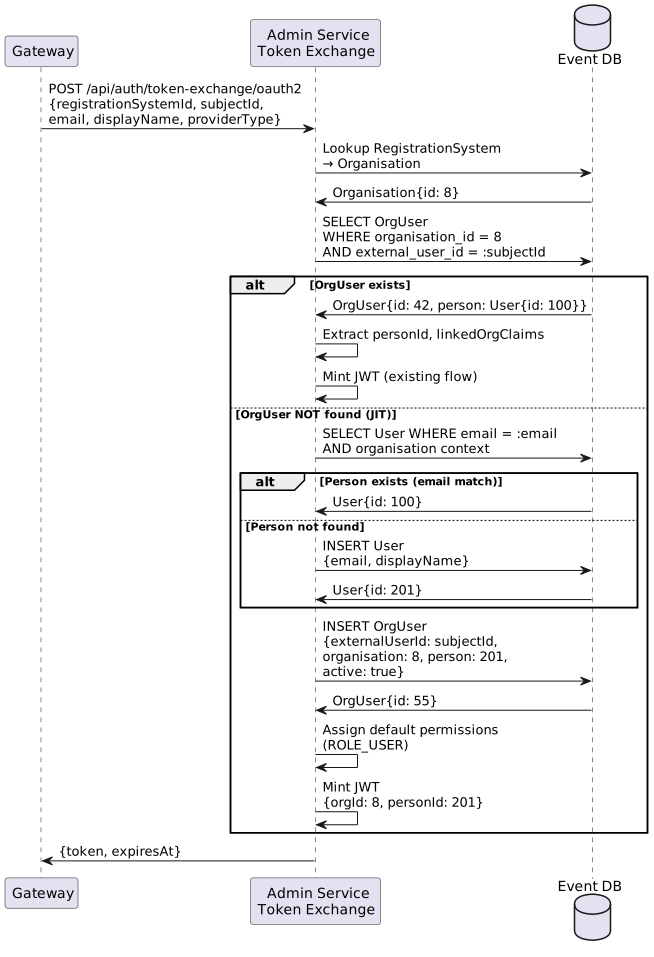
The admin-service ExternalAuthService handles JIT provisioning during the OAuth2 token exchange. This reuses the existing infrastructure for resolving RegistrationSystem → Organisation and minting JWTs via NimbusTokenProvider.
3.2. Subject Identifier Mapping
The claim used to populate OrgUser.externalUserId is configurable per identity provider via the TenantIdentityProvider.subjectClaimName field.
| Provider | Claim | Rationale |
|---|---|---|
|
Standard OIDC subject identifier; globally unique, stable |
|
|
Numeric string, unique per app, stable |
|
Apple |
|
Opaque string, unique per developer team, stable |
Microsoft Entra ID |
|
Object ID; unique across all app registrations in the Entra ID tenant. Microsoft recommends |
Custom OIDC |
Configurable |
Depends on IdP; defaults to |
The Gateway reads the configured subjectClaimName from the TenantIdentityProvider entity and extracts the corresponding value from the IdP token claims. This value is sent to the admin-service as subjectId in the token exchange request.
3.3. Email Deduplication
Before creating a new Person record, the system checks for an existing Person with the same email address within the Organisation. This handles scenarios where:
-
A user was pre-provisioned by an admin
-
A user previously registered via a different method (hash-based auth)
-
A user switches identity providers
If a match is found, the new OrgUser is linked to the existing Person. If no match, a new Person is created.
3.4. Idempotent Provisioning
The unique constraint (organisation_id, external_user_id) on the org_user table prevents duplicate records. If two concurrent requests arrive for the same new user:
-
First request creates the OrgUser successfully
-
Second request gets a
DataIntegrityViolationException -
On conflict, the service re-queries and returns the existing OrgUser
3.5. Default Permissions
JIT-provisioned users receive minimal permissions:
-
Authority:
ROLE_USER -
Organisational access: Primary organisation only (READ_WRITE via OrgUser.organisation)
-
No linked organisations
-
No linked persons (self-access only)
Administrators can upgrade permissions via the admin UI.
4. Authentication Process
When a request arrives via the OAuth2 token exchange flow:
-
The Gateway completes the OAuth2 Authorization Code flow with the external IdP
-
BackendTokenExchangeSuccessHandlerextracts validated claims from theOAuth2Userprincipal -
The Gateway sends claims to admin-service:
POST /api/auth/token-exchange/oauth2-
registrationSystemId— fromTenantContext -
subjectId— from the configuredsubjectClaimNamein the IdP token -
email— from IdP claims -
displayName— from IdP claims -
providerType— identifies which IdP was used
-
-
The admin-service resolves
RegistrationSystem→Organisation -
ExternalAuthServicelooks up OrgUser by(organisation, externalUserId = subjectId) -
If not found, JIT provisioning creates Person + OrgUser
-
NimbusTokenProvider.createToken()mints the internal JWT withorgId,personId,linkedOrgIds -
JWT returned to Gateway, stored in HTTP session
5. Implementation Location
| Component | Responsibility |
|---|---|
|
Extracts validated claims from OAuth2User principal; reads |
|
Resolves organisation; looks up or creates OrgUser (JIT); mints JWT |
|
Creates signed JWT with custom claims |
|
|