Event Registration
1. Overview
The Event Registration workflow enables users to register participants for events such as races, tournaments, and competitions. It follows the Phase 2 Registration Design with implementation-specific details for event scenarios.
Key Features:
-
Multi-participant Registration - Register multiple people in a single transaction
-
LinkedPerson Integration - Select from existing linked persons
-
Order-based System - Creates Order entity for payment tracking
-
Payment Gateway Integration - Redirect to payment portal after registration
-
Cancellation Support - Cancel registrations with refund rules (Phase 2)
2. Event Concepts
2.1. Event Entities
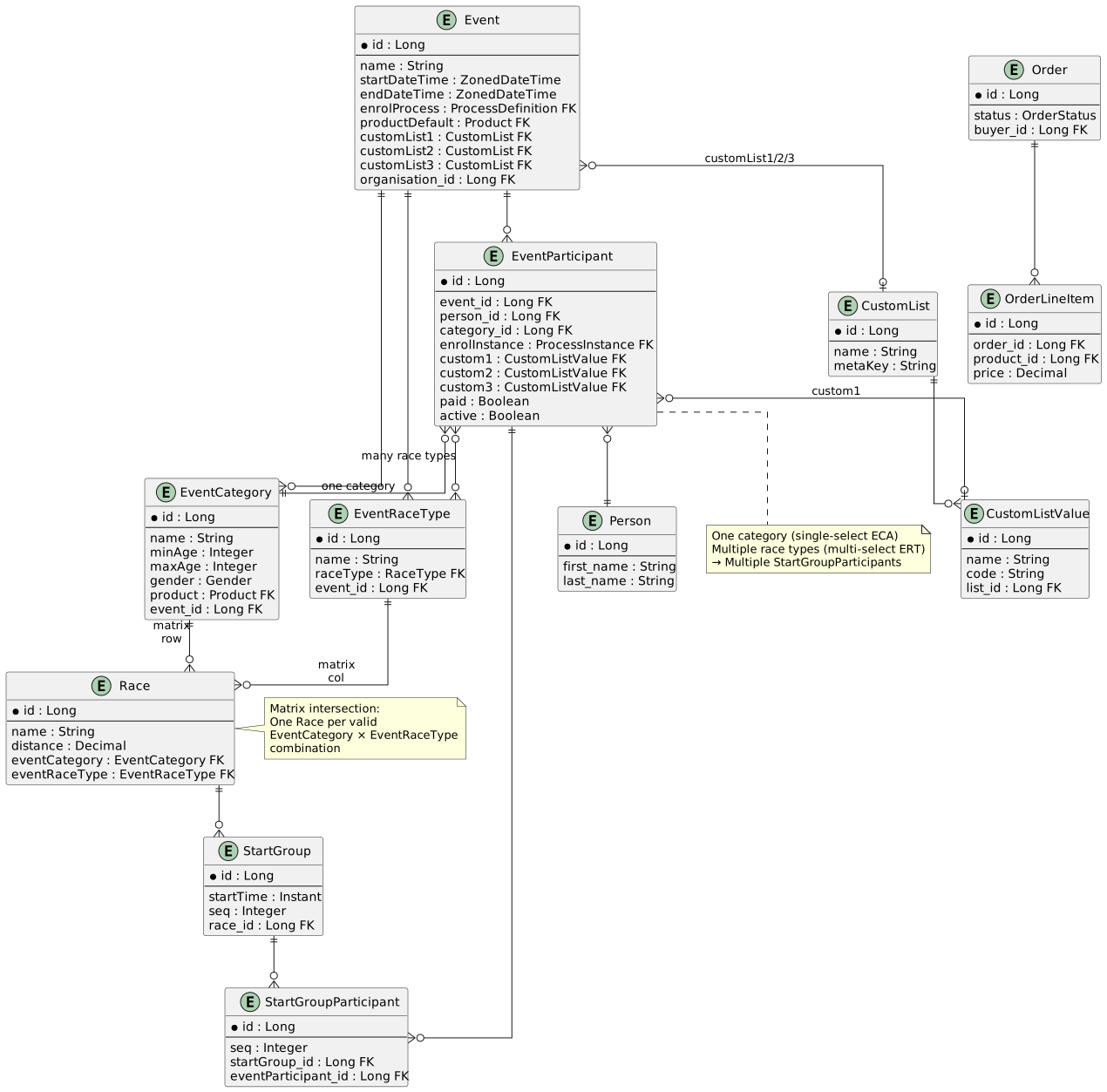
Event
Defines the overall competition or activity:
-
Name, description, dates, timezone
-
Location and venue
-
Organizer (Organisation)
-
enrolProcess— links to ProcessDefinition for the registration question workflow -
productDefault— fallback product for pricing when EventCategory has no product -
customList1/2/3— configurable custom lists (e.g., clubs, teams, sponsors)
EventCategory
Age/gender grouping within an event:
-
Name (e.g., "U15 Boys", "Senior Men", "Elite Women")
-
minAge,maxAge— age eligibility range -
gender— gender eligibility (M/F or null for mixed) -
product— pricing product for this category (primary pricing source) -
Can inherit from
sourceCategory(organisation-level standard categories)
EventRaceType
Race type configuration per event:
-
Links a
RaceType(e.g., Scratch, Elimination, Match Sprint) to an Event -
Optional name override; falls back to
RaceType.name
Race (Matrix Intersection)
Specific race within an event — created at each valid EventCategory × EventRaceType combination:
-
Links one
EventCategoryand oneEventRaceType -
Not all combinations are valid (e.g., U15 may not race Match Sprint)
-
Contains
StartGrouprecords for participant assignment
StartGroup / StartGroupParticipant
Race participation:
-
StartGroupbelongs to a Race; multiple groups possible (warm-up, qualification, final) -
StartGroupParticipantlinks anEventParticipantto aStartGroup -
One EventParticipant can have multiple StartGroupParticipant records (one per selected race type)
EventParticipant
Individual participant registration:
-
Links Person to Event with exactly one EventCategory (single-select)
-
Many-to-many with EventRaceType (multi-select)
-
custom1/2/3— CustomListValue references mapped fromEvent.customList1/2/3 -
enrolInstance— links to the ProcessInstance that created this participant -
Stores mirrored personal data from Person (override capability)
CustomList / CustomListValue
Event-configurable dropdown lists:
-
Event supports 3 custom list slots (
customList1/2/3) -
Each CustomList contains multiple CustomListValues
-
metaKeyon CustomList corresponds to UserMeta key for "last used" persistence -
Selected values populate
EventParticipant.custom1/2/3
Order / OrderLineItem
Payment transaction container:
-
Created during
EventFormController.onDone() -
Groups line items for all participants in a registration
-
Product/price sourced from
EventCategory.productwithEvent.productDefaultfallback -
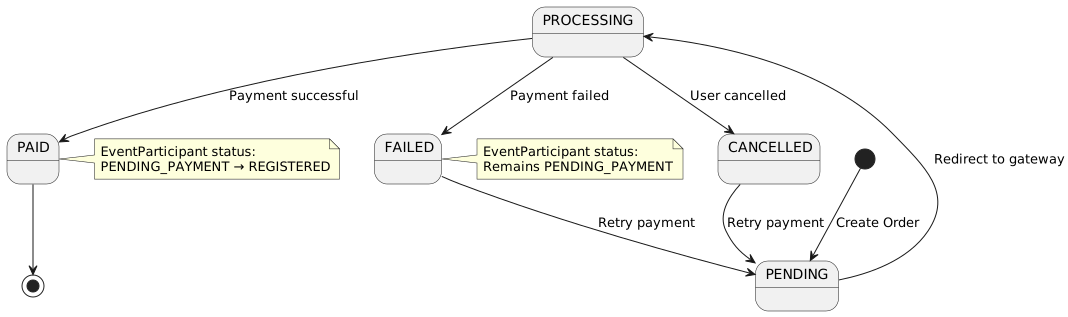
Tracks payment status (UNPAID → PENDING → PAID)
3. Registration Flow by Step
This section details each step from the Phase 2 Registration Design as it applies to event registration.
3.1. Step 1: Identity Selection
|
Phase 2 Enhancement: Identity Selection is a new capability being introduced. Current implementation uses URL parameters for user identification. |
3.1.1. Current Implementation (URL-Based Access)
Route Pattern:
/registerQuery Parameters:
| Parameter | Description | Required | Example |
|---|---|---|---|
|
Event ID to register for |
Yes |
|
|
Organisation ID (organizer) |
Yes |
|
|
User key (security context) |
Optional |
|
Example URLs:
https://app.example.com/register?eventId=42&orgId=8&userKey=abc123xyz
https://app.example.com/register?eventId=42&orgId=8
Session vs URL userKey:
-
If
userKeyprovided in URL → Use URL parameter (external link scenario) -
If no
userKeyin URL → Use sessionuserKey(logged-in user scenario)
3.1.2. Phase 2: OIDC Authentication
When OIDC authentication is configured for the tenant, users will be presented with a choice:
-
Authenticate - Sign in via OIDC provider to access existing profile
-
Continue Anonymously - Proceed without authentication
See Identity Selection in the Phase 2 design for details.
3.2. Step 2: Registration Overview
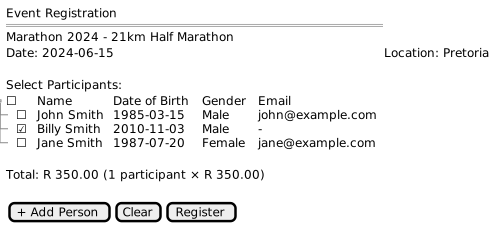
The Registration Overview displays the event details and linked persons for selection.
Component: RegistrationComponent
File: src/main/webapp/app/entities/registration/list/registration.component.ts
3.2.1. Component Structure
export class RegistrationComponent implements OnInit, OnDestroy {
  persons: IPersonSelect[] = [];
  selectForm!: FormGroup;
  selectCount = 0;
  isLoading = false;
  isSaving = false;

  _eventId: number | undefined;
  event: IEvent | undefined;
  _organisationId: number | undefined;
  organisation: IOrganisation | undefined;
  _userKey: string | undefined;
  principal: IPerson | undefined;
  sessionUserId: boolean = true;
}
3.2.2. Initialization
ngOnInit(): void {
  this.selectForm = this.fb.group({
    selection: this.fb.array([]),
  });

  // Subscribe to checkbox changes for count
  this.selectionChangeSubscription = this.selectForm.valueChanges
    .subscribe(data => {
      const arr: boolean[] = data.selection;
      this.selectCount = arr.reduce((n, checkbox) =>
        (checkbox ? n + 1 : n), 0);
    });

  this.handleNavigation();
}
3.2.3. Navigation Handler
protected handleNavigation(): void {
  combineLatest([this.activatedRoute.data, this.activatedRoute.queryParamMap])
    .subscribe(([data, params]) => {
      const eventId = params.get('eventId');
      if (eventId) {
        this.eventId = +eventId;
      }

      const organisationId = params.get('orgId');
      if (organisationId) {
        this.organisationId = +organisationId;
      }

      const userKey = params.get('userKey');
      if (userKey) {
        this.userKey = userKey;
        this.sessionUserId = false;
      } else {
        this.userKey = this.sessionService.getUserKey();
        this.sessionUserId = true;
      }

      this.loadPage(pageNumber, true);
    });
}
API Endpoints Called:
-
GET /api/events/{id}- Load event details -
GET /api/organisations/{id}- Load organisation details -
GET /api/people/userkey/{userkey}- Load or create principal person
3.2.4. Loading LinkedPersons
loadPage(page?: number, dontNavigate?: boolean): void {
  const pageToLoad: number = page ?? this.page ?? 1;

  if (this.organisationId && this.userKey) {
    this.isLoading = true;
    this.personService.getAllLinkedOrgUsersByPrincipal(
      this.userKey,
      this.organisationId
    ).subscribe(
      (res: EmbeddedLinkedPersonDTO[]) => {
        this.isLoading = false;
        this.persons = res;
        this.selectForm.setControl('selection', this.buildSelection());
      },
      () => {
        this.isLoading = false;
        this.onError();
      }
    );
  }
}
API Endpoint: GET /api/people/linked?userKey={key}&organisationId={orgid}
Response:
[
  {
    "id": 1,
    "firstName": "John",
    "lastName": "Smith",
    "dateOfBirth": "1985-03-15",
    "gender": "MALE",
    "email": "[email protected]",
    "contactNumber": "0821234567"
  },
  {
    "id": 3,
    "firstName": "Billy",
    "lastName": "Smith",
    "dateOfBirth": "2010-11-03",
    "gender": "MALE",
    "email": null,
    "contactNumber": null
  }
]
3.2.6. Existing Registration Status
|
Phase 2 Enhancement: The Registration Overview will clearly show if any person is already registered for this event. See Registration Overview in the Phase 2 design. |
For persons already registered:
-
Display "Registered" status
-
Show bib number if assigned
-
If current user was the payer, show link to view order/payment/invoice details
3.2.7. Event Cancellation
|
Phase 2 Enhancement: Event cancellation with refund rules is a new capability. See Registration Overview in the Phase 2 design. Outstanding Requirements:
|
For events, users will be able to cancel existing registrations:
-
Select registered person
-
Request cancellation
-
System applies configured refund rules
-
Refund processed (if applicable)
-
Registration status updated to cancelled
3.3. Step 3: Link Person
The Link Person step allows users to add participants to their profile.
See LinkedPerson Management for complete details on the person search, matching, and linking workflow.
Add Person Button:
<a routerLink="/linked-person/search">
  <button type="button" class="btn btn-primary">
    <fa-icon icon="plus"></fa-icon>
    Add Person
  </button>
</a>
Flow:
-
User clicks "Add Person"
-
Navigate to
/linked-person/search -
User searches/creates person
-
Person is linked to principal
-
Return to
/registerwith updated person list
3.3.1. Form Array for Selection
buildSelection(clear?: boolean): FormArray<FormControl<boolean | null>> {
  const arr = this.persons.map(person => {
    return this.fb.control(!clear ? !!person.selected : false);
  });
  return this.fb.array(arr);
}

get selectionControl(): FormArray<FormControl<boolean | null | undefined>> {
  return this.selectForm.get('selection') as FormArray;
}
Validation:
get canRegister(): boolean {
  return !!this.event &&
         this.selectForm.valid &&
         this.selectCount > 0 &&
         !this.isLoading &&
         !this.isSaving;
}
3.4. Step 4: Registration Details (Question Workflow)
Event registration uses the ProcessDefinition-driven question workflow, managed by EventFormController. The Event.enrolProcess field links to a ProcessDefinition containing ordered ProcessStep records, each mapped to a FormField type.
3.4.1. Question Flow
The EventFormController iterates through ProcessSteps in sequence order. For each step, the corresponding FormField is instantiated, options loaded, and the user’s answer validated before advancing. If all steps pass validation, onDone() is called to create backend records.
3.4.2. Event-Specific FormField Types
ECA — Event Category Selection (single-select)
-
Presents eligible EventCategories for the event
-
Filters by participant’s age and gender (
minAge,maxAge,gender) -
Matrix filtering: If ERT was already answered, further filters to categories that have valid Race records for the selected race types
-
Auto-selects and skips if only one valid category remains
-
Stores selected category ID in ProcessData (key:
eventCategory)
ERT — Event Race Type Selection (multi-select)
-
Presents available EventRaceTypes for the event
-
Matrix filtering: If ECA was already answered, filters to race types that have valid Race records for the selected category
-
Auto-selects and skips if only one valid race type remains
-
Stores selected race type IDs in ProcessData (key:
eventRaceTypes) -
UI renders as multi-select (UI_CODE:
MRT)
| ECA and ERT can appear in either order in the ProcessDefinition. The matrix filtering adapts: whichever is answered first constrains the options for the second. |
CLV — Custom List Value (dropdown)
-
When
ProcessStep.customListSlotis set (1, 2, or 3):-
Loads options from
Event.customList{N}→CustomListValueentities -
Default value resolution: existing
EventParticipant.custom{N}→UserMetaviapersonDataKey→ none -
On save: persists to ProcessData AND updates UserMeta for "last used" recall
-
-
When
customListSlotis null: falls back to pipe-delimitedlistOptions(backward compatibility)
3.4.3. Generic FormField Types
The following generic fields are shared with membership registration:
| Code | Type | Purpose |
|---|---|---|
TXT |
Free Text |
Text input with min/max/regex validation |
DRP |
Dropdown |
Select from ProcessStepOption records |
RBO |
Radio Buttons |
Radio group from ProcessStepOption records |
ROO |
Pick One |
Single radio option selection |
CHK |
Checkbox |
Boolean checkbox |
IND |
Indemnity |
Terms and conditions acceptance |
COM |
Communication |
Communication preference |
EMG |
Emergency Contact |
Emergency contact details |
PHO |
Phone Number |
Phone number with validation |
See Process Flow Integration for details on the ProcessDefinition system and the ProcessData staging pattern. See Question Types — Event-Specific for detailed documentation on each event FormField type. See CSA Integration for the CSA validation workflow.
3.4.4. Concrete Example: 8-Step Track Cycling Registration
This example traces a practical ProcessDefinition for track cycling event registration, showing how ProcessData accumulates across steps and feeds into onDone().
ProcessDefinition steps:
| Seq | Type | Purpose |
|---|---|---|
1 |
ECA |
Select category (e.g., U15 Boys, Senior Men) |
2 |
ERT |
Select race types (e.g., Scratch, Elimination) — multi-select |
3 |
COM |
Communication preferences |
4 |
CLV |
Select school (customListSlot=1) |
5 |
CSI |
Capture CSA membership number |
6 |
CSM |
Validate CSA membership (external API) |
7 |
CSL |
Validate CSA racing license (external API) |
8 |
CNF |
Confirm/assign race number |
ProcessData accumulation (for participant Billy, after each step completes):
| After Step | Step Type | ProcessData Key | Value Stored |
|---|---|---|---|
Step 1 |
ECA |
DEFAULT |
|
Step 2 |
ERT |
DEFAULT |
|
Step 3 |
COM |
DEFAULT |
|
Step 4 |
CLV |
DEFAULT |
|
Step 5 |
CSI |
DEFAULT |
CSA membership number and ID details |
Step 6 |
CSM |
DEFAULT |
CSA membership validation result |
Step 7 |
CSL |
DEFAULT |
CSA license validation result |
Step 8 |
CNF |
DEFAULT |
Confirmed race number |
Key inter-step dependencies:
-
Step 2 (ERT) reads Step 1 (ECA) ProcessData to perform matrix filtering — only showing race types that have valid
Racerecords for the selected category -
Steps 6-7 (CSM, CSL) read Step 5 (CSI) ProcessData to obtain the CSA number for API calls
-
onDone()reads Steps 1, 2, and 4 to create EventParticipant (category, custom1) and StartGroupParticipant (per Race) records
This staging pattern means that no business entities are created until all steps pass validation. See Process Flow — ProcessData as a Staging Area for the rationale.
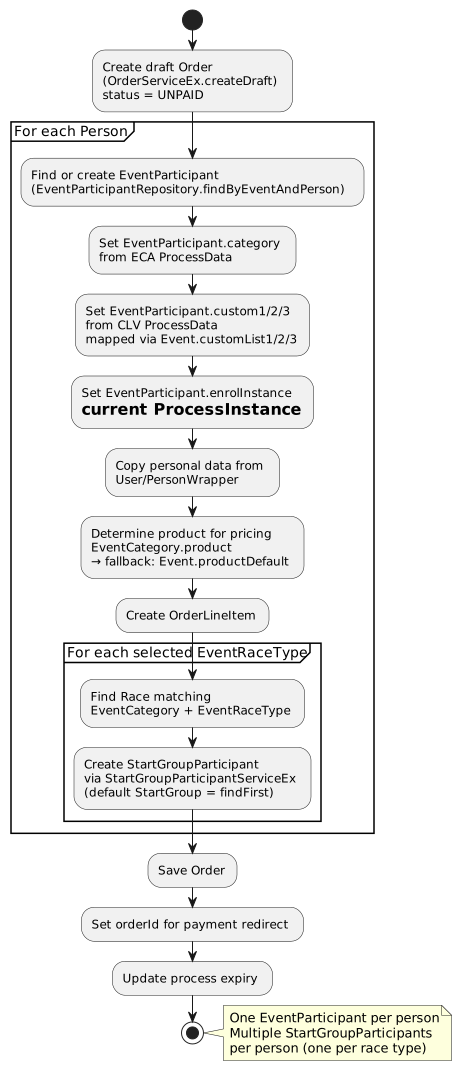
3.5. Step 5: Order Creation (EventFormController.onDone)
When all ProcessSteps pass validation, EventFormController.onDone() executes to create all backend records. This follows the same pattern as MembershipFormController.onDone().
3.5.2. Data Flow
| ProcessData Key | Source Step | Destination |
|---|---|---|
|
ECA |
|
|
ERT |
Race lookup per category → |
CLV field key |
CLV (slot 1/2/3) |
|
3.5.3. Order Structure
-
Order: Draft with status UNPAID, buyer =
ProcessInstance.startedBy -
OrderLineItem: One per person, product from
EventCategory.product(fallback:Event.productDefault) -
orderIdreturned in FormDTO response — frontend uses this to navigate to payment
See Order Creation in the Phase 2 design for payment callback details.
3.6. Step 6: Payment
3.6.1. Form Completion → Payment Redirect
When the participant completes all ProcessSteps, the frontend submits the form via the Form API. This triggers EventFormController.onDone() (documented in Step 5), which creates all backend records and returns the orderId in the FormDTO response.
The frontend then redirects to the payment URL:
// After form completion, FormDTO contains orderId
if (formResponse.orderId) {
  // Navigate to payment page with order reference
  this.router.navigate(['/registration/payment', formResponse.orderId]);
}
API Endpoints:
-
POST /api/form/{processInstanceId}/submit— Submit completed form (triggersonDone()) -
Response includes
orderIdfor payment redirect
3.6.2. Backend Processing (FormController-based)
The backend processing for event registration is handled entirely by the FormController architecture:
-
Form Validation (FormController base)
-
Each ProcessStep validated by its FormField implementation
-
All PersonData keys resolved and stored as ProcessData
-
Invalid steps returned to frontend for correction
-
-
Record Creation (
EventFormController.onDone()— see Step 5)-
EventParticipant created with category, custom values, and enrolInstance
-
StartGroupParticipant records created per Race (EventCategory × EventRaceType)
-
Order with OrderLineItems created (status UNPAID)
-
-
Registration State (
EventFormController.setRegistrationState())-
Checks for existing EventParticipant for each person/event pair
-
Sets
FormPersonStatus.REGISTEREDif already active -
Sets
FormPersonStatus.PENDING_PAYMENTif unpaid Order exists from same buyer (with paymentUrl) -
Sets
FormPersonStatus.NOT_REGISTEREDotherwise
-
-
Payment Integration
-
If Order amount > 0, frontend redirects to payment URL using
orderId -
Payment callback handling is out of scope for EventFormController (see below)
-
-
Free Registration
-
If amount = 0 (no product on EventCategory or Event), Order created with zero value
-
Participants registered immediately without payment redirect
-
3.6.3. Registration Response
The FormDTO response after successful form submission:
{
  "processInstanceId": 456,
  "status": "DONE",
  "orderId": 892,
  "people": [
    {
      "personId": 3,
      "name": "Billy Smith",
      "status": "PENDING_PAYMENT"
    }
  ]
}
3.6.4. Online Payment (WooCommerce)
Payment Redirect:
if (res.body?.infoURL) {
  location.href = res.body.infoURL;
}
Payment Gateway URL Example:
https://payment.gateway.com/pay?
  reference=ORD-892-2024&
  amount=350.00&
  return=https://app.example.com/registration/payment-return&
  cancel=https://app.example.com/registration/payment-cancel
3.6.5. Manual Payment
|
Phase 2 Enhancement: Manual payment is a new capability being introduced. See Payment in the Phase 2 design. |
Manual payment will be available for registration desk scenarios at events:
-
System generates reference number with QR code
-
User presents QR code to staff at registration desk
-
Staff scans/enters reference on registration system
-
Staff captures: amount, payment method, outcome
-
Registration completes upon payment confirmation
3.6.6. Payment Return
Return URL: /registration/payment-return
Query Parameters:
| Parameter | Description | Example |
|---|---|---|
|
Order reference |
|
|
Payment status |
|
|
Gateway transaction ID |
|
Backend Processing on Return:
-
Verify payment status with gateway
-
Update Order status
-
Update EventParticipant status
-
Send confirmation email
-
Display success/failure message
3.7. Step 7: Confirmation & Notifications
3.7.1. Immediate Confirmation
Upon successful payment:
-
EventParticipant records marked as REGISTERED
-
Bib numbers assigned (if applicable)
-
Confirmation displayed with registration details
-
Confirmation email sent
Confirmation Display:
Registration Successful!

Billy Smith - Bib Number: B1523

You will receive your race pack at:
Race Expo: March 14, 2024, 10:00-18:00
Centurion Mall

Race Start: March 15, 2024, 07:00

Good luck!
3.7.2. Scheduled Notifications
|
Phase 2 Enhancement: Scheduled notifications are managed by long-running processes. See Confirmation & Notifications in the Phase 2 design. |
For events, scheduled notifications include:
-
Registration confirmation with event details
-
Event location and directions (closer to event date)
-
Program updates and changes
-
Pre-event reminders (day before, morning of)
-
Post-event results and certificates
4. Error Handling
4.1. Validation Errors
Client-Side:
-
No event loaded → Disable register button
-
No persons selected → Disable register button
-
Form invalid → Display validation messages
Server-Side:
{
  "phase": "VALIDATION_ERROR",
  "title": "Registration Error",
  "message": "One or more participants are not eligible for this event",
  "participants": [
    {
      "id": null,
      "person": { "id": 3, "firstName": "Billy", "lastName": "Smith" },
      "valid": false,
      "message": "Participant is under minimum age requirement (18 years)"
    }
  ]
}
Error Display:
<div *ngIf="registration.phase === 'VALIDATION_ERROR'" class="alert alert-danger">
  <h4>{{ registration.title }}</h4>
  <p>{{ registration.message }}</p>
  <ul>
    <li *ngFor="let p of registration.participants">
      <span *ngIf="!p.valid">
        {{ p.person.firstName }} {{ p.person.lastName }}: {{ p.message }}
      </span>
    </li>
  </ul>
</div>
4.2. Registration Failures
Common Failure Scenarios:
| Scenario | Cause | Resolution |
|---|---|---|
Event Full |
Maximum participants reached |
Show waitlist option |
Registration Closed |
Outside registration window |
Display event information only |
Duplicate Registration |
Person already registered |
Show existing registration |
Payment Gateway Down |
External service unavailable |
Allow registration, mark as pending payment |
Network Error |
Connection timeout |
Show retry button, preserve selection |
4.3. Loading States
<div *ngIf="isLoading" class="text-center">
  <div class="spinner-border" role="status">
    <span class="sr-only">Loading persons...</span>
  </div>
</div>

<div *ngIf="isSaving" class="text-center">
  <div class="spinner-border" role="status">
    <span class="sr-only">Processing registration...</span>
  </div>
</div>
5. Integration Points
5.1. LinkedPerson Workflow
Event registration integrates with LinkedPerson management:
-
User accesses registration URL
-
System loads linked persons for user
-
User can add more persons via LinkedPerson workflow
-
User selects participants from linked persons
-
Registration creates EventParticipant records
5.2. Order System
Event registration creates Order entities:
-
Order - Container for transaction
-
OrderLine - Individual line items (one per participant)
-
Payment - Payment record after gateway processing
See Financial Entities for details.
5.3. Email Notifications
Registration Confirmation:
-
Sent after successful registration (free events)
-
Sent after successful payment (paid events)
-
Includes participant details, event information
-
Includes payment receipt (if applicable)
Payment Receipt:
-
Sent after successful payment
-
Includes order reference, amount paid
-
Itemized list of participants
6. Interactive UI Prototypes
Interactive HTML prototypes are available for event registration screens. See Screen Designs - Interactive UI Prototypes for links to:
-
Registration Overview (Event) - Participant selection with event details
-
Payment Selection (Event) - Order summary with individual line items
-
Manual Payment QR Handoff - Staff capture screen