Event Management Entities
1. Overview
Event management entities comprise the largest category with 35 entities supporting the complete lifecycle of event management, from event creation through participant registration, race execution, and results processing.
Package: za.co.idealogic.event.domain
Repository: event-database
| For a detailed explanation of how Event, Race, and Participant entities work together, including the event creation workflow and design rationale, see Event, Race, and Participant Design. |
3. Core Event Entities
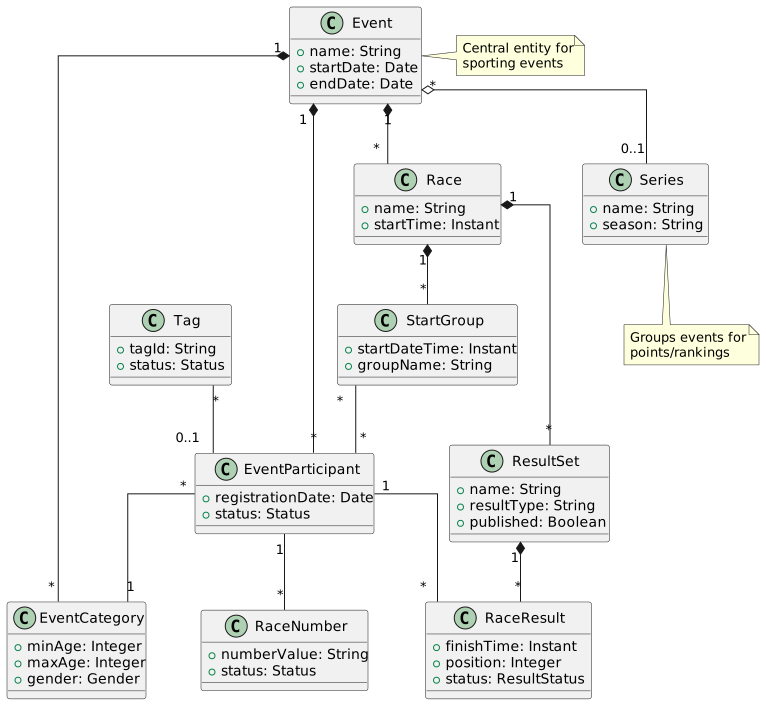
3.1. Event
The high-level construct representing date(s) on a calendar when one or more races (activities) are held.
An Event is the primary organizing entity for sporting events such as marathons, triathlons, cycling races, track meets, or multi-sport competitions. It serves as the container for all races, participants, and related information for a specific event occurrence.
Package: za.co.idealogic.event.domain
Repository: event-database
Key Fields:
-
Event name
-
Event date(s) - supports single or multi-day events
-
Event description and images (HTML format)
-
Discipline (sport type)
-
Series membership (optional)
Key Relationships:
-
Many-to-one with Organisation
-
One-to-many with Race (multiple races within an event)
-
One-to-many with EventParticipant
-
One-to-many with EventCategory
-
Many-to-one with Discipline
-
Many-to-one with Series (optional)
Special Features:
-
Extends
ContentChangeAwarefor tracking modifications -
Multi-day event support
-
Online/offline registration configuration
-
CategoryReferenceDate for age calculation (if defined, otherwise uses first event date)
3.2. EventParticipant
Represents a Person that is entered into an Event. Links the Person to an Event and EventCategory.
EventParticipant is specific to an Event and is linked but independent from the users of the system and the member tracking components. This entity tracks the lifecycle of the entry, including confirmation email, race number assignment, and event-specific attributes.
Package: za.co.idealogic.event.domain
Repository: event-database
Key Relationships:
-
Many-to-one with Event
-
Many-to-one with User (WordPress legacy - will migrate to Person)
-
One-to-many with RaceNumber
-
One-to-many with RaceResult
-
Many-to-one with EventCategory
-
References Order (via registration)
Attributes:
-
Registration timestamp
-
Participant status (registered, checked-in, DNS, DNF, DQ)
-
Withdraw status and reason
-
Registration and payment status
-
Event-specific email
-
Emergency contact information
-
Custom field values
-
Communication tracking
Automatic Category Assignment:
Entries are automatically assigned to EventCategories based on:
-
Age specification - Takes lowest possible age as default; age calculated from Event’s CategoryReferenceDate if defined, otherwise first event date
-
Gender - Assigned to gender-specific age category, or gender-neutral category if available
3.3. EventCategory
Event-specific categories that can be applied to participant entries. These categories can be limited by age and/or gender and form the basis for race organization.
EventCategory is a Regulatory Construct often defined in terms of rules and regulations set by sanctioning organisations. These regulations typically include age, gender, or other prior classifications like seeding. EventCategories are often numerous, catering for all combinations of ages and genders to ensure regulatory compliance.
Package: za.co.idealogic.event.domain
Repository: event-database
Category Types:
-
Standard Categories - Based on organisation-level Category entities (e.g., U/13 Boys, Elite Women)
-
Ad-hoc Categories - Created specifically for an event without underlying Category reference
-
Composite Categories - Combine multiple feeder categories (e.g., "Open Men" combining all men’s categories)
Inheritance Model:
EventCategory rows can inherit shared attributes (name, age range, gender, product, policy flags, default number subtypes) from a parent definition rather than duplicating values. The model is three-tier: organisational Category → series-level EventCategory → event-level EventCategory. See EventCategory Cascading Inheritance for the full operating guide, the FieldOrigin API surface, and the parentage-exclusivity rule for event-level rows.
Composite Category Behavior:
When a composite EventCategory is selected in the Race Matrix, the constituent EventCategories for that EventRaceType are automatically excluded to prevent participants from being entered twice in the same race type.
Key Attributes:
-
MinAge, MaxAge - Age range constraints
-
Gender restrictions (Male, Female, or neutral)
-
Category reference (links to organisation-level Category)
-
Composite configuration (identifies constituent categories)
Key Relationships:
-
Many-to-one with Event
-
Many-to-one with Category (optional, for standard categories)
-
One-to-many with Race (via EventCategory × EventRaceType combinations)
Automatic Assignment:
Entries are automatically assigned to the relevant EventCategory based on participant age and gender. Age is calculated from Event’s categoryReferenceDate (if defined) or first event date. See EventParticipant for detailed assignment rules.
4. Series Management
4.1. Series
A collection of events grouped together to have a final outcome in terms of standing or ranking, or alternatively to share common configuration parameters.
An event can be part of multiple series. A series can be marked as private if used solely for administrative/operational purposes, such as tracking participants in a given season.
Package: za.co.idealogic.event.domain
Repository: event-database
Key Relationships:
-
One-to-many with Event
-
One-to-many with SeriesPost
Use Cases:
-
Point scoring across multiple events
-
Championship rankings and standings
-
Season-long competitions
-
Sharing configuration parameters (e.g., reusable race numbers across series events)
-
Sharing fees (e.g., annual series entry fee)
-
Private series for administrative tracking
5. Race Structure
5.1. Race
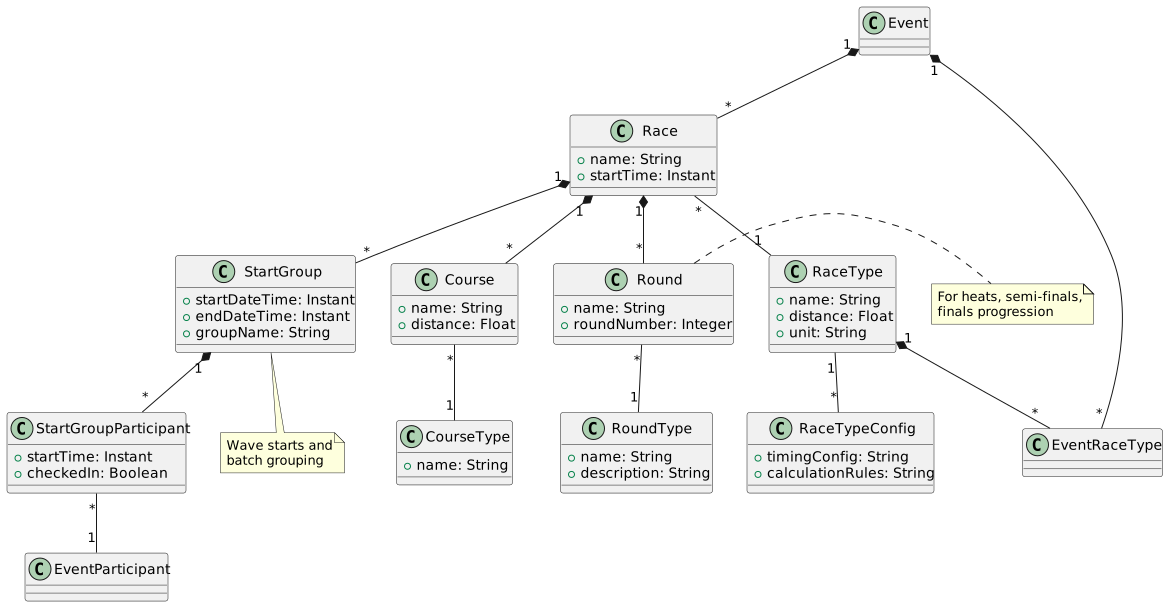
A competitive event for which positions and results are generated. Owner of Start Groups and Result records.
A Race represents a competition amongst participants in a specific EventCategory and EventRaceType, run on a Course, with a defined outcome in terms of position, times, and/or points. It is an individual competitive activity within an event (e.g., 10K race within a marathon event, or Elite Men’s Points Race in a track cycling event).
Package: za.co.idealogic.event.domain
Repository: event-database
Key Characteristics:
-
Auto-Generation: Initially auto-generated as combinations of all EventCategories × EventRaceTypes
-
Activation Control: Can be deactivated by setting
active = falseduring event configuration -
Multiple Start Groups: When using wave/batch starts, each group has different start time but all participants are placed together based on race scoring criteria
-
Individual vs Mass Start: Can be configured for individual start times (Time Trials) or mass starts
-
Timing: For individual starts, each participant’s start/finish time is tracked; for mass starts, StartGroup time applies to all
-
Rounds: Can support heats, semi-finals, finals with advancement rules
-
Scoring: Determines winner by fastest time, highest points, or other race-specific criteria
-
Course Assignment: Course value is initially undefined, but set once StartGroups are configured
Event Association (Immutability):
The Race is indirectly linked to an Event via EventRaceType, Course, or EventCategory. An Event property is provided as a convenience to lookup the Races assigned to an event. This property is set by the first setter of any of the aforementioned properties and is immutable. If any EventRaceType, Course, or EventCategory is subsequently set with a different Event, an exception will be raised.
Key Relationships:
-
Many-to-one with Event (indirect, immutable)
-
Many-to-one with RaceType
-
Many-to-one with EventRaceType (required)
-
Many-to-one with EventCategory (required)
-
Many-to-one with Course (optional, set during StartGroup configuration)
-
One-to-many with Round (for multi-stage competitions)
-
One-to-many with StartGroup (for batch/wave starts)
-
One-to-many with RaceResult
Unique Constraint: EventRaceType and EventCategory fields have a unique constraint to prevent duplicate races.
5.2. RaceType
Organisation-level entity defining the rules and characteristics by which a race is run, determining if outcome is time-based, points-based, or other scoring methods.
RaceType is a standard, pre-defined construct (usually defined by sanctioning organisations) that enables creating events off a common configuration. This allows events with similar races to be combined into leader boards, seeding systems, and performance tracking over time. RaceTypes are often bound by regulatory constraints ensuring compliance with sport governing bodies.
Package: za.co.idealogic.event.domain
Repository: event-database
Examples by Discipline:
-
Track Cycling: Points Race, Individual Pursuit, Match Sprint, Keirin, Madison, Sprint
-
Road Cycling: Road Race, Individual Time Trial, Team Time Trial, Criterium
-
Mountain Biking: Cross Country, Downhill, Enduro
-
Athletics: 100m, 200m, 400m, Marathon, High Jump
Purpose:
Formal RaceTypes serve multiple critical functions:
-
Performance Tracking: Collate similar race results across multiple events into meaningful performance data
-
Record Keeping: Enable tracking of records for standard race types (e.g., fastest 200m track time)
-
Selector Reports: Provide consistent data for team selection and athlete evaluation
-
Series Rankings: Support point scoring and rankings across event series
-
Regulatory Compliance: Ensure races conform to sanctioning organisation standards
Attributes:
-
Distance (e.g., 200m, 40km)
-
Unit of measure (meters, kilometers, miles)
-
Sport discipline (track cycling, road cycling, MTB, athletics)
-
Standard configurations (timing, scoring, advancement rules)
-
Scoring method (time-based, points-based, position-based)
-
Round configurations (for multi-stage races like heats → semi-finals → finals)
Key Relationships:
-
One-to-many with RaceTypeConfig
-
One-to-many with EventRaceType (event-specific instances)
-
Many-to-many with Event (via EventRaceType)
-
One-to-many with Record (athletic records for this race type)
Event-Specific Configuration:
Events create EventRaceType entities as event-specific variants of standard RaceTypes, allowing customization while maintaining the connection to the standard type for reporting and record tracking.
5.3. RaceTypeConfig
Configuration settings for race types.
Attributes:
-
Timing configurations
-
Result calculation rules
-
Qualification standards
5.4. EventRaceType
Event-specific configuration of standard RaceTypes, linking Events to their available race types with event-specific settings.
EventRaceType serves as both a junction entity and a configuration container, allowing events to leverage standard RaceType definitions while accommodating event-specific variations and constraints.
Package: za.co.idealogic.event.domain
Repository: event-database
Purpose:
-
Links standard organisation-level RaceTypes to specific Events
-
Provides event-specific configuration overrides
-
Enables Race Matrix generation (EventRaceType × EventCategory combinations)
-
Supports both standard and ad-hoc race types
Configuration Options:
-
Event-specific timing configurations
-
Custom scoring rules or modifications
-
Round configuration selection (based on participant count)
-
Distance or rule variations from standard RaceType
Key Relationships:
-
Many-to-one with Event (required)
-
Many-to-one with RaceType (optional - can be ad-hoc)
-
One-to-many with Race (via EventRaceType × EventCategory combinations)
Standard vs Ad-hoc:
-
Standard EventRaceType - References an organisation-level RaceType, inheriting its configuration
-
Ad-hoc EventRaceType - Created without RaceType reference for one-off event-specific race types
6. Race Organization
6.1. Round
Represents rounds in multi-stage races (e.g., heats, semi-finals, finals) with progression rules for participant advancement.
Round entities are created when RaceTypes have defined multi-stage configurations. These configurations are typically based on participant count and are applied after event entries close.
Package: za.co.idealogic.event.domain
Repository: event-database
Characteristics:
-
Round number indicates stage sequence (1 = heats, 2 = semi-finals, 3 = finals)
-
Advancement rules defined in RaceTypeConfig
-
Participants progress based on position, time, or qualification standards
-
Can be configured for multiple heats progressing to fewer semi-finals and a single final
Example Round Progression:
Round 1: Heats (6 heats, all participants)
  → Top 2 from each heat advance

Round 2: Semi-Finals (2 semi-finals, 12 participants)
  → Top 3 from each semi-final advance

Round 3: Final (1 final, 6 participants)
  → Final results determine positions 1-6
Key Relationships:
-
Many-to-one with Race
-
Many-to-one with RoundType
-
One-to-many with RaceResult
-
One-to-many with StartGroupParticipant (participants in this round)
6.2. RoundType
Organisation-level entity defining types of rounds (e.g., qualifying, heat, semi-final, final).
RoundType is a standard, pre-defined construct (usually defined by sanctioning organisations) that provides consistency across events and enables regulatory compliance.
Package: za.co.idealogic.event.domain
Repository: event-database
Common RoundTypes:
-
Qualifying - Initial qualification round
-
Heat - First competitive round with multiple groups
-
Quarter-Final - Round of 8 (if applicable)
-
Semi-Final - Round determining finalists
-
Final - Championship round
-
Repechage - Second-chance round for eliminated participants
Attributes:
-
Name (e.g., "Heat", "Semi-Final")
-
Description and rules
-
Typical advancement criteria
-
Display order for results presentation
6.3. StartGroup
Identifies the planned start of a group of participants in a race or round. Used as a batch mechanism where outcomes of multiple StartGroups may be combined to form an overall race outcome.
A StartGroup represents wave/batch starts where one or more participants start together. The Race is the owner of the StartGroup. Start Groups are typically not used for race types with individual start times (Individual Pursuit, Time Trial, Team Time Trial), as start times are controlled individually - though a StartGroup still exists for grouping purposes.
Package: za.co.idealogic.event.domain
Repository: event-database
Key Characteristics:
-
Batch Mechanism: Multiple StartGroups can be combined for overall race results
-
Individual vs Group Start: If Race configured for individual start, each participant’s StartTime/FinishTime is tracked in StartGroupParticipant; otherwise StartGroup time applies to all
-
Always Present: There is always at least one StartGroup, even if implicit, for each Race start
-
Course Inheritance: Inherits Course from Race, but can be overridden (e.g., track races starting at different locations on same track)
-
Program Entry Association: Multiple StartGroups can share a single ProgramEntry (e.g., all scholar categories starting simultaneously)
-
Derives Name: StartGroup name typically derived from associated ProgramEntry name
Registration and Assignment:
During participant registration:
-
When Person selects EventRaceType to participate in, system identifies relevant StartGroup
-
If multiple StartGroups exist for the Race, selects the one with latest start time (to avoid confusion during registration)
-
Creates StartGroupParticipant record linking EventParticipant to StartGroup
-
Additional StartGroups can be defined later based on final participation count
-
StartGroupParticipants can be moved between StartGroups before race day
Key Relationships:
-
Many-to-one with Race
-
Many-to-one with ProgramEntry (optional, for scheduling)
-
One-to-many with StartGroupParticipant
Attributes:
-
Start date/time
-
End date/time (when last participant must finish)
-
Finish date/time (scheduled finish)
-
Group capacity (maximum participants)
-
Group name/number
-
Sequence within event
-
Course override (optional)
6.4. StartGroupParticipant
A participant entry created for each person starting in a StartGroup, linking EventParticipant to their assigned start wave or batch.
StartGroupParticipant (which replaces the deprecated "StartParticipant" entity) is created during registration when a Person selects EventRaceTypes to participate in. It tracks the participant’s assignment to a specific start group and manages their race day status and timing data.
Package: za.co.idealogic.event.domain
Repository: event-database
Creation and Assignment:
-
Created automatically during registration when Person selects EventRaceType
-
Links EventParticipant to appropriate StartGroup
-
If multiple StartGroups exist, initially assigned to one with latest start time
-
Can be reassigned to different StartGroup before race day
-
For multi-round races, additional StartGroupParticipant records created for subsequent rounds
Key Functionality:
-
Individual Start Races: If Race configured for individual start (e.g., Time Trial), the StartTime and FinishTime on each StartGroupParticipant record applies
-
Mass/Wave Start Races: If not individual start, the StartTime is derived from StartGroup.startDateTime
-
Status Tracking: Participants can be flagged as: CheckedIn, DidNotStart (DNS), DidNotFinish (DNF), Disqualified (DQ)
-
DNF Handling: If DidNotFinish, the FinishTime is set to the time when the ruling was made
-
Result Adjudication: All StartGroupParticipant records must be adjudicated to determine the outcome of the StartGroup
-
Time Calculation: TotalTime variable provided to facilitate easy calculation of results (for timed race: FinishTime less effective StartTime)
Timing Scenarios:
| Race Configuration | StartTime Source | FinishTime Source |
|---|---|---|
Individual Start (TT) |
StartGroupParticipant.startTime |
StartGroupParticipant.finishTime |
Mass/Wave Start |
StartGroup.startDateTime (all participants) |
StartGroupParticipant.finishTime |
Multiple Waves |
StartGroup.startDateTime (per wave) |
StartGroupParticipant.finishTime |
Key Relationships:
-
Many-to-one with StartGroup (required)
-
Many-to-one with EventParticipant (required)
-
One-to-many with RaceResult (participant’s results across rounds)
Attributes:
-
StartTime (individual start times for TT events)
-
FinishTime (actual finish time)
-
CheckedIn status (boolean)
-
DNS/DNF/DQ flags
-
TotalTime (calculated: FinishTime - effective StartTime)
-
Position within StartGroup
Note on Deprecated Entities:
This entity replaces two deprecated entity concepts from older documentation:
-
StartParticipant - Old name for StartGroupParticipant (same entity, renamed for clarity)
-
RaceParticipant - Removed entity; functionality now handled by StartGroupParticipant
All references should use StartGroupParticipant as the current, correct entity name.
6.5. ProgramEntry
Defines a time slot in the event program for a Race or other type of activity (e.g., prize giving, registration, briefing).
ProgramEntry provides the scheduling backbone for event organization, allowing event organisers to create a detailed program timeline. It is intentionally kept separate from StartGroup to support scenarios where multiple races start simultaneously.
Package: za.co.idealogic.event.domain
Repository: event-database
Purpose:
-
Schedule specific time slots in event program
-
Support both race activities and non-race activities
-
Enable multiple StartGroups to share a single program time slot
-
Provide structured program for participants and spectators
Separation from StartGroup:
ProgramEntry and StartGroup are kept as separate entities because:
-
A single ProgramEntry can accommodate multiple races starting simultaneously (e.g., all scholar categories starting together at 09:00)
-
Multiple StartGroups can be associated with one ProgramEntry
-
Non-race activities (prize giving, registration) need program entries but have no StartGroups
-
Provides clearer separation between scheduling (ProgramEntry) and participant grouping (StartGroup)
Attributes:
-
Date and time (required)
-
Activity name/description
-
Race order/sequence
-
Duration estimate
-
Activity type (race, prize giving, registration, etc.)
-
Location/venue (if different from main event location)
Key Relationships:
-
Many-to-one with Event
-
One-to-many with StartGroup (StartGroups derive name from ProgramEntry)
-
Can reference Race (for race-related entries)
Example Program:
08:00 - Registration Opens (ProgramEntry, no StartGroup)
09:00 - U/11 & U/13 Road Race (ProgramEntry, 2 StartGroups)
10:30 - Elite Women Road Race (ProgramEntry, 1 StartGroup)
11:30 - Elite Men Road Race (ProgramEntry, 1 StartGroup)
13:00 - Prize Giving (ProgramEntry, no StartGroup)8. Race Number Management
8.1. RaceNumber
Physical race number bibs assigned to participants.
Inheritance: Extends BaseAuditable for creation/modification tracking
Key Relationships:
-
One-to-many with RaceNumberAssignment
-
One-to-many with RaceNumberBarcode
Attributes:
-
Number value
-
Number type
-
Status (available, assigned, collected, returned)
9. Timing & Tags
10. Results Management
10.1. ResultSet
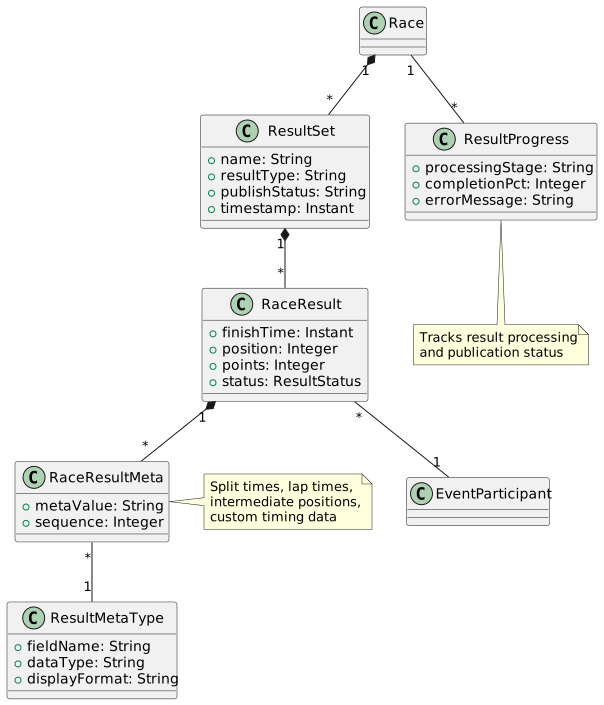
A collection of results, typically representing a single race or round.
Key Relationships:
-
Many-to-one with Race
-
One-to-many with RaceResult
Attributes:
-
Result set name
-
Result type (preliminary, official, final)
-
Publication status
-
Timestamp
10.2. RaceResult
Individual participant result in a race.
Key Relationships:
-
Many-to-one with EventParticipant
-
Many-to-one with Race
-
Many-to-one with Round (optional)
-
Many-to-one with ResultSet
-
One-to-many with RaceResultMeta
Attributes:
-
Finish time
-
Position/rank
-
Points
-
Status (finished, DNS, DNF, DQ)
-
Split times
10.3. RaceResultMeta
Additional metadata for race results (custom fields, split times, intermediate positions).
Key Relationships:
-
Many-to-one with RaceResult
-
Many-to-one with ResultMetaType
Use Cases:
-
Lap times
-
Split times at checkpoints
-
Pace information
-
Heart rate data
-
Custom timing points
11. Records Management
12. Entity Summary
| Entity | Primary Purpose | Count |
|---|---|---|
Core Event (4) |
||
Event |
Main event definition |
|
EventParticipant |
Participant registration |
|
EventCategory |
Event categorization |
|
Category |
Reusable categories |
|
Series (2) |
||
Series |
Event series grouping |
|
SeriesPost |
Series content |
|
Race Structure (9) |
||
Race |
Individual race |
|
RaceType |
Standard race definitions |
|
RaceTypeConfig |
Race type configuration |
|
EventRaceType |
Event-race type linking |
|
Round |
Multi-stage rounds |
|
RoundType |
Round classifications |
|
StartGroup |
Wave start management |
|
StartGroupParticipant |
Participant start assignment |
|
ProgramEntry |
Event scheduling |
|
Course (2) |
||
Course |
Race course definition |
|
CourseType |
Course classifications |
|
Race Numbers (3) |
||
RaceNumber |
Race bib numbers |
|
RaceNumberAssignment |
Number assignment tracking |
|
NumberType |
Number categorization |
|
Timing (2) |
||
Tag |
Timing chips/tags |
|
TagType |
Tag classifications |
|
Results (5) |
||
ResultSet |
Result collections |
|
RaceResult |
Individual results |
|
RaceResultMeta |
Result metadata |
|
ResultMetaType |
Metadata field definitions |
|
ResultProgress |
Processing status |
|
Records (2) |
||
Record |
Athletic records |
|
RecordPerson |
Record holders |
|
13. Common Workflows
13.1. Event Creation Workflow
-
Create Event with Organisation and Discipline
-
Define EventCategories
-
Create Races with RaceTypes
-
Define Courses
-
Set up StartGroups (if using wave starts)
-
Configure race numbers pool
13.2. Participant Registration Workflow
-
Create EventParticipant
-
Assign to EventCategory
-
Generate/assign RaceNumber
-
Assign to StartGroup (if applicable)
-
Link to Order (payment)