Data Synchronisation Architecture
1. Overview
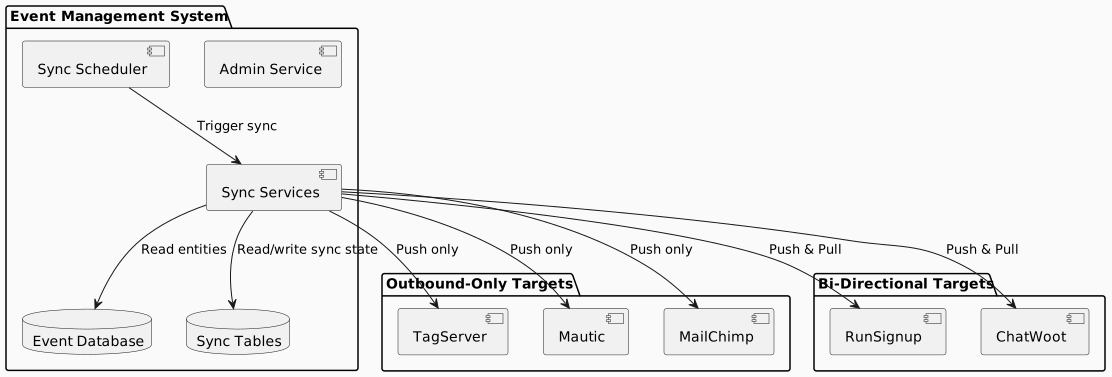
This document describes the integration architecture for synchronising data between the Event and Membership System (EMS) and external platforms. The architecture supports both outbound-only and bi-directional synchronisation patterns while maintaining EMS as the authoritative data source.
2. Architecture Principles
2.1. Master Data Ownership
EMS is the single source of truth for all event, participant, and membership data. External systems receive data from EMS and may contribute changes, but EMS always has final authority.
2.2. Sync Direction Classification
| Direction | Pattern | Use Case |
|---|---|---|
Outbound-Only |
EMS pushes data to remote; no changes flow back |
Timing systems, marketing platforms |
Bi-Directional |
Data flows both ways; EMS wins on conflict |
Registration platforms, customer support |
2.3. Design Principles
-
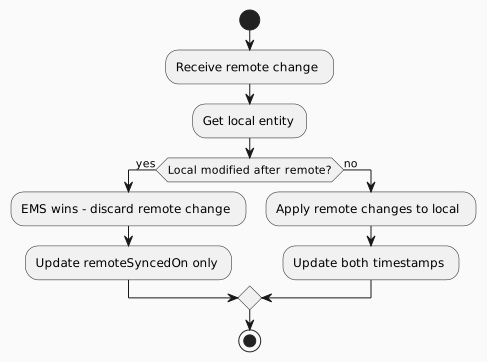
EMS Always Wins - When conflicts occur, EMS data takes precedence based on timestamp comparison
-
Change Detection via Timestamps - The
modifiedOnfield on entities drives sync decisions -
Content Hash for Bounce-back - Prevents infinite sync loops when changes echo back
-
Per-Entity Transactions - Single entity failures don’t block entire sync batches
-
Supplementary Tables - Sync metadata stored separately from main entities
4. Sync Targets
4.1. Outbound-Only Targets
These systems receive data from EMS but do not send changes back:
| Target | Purpose | Entities Synced |
|---|---|---|
TagServer |
In-house timing system for race events |
Event, Person, Organisation, Race, StartGroup, StartGroupParticipant, EventParticipant, Tag |
Mautic |
Marketing automation platform |
Person, Contact preferences |
MailChimp |
Email marketing platform |
Person, List memberships |
5. Data Model
5.1. Sync Record Concept
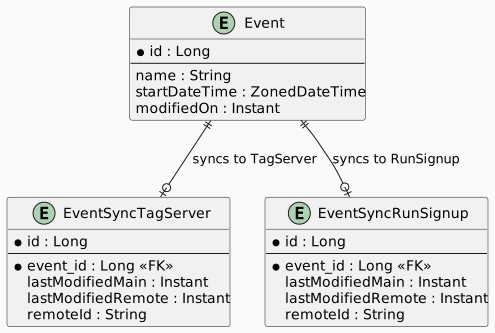
Each entity that participates in synchronisation has an associated Sync Record that tracks:
| Field | Purpose |
|---|---|
Entity Reference |
Foreign key to the main entity being synced |
Sync Target |
Identifies which remote system this record tracks |
Entity Synced On |
Timestamp when entity was last pushed TO remote |
Remote Synced On |
Timestamp when remote changes were last pulled (bi-directional only) |
Remote ID |
The entity’s identifier in the remote system |
Data Hash |
Content hash for change detection |
6. Synchronisation Flows
6.1. Outbound Sync Flow
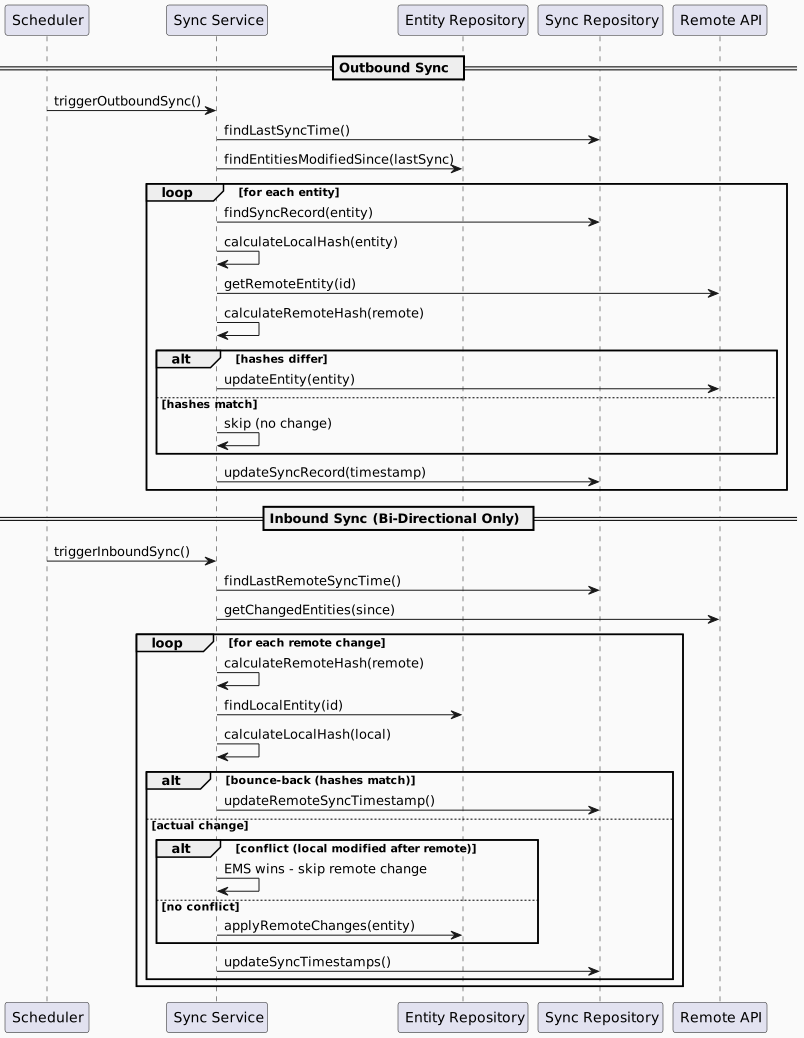
The outbound sync process pushes changes from EMS to remote systems:
-
Scheduler triggers sync at configured interval
-
Query for changes: Find entities where
modifiedOn > lastSyncedOn -
For each entity:
-
Calculate content hash
-
Compare with remote (if exists)
-
CREATE if new, UPDATE if changed, SKIP if unchanged
-
-
Update sync record with current timestamp
-
Handle deletions: Remove orphaned remote entities
6.2. Inbound Sync Flow (Bi-Directional)
The inbound sync process pulls changes from remote systems:
-
Scheduler triggers sync at configured interval
-
Query remote for entities changed since last sync
-
For each remote change:
-
Check for bounce-back (our own change echoing back)
-
Check for conflict (EMS modified more recently)
-
Apply changes if no conflict (EMS wins otherwise)
-
-
Update sync timestamps for both directions
7. Scheduling
7.1. Sync Schedules
| Sync Type | Default Schedule | Description |
|---|---|---|
Outbound |
Every 5 minutes |
Push EMS changes to all enabled targets |
Inbound |
Every 10 minutes |
Pull changes from bi-directional targets |
| Inbound sync only runs for bi-directional targets (RunSignup, ChatWoot). |
7.2. Sync Order
For outbound sync, entities are processed in dependency order:
-
Organisation (no dependencies)
-
Person (no dependencies)
-
Event (depends on Organisation)
-
Race (depends on Event)
-
StartGroup (depends on Race)
-
EventParticipant (depends on Event, Person)
-
StartGroupParticipant (depends on StartGroup, EventParticipant)
-
Tag/BibTagMapping (depends on Person)
8. Error Handling
9. Security Considerations
10. Related Documentation
-
Data Synchronisation Module - Detailed sync documentation
-
Framework Design - Implementation design
-
TagServer Integration - TagServer-specific details