Communication Integration Architecture
1. Overview
This document describes the integration architecture for the async communication system, detailing how Fluxnova (BPMN workflow engine), Mautic (marketing automation), and Chatwoot (customer engagement) work together to deliver multi-channel customer communications.
2. Architecture Principles
2.1. Hybrid Orchestration
The architecture follows a hybrid approach where each platform handles what it does best:
| Platform | Role | Responsibility |
|---|---|---|
Fluxnova |
Orchestrator |
Business logic, workflow state, scheduling, system integration |
Mautic |
Email Engine |
Email delivery, templates, marketing campaigns, analytics |
Chatwoot |
Messaging Gateway |
WhatsApp/SMS delivery, customer conversations, agent UI |
2.2. Design Principles
-
Single Source of Truth - Fluxnova owns workflow state; Mautic/Chatwoot are delivery mechanisms
-
Loose Coupling - Platforms communicate via REST APIs; no direct database sharing
-
Idempotent Operations - Message sends are idempotent to handle retries safely
-
Observability - All integrations log for debugging and audit
3. System Architecture
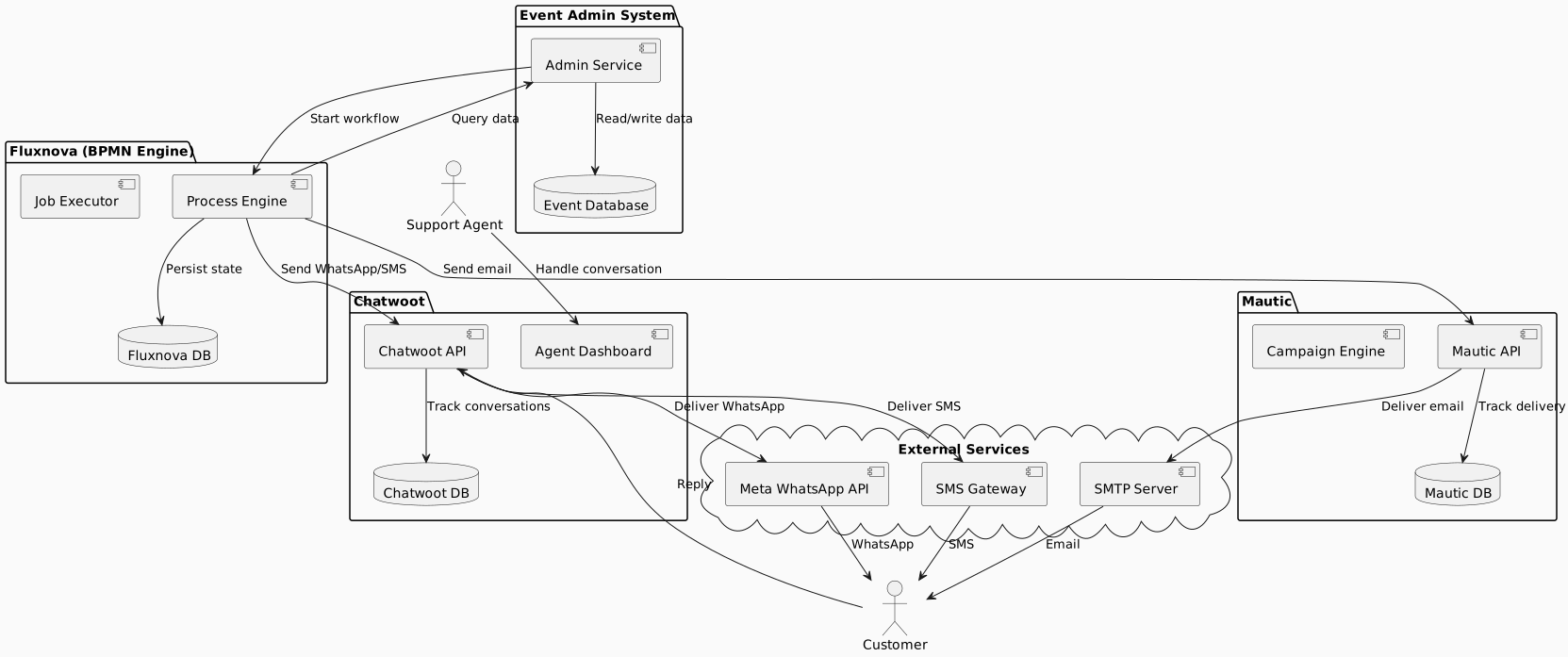
3.2. Component Responsibilities
3.2.1. Fluxnova (Workflow Orchestrator)
Responsibilities:
-
Execute BPMN workflow definitions
-
Manage workflow state and timers
-
Evaluate business rules and conditions
-
Coordinate message delivery via external systems
-
Handle retries and error recovery
Integration Points:
-
REST API calls to Mautic and Chatwoot
-
Event database queries for customer data
-
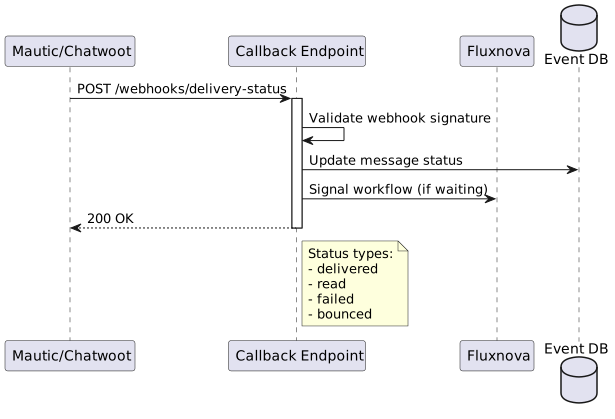
Webhook endpoints for status callbacks
3.2.2. Mautic (Email Automation)
Responsibilities:
-
Email template management and rendering
-
Email delivery via SMTP
-
Delivery tracking (sent, delivered, bounced)
-
Marketing campaign management (separate from transactional)
Integration Points:
-
REST API for sending emails
-
Webhook callbacks for delivery status
-
Contact synchronisation
3.2.3. Chatwoot (Messaging Gateway)
Responsibilities:
-
WhatsApp template message delivery
-
SMS message delivery
-
Customer conversation management
-
Agent UI for support interactions
Integration Points:
-
REST API for sending messages
-
Webhook callbacks for delivery and responses
-
WhatsApp template synchronisation with Meta
4. Integration Patterns
4.1. Pattern 1: Fluxnova to Mautic (Email)
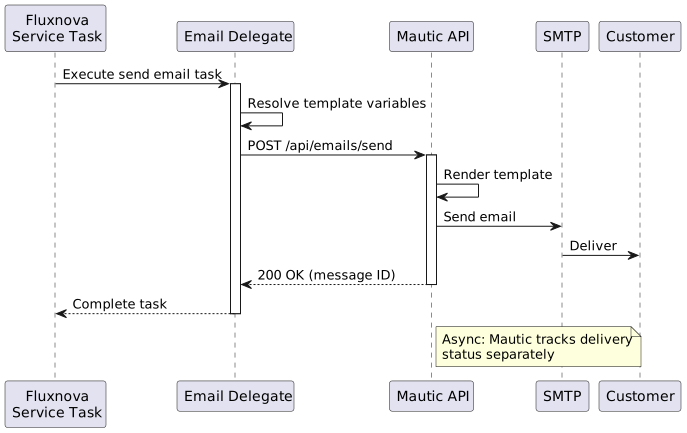
API Call:
// Fluxnova JavaDelegate implementation
public class SendEmailDelegate implements JavaDelegate {

    @Override
    public void execute(DelegateExecution execution) {
        String recipientEmail = (String) execution.getVariable("customerEmail");
        String templateId = (String) execution.getVariable("emailTemplate");
        Map<String, Object> variables = buildVariables(execution);

        MauticEmailRequest request = MauticEmailRequest.builder()
            .contactEmail(recipientEmail)
            .emailId(templateId)
            .tokens(variables)
            .build();

        MauticResponse response = mauticClient.sendEmail(request);

        execution.setVariable("emailMessageId", response.getMessageId());
        execution.setVariable("emailSentAt", Instant.now());
    }
}
4.2. Pattern 2: Fluxnova to Chatwoot (WhatsApp)
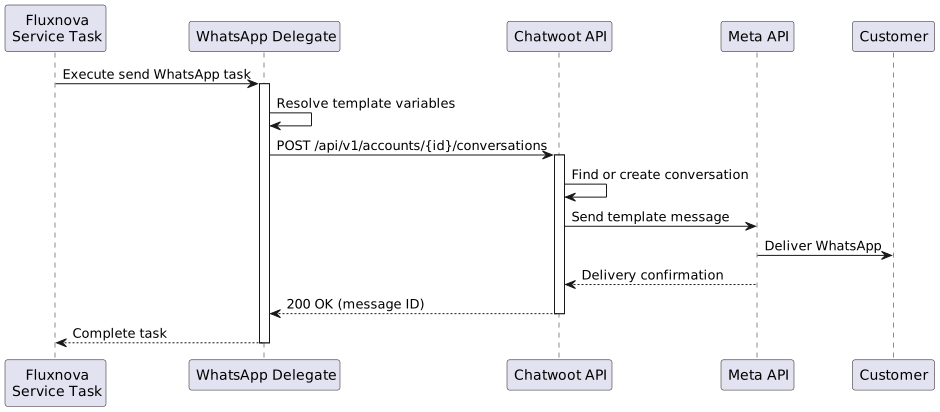
API Call:
// Fluxnova JavaDelegate implementation
public class SendWhatsAppDelegate implements JavaDelegate {

    @Override
    public void execute(DelegateExecution execution) {
        String phoneNumber = (String) execution.getVariable("customerPhone");
        String templateName = (String) execution.getVariable("whatsappTemplate");
        List<String> templateParams = buildTemplateParams(execution);

        // Find or create contact in Chatwoot
        ChatwootContact contact = chatwootClient.findOrCreateContact(phoneNumber);

        // Send template message
        ChatwootMessageRequest request = ChatwootMessageRequest.builder()
            .contactId(contact.getId())
            .inboxId(whatsappInboxId)
            .templateParams(ChatwootTemplateParams.builder()
                .name(templateName)
                .params(templateParams)
                .build())
            .build();

        ChatwootResponse response = chatwootClient.sendTemplateMessage(request);

        execution.setVariable("whatsappMessageId", response.getMessageId());
        execution.setVariable("whatsappSentAt", Instant.now());
    }
}
4.4. Pattern 4: Channel Selection
@startuml
start

:Get customer preference;

if (Preference set?) then (yes)
    :Use preferred channel;
else (no)
    :Use scenario default;
endif

:Attempt delivery;

if (Delivery successful?) then (yes)
    :Log success;
    stop
else (no)
    :Get next channel in priority;

    if (More channels available?) then (yes)
        :Attempt next channel;
        backward :Attempt delivery;
    else (no)
        :Flag for manual follow-up;
        stop
    endif
endif

@enduml
5. API Specifications
5.1. Mautic Integration
Base URL: https://mautic.example.com/api
Authentication: OAuth2 or Basic Auth
5.1.1. Send Email
POST /emails/{emailId}/contact/{contactId}/send

Request Body:
{
  "tokens": {
    "firstName": "John",
    "eventName": "Summer Fun Run",
    "registrationRef": "REG-2026-001234"
  }
}

Response:
{
  "success": true,
  "messageId": "msg_abc123"
}
5.1.2. Create/Update Contact
POST /contacts/new

Request Body:
{
  "email": "[email protected]",
  "firstname": "John",
  "lastname": "Doe",
  "phone": "+27821234567"
}

Response:
{
  "contact": {
    "id": 12345,
    "email": "[email protected]"
  }
}
5.2. Chatwoot Integration
Base URL: https://chatwoot.example.com/api/v1
Authentication: API Key (X-API-KEY header)
5.2.1. Send Template Message
POST /accounts/{account_id}/conversations/{conversation_id}/messages

Request Body:
{
  "content": "",
  "message_type": "template",
  "template_params": {
    "name": "registration_confirmation",
    "category": "UTILITY",
    "processed_params": {
      "1": "John",
      "2": "Summer Fun Run",
      "3": "REG-2026-001234"
    }
  }
}

Response:
{
  "id": 98765,
  "status": "sent"
}6. Data Synchronisation
6.1. Contact Synchronisation
Customer contact data must be synchronised between systems:
| Field | Source | Sync Direction |
|---|---|---|
Event Database |
Event DB → Mautic, Chatwoot |
|
Phone |
Event Database |
Event DB → Chatwoot |
Name |
Event Database |
Event DB → Mautic, Chatwoot |
Opt-out status |
Mautic (email), Chatwoot (WhatsApp) |
Mautic, Chatwoot → Event DB |
Communication preference |
Event Database (Person entity) |
Event DB → Fluxnova (workflow decision) |
7. Error Handling
7.1. Retry Strategy
| Error Type | Retry Strategy | Escalation |
|---|---|---|
Network timeout |
3 retries with exponential backoff (1s, 5s, 30s) |
Log and continue workflow |
API rate limit |
Wait for reset window, then retry |
Alert if persistent |
Invalid recipient |
No retry |
Mark contact as invalid, log |
Template not found |
No retry |
Alert immediately, fail workflow step |
Platform unavailable |
Retry every 5 minutes for 1 hour |
Alert, queue for manual retry |
8. Monitoring and Observability
8.1. Metrics to Collect
| Metric | Purpose |
|---|---|
|
Track workflow initiation rate |
|
Track successful workflow completion |
|
Track messages sent per channel |
|
Track delivery confirmations |
|
Track delivery failures |
|
Track API response times |
|
Track API error rates |
9. Security Considerations
10. Deployment Considerations
10.1. Infrastructure Requirements
| Component | Requirement |
|---|---|
Fluxnova |
Embedded in admin-service or standalone (2-4GB heap) |
Mautic |
Already deployed (requires configuration) |
Chatwoot |
Already deployed (requires configuration) |
Message queues |
Optional - for high-volume async processing |
Database |
PostgreSQL for Fluxnova state (shared or dedicated) |
10.2. Configuration
Key configuration parameters:
communication:
  mautic:
    base-url: https://mautic.example.com/api
    client-id: ${MAUTIC_CLIENT_ID}
    client-secret: ${MAUTIC_CLIENT_SECRET}

  chatwoot:
    base-url: https://chatwoot.example.com/api/v1
    api-key: ${CHATWOOT_API_KEY}
    account-id: 1
    whatsapp-inbox-id: 2

  sms:
    provider: clickatell  # or twilio
    api-key: ${SMS_API_KEY}

  delivery:
    quiet-hours-start: "20:00"
    quiet-hours-end: "08:00"
    timezone: "Africa/Johannesburg"