General Ledger Design
1. Overview
This document describes the general ledger integration that records the financial effect of orders as GL entries, supports delta tracking when orders are modified after journaling, and enables journal creation for export to external accounting systems.
2. Status
Implementation Status: Planned
Related Architecture: Financial Management Architecture
3. Purpose
3.1. Business Goals
-
Automatic GL Entry Creation - Record financial effect of orders when paid
-
Traceability - Link GL records back to source order line items
-
Delta Tracking - Handle order modifications after journaling
-
Journal Consolidation - Aggregate transactions for accounting software export
-
Steady State Balance - All accounts net to zero when fully exported
3.2. Design Rationale
Orders can be modified after their financial effect has been recorded. The design separates Order records from GL records because:
-
Orders are operational - Can be modified at any time for business reasons
-
GL records are financial - Must maintain audit trail and immutability
-
Journals lock transactions - Once exported, changes must be tracked as deltas
4. Database Schema
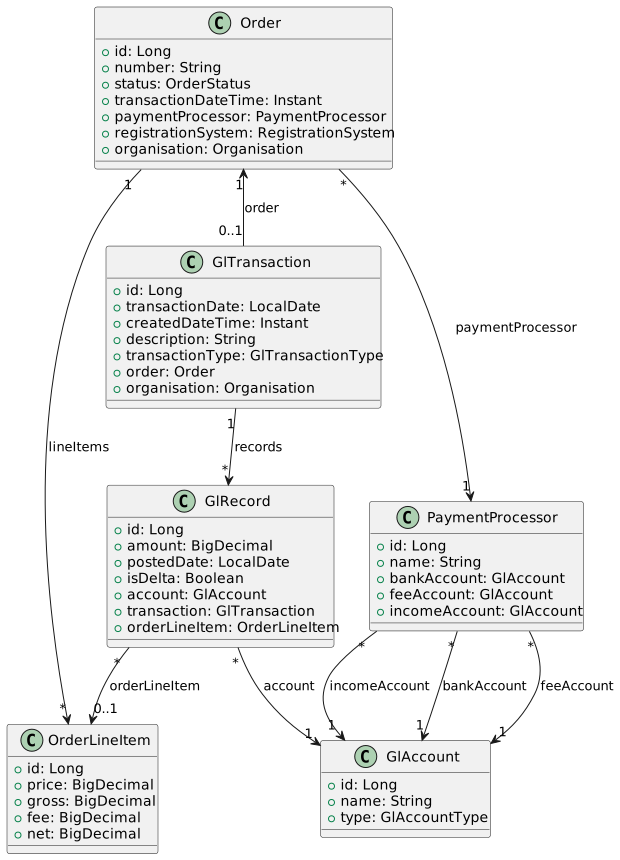
4.2. Relationship Ownership
| Relationship | Owner | Rationale |
|---|---|---|
GlTransaction → Order |
GlTransaction (FK on gl_transaction) |
Financial record references operational source |
GlRecord → OrderLineItem |
GlRecord (FK on gl_record) |
Financial record references operational source |
Order → GlTransaction |
Inverse (mappedBy) |
Navigation convenience only |
4.3. Table: gl_transaction (Modified)
CREATE TABLE gl_transaction (
    id BIGINT AUTO_INCREMENT PRIMARY KEY,

    -- Transaction details
    transaction_date DATE NOT NULL,
    created_date_time TIMESTAMP NOT NULL,
    description VARCHAR(50),

    -- Type discriminator
    transaction_type VARCHAR(2) NOT NULL,        -- 'OR', 'JN', 'AD', 'RF'

    -- Relationships
    order_id BIGINT,                             -- FK to sales_order (nullable)
    organisation_id BIGINT NOT NULL,

    CONSTRAINT fk_gl_transaction_order
        FOREIGN KEY (order_id) REFERENCES sales_order(id),
    CONSTRAINT fk_gl_transaction_organisation
        FOREIGN KEY (organisation_id) REFERENCES organisation(id)
);
4.4. Table: gl_record (Modified)
CREATE TABLE gl_record (
    id BIGINT AUTO_INCREMENT PRIMARY KEY,

    -- Amount (positive = debit, negative = credit)
    amount DECIMAL(21,2) NOT NULL,
    posted_date DATE NOT NULL,

    -- Delta indicator
    is_delta BOOLEAN DEFAULT FALSE,

    -- Relationships
    account_id BIGINT NOT NULL,
    transaction_id BIGINT NOT NULL,
    order_line_item_id BIGINT,                   -- FK to order_line_item (nullable)

    CONSTRAINT fk_gl_record_account
        FOREIGN KEY (account_id) REFERENCES gl_account(id),
    CONSTRAINT fk_gl_record_transaction
        FOREIGN KEY (transaction_id) REFERENCES gl_transaction(id),
    CONSTRAINT fk_gl_record_line_item
        FOREIGN KEY (order_line_item_id) REFERENCES order_line_item(id)
);
4.5. Enumerations
4.5.1. GlTransactionType
public enum GlTransactionType {
    ORDER("OR", "Order Payment"),       // Created from order payment
    JOURNAL("JN", "Journal Entry"),     // Consolidated export entry
    ADJUSTMENT("AD", "Adjustment"),     // Manual adjustment
    REFUND("RF", "Refund");            // Refund transaction

    private final String code;
    private final String name;

    // Stored as varchar(2) in database via converter
}5. Transaction Creation Logic
5.1. Order Payment Handler
When an order transitions to PAID status, the Order GL Service creates corresponding GL entries:
@Service
public class OrderGlService {

    public GlTransaction createTransactionForOrder(Order order) {
        // PaymentProcessor is required - determines GL accounts
        PaymentProcessor processor = order.getPaymentProcessor();
        if (processor == null) {
            throw new IllegalStateException("Order must have a PaymentProcessor");
        }

        GlTransaction tx = new GlTransaction();
        tx.setTransactionDate(LocalDate.now());
        tx.setCreatedDateTime(Instant.now());
        tx.setTransactionType(GlTransactionType.ORDER);
        tx.setOrder(order);
        tx.setOrganisation(order.getOrganisation());
        tx.setDescription("Order #" + order.getNumber());

        BigDecimal totalNet = BigDecimal.ZERO;

        // Create records for each line item (income and fee)
        for (OrderLineItem item : order.getLineItems()) {
            // CR: Income record per line item
            createRecord(tx, processor.getIncomeAccount(),
                item.getGross().negate(), item);

            // DR: Fee record per line item
            createRecord(tx, processor.getFeeAccount(),
                item.getFee(), item);

            totalNet = totalNet.add(item.getNet());
        }

        // DR: Bank/asset record for total received (consolidated)
        createRecord(tx, processor.getBankAccount(), totalNet, null);

        return glTransactionRepository.save(tx);
    }

    private void createRecord(GlTransaction tx, GlAccount account,
            BigDecimal amount, OrderLineItem lineItem) {
        GlRecord record = new GlRecord();
        record.setTransaction(tx);
        record.setAccount(account);
        record.setAmount(amount);
        record.setPostedDate(LocalDate.now());
        record.setOrderLineItem(lineItem);
        record.setIsDelta(false);
        tx.getRecords().add(record);
    }
}
5.2. GL Record Generation Rules
GL accounts are determined by the PaymentProcessor associated with the Order:
| Record Type | Account Source | Amount | Per | Sign |
|---|---|---|---|---|
Payment received |
PaymentProcessor.bankAccount |
SUM(item.net) |
Order (consolidated) |
Debit (positive) |
Processing fee |
PaymentProcessor.feeAccount |
item.fee |
Line item |
Debit (positive) |
Line item income |
PaymentProcessor.incomeAccount |
item.gross |
Line item |
Credit (negative) |
Double-Entry Validation: Total debits must equal total credits for each transaction.
Note: The PaymentProcessor must be set on the Order before payment. This determines where the money is received (bankAccount), how fees are tracked (feeAccount), and where income is recorded (incomeAccount).
5.3. Example: Order Payment
Order #12345 via PayFast PaymentProcessor:
-
Line 1: Event registration R500.00 gross, R10.00 fee, R490.00 net
-
Line 2: Timing chip R50.00 gross, R5.00 fee, R45.00 net
-
Total: R550.00 gross, R15.00 fees, R535.00 net
PaymentProcessor "PayFast" account mappings:
-
bankAccount → "PayFast Balance" (Asset)
-
feeAccount → "PayFast Fees" (Expense)
-
incomeAccount → "Sales Income" (Income)
| Account | Source | Description | Debit | Credit |
|---|---|---|---|---|
PayFast Balance |
processor.bankAccount |
Payment received (consolidated) |
R535.00 |
|
PayFast Fees |
processor.feeAccount |
Registration fee |
R10.00 |
|
PayFast Fees |
processor.feeAccount |
Timing chip fee |
R5.00 |
|
Sales Income |
processor.incomeAccount |
Registration |
R500.00 |
|
Sales Income |
processor.incomeAccount |
Timing chip |
R50.00 |
|
Totals |
R550.00 |
R550.00 |
Note: All accounts are derived from the PaymentProcessor associated with the Order. The bank account receives a consolidated debit, while income and fee records are created per line item for traceability.
6. Delta Handling
6.1. When Delta Records Are Created
Delta records are created when an order is modified after its GlTransaction has been included in a journal:
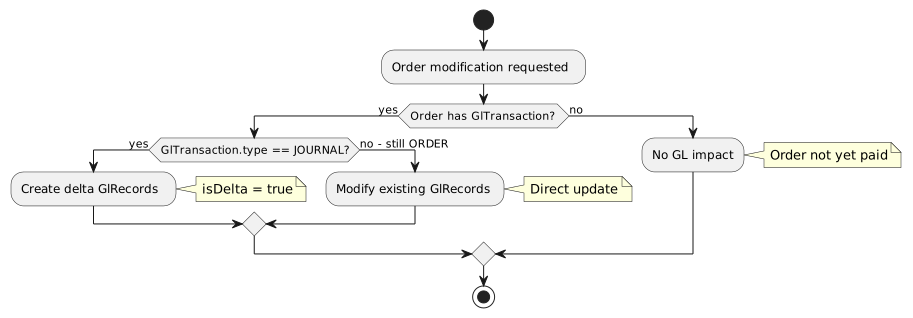
6.2. Delta Record Creation
public void addDeltaRecords(Order order, List<OrderLineItemChange> changes) {
    GlTransaction tx = order.getGlTransaction();

    if (tx.getTransactionType() != GlTransactionType.JOURNAL) {
        // Not yet journaled - modify directly
        updateExistingRecords(tx, changes);
        return;
    }

    // Already journaled - create delta records
    for (OrderLineItemChange change : changes) {
        GlRecord delta = new GlRecord();
        delta.setAmount(change.getAmountDelta());  // Can be negative
        delta.setPostedDate(LocalDate.now());
        delta.setIsDelta(true);
        delta.setAccount(determineAccount(change.getLineItem()));
        delta.setOrderLineItem(change.getLineItem());
        delta.setTransaction(tx);

        glRecordRepository.save(delta);
    }
}7. Journal Management
7.1. Journal Creation
Journals consolidate ORDER transactions for export to accounting software. Multiple optional filter parameters allow flexible consolidation:
7.1.1. Filter Parameters
| Parameter | Type | Description |
|---|---|---|
organisationId |
Long (required) |
Organisation owning the orders |
toDate |
LocalDate (required) |
Include transactions up to and including this date |
fromDate |
LocalDate (optional) |
Include transactions from this date (if null, includes all prior) |
registrationSystemId |
Long (optional) |
Filter by registration system |
paymentProcessorId |
Long (optional) |
Filter by payment processor |
description |
String (optional) |
Journal description |
@Service
public class GlJournalService {

    public GlTransaction createJournal(JournalCreateRequest request) {

        // Build query with optional filters
        List<GlTransaction> orderTxs = glTransactionRepository
            .findOrderTransactionsForJournal(
                request.getOrganisationId(),
                request.getToDate(),
                request.getFromDate(),           // optional
                request.getRegistrationSystemId(), // optional
                request.getPaymentProcessorId()    // optional
            );

        // Create journal transaction
        GlTransaction journal = new GlTransaction();
        journal.setTransactionDate(LocalDate.now());
        journal.setCreatedDateTime(Instant.now());
        journal.setTransactionType(GlTransactionType.JOURNAL);
        journal.setOrganisation(org);
        journal.setDescription(description);

        // Consolidate by account
        Map<GlAccount, BigDecimal> accountTotals = new HashMap<>();
        for (GlTransaction tx : orderTxs) {
            for (GlRecord record : tx.getRecords()) {
                accountTotals.merge(
                    record.getAccount(),
                    record.getAmount(),
                    BigDecimal::add
                );
            }
        }

        // Create consolidated records
        for (Map.Entry<GlAccount, BigDecimal> entry : accountTotals.entrySet()) {
            GlRecord record = new GlRecord();
            record.setAccount(entry.getKey());
            record.setAmount(entry.getValue());
            record.setPostedDate(LocalDate.now());
            record.setIsDelta(false);
            record.setTransaction(journal);
            journal.getRecords().add(record);
        }

        // Mark source transactions as journaled
        for (GlTransaction tx : orderTxs) {
            tx.setTransactionType(GlTransactionType.JOURNAL);
        }

        return glTransactionRepository.save(journal);
    }
}
7.2. Journal Deletion (Unwind)
Deleting a journal reverses the consolidation:
public void deleteJournal(Long journalId) {
    GlTransaction journal = glTransactionRepository.findById(journalId)
        .orElseThrow(() -> new NotFoundException("Journal not found"));

    if (journal.getTransactionType() != GlTransactionType.JOURNAL) {
        throw new InvalidOperationException("Not a journal transaction");
    }

    // Find transactions that were included in this journal
    // (Those with type=JOURNAL and date within journal period)
    List<GlTransaction> includedTxs = findIncludedTransactions(journal);

    // Revert to ORDER type
    for (GlTransaction tx : includedTxs) {
        if (tx.getOrder() != null) {
            tx.setTransactionType(GlTransactionType.ORDER);
        }
    }

    // Delete the journal transaction
    glTransactionRepository.delete(journal);
}
8. API Design
8.1. Endpoints
| Method | Endpoint | Description |
|---|---|---|
POST |
|
Create journal for date range |
GET |
|
List journals (paginated) |
GET |
|
Get journal details |
GET |
|
Get journal GL records |
DELETE |
|
Delete journal (unwind) |
8.2. Request/Response Examples
8.2.1. Create Journal
# Minimal request - all orders for organisation up to date
curl -X POST http://localhost:8080/api/gl/journals \
  -H "Authorization: Bearer $TOKEN" \
  -H "Content-Type: application/json" \
  -d '{
    "organisationId": 1,
    "toDate": "2026-01-31",
    "description": "January 2026 Journal"
  }'

# Full request - with optional filters
curl -X POST http://localhost:8080/api/gl/journals \
  -H "Authorization: Bearer $TOKEN" \
  -H "Content-Type: application/json" \
  -d '{
    "organisationId": 1,
    "fromDate": "2026-01-01",
    "toDate": "2026-01-31",
    "registrationSystemId": 5,
    "paymentProcessorId": 2,
    "description": "January 2026 - PayFast Only"
  }'
Response:
{
  "id": 123,
  "transactionDate": "2026-02-01",
  "transactionType": "JOURNAL",
  "description": "January 2026 - PayFast Only",
  "filters": {
    "organisationId": 1,
    "fromDate": "2026-01-01",
    "toDate": "2026-01-31",
    "registrationSystemId": 5,
    "paymentProcessorId": 2
  },
  "records": [
    {
      "accountName": "Sales Income",
      "accountType": "INCOME",
      "amount": -15000.00
    },
    {
      "accountName": "PayFast Balance",
      "accountType": "ASSET",
      "amount": 14550.00
    },
    {
      "accountName": "PayFast Fees",
      "accountType": "EXPENSE",
      "amount": 450.00
    }
  ],
  "summary": {
    "totalDebits": 15000.00,
    "totalCredits": 15000.00,
    "transactionCount": 42
  }
}9. Steady State Behavior
When all transactions have been exported (journaled):
-
Each ORDER transaction has type = JOURNAL
-
A JOURNAL transaction exists with consolidated totals
-
Any subsequent order modifications create delta records
-
Next journal captures only the deltas
Net Zero Goal: When all income and assets have been transferred to the external accounting system, the GL within this system should show net zero in all accounts.
10. Account Mapping Strategy
All GL accounts are derived from the PaymentProcessor associated with the Order:
10.1. PaymentProcessor Account Fields
| Field | Account Type | Usage |
|---|---|---|
bankAccount |
ASSET |
Debit for net payment received (consolidated per order) |
feeAccount |
EXPENSE |
Debit for processing fees (per line item) |
incomeAccount |
INCOME |
Credit for gross income (per line item) |
10.2. Example PaymentProcessor Configuration
| Processor | Account Mappings |
|---|---|
PayFast |
|
PayGate |
|
Bank Transfer |
|
10.3. Design Rationale
Using PaymentProcessor-based account mapping provides:
-
Segregation by payment method - Track balances per payment processor
-
Accurate fee allocation - Fees recorded against correct processor
-
Simplified reconciliation - Bank account matches processor settlement
-
Flexible configuration - Different income accounts per processor if needed
Note: The PaymentProcessor is a required field on Order. Each processor must have valid GlAccount references for bankAccount and incomeAccount. The feeAccount is optional (may be null for processors with no fees).
11. Migration Requirements
11.1. Add Columns to payment_processor
ALTER TABLE payment_processor
    ADD COLUMN fee_account_id BIGINT,
    ADD COLUMN income_account_id BIGINT;

ALTER TABLE payment_processor
    ADD CONSTRAINT fk_payment_processor_fee_account
    FOREIGN KEY (fee_account_id) REFERENCES gl_account(id);

ALTER TABLE payment_processor
    ADD CONSTRAINT fk_payment_processor_income_account
    FOREIGN KEY (income_account_id) REFERENCES gl_account(id);