WordPress Event Components
1. Overview
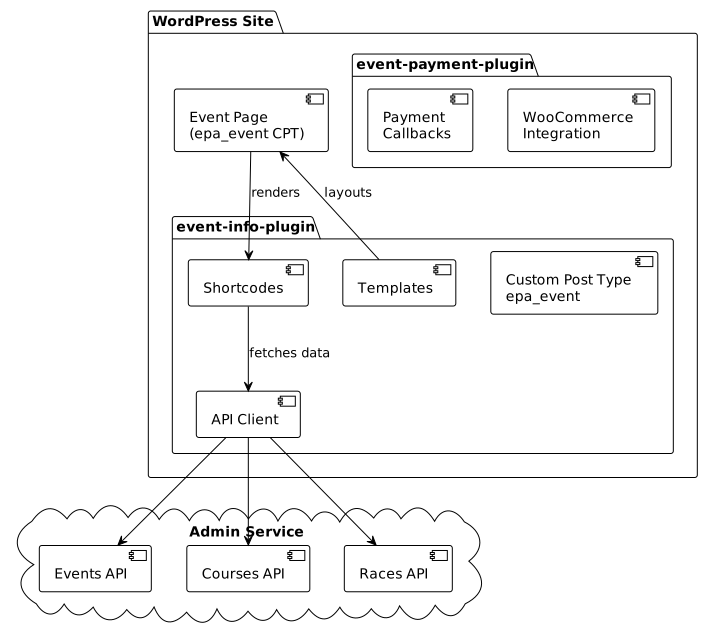
The WordPress event components provide a lightweight solution for displaying event information on WordPress sites. The architecture follows a two-plugin approach to separate concerns:
| Plugin | Purpose | Components |
|---|---|---|
|
Payment integration |
WooCommerce hooks, order management, API callbacks |
|
Event display |
Custom post type, shortcodes, templates |
This separation allows sites to use event display without payment integration, and vice versa.
3. Custom Post Type: epa_event
The epa_event custom post type replaces the dependency on The Events Calendar plugin, providing a lightweight alternative.
4. Shortcode Catalogue
4.1. Event Information Shortcodes
| Shortcode | Purpose | Data Source |
|---|---|---|
|
Display race courses with RideWithGPS embed |
|
|
Age categories with birth year calculations |
|
|
Event schedule/timetable |
|
|
Race listing with start times |
|
|
Registration portal button |
Post metadata |
5. Rendering Pattern
All shortcodes follow a consistent rendering pattern:
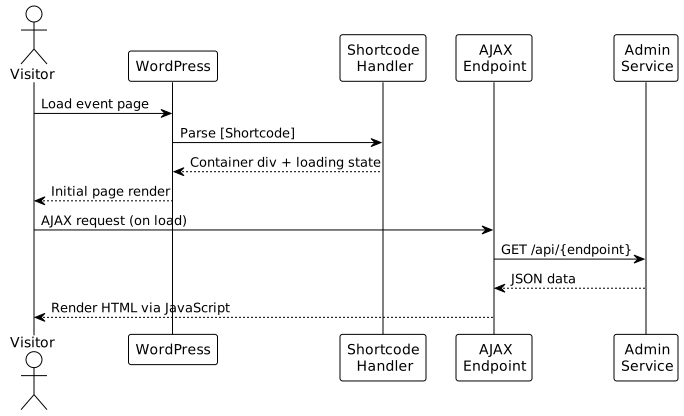
This pattern provides:
-
Fast initial page load (no blocking API calls)
-
Loading states for better UX
-
Error handling with graceful fallbacks
-
Client-side caching opportunities
6. Theme Independence
The components are designed to work across any WordPress theme:
-
CSS isolation - Scoped styles avoid conflicts
-
Responsive design - Mobile-first breakpoints
-
No page builder dependency - Pure shortcode implementation
-
Template overrides - Themes can override templates in their directory
7. Slider Library
The featured events slider uses Splide.js:
-
MIT License - Open source, no commercial restrictions
-
Lightweight - 29KB minified, no dependencies
-
Accessible - ARIA compliant
-
Touch support - Mobile-friendly gestures
-
CSS-friendly - Works with relative units (%, em, rem)
8. Related Documentation
-
WordPress Payment Integration - Payment flow architecture
-
Component Implementation Details - Technical implementation
-
WordPress Site Guide - User documentation