Event, Race, and Participant Design
1. Overview
This document describes the design and rationale for the entities relating to the structure of an event and its participants. The design revolves around the Event entity as the anchor point, with a carefully structured hierarchy to support complex sporting event scenarios.
The entities covered include:
-
Event - The main event container
-
EventCategory and Category - Age and gender categorization
-
EventRaceType and RaceType - Race type definitions
-
Race - Individual competitive activities
-
Round and RoundType - Multi-stage competition support
-
Course - Physical routes and venues
-
StartGroup - Wave start and batch management
-
EventParticipant - Person entry into an event
-
StartGroupParticipant - Participant assignment to start groups
2. Design Principles
2.1. Organization-Level vs Event-Level Entities
The design makes a critical distinction between organization-level and event-level entities:
Organization-Level Entities (defined outside event context):
-
Category - Standard age/gender categories (e.g., U/13 Boys, Elite Women)
-
RaceType - Standard race types (e.g., 200m Sprint, Individual Pursuit, Road Race)
-
RoundType - Standard round types (e.g., Heat, Semi-Final, Final)
These are pre-defined constructs that enable:
-
Creating events off common configuration
-
Combining events with similar races into leader boards
-
Supporting seeding and ranking across events
-
Ensuring regulatory compliance
-
Building meaningful performance data reports over time
-
Tracking records for standard race types
Event-Level Entities (specific to an event):
-
EventCategory - Event-specific variant of Category
-
EventRaceType - Event-specific configuration of RaceType
-
Race - Actual competitive activity at the event
-
Course - Physical route/venue (no underlying construct)
This separation allows events to leverage standard definitions while accommodating event-specific variations and constraints.
3. Event Creation and Configuration Process
The design is best understood through the event creation workflow, which follows a logical progression from high-level event definition to detailed race configuration.
3.1. Step 1: Create Event
An Event is created by a user, specifying:
-
Event name and dates (single or multi-day)
-
Location and venue
-
Sanctioning organisation(s)
-
Event organisers
-
Discipline (sport type)
-
Optional series membership
The Event serves as the container for all subsequent entities.
3.2. Step 2: Define Event Categories
Event organisers create EventCategories based on:
-
Standard Categories (from sanctioning organisations)
-
Ad-hoc custom categories
-
Age and gender constraints
-
Composite categories (combining feeder categories)
EventCategory Characteristics:
-
Can specify minimum and maximum age
-
Can restrict by gender
-
Can be composite (e.g., "Open Men" combining all men’s categories)
-
When composite category is used, constituent categories are automatically excluded
Example:
EventCategory: U/13 Boys (minAge=11, maxAge=13, gender=MALE)
EventCategory: U/13 Girls (minAge=11, maxAge=13, gender=FEMALE)
EventCategory: U/13 Open (composite, combining U/13 Boys + U/13 Girls)
3.3. Step 3: Define Event Race Types
Event organisers create EventRaceTypes based on:
-
Standard RaceTypes (from sanctioning organisations or discipline)
-
Ad-hoc custom race types
-
Event-specific configurations
RaceType Examples by Discipline:
-
Track Cycling: Points Race, Individual Pursuit, Match Sprint, Keirin
-
Road Cycling: Road Race, Individual Time Trial, Team Time Trial
-
Mountain Biking: Cross Country, Downhill
-
Athletics: 100m, 200m, Marathon
Each RaceType defines:
-
Distance and unit of measure
-
Scoring method (time-based, points-based, position-based)
-
Timing configurations
-
Result calculation rules
3.4. Step 4: Create Courses
Courses define the physical routes or venues where races will be held:
-
Course name
-
Distance and elevation profile
-
GPS coordinates and course map
-
CourseType classification (road, trail, track, cross-country)
Note: Courses are event-specific and do not have underlying constructs like Categories or RaceTypes.
3.5. Step 5: Race Matrix and Race Generation
At this point, the event organiser can view a Race Matrix:
-
One axis: EventRaceTypes
-
Other axis: EventCategories
-
Cells: Possible Race combinations
The organiser selects which combinations to activate, and the system auto-generates Race entities.
Composite Category Handling:
When a composite EventCategory is selected for a given EventRaceType, the constituent EventCategories for that EventRaceType are greyed out, preventing duplicate race creation.
Race Definition:
A Race is defined as a group of participants competing along/on a given Course for a ranking, awards, and/or prizes.
Race Characteristics:
-
Initially auto-generated for all EventCategory × EventRaceType combinations
-
Can be deactivated by setting
active = false -
Links to Event via EventRaceType, Course, or EventCategory
-
EventRaceType and EventCategory fields have unique constraint
-
Course is initially undefined, set later during StartGroup configuration
3.6. Step 6: Accept Participant Entries
Once Races are generated, the Event is ready to accept entries.
EventParticipant Creation:
When a Person enters an Event:
-
EventParticipant record is created, linking Person to Event
-
Automatic Category Assignment based on:
-
Age calculation - Uses Event’s CategoryReferenceDate if defined, otherwise first event date
-
Gender matching - Assigns to gender-specific or gender-neutral category
-
Lowest age default - When multiple categories match, selects lowest possible age
-
Race Selection:
The Person selects one or more EventRaceTypes to participate in:
-
If only one Race (RaceType × EventCategory combination) exists, skip selection
-
For each selection, the system identifies the relevant StartGroup
-
If multiple StartGroups exist, select the one with the latest start time
-
Create StartGroupParticipant record (this replaces the deprecated StartParticipant entity)
Note on StartGroupParticipant:
The legacy documentation refers to "StartParticipant" which has been superseded by StartGroupParticipant. This entity links EventParticipant to StartGroup and tracks:
-
Individual start times (for Time Trial events)
-
Finish times
-
Check-in status
-
DNS (Did Not Start), DNF (Did Not Finish), DQ (Disqualified) flags
-
Total time calculation
3.7. Step 7: Entry Monitoring and Planning
As entries flow in, event organisers can monitor:
-
Overall entries via EventParticipants
-
Race entries via StartGroupParticipants (filtered by Race or EventCategory)
This provides valuable planning data for:
-
Start group sizing
-
Race scheduling
-
Resource allocation
-
Prize category planning
3.8. Step 8: Round Configuration (Optional)
For EventRaceTypes derived from standard RaceTypes with multi-stage configurations:
-
Round Configuration can be applied after entries close
-
Configurations based on participant count (e.g., heats → semi-finals → finals)
-
Round entities created with RoundType associations
-
RoundParticipant records created for progression through rounds
Round Progression Example:
RaceType: 200m Sprint Track Cycling
- Round 1: Heats (all participants)
- Round 2: Semi-Finals (top 2 from each heat)
- Round 3: Final (top 2 from each semi-final)4. Entity Relationships and Dependencies
4.1. Event as the Central Anchor
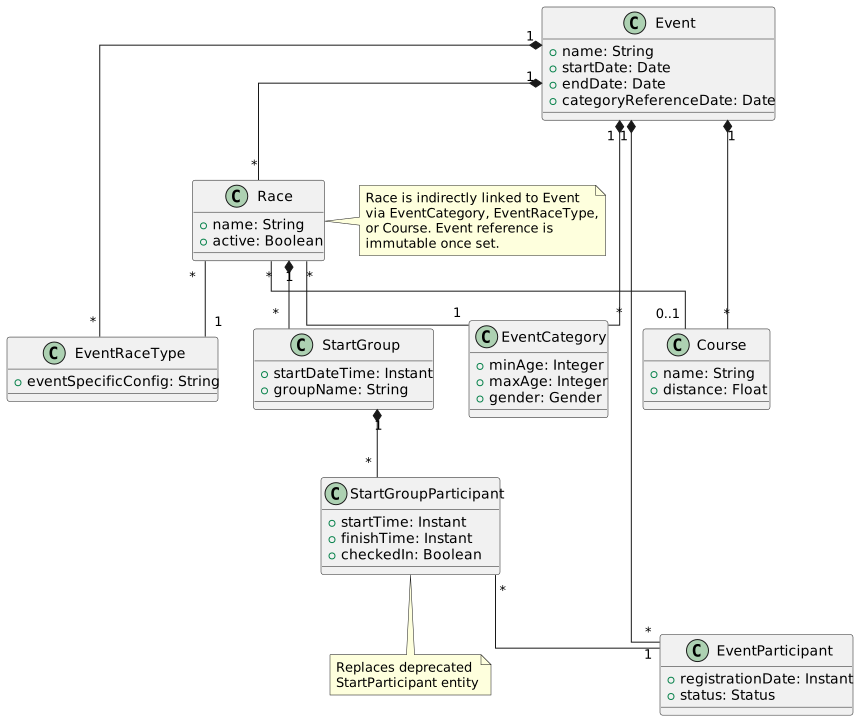
The Event entity is the central anchor, with relationships propagating through:
4.2. Race Entity Immutability Rules
The Race entity has special immutability rules to ensure data integrity:
-
Event Reference: Race has a convenience property for Event lookup
-
Indirect Linking: Race is indirectly linked to Event via EventRaceType, Course, or EventCategory
-
Immutability: The Event property is set by the first setter of EventRaceType, Course, or EventCategory
-
Validation: If any subsequent property is set with a different Event, an exception is raised
-
Course Inheritance: Race inherits Course initially undefined, set when StartGroups are configured
4.3. StartGroup and Course Relationship
StartGroup has a special relationship with Course:
-
Inherits from Race: StartGroup inherits Course from its parent Race
-
Override capability: Can be overridden for specific scenarios
-
Use case example: Track races starting at different locations on same track
4.4. ProgramEntry and StartGroup Separation
The design keeps ProgramEntry and StartGroup as separate entities:
ProgramEntry:
-
Defines a time slot in the event program
-
Can be for races or other activities (e.g., prize giving)
-
Minimum fields: date and time
-
Duration estimate for scheduling
StartGroup:
-
Associates one or more Races/Rounds with a ProgramEntry
-
Multiple StartGroups can share a ProgramEntry
-
Derives name from ProgramEntry name
Rationale for Separation:
A single ProgramEntry is needed for multiple races that start simultaneously (e.g., all scholar categories starting together at the same time).
5. Participant Start Mechanisms
The design supports two distinct start mechanisms:
5.1. Individual Start Times
Used for Time Trial events and similar individual start formats:
-
Individual Pursuit
-
Individual Time Trial
-
Team Time Trial
Configuration:
-
Race configured with
individualStart = true -
StartGroup used primarily for grouping, not batch starting
-
Each StartGroupParticipant has individual
startTimeandfinishTime -
Results calculated from individual times
StartGroupParticipant Attributes:
-
startTime- Individual start time for this participant -
finishTime- Individual finish time -
totalTime- Calculated (finishTime - startTime)
5.2. Mass/Wave Starts
Used for road races, criteriums, and similar formats:
-
Road Race
-
Criterium
-
Cross Country MTB
Configuration:
-
Race configured with
individualStart = false -
StartGroup represents actual wave/batch
-
All participants in StartGroup use
StartGroup.startDateTime -
Results calculated from StartGroup time
Multiple StartGroups:
When using multiple StartGroups (wave starts):
-
Each group has different start time
-
All participants placed together for overall race results
-
Race scoring criteria determine final positions (usually fastest time)
6. Timing and Result Calculation
6.1. Time-Based Races
For races scored by time:
Individual Start:
TotalTime = FinishTime - StartTime
Position = Rank by TotalTime (ascending)
Mass/Wave Start:
EffectiveStartTime = StartGroup.startDateTime
TotalTime = FinishTime - EffectiveStartTime
Position = Rank by TotalTime (ascending), combining all StartGroups
6.2. Points-Based Races
For races scored by points (e.g., Points Race in track cycling):
-
Points awarded during race based on RaceType rules
-
Position determined by total points (descending)
-
Time may be used as tiebreaker
6.3. Participant Status Handling
StartGroupParticipant Status Flags:
-
CheckedIn - Participant has checked in before start
-
DNS (Did Not Start) - Participant did not start
-
DNF (Did Not Finish) - Participant started but did not finish
-
DQ (Disqualified) - Participant disqualified
DNF Handling:
-
FinishTime is set to the time when DNF ruling was made
-
TotalTime calculated up to DNF time
-
Results show DNF status with time completed
Result Adjudication:
All StartGroupParticipant records must be adjudicated to determine StartGroup outcome. This ensures all participants are accounted for in final results.
7. Multi-Stage Race Support
7.1. Round-Based Progression
For race types with heats, semi-finals, and finals:
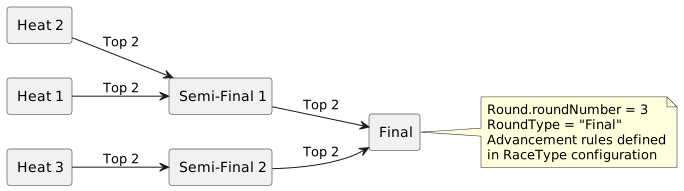
Round Entity:
-
Many-to-one with Race
-
Many-to-one with RoundType
-
roundNumberindicates stage sequence -
One-to-many with RaceResult
Advancement Rules:
-
Defined in RaceTypeConfig
-
Based on position, time, or qualification standards
-
Create new StartGroupParticipant records for subsequent rounds
8. Automatic Category Assignment
EventParticipant entities are automatically assigned to EventCategories based on:
8.1. Age Calculation
Reference Date Determination:
-
Use Event’s
categoryReferenceDateif defined -
Otherwise, use Event’s first event date (
startDate)
Age Specification:
-
System calculates participant’s age as of reference date
-
Selects lowest possible age category when multiple match
-
Example: 12-year-old eligible for both U/13 and U/15 → assigned to U/13
8.2. Gender Matching
Assignment Priority:
-
Gender-specific category - If participant gender matches EventCategory gender
-
Gender-neutral category - If available and no gender-specific match
-
Error - If no suitable category found
Example Scenarios:
| Participant | Available Categories | Assignment |
|---|---|---|
12yr Male |
U/13 Boys, U/13 Girls, U/13 Open |
U/13 Boys (gender-specific match) |
12yr Female |
U/13 Boys, U/13 Open |
U/13 Open (gender-neutral fallback) |
12yr Male |
U/13 Girls only |
Error (no suitable category) |
9. Deprecated Entities
9.1. RaceParticipant (DEPRECATED)
The legacy documentation may refer to RaceParticipant, which has been removed from the design. The current design uses StartGroupParticipant to manage the distribution of participants into Races and StartGroups.
Migration Notes:
-
RaceParticipant functionality is now handled by StartGroupParticipant
-
StartGroupParticipant links EventParticipant to both Race (indirectly via StartGroup) and StartGroup
-
This design allows for proper management of wave/batch starts and participant distribution
10. Race Matrix Visualization
The Race Matrix is a key tool for event configuration:
| Road Race | Time Trial | Criterium | Track Sprint | |
|---|---|---|---|---|
U/11 Boys |
✓ |
|||
U/11 Girls |
✓ |
|||
U/13 Boys |
✓ |
✓ |
✓ |
|
U/13 Girls |
✓ |
✓ |
✓ |
|
Elite Men |
✓ |
✓ |
✓ |
✓ |
Elite Women |
✓ |
✓ |
✓ |
✓ |
Open (Composite) |
✓ |
Matrix Features:
-
Checkmark (✓) indicates Race will be created
-
Empty cells indicate no Race for that combination
-
When "Open (Composite)" is selected for Criterium, Elite Men and Elite Women Criterium races are disabled
-
Each selected cell generates a Race entity
11. Design Benefits
11.1. Regulatory Compliance
-
Standard Categories and RaceTypes ensure consistency with sanctioning organisations
-
Events can prove compliance by referencing organisation-level entities
-
Records and rankings can be tracked across events using common RaceTypes
11.2. Flexibility
-
Event-specific variants allow customization while maintaining standards
-
Ad-hoc categories and race types support unique event formats
-
Composite categories enable practical race scheduling
11.3. Data Integrity
-
Immutability rules prevent accidental Event association changes
-
Unique constraints on Race (EventRaceType × EventCategory) prevent duplicates
-
Automatic category assignment reduces manual errors