WordPress Payment Integration
1. Overview
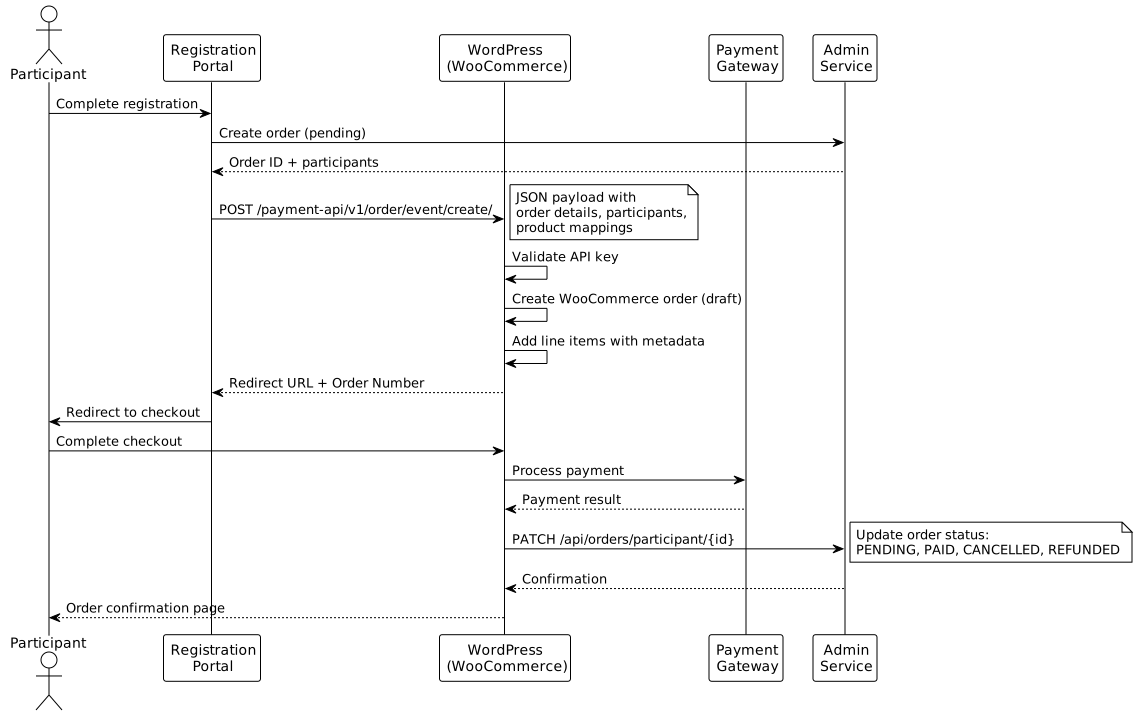
The WordPress payment integration enables event registration payments through WooCommerce on WordPress sites. This solution bridges the Event Management System’s admin-service with WordPress/WooCommerce, providing a complete payment workflow for events and memberships.
The integration is implemented as a WordPress plugin (event-payment-plugin-woocommerce) that:
-
Receives order creation requests from the registration portal
-
Creates WooCommerce orders for payment processing
-
Synchronises payment status back to the admin-service
-
Manages user accounts for returning customers
3. Order Lifecycle
WooCommerce order statuses are mapped to admin-service statuses:
| WooCommerce Status | Admin-Service Status | Description |
|---|---|---|
|
|
Order created, awaiting payment |
|
|
Payment received, processing |
|
|
Order fulfilled |
|
|
Awaiting action (e.g., EFT confirmation) |
|
|
Order cancelled by user or admin |
|
|
Payment refunded |
|
|
Payment failed |
4. Data Flow
4.1. Inbound: Order Creation
The registration portal sends a JSON payload to the WordPress REST endpoint:
POST /wp-json/payment-api/v1/order/event/create/Payload structure:
-
API key for authentication
-
Admin portal order ID
-
Event details (ID, name, date)
-
Participants with product mappings
-
Total and discount amounts
5. Security
5.1. API Authentication
-
Inbound requests: Custom API key validated in JSON payload
-
Outbound requests:
X-API-KEYheader to admin-service -
Both keys configured in WordPress options
6. Configuration
Required WordPress options:
| Option | Description |
|---|---|
|
Admin-service base URL |
|
API key for admin-service |
|
API key for inbound validation |
|
Fallback WooCommerce product ID |
|
Registration portal URL |
|
Post-payment redirect URL |
|
Enable strict validation mode |
|
Enable debug logging |
7. Related Documentation
-
WordPress Event Components - Event display shortcodes
-
Payment Implementation Details - Technical implementation