Component Dependencies
1. Overview
This document provides a comprehensive view of component dependencies within the Event and Membership Administration System. It covers both compile-time and runtime dependencies, as well as version management strategies.
2. Compile-Time Dependencies
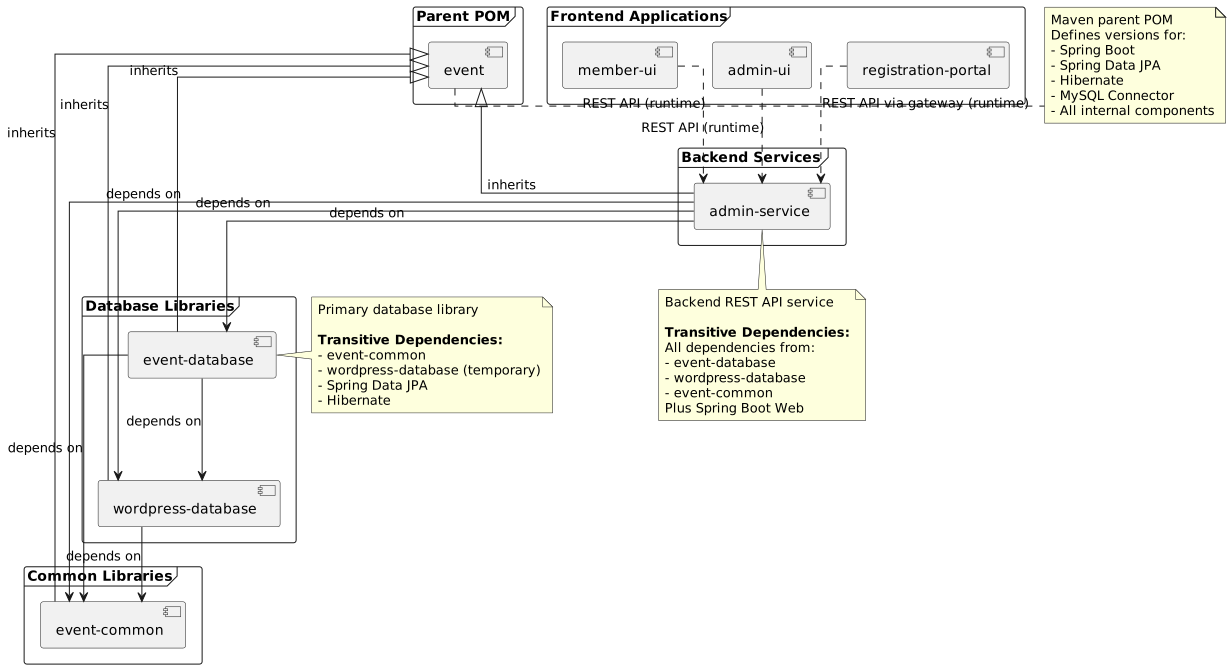
The following diagram shows the Maven compile-time dependencies between Java components:
3. Runtime Dependencies
3.1. Backend Service Runtime Dependencies
The admin-service component has the following runtime dependencies:
Database Connections:
-
MySQL database for event data
-
MySQL database for legacy WordPress data (during migration period)
External Services:
-
Authentication provider (OAuth2/JWT)
-
Email service (SMTP)
-
Payment gateway integration
-
File storage service
3.2. Frontend Application Runtime Dependencies
The frontend applications (admin-ui, member-ui) have runtime dependencies on:
-
admin-serviceREST API -
Browser localStorage for session management
-
External CDN resources (if configured)
The registration-portal has runtime dependencies on:
-
admin-serviceREST API (proxied via Spring Cloud Gateway) -
HTTP session for server-side JWT storage
-
External Identity Provider (for OIDC authentication, optional)
See Registration Portal Architecture for details.
4. Dependency Graph
4.1. Direct Dependencies
| Component | Depends On | Purpose |
|---|---|---|
event-common |
event (parent) |
Common utility classes, constants, and helper functions |
wordpress-database |
event (parent), event-common |
Legacy WordPress JPA entities |
event-database |
event (parent), event-common, wordpress-database |
Primary JPA entity repository with 65 entities |
admin-service |
event (parent), event-common, wordpress-database, event-database |
REST API service with business logic |
admin-ui |
admin-service (runtime) |
Administration interface consuming REST API |
member-ui |
admin-service (runtime) |
Member portal consuming REST API |
registration-portal |
admin-service (runtime via gateway) |
Self-service registration portal (JHipster gateway proxying to admin-service) |
4.2. Transitive Dependencies
Due to Maven’s transitive dependency resolution, components inherit dependencies from their direct dependencies:
admin-service transitive dependencies:
-
All dependencies from
event-database -
All dependencies from
wordpress-database -
All dependencies from
event-common -
Spring Boot framework dependencies
-
Hibernate ORM dependencies
-
MySQL JDBC driver
event-database transitive dependencies:
-
All dependencies from
wordpress-database -
All dependencies from
event-common -
Spring Data JPA dependencies
5. Version Management
5.1. Parent POM Version Strategy
The event parent POM controls version numbers for the entire system. Its version number follows semantic versioning with a special strategy:
<version>${revision}</version>

<properties>
  <revision>1.2.0-SNAPSHOT</revision>
</properties>
Version Number Strategy:
-
Major version - Breaking API changes or major architectural changes
-
Minor version - New features, enhancements, backward-compatible changes
-
Patch version - Always 0 in parent POM (individual components manage patch versions)
|
The parent POM version (major.minor.0) mirrors the major and minor versions of the releasable software components, allowing individual components to have different patch versions while maintaining coordinated major/minor releases. |
5.2. Maven CI-Friendly Versioning
All components use Maven’s CI-friendly version approach using the ${revision} property:
<parent>
  <groupId>za.co.idealogic</groupId>
  <artifactId>event</artifactId>
  <version>${revision}</version>
</parent>

<artifactId>event-database</artifactId>
<version>${revision}</version>

<properties>
  <revision>1.2.4-SNAPSHOT</revision>
</properties>
Benefits:
-
Single property to update version across entire build
-
Easy version updates in CI/CD pipelines
-
Consistent versioning across multi-module builds
Flatten Maven Plugin:
The flatten-maven-plugin is required to properly publish artifacts with resolved versions:
<plugin>
  <groupId>org.codehaus.mojo</groupId>
  <artifactId>flatten-maven-plugin</artifactId>
  <version>1.5.0</version>
  <configuration>
    <updatePomFile>true</updatePomFile>
    <flattenMode>resolveCiFriendliesOnly</flattenMode>
  </configuration>
  <executions>
    <execution>
      <id>flatten</id>
      <phase>process-resources</phase>
      <goals>
        <goal>flatten</goal>
      </goals>
    </execution>
    <execution>
      <id>flatten.clean</id>
      <phase>clean</phase>
      <goals>
        <goal>clean</goal>
      </goals>
    </execution>
  </executions>
</plugin>
5.3. Dependency Version Management
The parent POM manages all dependency versions through the <dependencyManagement> section:
<dependencyManagement>
  <dependencies>
    <!-- Spring Boot BOM -->
    <dependency>
      <groupId>org.springframework.boot</groupId>
      <artifactId>spring-boot-dependencies</artifactId>
      <version>2.7.14</version>
      <type>pom</type>
      <scope>import</scope>
    </dependency>

    <!-- Internal Components -->
    <dependency>
      <groupId>za.co.idealogic</groupId>
      <artifactId>event-common</artifactId>
      <version>${revision}</version>
    </dependency>

    <dependency>
      <groupId>za.co.idealogic</groupId>
      <artifactId>wordpress-database</artifactId>
      <version>${revision}</version>
    </dependency>

    <dependency>
      <groupId>za.co.idealogic</groupId>
      <artifactId>event-database</artifactId>
      <version>${revision}</version>
    </dependency>
  </dependencies>
</dependencyManagement>
5.4. Updating Dependency Versions
Process for updating component versions:
-
Update parent POM - Change
${revision}property ineventPOM -
Rebuild all components - Execute
mvn clean installfrom parent -
Test integration - Run integration tests to verify compatibility
-
Deploy to package registry - Use GitHub Actions workflow to deploy
Example version update:
# Update revision property in event/pom.xml
sed -i 's/<revision>1.2.0-SNAPSHOT<\/revision>/<revision>1.3.0-SNAPSHOT<\/revision>/' pom.xml

# Rebuild all components
mvn clean install

# Run integration tests
mvn verify -P integration-tests

# Deploy (via GitHub Actions or manually)
mvn deploy
6. Dependency Conflicts
6.1. Common Conflict Scenarios
Scenario 1: Spring Boot version mismatch
If a component imports a different Spring Boot version, it can cause classpath conflicts.
Resolution: Always import Spring Boot dependencies through the parent POM’s <dependencyManagement> section.
Scenario 2: Hibernate version conflicts
Hibernate versions must match across all JPA components.
Resolution: Use the Hibernate version defined in the Spring Boot BOM imported by the parent POM.
Scenario 3: Transitive dependency conflicts
Third-party libraries may bring conflicting transitive dependencies.
Resolution: Use <exclusions> to exclude conflicting transitive dependencies and explicitly declare the correct version in <dependencyManagement>.
6.2. Dependency Analysis Tools
Maven Dependency Plugin:
# View dependency tree
mvn dependency:tree

# View dependency tree for specific component
cd event-database
mvn dependency:tree

# Analyze for conflicts
mvn dependency:analyze

# Display resolved dependency versions
mvn dependency:list
Maven Enforcer Plugin:
Add to parent POM to enforce dependency rules:
<plugin>
  <groupId>org.apache.maven.plugins</groupId>
  <artifactId>maven-enforcer-plugin</artifactId>
  <version>3.3.0</version>
  <executions>
    <execution>
      <id>enforce-dependencies</id>
      <goals>
        <goal>enforce</goal>
      </goals>
      <configuration>
        <rules>
          <dependencyConvergence/>
          <bannedDependencies>
            <excludes>
              <exclude>commons-logging:commons-logging</exclude>
            </excludes>
          </bannedDependencies>
        </rules>
      </configuration>
    </execution>
  </executions>
</plugin>
7. Migration Considerations
7.1. WordPress Database Deprecation
The wordpress-database dependency is scheduled for removal. During the migration:
Phase 1 (Months 1-3): Dual Dependencies
-
Both
wordpress-databaseandevent-databaseremain as dependencies -
Dual-write mode ensures data consistency
-
All components continue to depend on both
Phase 2 (Months 3-5): Migration
-
Data migration utilities added to
admin-service -
Validation tools ensure data integrity
-
Components begin transitioning to
event-databaseonly
Phase 3 (Month 6): Completion
-
Remove
wordpress-databasedependency from all components -
Update parent POM to remove
wordpress-databasefrom<dependencyManagement> -
Archive
wordpress-databaserepository
Impact on Components:
| Component | Current State | Post-Migration State |
|---|---|---|
event-database |
Depends on wordpress-database |
No wordpress-database dependency |
admin-service |
Depends on both databases |
Depends only on event-database |
admin-ui |
Indirect dependency via admin-service |
No change (runtime dependency) |
member-ui |
Indirect dependency via admin-service |
No change (runtime dependency) |
8. Dependency Best Practices
8.1. Use Parent POM for Version Management
<!-- Good: Version managed by parent -->
<dependency>
  <groupId>org.springframework.boot</groupId>
  <artifactId>spring-boot-starter-web</artifactId>
</dependency>

<!-- Avoid: Explicit version override -->
<dependency>
  <groupId>org.springframework.boot</groupId>
  <artifactId>spring-boot-starter-web</artifactId>
  <version>2.7.14</version>
</dependency>
8.2. Minimize Dependency Scope
Use appropriate dependency scopes to minimize classpath pollution:
<!-- Runtime-only dependency -->
<dependency>
  <groupId>mysql</groupId>
  <artifactId>mysql-connector-java</artifactId>
  <scope>runtime</scope>
</dependency>

<!-- Test-only dependency -->
<dependency>
  <groupId>org.junit.jupiter</groupId>
  <artifactId>junit-jupiter</artifactId>
  <scope>test</scope>
</dependency>

<!-- Provided by container -->
<dependency>
  <groupId>javax.servlet</groupId>
  <artifactId>javax.servlet-api</artifactId>
  <scope>provided</scope>
</dependency>