Async Import Architecture
1. Overview
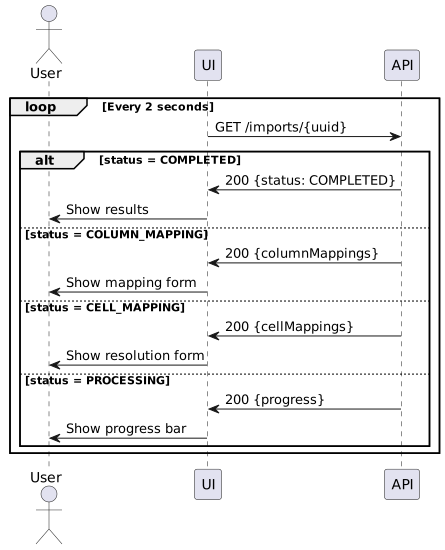
The Async Import architecture provides a framework for processing large spreadsheet imports asynchronously, with support for interactive column and cell mapping when automatic resolution fails. This enables imports that would otherwise timeout to complete successfully with user assistance.
2. Implementation Status
2.1. 2026-04 baseline
The framework was implemented in two layers that both ship in release 2.4:
-
Generic interactive framework —
ImportResource+ state machine + mapping services. Designed to support UX-driven imports where the operator walks through column and cell mapping interactively. Fully wired end-to-end; used today by any future import that needs interactive resolution. -
Per-entity facade endpoints (primary surface) — thin controllers on each domain’s existing REST resource (
ResultSetResourceEx,EventParticipantResourceEx,MembershipResourceEx) that accept a one-shot upload, orchestrate the generic framework internally, and return HTTP 202 with anImportJobDTO. The caller polls a per-entityGET /import/{jobId}that deserialises the per-type response DTO (BulkResultImportResponseDTO,EventParticipantImportResultDTO,MembershipImportResultDTO). This is the contract you almost certainly want — domain-typed Swagger, tenant-scoped security, shape parity with the prior synchronous response.
Two processor modes feed the generic framework:
-
Whole-file (RESULT, EP) — the processor sets
supportsWholeFile()=trueand consumes the uploaded file in a single call viaprocessWholeFile(ImportJob, InputStream, ImportContext). Used when cross-row logic (number-change detection, category grouping, upsert-by-seq for RESULT; summary aggregation for EP) cannot be expressed row-at-a-time. The job skipsCOLUMN_MAPPINGandCELL_MAPPING(skipMappingPhases=true) and transitions straight fromUPLOADEDtoPROCESSING. -
Row-by-row (MEMBERSHIP) — the processor overrides
processRow(ImportJob, SpreadsheetRow, rowNumber, ImportContext). The framework iterates the spreadsheet itself, persisting anImportRowResultper row. The per-entity GET endpoint aggregates those rows into aMembershipImportResultDTOon demand.
2.2. 2026-05 / Feature #686 layer
Feature #686 ("Cross-System Participant Identity Correlation") extended the framework with interactive sub-states and typed wire shapes so the EP-import flow can run as the C05/E06 interactive UI instead of a one-shot upload-and-poll. The work splits into fifteen identifiable surfaces (F1–F15) plus a code-drift sweep (F16); F1–F10 shipped, F11–F15 are deferred and largely focus on the round-trip loop (EP export, timing-system export, result-import audit). See F-Feature Status for the table.
What the May layer added on top of the April baseline:
-
Source-system gating —
RegistrationSystem.isSelfflag classifies the upload as SELF (we own the source) or EXTERNAL (another system’s export). Drives target-field filtering on C05, the (is_self, trustPKs) validation matrix at upload, and the fingerprint predicate. See Source-System Gating Matrix. -
Fingerprint sub-states —
FINGERPRINT_CHECK / FINGERPRINT_WARN / FINGERPRINT_ABORTbetweenCELL_MAPPINGandPROCESSING. Sample-based identity verification when SELF +trustPKs=true; the operator can acknowledge a WARN to proceed or accept an ABORT as terminal. -
Typed failure metadata —
import_row_result.failure_metadata_json(admin-serviceRowFailureMetadata). Failures categorise asFK_MISMATCH/UNRESOLVED_PERSON/GENERICso the E06 summary screen renders typed branches with structured detail (rawFirstName/Last, fkType/fkValue) instead of collapsing every non-success row onto a generic FAILED branch with a free-form message. -
Column samples —
import_column_mapping.samples_jsoncaptures the first 3 source-column values at upload time so the C05 column-mapping stage’s sample-mismatch indicator renders without re-reading the attachment on every poll. -
Column-mapping templates (F10) —
column_mapping_templatetable +GET /api/column-mapping-templates(/by-source)?endpoints. An operator-picked variant key (e.g. Entry Ninja’sbasic-reportvscombined-report) drives a (sourceSystemId, importerKey, templateVariantKey) lookup that auto-applies a saved column mapping at C05. -
Async-signal sweep —
processing_started_atcolumn onimport_jobso the C05 progress stage’s elapsed/rate labels track the server-authoritative PROCESSING transition rather than a client-anchored clock. -
Bookend ↔ common-stage split — the EP-import flow’s E06 upload + E06 summary screens are codified as importer-specific "bookends" wrapping the shared C05 host (columns / cells / verifying / processing stages). The contract is documented separately in Import Bookend Contract, which also serves as the cookbook for adding a new import flow (Result, Membership, Numbers, …).
See Result Import Design, Event Participant Import Design and Import Operations Runbook for the per-entity surfaces and operator workflows. The sections below describe the generic framework in full.
3. Problem Statement
3.1. Current Limitations
The synchronous import approach has several limitations:
| Limitation | Impact |
|---|---|
HTTP timeout |
Large files fail before processing completes |
No progress visibility |
Users don’t know import status |
All-or-nothing mapping |
Any unmapped column/cell fails the entire import |
No resume capability |
Failed imports must restart from scratch |
Resource consumption |
Long-running requests tie up server threads |
3.2. Requirements
The async import system must:
-
Accept large files with immediate acknowledgment
-
Process rows asynchronously in the background
-
Pause for user input when mappings cannot be resolved
-
Allow resume after user provides missing mappings
-
Track progress and provide status updates
-
Clean up completed/abandoned imports automatically
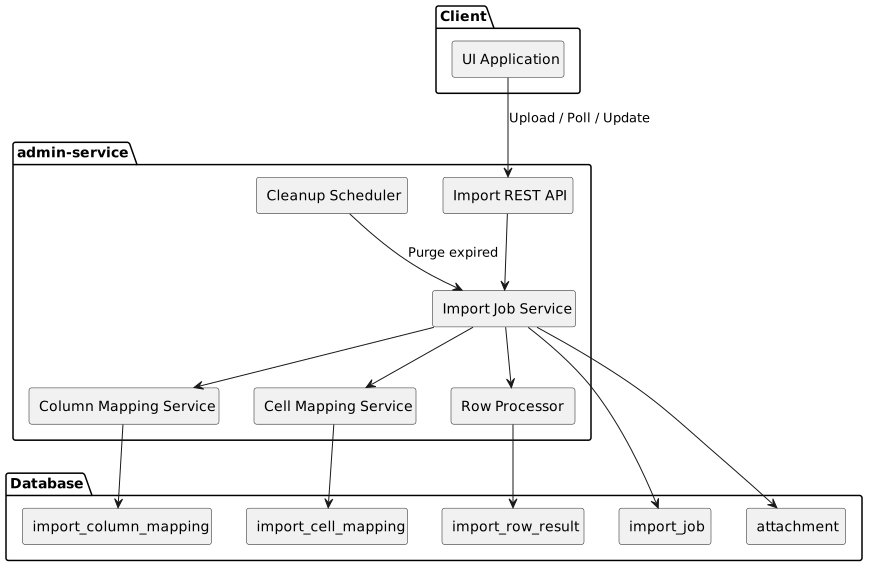
5. State Machine
5.1. States
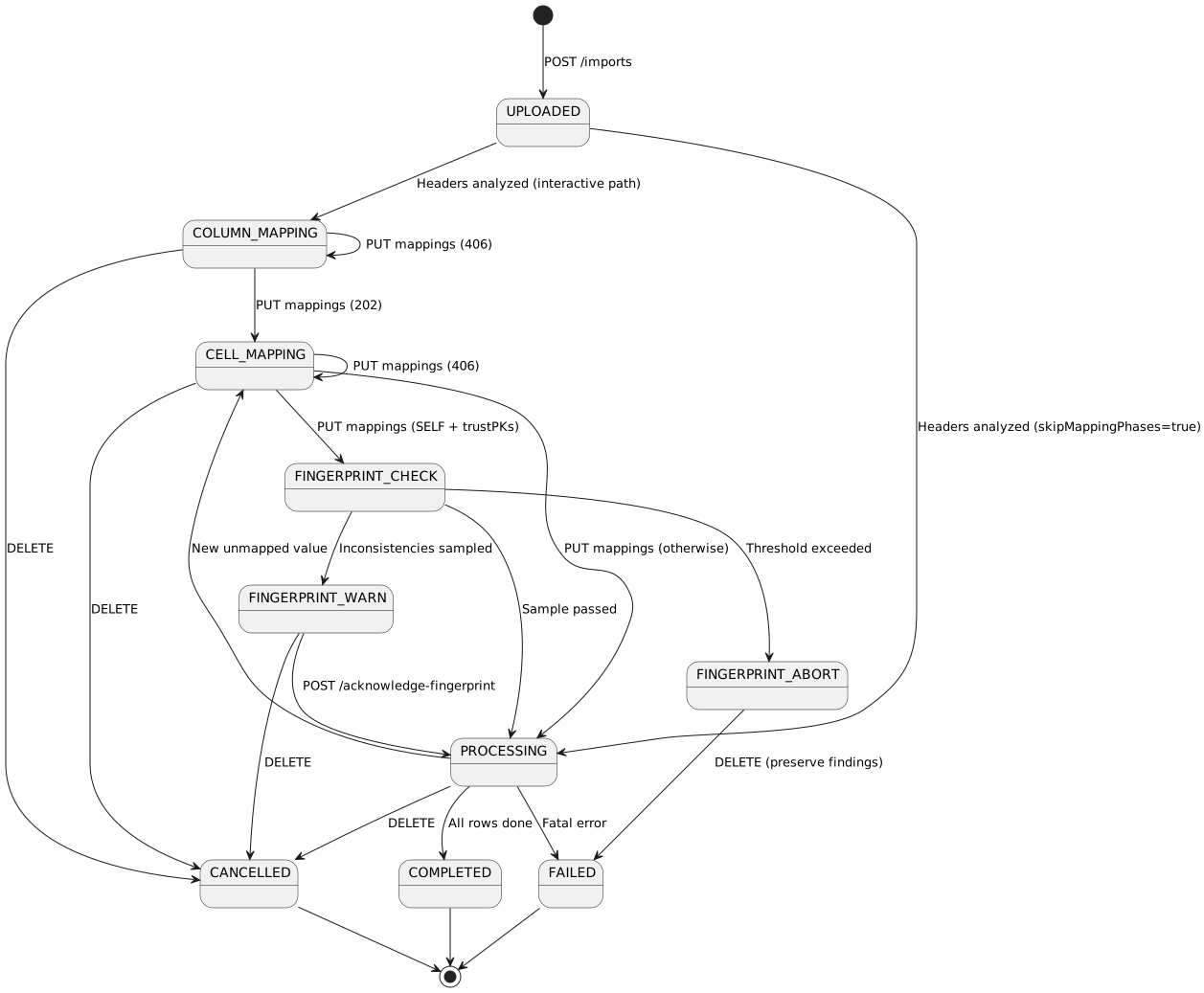
|
The The The
|
5.2. State Descriptions
| State | Description | Next States |
|---|---|---|
UPLOADED |
File received and stored as BLOB. Awaiting column detection. |
COLUMN_MAPPING, PROCESSING ( |
COLUMN_MAPPING |
Headers analyzed. Required fields not all matched. Waiting for user to provide mappings. |
CELL_MAPPING, CANCELLED |
CELL_MAPPING |
Columns mapped. Foreign key values cannot be resolved. Waiting for user to select valid values. |
FINGERPRINT_CHECK (SELF + trustPKs), PROCESSING (otherwise), CANCELLED |
FINGERPRINT_CHECK |
Sample-based identity verification (Feature #686, F7). Compares file identity values against matched EventParticipant rows. Synchronous and short-lived; either passes through to PROCESSING or transitions to FINGERPRINT_WARN / FINGERPRINT_ABORT. |
FINGERPRINT_WARN, FINGERPRINT_ABORT, PROCESSING |
FINGERPRINT_WARN |
Some sampled rows showed inconsistencies between file and DB identities, but below the abort threshold. Waiting for the operator to acknowledge via |
PROCESSING, CANCELLED |
FINGERPRINT_ABORT |
Inconsistencies exceeded the abort threshold. Terminal-pending — the operator must DELETE to acknowledge and convert to FAILED. Sample findings preserved on the job’s |
FAILED |
PROCESSING |
Actively processing rows. Progress tracked. |
CELL_MAPPING (new value), COMPLETED, FAILED, CANCELLED |
COMPLETED |
All rows processed. Results available. |
(terminal) |
FAILED |
Fatal error occurred during processing, OR operator-acknowledged FINGERPRINT_ABORT. |
(terminal) |
CANCELLED |
User cancelled the import via DELETE. |
(terminal) |
6. BLOB Storage
6.1. Attachment Entity
Import files are stored using the existing Attachment entity:
@Entity
@Inheritance(strategy = InheritanceType.JOINED)
public class Attachment {
    @Id @GeneratedValue
    private Long id;

    @Column(unique = true, nullable = false)
    private String uuid;

    @Lob @Basic(fetch = FetchType.EAGER)
    private byte[] data;

    @ManyToOne(optional = false)
    private Organisation organisation;

    @NotNull
    private String mediaType;

    private Instant expiryDate;

    @NotNull
    private String name;
}7. Database Schema
7.1. Entity Relationship Diagram
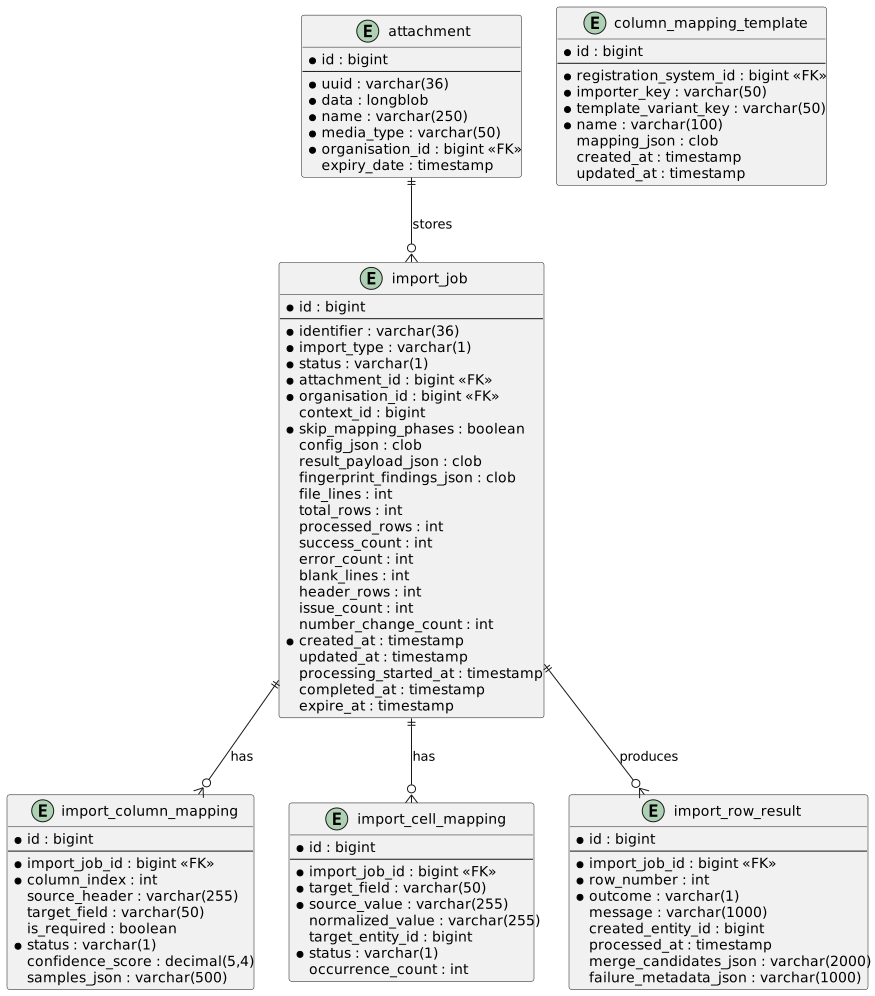
|
The four
|
7.2. Enumerations
public enum ImportType {
    EVENT_PARTICIPANT('E'),
    MEMBERSHIP('M'),
    RESULT('R');
}

public enum ImportJobStatus {
    UPLOADED,
    COLUMN_MAPPING,
    CELL_MAPPING,
    FINGERPRINT_CHECK,    // Feature #686, F7 — sample-based identity verification
    FINGERPRINT_WARN,     // Feature #686, F7 — operator must acknowledge
    FINGERPRINT_ABORT,    // Feature #686, F7 — terminal-pending, DELETE → FAILED
    PROCESSING,
    COMPLETED,
    FAILED,
    CANCELLED
}

public enum ImportMappingStatus {       // applies to both column + cell mappings
    UNRESOLVED,             // Cannot match, needs user input
    AUTO_MATCHED,           // System matched with high confidence
    USER_CONFIRMED,         // User accepted the auto-match
    USER_OVERRIDDEN,        // User picked a different target than auto-match
    IGNORED                 // User chose to skip
}

public enum ImportRowOutcome {
    SUCCESS('S'),
    CREATED('C'),
    UPDATED('U'),
    SKIPPED('K'),
    ERROR('E'),
    VALIDATION_ERROR('V');
}

// Feature #686 / PR #224 — typed sub-DTO serialised into
// import_row_result.failure_metadata_json. Categories are stored as
// a String (not a Java enum) for forward-compat — admin-service may
// add new categories without breaking deserialisers on the SPA side.
public final class RowFailureMetadata {
    public static final String CATEGORY_FK_MISMATCH       = "FK_MISMATCH";
    public static final String CATEGORY_UNRESOLVED_PERSON = "UNRESOLVED_PERSON";
    public static final String CATEGORY_GENERIC           = "GENERIC";
    // ... fkType, fkValue (FK_MISMATCH only)
    // ... rawFirstName, rawLastName (UNRESOLVED_PERSON only)
}|
The
|
8. API Design
8.1. Per-Entity Facade Endpoints (primary surface)
These are the endpoints operators and integrations should use by default. Each accepts a one-shot upload, orchestrates the generic framework internally, and returns HTTP 202 + ImportJobDTO immediately; the caller polls the paired GET /import/{jobId} for the domain-typed response DTO once the job reaches COMPLETED or FAILED.
| Method | Endpoint | Description |
|---|---|---|
PUT |
|
Upload a combined CSV for a bulk result import. Query params: |
GET |
|
Returns |
PUT |
|
Upload an EP roster. Multipart form fields: |
GET |
|
Returns |
PUT |
|
Upload a membership roster. Query params: |
GET |
|
Returns |
8.2. Generic Framework Endpoints (interactive / cross-cutting)
These endpoints expose the full state machine for interactive imports (where the operator needs to walk through column and cell mapping) and for cross-cutting operations that don’t belong to any one domain.
| Method | Endpoint | Description |
|---|---|---|
POST |
|
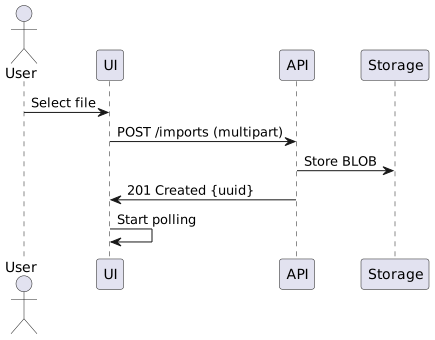
Upload file and create import job (interactive flow). Returns 201 + |
GET |
|
List import jobs (paginated, filterable by status and organisation). |
GET |
|
Get import job status (generic — no domain DTO). Useful during polling when the caller wants |
DELETE |
|
Cancel import job. |
GET |
|
Get column mappings (interactive). |
PUT |
|
Update column mappings (interactive). |
POST |
|
Confirm all auto-matched column mappings and proceed to cell mapping (interactive). |
GET |
|
Get cell mappings (interactive). |
GET |
|
Get candidate entities for FK resolution (interactive dropdown population). |
PUT |
|
Update cell mappings (interactive). |
POST |
|
Confirm all cell mappings and start processing (interactive). |
POST |
|
Skip cell mapping and start processing (from COLUMN_MAPPING). Equivalent to |
GET |
|
Get per-row results (paginated, filterable by outcome). Generic shape; per-entity endpoints give the domain DTO. Each row’s |
GET |
|
Get results summary by outcome (generic counts). |
GET |
|
Mode-filtered candidate target fields for the C05 columns stage dropdown (Feature #686 / F9). Drops |
GET |
|
Job-level column-mapping warnings (Feature #686 / F9). Returns |
POST |
|
Acknowledge a |
GET |
|
F10 lookup. Query params: |
GET |
|
F10 discovery. Query params: |
8.3. Endpoint Details
8.3.1. Create Import Job
POST /api/imports
Content-Type: multipart/form-data

Parameters:
- file: MultipartFile (required) - The spreadsheet file
- importType: String (required) - EVENT_PARTICIPANT, MEMBERSHIP, RESULT
- contextId: Long (optional) - Event ID, MembershipPeriod ID, or Race ID
- organisationId: Long (optional) - Organisation ID (defaults to current user's org)

Response: 201 Created
Location: /api/imports/{uuid}

{
    "identifier": "abc-123-def-456",
    "importType": "EVENT_PARTICIPANT",
    "status": "COLUMN_MAPPING",
    "originalFilename": "registrations.xlsx",
    "totalRows": 150,
    "processedRows": 0,
    "successCount": 0,
    "errorCount": 0,
    "createdAt": "2026-01-03T10:00:00Z",
    "columnMappings": [
        {"id": 1, "columnIndex": 0, "sourceHeader": "Name", "targetField": "FIRST_NAME", "status": "AUTO_MATCHED", "confidenceScore": 1.0},
        {"id": 2, "columnIndex": 1, "sourceHeader": "Unknown Col", "targetField": null, "status": "UNRESOLVED", "confidenceScore": 0.0}
    ]
}
8.3.2. Get Import Job Status
GET /api/imports/{uuid}?includeMappings=true

Response: 200 OK
{
    "identifier": "abc-123-def-456",
    "importType": "EVENT_PARTICIPANT",
    "status": "PROCESSING",
    "totalRows": 150,
    "processedRows": 75,
    "successCount": 72,
    "errorCount": 3,
    "progressPercent": 50,
    "createdAt": "2026-01-03T10:00:00Z"
}
8.3.3. List Import Jobs
GET /api/imports?organisationId=1&status=PROCESSING&page=0&size=20

Response: 200 OK
X-Total-Count: 5

[
    {"identifier": "abc-123", "status": "PROCESSING", "progressPercent": 50, ...},
    {"identifier": "def-456", "status": "COMPLETED", "progressPercent": 100, ...}
]
8.3.4. Update Column Mappings
PUT /api/imports/{uuid}/column-mappings
Content-Type: application/json

[
    {"id": 1, "confirm": true},
    {"id": 2, "targetField": "EVENT_CATEGORY_NAME"},
    {"id": 3, "ignore": true}
]

Response: 202 Accepted (all required mapped)
Response: 406 Not Acceptable (required fields still unresolved)
8.3.5. Confirm Column Mappings
POST /api/imports/{uuid}/column-mappings/confirm

Response: 202 Accepted
{
    "identifier": "abc-123-def-456",
    "status": "CELL_MAPPING",
    "cellMappings": [
        {"id": 1, "targetField": "EVENT_CATEGORY_NAME", "sourceValue": "Junior", "status": "AUTO_MATCHED", "targetEntityId": 42},
        {"id": 2, "targetField": "EVENT_CATEGORY_NAME", "sourceValue": "Unknown Cat", "status": "UNRESOLVED", "targetEntityId": null}
    ]
}
8.3.6. Get Cell Mapping Candidates
GET /api/imports/{uuid}/cell-mappings/candidates?targetField=EVENT_CATEGORY_NAME

Response: 200 OK
[
    {"id": 42, "displayName": "Junior (U18)"},
    {"id": 43, "displayName": "Senior (18+)"},
    {"id": 44, "displayName": "Masters (40+)"}
]
8.3.7. Update Cell Mappings
PUT /api/imports/{uuid}/cell-mappings
Content-Type: application/json

[
    {"id": 1, "confirm": true},
    {"id": 2, "targetEntityId": 43},
    {"id": 3, "ignore": true}
]

Response: 202 Accepted (all resolved)
Response: 406 Not Acceptable (unresolved mappings remain)
8.3.8. Start Processing
POST /api/imports/{uuid}/start

Description: Confirms all auto-matched mappings and starts processing.
             Can be called from COLUMN_MAPPING (skips cell mapping) or CELL_MAPPING status.

Response: 202 Accepted
{
    "identifier": "abc-123-def-456",
    "status": "PROCESSING",
    "totalRows": 150,
    "processedRows": 0
}
8.3.9. Get Row Results
GET /api/imports/{uuid}/results?outcome=ERROR&page=0&size=50

Response: 200 OK
X-Total-Count: 5

[
    {"id": 1, "rowNumber": 15, "outcome": "ERROR", "message": "Duplicate email: [email protected]"},
    {"id": 2, "rowNumber": 42, "outcome": "ERROR", "message": "Invalid date format"}
]9. Feature #686 — F1–F16 Status
The Feature #686 ("Cross-System Participant Identity Correlation") work split into fifteen identifiable feature surfaces (F1–F15) plus a code-drift comment sweep (F16). F1–F10 shipped end-to-end (backend + admin-portal C05/E06 wiring) and form the import half of the design. F11–F15 are deferred and form the round-trip half (EP export, timing-system export, result-import audit) plus the supporting Event.preferredTimingIdentifier lock and doc updates.
| ID | Feature | Where | Status |
|---|---|---|---|
F1 |
Four typed identifier columns on the upload ( |
US #690 |
Done |
F2 |
|
US #687 |
Done |
F3 |
|
US #688 |
Done |
F4 |
Person matching priority — typed identifiers first, then SAID, then external UID, then name-only fallback. Emits merge-candidate refs on collision. |
US #689 |
Done |
F5 |
Source-system-aware target-field filtering on the C05 columns stage (drops |
US #694 / F9 |
Done |
F6 |
|
US #691 |
Done |
F7 |
Fingerprint sub-states (CHECK / WARN / ABORT) — sample-based identity verification when SELF + |
US #692 |
Done |
F8 |
Per-row merge-candidate refs surfaced on |
US #693 |
Done |
F9 |
Job-level |
US #694 |
Done |
F10 |
Column-mapping templates — |
US #695 |
Done |
F11 |
EP export — |
US #696 |
Deferred |
F12 |
|
US #697 |
Deferred |
F13 |
Timing-system export — companion to F11. New endpoint serving the timing system’s CSV ingest format. Sets |
US #698 |
Deferred |
F14 |
Result import — persist |
US #699 |
Deferred |
F15 |
Doc updates — use-case |
US #700 |
Deferred |
F16 |
Code-drift comment sweep — apply |
Task #702 |
Deferred |
10. Source-System Gating Matrix
RegistrationSystem.isSelf classifies the upload’s origin and drives target-field filtering, the trustPKs / updatePII availability matrix, and the fingerprint predicate. The matrix is enforced at three layers — once at the C05 upload bookend (UI), once on the EP-import controller, and once inside EventParticipantServiceEx.register (defence in depth).
| isSelf | trustPKs | updatePII | Validation outcome | Behaviour |
|---|---|---|---|---|
true |
true |
any |
Accepted |
Trust file’s |
true |
false |
any |
Accepted |
Match by typed identifiers / SAID / name. No fingerprint check. |
false |
true |
any |
Rejected (HTTP 400) |
External systems cannot supply our internal IDs. The C05 upload bookend disables the Trust-file-PKs checkbox with an inline tooltip; the controller rejects the request if it slips through. |
false |
false |
any |
Accepted |
Match by |
The our*Id columns are also filtered out of the C05 target-field dropdown when isSelf=false (Feature #686 / F9), and the sourceSystemPersonId column is filtered out when isSelf=true (semantic mismatch — a self-source row’s external Person UID is meaningless).
11. Typed Failure Metadata
The legacy ImportRowResult surface collapsed every non-success outcome onto a single ERROR value with a free-form message. The C05/E06 summary screen needs typed branches (UNRESOLVED_PERSON renders raw first/last name; FK_MISMATCH renders fkType + fkValue) so the operator can see what failed without parsing free-form text. Feature #686 added RowFailureMetadata (admin-service PR #224 + event-database PR #62) as a JSON sub-DTO on import_row_result.failure_metadata_json.
The producer (today only EventParticipantRowProcessor) emits the typed metadata at two clearly-FK paths:
-
eventCategoryrequired-but-absent →FK_MISMATCH("EventCategory", null). The failed key is structurally absent rather than a specific bad value. -
NotFoundExceptionfromregister()→FK_MISMATCH(nfe.getEntity(), summarised(nfe.getParameters())). The exception already carries(entity, parameters)so no message-parsing brittleness.
UNRESOLVED_PERSON is defined in the enum but no current producer path emits it — the structure is a forward hook for a future F4 retrofit (when the matching path runs in a no-auto-create mode, an unmatched person becomes a typed failure rather than a Person creation).
GENERIC covers everything else (validation errors, generic register() failures, etc.). The frontend adapter falls through to the FAILED branch with description = message for these.
12. Column Samples
import_column_mapping.samples_json (admin-service PR #227 + event-database PR #63) carries the first 3 source-column values captured at upload time. Drives the C05 column-mapping stage’s sample-mismatch indicator without re-reading the attachment on every poll.
HeaderDictionaryBuilder.readRawSampleRows(data, filename, n) reads the first N data rows after the header — same code path for both CSV and XLSX, with blank cells preserved as null so column indices stay aligned. ImportColumnMappingService.analyzeAndCreateMappings serialises the per-column slice onto each new mapping; entirely-empty columns persist null (small storage saving on sparse spreadsheets).
The sample size is centralised on ImportColumnMappingService.SAMPLE_ROWS_PER_COLUMN (currently 3) so producer + consumer stay in lock-step. Bumping it requires also bumping the varchar(500) column cap if the average sample length grows.
13. Column-Mapping Templates (F10)
The column_mapping_template table (event-database PR #60) plus ColumnMappingTemplateResource (admin-service PR #214) implement Feature #686’s saved-mapping discovery and lookup. Two endpoints serve different stages of the operator workflow:
| Stage | Endpoint |
|---|---|
E06 upload — variant picker |
|
C05 columns stage — auto-apply |
|
The lookup tuple is captured at upload time. EventParticipantResourceEx.importEventParticipants accepts a templateVariantKey form param, hydrates it into ImportJob.configJson, and ImportJobDTO surfaces it on the wire. The C05 columns stage reads it from IImportJob.templateVariantKey and supplies it to the lookup endpoint.
importerKey is fixed by the import flow: participants for EP, results for race results, and so on. Frontend pins participants at the SPA boundary in ImportService.EP_IMPORTER_KEY rather than threading it through every call site.
14. Column Mapping
14.1. Auto-Matching Process
-
Extract headers from first row
-
Normalize each header (remove spaces, special chars, uppercase)
-
Look up in header dictionary
-
Calculate confidence score for fuzzy matches
-
Mark required fields that couldn’t match
15. Cell Mapping
15.1. Foreign Key Resolution
For fields that reference other entities, values must be resolved to IDs:
| Field | Resolution |
|---|---|
ID_COUNTRY |
Lookup |
EVENT_CATEGORY_NAME |
Lookup |
CUSTOM_LIST_* |
Lookup |
MEMBERSHIP_TYPE_ID |
Lookup |
15.2. Resolution Strategy
public interface CellValueResolver {
    /**
     * Attempt to resolve a source value to an entity ID.
     */
    CellResolutionResult resolve(String sourceValue, ImportContext context);

    /**
     * Get all valid target values for UI dropdown.
     */
    List<TargetOptionDTO> getAvailableTargets(ImportContext context);
}16. Whole-File Bridge
Some bulk importers cannot be expressed as "row in → row out". RESULT, for example, needs two passes over the CSV (category grouping + per-category upsert), cross-row number-change detection, and a reconciliation summary that counts blank/header/malformed rows. Modelling these as a loop over processRow(…) would throw away the synchronous importer’s battle-tested logic.
The bridge is a default-method extension on ImportRowProcessor:
public interface ImportRowProcessor {
    ImportType getImportType();

    default boolean supportsWholeFile() { return false; }

    default Object processWholeFile(ImportJob job, InputStream stream, ImportContext ctx) {
        throw new UnsupportedOperationException();
    }

    default ImportRowResult processRow(ImportJob job, SpreadsheetRow row, int rowNumber, ImportContext ctx) {
        throw new UnsupportedOperationException();
    }

    default void beforeProcessing(ImportJob job, ImportContext ctx) {}
    default void afterProcessing(ImportJob job, ImportContext ctx) {}
}
16.1. Dispatch
ImportProcessingService.processRows(…) branches on processor.supportsWholeFile():
-
true →
processWholeFileInternalre-opens the uploaded attachment as anInputStream, hands the whole stream toprocessor.processWholeFile(…), JSON-serialises the returned DTO toImportJob.resultPayloadJson, and returns. Counters the processor wrote directly onto the managedImportJob(e.g.fileLines,successCount,blankLines) are persisted. -
false →
processRowByRowInternaliterates the spreadsheet viaSpreadsheetReaderand callsrowProcessingService.processRowInTransaction(jobId, processor, row, rowNumber, ctx)per row. Each row commits in its ownREQUIRES_NEWtransaction so a rollback on one row doesn’t affect subsequent rows.
16.2. Contract for whole-file processors
The processor is expected to:
-
Parse
ImportJob.getConfigJson()to recover per-type parameters (e.g.participantIdMode,pointsCalculator,applyNumberChangesfor RESULT). -
Do its work — typically by delegating to the synchronous bulk importer (
ResultImportXLS.processBulkCsv,EventParticipantImportXLS.process). -
Write observability counters onto the managed
ImportJobpassed tobeforeProcessing:fileLines,totalRows,processedRows,successCount,errorCount,blankLines,headerRows,issueCount,numberChangeCount. These feed the generic status endpoint and dashboards. -
Return the response DTO — shape should match the synchronous importer’s so the per-entity GET endpoint can deserialise and return it verbatim.
16.3. Configuration JSON
ImportJob.configJson is a CLOB holding a per-type options object. Shape is intentionally open so new options can be added without schema migration. Current keys:
| Type | Key | Meaning |
|---|---|---|
RESULT |
|
|
RESULT |
|
Short code (e.g. |
RESULT |
|
|
EVENT_PARTICIPANT |
|
XLSX sheet index (default 0, ignored for CSV) |
EVENT_PARTICIPANT |
|
Auto-create missing custom-list values (default |
MEMBERSHIP |
|
XLSX sheet index |
17. Row-Counter Invariant
After processing completes, ImportProcessingService.completeJob(…) asserts:
fileLines == successCount + blankLines + headerRows + errorCountViolation is logged at WARN (with the expected and actual values) but does not fail the job — the invariant is a defensive check, not a correctness constraint; individual failures would already have surfaced during processing.
The whole-file processors populate every term from the sync DTO’s reconciliation summary; row-by-row imports (MEMBERSHIP) currently leave fileLines null and skip the assertion.
18. Observability
-
import.processWholeFile(Micrometer Timer, taggedimportType) — latency of the async whole-file path per import type. Hooks into the existing Spring Boot Actuator / OTLP stack. -
import.status.transitions(Micrometer Counter, taggedimportType,from,to) — incremented every time a job reaches a terminal status viacompleteJobormarkJobFailed. Enables alerting on unusual FAILED rates per type. -
Structured logs on terminal transitions include the job identifier, import type, from/to status, success/error counts, and
fileLines— tailable from ELK/Loki without needing the full metrics pipeline.
19. Async Processing
19.1. Spring Async Configuration
@Configuration
@EnableAsync
public class AsyncConfig {

    @Bean(name = "importTaskExecutor")
    public Executor importTaskExecutor() {
        ThreadPoolTaskExecutor executor = new ThreadPoolTaskExecutor();
        executor.setCorePoolSize(2);
        executor.setMaxPoolSize(5);
        executor.setQueueCapacity(25);
        executor.setThreadNamePrefix("import-");
        executor.initialize();
        return executor;
    }
}
19.2. Processing Service
@Service
public class ImportProcessingService {

    @Async("importTaskExecutor")
    public CompletableFuture<Void> processImport(UUID jobId) {
        ImportJob job = findByUuid(jobId);

        try {
            job.setStatus(PROCESSING);
            save(job);

            SpreadsheetReader reader = createReader(job);
            int rowIndex = 1;  // Skip header

            while (rowIndex < reader.getRowCount()) {
                // Check cancellation
                if (isCancelled(jobId)) return complete();

                try {
                    processRow(reader.getRow(rowIndex), job);
                    job.incrementSuccess();
                } catch (UnmappedCellException e) {
                    // Pause for user input
                    savePendingCellMapping(job, e);
                    job.setStatus(CELL_MAPPING);
                    save(job);
                    return complete();
                } catch (Exception e) {
                    saveError(job, rowIndex, e);
                    job.incrementError();
                }

                job.setProcessedRows(rowIndex);
                if (rowIndex % 100 == 0) save(job);
                rowIndex++;
            }

            job.setStatus(COMPLETED);
            job.setCompletedAt(Instant.now());
            save(job);

        } catch (Exception e) {
            job.setStatus(FAILED);
            save(job);
        }

        return complete();
    }
}
20. Purging Strategy
20.1. Retention Rules
| Status | Retention | Rationale |
|---|---|---|
COMPLETED |
7 days |
Allow review and re-download |
FAILED |
7 days |
Allow debugging |
CANCELLED |
7 days |
Same as completed |
UPLOADED, COLUMN_MAPPING, CELL_MAPPING |
90 days |
User may return to complete |
PROCESSING |
No auto-purge |
Requires manual intervention |
20.2. Scheduled Cleanup
@Service
public class ImportCleanupService {

    @Scheduled(cron = "0 0 2 * * ?")  // Daily at 2 AM
    @Transactional
    public void cleanupExpiredImports() {
        Instant now = Instant.now();

        // Completed/Failed/Cancelled: 7 days
        deleteByStatusesOlderThan(
            Set.of(COMPLETED, FAILED, CANCELLED),
            now.minus(7, ChronoUnit.DAYS)
        );

        // Abandoned: 90 days
        deleteByStatusesOlderThan(
            Set.of(UPLOADED, COLUMN_MAPPING, CELL_MAPPING),
            now.minus(90, ChronoUnit.DAYS)
        );
    }

    private void deleteByStatusesOlderThan(Set<Status> statuses, Instant cutoff) {
        List<ImportJob> jobs = repository.findByStatusInAndCreatedAtBefore(statuses, cutoff);
        for (ImportJob job : jobs) {
            attachmentRepository.delete(job.getSourceFile());
            repository.delete(job);
        }
    }
}
22. Related Documentation
-
Import Bookend Contract — what an importer-specific bookend (E06/E08/T06/M01) must provide and what the shared C05 stages assume from
IImportJob. The cookbook for adding a new import flow. -
File Import — XLSX/CSV parsing and column mapping (sync-era reference; the async framework sits on top of this stack via
HeaderDictionaryBuilder/IFileProcessor). -
Data Synchronisation — Related synchronisation patterns.