Component Deployment Dependencies
1. Overview
This document describes the build and deployment dependencies between components. For detailed component architecture and design, see System Components.
|
This page focuses on deployment-time dependencies and build order. For compile-time dependencies and component architecture, see Component Dependencies. |
2. Build Order
Components must be built in the following order due to Maven dependency resolution:
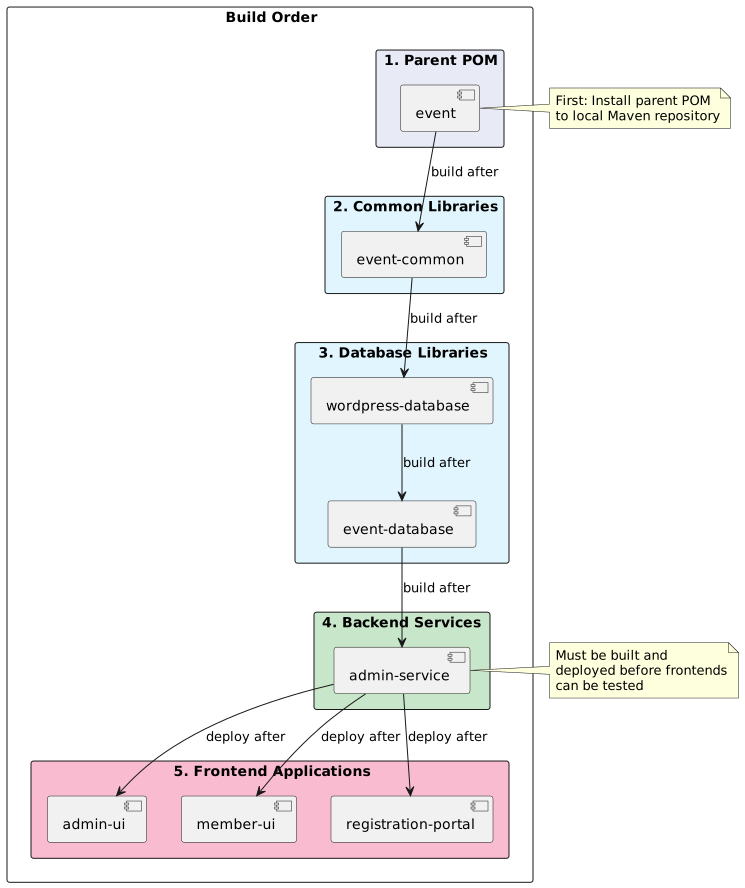
2.1. Step-by-Step Build Process
Step 1: Build Parent POM
cd event
mvn clean install
This installs the parent POM to your local Maven repository (~/.m2/repository), making version and dependency management available to child projects.
Step 2: Build Common Libraries
cd event-common
mvn clean install
Step 3: Build Database Libraries
# Build wordpress-database first (event-database depends on it)
cd wordpress-database
mvn clean install

# Then build event-database
cd ../event-database
mvn clean install|
|
Step 4: Build Backend Services
cd admin-service
mvn clean package
Use package instead of install for services since other projects don’t depend on them.
Step 5: Build Frontend Applications
cd admin-ui
npm install
npm run build

cd ../member-ui
npm install
npm run build
Frontend builds are independent of each other and can be built in parallel.
Step 5b: Build Registration Portal
The Registration Portal is a JHipster gateway application with both Maven (backend) and npm (frontend) builds:
cd registration-portal
./mvnw clean package -Pprod
The production build creates a single executable JAR containing both the Spring Gateway backend and Angular frontend.
See Registration Portal Documentation for detailed build and deployment instructions.
3. Runtime Dependencies
3.1. Backend Service Runtime Dependencies
The admin-service requires the following at runtime:
Database:
-
MySQL 8.0+ server
-
event_dbdatabase (created via Flyway migrations) -
wordpress_dbdatabase (legacy, during migration period)
Configuration:
-
application.ymlorapplication.properties -
Environment variables for sensitive data (database passwords, JWT secrets)
External Services:
-
SMTP server (for email notifications)
-
Payment gateway (for financial transactions)
-
File storage (local or S3-compatible)
3.2. Frontend Application Runtime Dependencies
Both admin-ui and member-ui require:
Backend API:
-
Running
admin-serviceinstance -
Accessible API endpoint (configured via
VITE_API_BASE_URL)
Web Server:
-
Static file hosting (Nginx, Apache, or CDN)
-
HTTPS support (recommended for production)
Browser:
-
Modern browser with JavaScript enabled
-
Local storage support for session management
3.3. Registration Portal Runtime Dependencies
The registration-portal requires:
Backend API:
-
Running
admin-serviceinstance (proxied via Spring Cloud Gateway)
Application Server:
-
JDK 17+ runtime environment
-
Sufficient memory for Spring Boot application (~512MB minimum)
Authentication (depends on configuration):
-
External Identity Provider (for OIDC authentication), or
-
Hash-based authentication via external system (e.g., WordPress)
Session Storage:
-
HTTP session storage (in-memory by default, Redis for production scaling)
See Registration Portal Security for authentication configuration details.
4. Deployment Order
When deploying to a new environment, follow this sequence:
1. Database Setup
CREATE DATABASE event_db CHARACTER SET utf8mb4 COLLATE utf8mb4_unicode_ci;
CREATE DATABASE wordpress_db CHARACTER SET utf8mb4 COLLATE utf8mb4_unicode_ci;

CREATE USER 'event_user'@'%' IDENTIFIED BY 'secure_password';
GRANT ALL PRIVILEGES ON event_db.* TO 'event_user'@'%';
GRANT ALL PRIVILEGES ON wordpress_db.* TO 'event_user'@'%';
FLUSH PRIVILEGES;
2. Deploy Backend Service
# Copy JAR to server
scp admin-service/target/admin-service-1.2.0.jar server:/opt/app/

# Copy configuration
scp application-prod.yml server:/opt/app/config/

# Start service
ssh server "java -jar /opt/app/admin-service-1.2.0.jar --spring.config.location=/opt/app/config/application-prod.yml"
3. Run Database Migrations
Flyway migrations run automatically on application startup. Verify:
# Check application logs
tail -f /var/log/admin-service.log | grep Flyway
4. Deploy Frontend Applications
# Deploy admin-ui
scp -r admin-ui/dist/* server:/var/www/admin/

# Deploy member-ui
scp -r member-ui/dist/* server:/var/www/member/

# Configure Nginx (example)
ssh server "systemctl reload nginx"
5. CI/CD Pipeline Dependencies
In GitHub Actions or similar CI/CD systems, the build pipeline must respect dependency order:
name: Build and Deploy

on:
  push:
    branches: [main]

jobs:
  build-parent:
    runs-on: ubuntu-latest
    steps:
      - uses: actions/checkout@v3
        with:
          repository: christhonie/event
      - name: Build parent POM
        run: mvn clean install

  build-common:
    needs: build-parent
    runs-on: ubuntu-latest
    steps:
      - uses: actions/checkout@v3
        with:
          repository: christhonie/event-common
      - name: Build event-common
        run: mvn clean install

  build-databases:
    needs: build-common
    runs-on: ubuntu-latest
    strategy:
      matrix:
        repo: [wordpress-database, event-database]
    steps:
      - uses: actions/checkout@v3
        with:
          repository: christhonie/${{ matrix.repo }}
      - name: Build ${{ matrix.repo }}
        run: mvn clean install

  build-service:
    needs: build-databases
    runs-on: ubuntu-latest
    steps:
      - uses: actions/checkout@v3
        with:
          repository: christhonie/admin-service
      - name: Build admin-service
        run: mvn clean package

  build-frontends:
    needs: build-service
    runs-on: ubuntu-latest
    strategy:
      matrix:
        repo: [admin-ui, member-ui]
    steps:
      - uses: actions/checkout@v3
        with:
          repository: christhonie/${{ matrix.repo }}
      - name: Build ${{ matrix.repo }}
        run: |
          npm install
npm run build|
Frontend builds can technically start as soon as the backend service API is stable, but it’s safer to complete the backend build first to ensure API compatibility. |
6. Package Registry Dependencies
All Maven artifacts are published to GitHub Package Registry. Access requires authentication:
Maven settings.xml:
<settings>
  <servers>
    <server>
      <id>github-christhonie</id>
      <username>${env.GITHUB_USERNAME}</username>
      <password>${env.GITHUB_TOKEN}</password>
    </server>
  </servers>
</settings>
Repository Configuration:
Each Maven POM includes the repository configuration:
<repositories>
  <repository>
    <id>github-christhonie</id>
    <url>https://maven.pkg.github.com/christhonie/event</url>
    <releases>
      <enabled>true</enabled>
    </releases>
    <snapshots>
      <enabled>false</enabled>
    </snapshots>
  </repository>
</repositories>
See GitHub Actions Deployment for authentication details.
7. Version Synchronization
All Java components use synchronized versions via the parent POM’s ${revision} property:
<properties>
  <revision>1.2.0-SNAPSHOT</revision>
</properties>
When releasing a new version:
1. Update parent POM revision:
cd event
sed -i 's/<revision>1.2.0-SNAPSHOT<\/revision>/<revision>1.3.0-SNAPSHOT<\/revision>/' pom.xml
git commit -am "Bump version to 1.3.0-SNAPSHOT"
git push
2. Rebuild all components in order:
Follow the build order described above. Each component will automatically use the new version from the parent POM.
3. Tag releases:
git tag -a v1.3.0 -m "Release version 1.3.0"
git push origin v1.3.0
8. Troubleshooting Build Dependencies
8.1. Missing Dependency Error
Error:
Could not resolve dependencies for project za.co.idealogic:admin-service:jar:1.2.0
  Could not find artifact za.co.idealogic:event-database:jar:1.2.0
Solution:
-
Verify
event-databasewas built and installed:ls ~/.m2/repository/za/co/idealogic/event-database/ -
Rebuild
event-database:cd event-database && mvn clean install -
Retry building
admin-service
8.2. Version Mismatch Error
Error:
Version 1.2.0 is required but 1.1.0 was resolvedSolution:
-
Check parent POM version:
cat event/pom.xml | grep revision -
Rebuild parent POM:
cd event && mvn clean install -
Rebuild all dependent components in order
8.3. Package Registry Authentication Error
Error:
Could not transfer artifact from github-christhonie: status code 401Solution:
-
Verify GitHub token has
read:packagespermission -
Update Maven
settings.xmlwith correct credentials -
Export environment variables:
export GITHUB_USERNAME=… GITHUB_TOKEN=…
See Maven Repository Authentication for details.
9. WordPress Database Migration Impact
During the WordPress database migration (6-month timeline), deployment dependencies will change:
Current State:
-
event-databasedepends onwordpress-database -
admin-servicedepends on both databases
Post-Migration State:
-
event-databasehas nowordpress-databasedependency -
admin-servicedepends only onevent-database -
Build order simplified (one fewer step)
See Migration Strategy for detailed migration plan.
10. Related Documentation
-
Component Dependencies - Compile-time dependencies and architecture
-
Maven POM Files - POM file structure and configuration
-
GitHub Actions Deployment - CI/CD pipeline configuration
-
Registration Portal - Self-service registration portal documentation