Process Flow Integration
1. Overview
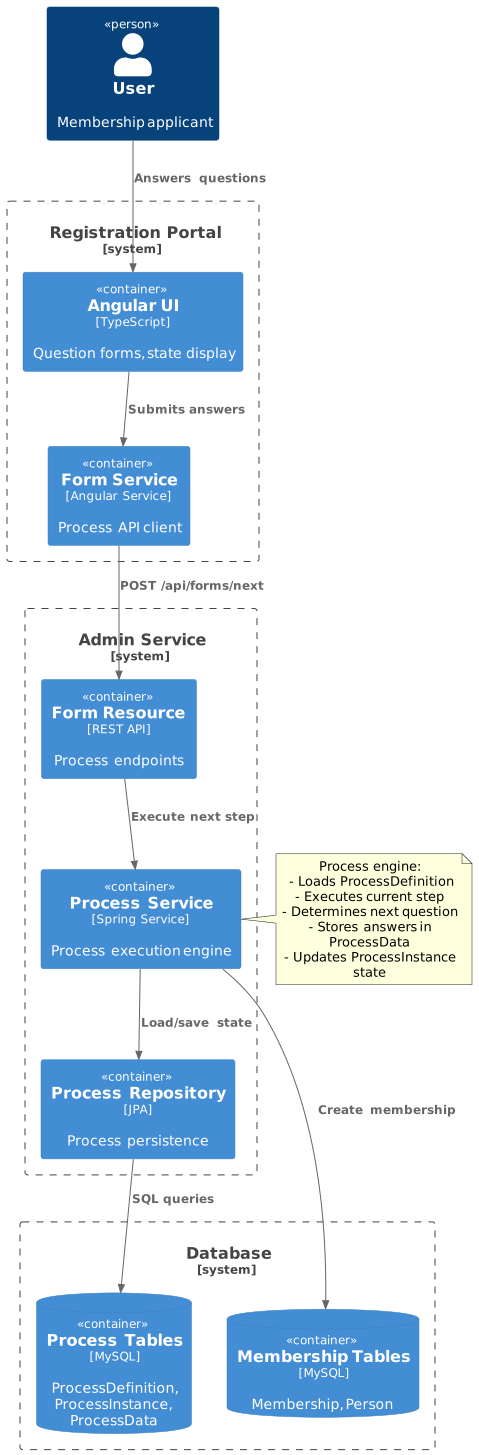
The Registration Portal integrates with the Process entity system to provide flexible, multi-step workflows for both membership and event registration. The process engine enables dynamic question sequences, conditional branching, and state management for complex registration scenarios.
Key Integration Points:
-
Membership Registration - Process-driven question workflow via
MembershipFormController -
Event Registration - Process-driven question workflow via
EventFormController -
Future Extensions - Any multi-step workflow can leverage process system
1.1. ProcessData as a Staging Area
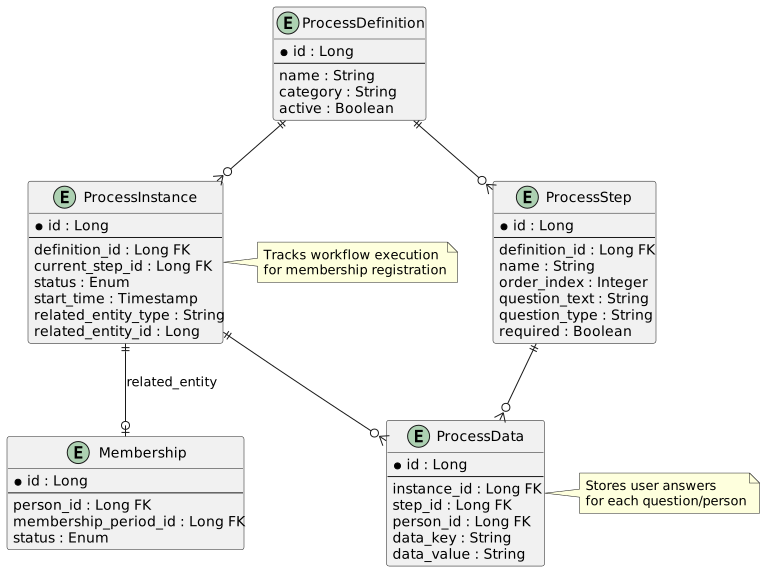
A central design principle of the process-driven registration is that ProcessData acts as a staging area for working data, not a convenience cache.
While the user fills in the form, the system cannot create business entities (EventParticipant, Membership, Order, etc.) because:
-
Non-null fields are unknown — e.g., the participant’s category is not selected until step 1, but EventParticipant requires it
-
Earlier answers may be revised — changing a category selection invalidates race type selections made later
-
Abandoned forms leave no orphans — if the user closes the browser mid-flow, no draft entities exist in the database
For these reasons, all working data is staged in ProcessData (per-person, per-step key-value pairs) as each question is answered. Only when all steps pass validation does the FormController subclass’s onDone() method harvest all staged values and create the final business entities in a single transaction.
See Event Registration — Step 4 for a concrete example of how ProcessData accumulates across 8 steps.
1.2. ProcessData Dimensions
ProcessData supports four scoping dimensions for reading and writing data:
| Scope | Access Method | Use Case |
|---|---|---|
Global |
|
Process-wide flags (e.g., family membership status) |
Per-step |
|
Step-level data not specific to a person |
Per-person |
|
Person-level data not tied to a step (e.g., MembershipCriteriaId) |
Per-step + Per-person |
|
Most common: a specific person’s answer to a specific question |
Later steps can read data stored by earlier steps. For example, the ERT (Event Race Type) FormField reads the ECA (Event Category) answer to filter race type options via the Race matrix intersection.
3. Form DTO
3.1. FormDTO Structure
The FormDTO is the primary data transfer object for process workflows:
export interface FormDTO {
  processId: string;
  step: number;
  processState: ProcessInstanceDTO.StatusEnum;
  question?: string;
  questionType?: string;
  required?: boolean;
  options?: string[];
  people?: Set<FormPersonDTO>;
  paymentUrl?: string;
}

export interface FormPersonDTO {
  id?: number;
  firstName?: string;
  lastName?: string;
  dateOfBirth?: string;
  answer?: string;
  hide?: boolean;
  selected?: boolean;
  canSelect?: boolean;
  status?: string;
  paymentUrl?: string;
}
FormDTO Properties:
| Property | Type | Description |
|---|---|---|
|
string |
Unique process instance identifier |
|
number |
Current step number (1-indexed) |
|
enum |
NONE, RUNNING, RESUME, DONE, etc. |
|
string |
Question text for current step |
|
string |
TXT, NUM, BCB, ITC, ONE, etc. |
|
boolean |
Whether answer is mandatory |
|
string[] |
Options for dropdown/radio questions |
|
Set<FormPersonDTO> |
People selected for registration |
|
string |
Payment gateway URL (when complete) |
3.2. Process States
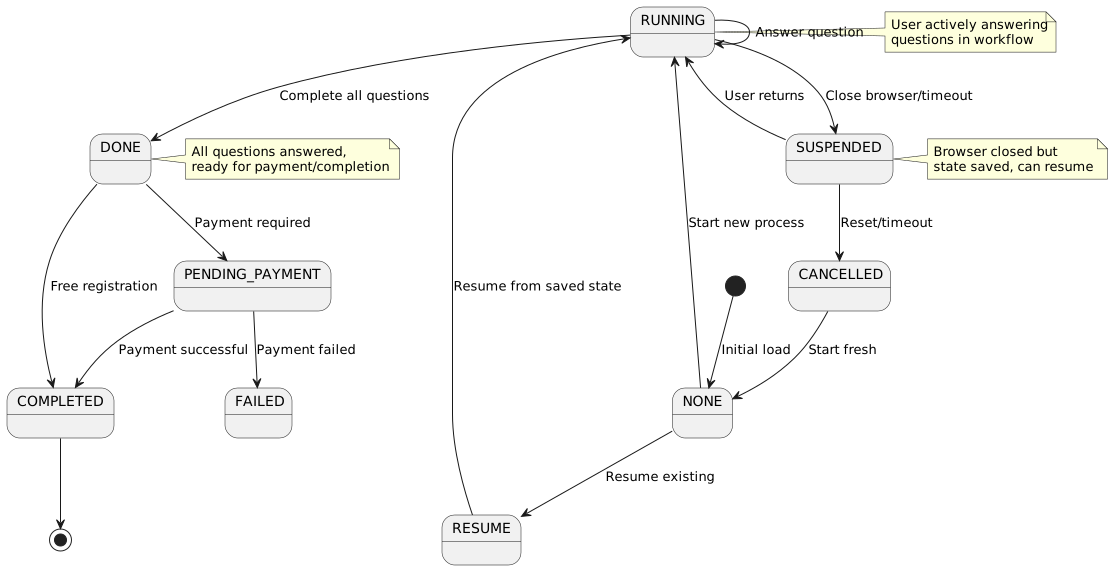
Status Enum:
export enum ProcessState {
  NONE = 'NONE',           // No process started
  RUNNING = 'RUNNING',     // Process executing
  RESUME = 'RESUME',       // Resuming from suspended
  SUSPENDED = 'SUSPENDED', // Paused (browser closed)
  DONE = 'DONE',          // Questions complete
  PENDING_PAYMENT = 'PENDING_PAYMENT',
  COMPLETED = 'COMPLETED', // Fully complete
  CANCELLED = 'CANCELLED', // User cancelled
  FAILED = 'FAILED'        // Error occurred
}
4. Process Lifecycle
4.1. Initialization
1. User Accesses Membership Registration
URL: /membership/register/42?u=abc123&h=5d41402a…
2. Load Membership Form State
this.formService.getFormMembership(this.membershipPeriodId, this.userKey)
  .subscribe(formState => {
    this.formDTO = formState;
    this.linkedPersons = Array.from(formState.people || []);
    this.processId = formState.processId;

    if (formState.processState === ProcessInstanceDTO.StatusEnum.Running ||
        formState.processState === ProcessInstanceDTO.StatusEnum.Resume) {
      this.showProcessDialog(); // Ask to resume or start fresh
    }
  });
API Endpoint: GET /api/forms/membership/{periodid}?userKey={key}
Initial Response (No Process):
{
  "processId": "proc-12345",
  "step": 0,
  "processState": "NONE",
  "people": [
    {
      "id": 1,
      "firstName": "John",
      "lastName": "Smith",
      "selected": false,
      "canSelect": true,
      "status": "Available"
    },
    {
      "id": 3,
      "firstName": "Billy",
      "lastName": "Smith",
      "selected": false,
      "canSelect": true,
      "status": "Available"
    }
  ]
}
4.2. Person Selection
User Selects Persons:
User checks boxes for John and Billy Smith, then clicks "Register".
Submit Selection:
this.formService.next({
  processId: this.processId,
  step: this.formDTO.step,
  people: [
    { id: 1 },
    { id: 3 }
  ]
}).subscribe(response => {
  this.formDTO = response;
  this.showQuestionBox = true;
});
API Endpoint: POST /api/forms/next
Request:
{
  "processId": "proc-12345",
  "step": 0,
  "people": [
    { "id": 1 },
    { "id": 3 }
  ]
}
Response (First Question):
{
  "processId": "proc-12345",
  "step": 1,
  "processState": "RUNNING",
  "question": "Does anyone have any medical conditions?",
  "questionType": "BCB",
  "required": true,
  "people": [
    {
      "id": 1,
      "firstName": "John",
      "lastName": "Smith",
      "answer": null,
      "hide": false
    },
    {
      "id": 3,
      "firstName": "Billy",
      "lastName": "Smith",
      "answer": null,
      "hide": false
    }
  ]
}
4.3. Question Workflow
Backend Process Flow:
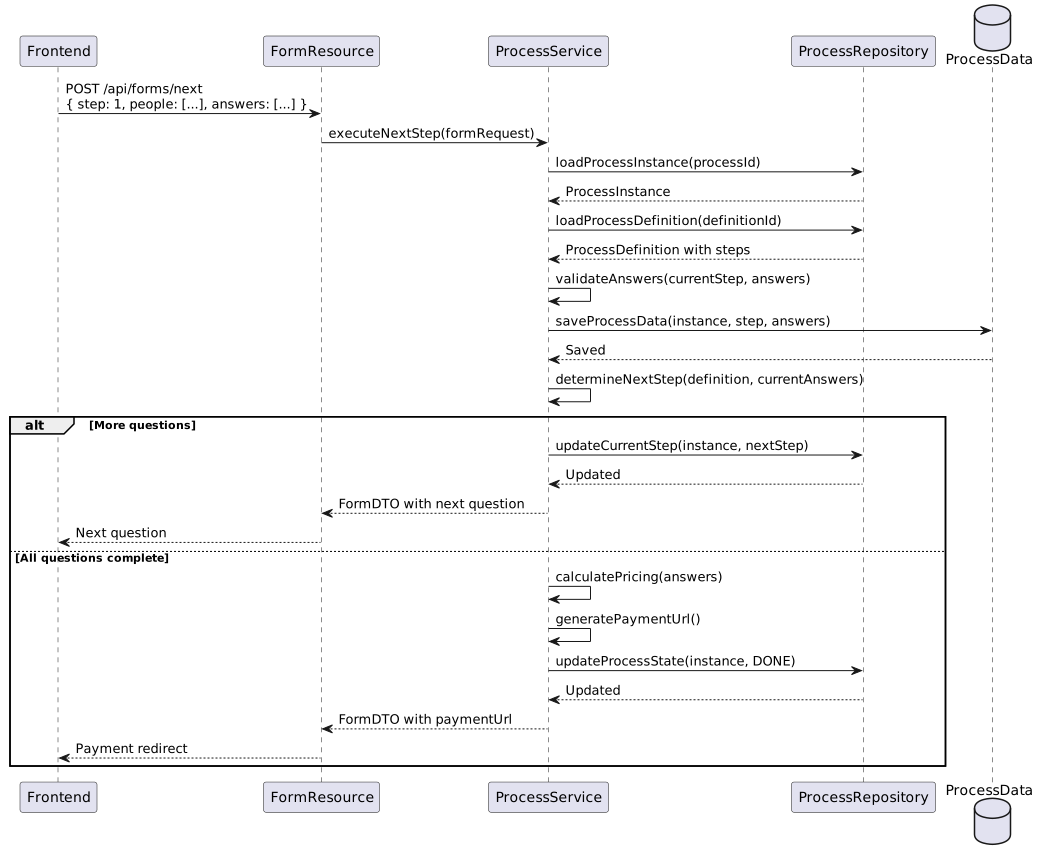
Sequential Question Answering:
// Question 1: Medical conditions
next({
  processId: "proc-12345",
  step: 1,
  people: [
    { id: 1, answer: "0" },  // John: No
    { id: 3, answer: "1" }   // Billy: Yes
  ]
})

// Question 2: Emergency contact (shown because step 1 answered)
next({
  processId: "proc-12345",
  step: 2,
  people: [
    { id: 1, answer: "0821234567" },
    { id: 3, answer: "0821234567" }
  ]
})

// Question 3: Terms and conditions
next({
  processId: "proc-12345",
  step: 3,
  people: [
    { id: 1, answer: "1" },  // Accepted
    { id: 3, answer: "1" }   // Accepted
  ]
})
4.4. Completion
Final Response:
{
  "processId": "proc-12345",
  "step": 3,
  "processState": "DONE",
  "people": [
    {
      "id": 1,
      "firstName": "John",
      "lastName": "Smith",
      "status": "Pending Payment",
      "paymentUrl": null
    },
    {
      "id": 3,
      "firstName": "Billy",
      "lastName": "Smith",
      "status": "Pending Payment",
      "paymentUrl": null
    }
  ],
  "paymentUrl": "https://payment.gateway.com/pay?reference=ORD-892&amount=800.00"
}
Frontend Payment Redirect:
if (this.questionData.paymentUrl) {
  this.messageService.add({
    severity: 'info',
    summary: 'Payment Portal',
    detail: 'Redirecting to payment portal...',
    life: 5000
  });

  setTimeout(() => {
    window.location.href = this.questionData.paymentUrl;
  }, 5000);
}
5. Process Actions
5.1. Reset Process
User Action: User clicks "Start Fresh" when prompted to resume.
Frontend:
this.formService.reset(this.formDTO.processId)
  .subscribe(_formDTO => {
    if (_formDTO.processState === ProcessInstanceDTO.StatusEnum.Running) {
      this.updateFormWithData(_formDTO);
    }
  });
API Endpoint: POST /api/forms/processes/{processid}/reset
Backend Operations:
-
Load ProcessInstance
-
Delete all ProcessData for instance
-
Reset current_step to first step
-
Set status to RUNNING
-
Clear related Membership records (if any)
-
Return initial FormDTO
5.2. Resume Process
User Action: User clicks "Resume" when prompted.
Frontend:
this.formService.resume(this.formDTO.processId)
  .subscribe(_formDTO => {
    if (_formDTO.processState === ProcessInstanceDTO.StatusEnum.Running) {
      this.updateFormWithData(_formDTO);
      this.showQuestionBox = true; // Jump to questions
    }
  });
API Endpoint: POST /api/forms/processes/{processid}/resume
Backend Operations:
-
Load ProcessInstance
-
Load ProcessData for current step
-
Reconstruct FormDTO with saved answers
-
Set status to RUNNING (from SUSPENDED)
-
Return FormDTO for current question
Resume Behavior:
-
Resumes from last completed step
-
Pre-populates previous answers
-
Allows back navigation through completed steps
-
Preserves person selection
6. Question Types
For detailed documentation on all question types, including backend implementation, frontend rendering, validation rules, and interactive mockups, see:
6.1. Quick Reference
| StepCode | UI_CODE | Description |
|---|---|---|
TXT |
TXT |
Free text input per person |
SEL |
SEL |
Dropdown selection per person |
BCB |
BCB |
Binary checkbox (yes/no) per person |
ONE |
ONE |
Radio button single selection (pick one person) |
ITC |
ITC |
Terms & conditions with master checkbox |
MFA |
BCB |
Family adult selection (membership-specific) |
MFC |
BCB |
Family child selection (membership-specific) |
MFM |
ONE |
Family main member selection (membership-specific) |
| The detailed question type documentation includes DTO examples, validation rules, and links to interactive HTML mockups for each type. |
7. Process Data Storage
7.1. Database Schema
ProcessInstance Table:
| Column | Type | Description |
|---|---|---|
id |
BIGINT |
Primary key |
definition_id |
BIGINT |
FK to ProcessDefinition |
current_step_id |
BIGINT |
FK to ProcessStep |
status |
VARCHAR |
NONE, RUNNING, DONE, etc. |
start_time |
TIMESTAMP |
When process started |
end_time |
TIMESTAMP |
When process completed |
related_entity_type |
VARCHAR |
"MEMBERSHIP", "EVENT", etc. |
related_entity_id |
BIGINT |
FK to Membership, Event, etc. |
user_key |
VARCHAR |
Security context |
ProcessData Table:
| Column | Type | Description |
|---|---|---|
id |
BIGINT |
Primary key |
instance_id |
BIGINT |
FK to ProcessInstance |
step_id |
BIGINT |
FK to ProcessStep |
person_id |
BIGINT |
FK to Person (nullable) |
data_key |
VARCHAR |
"answer", "selected", etc. |
data_value |
TEXT |
JSON or string value |
created_at |
TIMESTAMP |
When data was saved |
7.2. Data Storage Example
After Question 1 (Medical conditions):
INSERT INTO process_data (instance_id, step_id, person_id, data_key, data_value)
VALUES
  (12345, 1, 1, 'answer', '0'),
  (12345, 1, 3, 'answer', '1');
After Question 2 (Emergency contact):
INSERT INTO process_data (instance_id, step_id, person_id, data_key, data_value)
VALUES
  (12345, 2, 1, 'answer', '0821234567'),
  (12345, 2, 3, 'answer', '0821234567');
Query All Answers:
SELECT
  ps.name AS step_name,
  ps.question_text,
  p.first_name || ' ' || p.last_name AS person_name,
  pd.data_value AS answer
FROM process_data pd
JOIN process_step ps ON pd.step_id = ps.id
JOIN person p ON pd.person_id = p.id
WHERE pd.instance_id = 12345
ORDER BY ps.order_index, p.id;
Result:
step_name              | question_text                        | person_name  | answer
-----------------------|--------------------------------------|--------------|------------
Medical Condition      | Does anyone have medical conditions? | John Smith   | 0
Medical Condition      | Does anyone have medical conditions? | Billy Smith  | 1
Emergency Contact      | Emergency contact number?            | John Smith   | 0821234567
Emergency Contact      | Emergency contact number?            | Billy Smith  | 0821234567
8. Process Definition Structure
8.1. Membership Application Process
ProcessDefinition:
{
  "id": 42,
  "name": "Standard Membership Application",
  "category": "MEMBERSHIP",
  "version": 1,
  "active": true,
  "organisationId": 8
}
ProcessSteps:
[
  {
    "id": 1,
    "definitionId": 42,
    "orderIndex": 1,
    "name": "Medical Conditions",
    "questionText": "Does anyone have any medical conditions?",
    "questionType": "BCB",
    "required": false
  },
  {
    "id": 2,
    "definitionId": 42,
    "orderIndex": 2,
    "name": "Emergency Contact",
    "questionText": "What is your emergency contact number?",
    "questionType": "TXT",
    "required": true
  },
  {
    "id": 3,
    "definitionId": 42,
    "orderIndex": 3,
    "name": "Primary Contact",
    "questionText": "Who will be the primary contact person?",
    "questionType": "ONE",
    "required": true
  },
  {
    "id": 4,
    "definitionId": 42,
    "orderIndex": 4,
    "name": "Terms and Conditions",
    "questionText": "I accept the terms and conditions of membership",
    "questionType": "ITC",
    "required": true
  }
]
8.2. Conditional Steps
Future Enhancement: Process engine can support conditional branching:
Step 1: "Does anyone have medical conditions?"
  Answer = "0" (No) → Skip to Step 3
  Answer = "1" (Yes) → Continue to Step 2

Step 2: "Please describe medical conditions"
  Type: TXT
  Required: true

Step 3: "Emergency contact number"
  ...
Implementation:
-
ProcessStepOption entities define branches
-
Backend evaluates conditions based on answers
-
FormDTO returns appropriate next step
9. Form Service API
9.1. Service Interface
@Injectable({ providedIn: 'root' })
export class FormService {
  /**
   * Get initial form state for membership
   */
  getFormMembership(membershipPeriodId: number, userKey: string):
    Observable<FormDTO>

  /**
   * Submit current step and get next
   */
  next(data: { processId: string, step: number, people: any[] }):
    Observable<FormDTO>

  /**
   * Reset process to beginning
   */
  reset(processId: string): Observable<FormDTO>

  /**
   * Resume suspended process
   */
  resume(processId: string): Observable<FormDTO>
}
9.2. REST Endpoints
| Method | Endpoint | Purpose | Response |
|---|---|---|---|
GET |
|
Get initial form state |
FormDTO with people, processId |
POST |
|
Submit step, get next |
FormDTO with next question or completion |
POST |
|
Reset to start |
FormDTO with initial state |
POST |
|
Resume from suspension |
FormDTO with current question |
9.3. Detailed API Examples
9.3.1. GET /api/forms/membership/{periodid}
Purpose: Initialize a membership registration workflow
URL Parameters:
-
periodId- MembershipPeriod ID (e.g.,42) -
userKey- User security token (query param) -
organisationId- Organization ID (query param)
Example Request:
GET /api/forms/membership/42?userKey=abc123xyz&organisationId=8
Accept: application/json
Example Response - New Process:
{
  "processId": "proc-12345-67890",
  "step": 0,
  "processState": "INIT",
  "question": null,
  "questionType": null,
  "people": [
    {
      "id": 1,
      "firstName": "Sarah",
      "lastName": "Smith",
      "dateOfBirth": "1985-03-15",
      "selected": false,
      "canSelect": true,
      "status": "Available"
    },
    {
      "id": 3,
      "firstName": "Billy",
      "lastName": "Smith",
      "dateOfBirth": "2010-11-03",
      "selected": false,
      "canSelect": true,
      "status": "Available"
    },
    {
      "id": 5,
      "firstName": "Emma",
      "lastName": "Smith",
      "dateOfBirth": "2013-07-20",
      "selected": false,
      "canSelect": false,
      "status": "Already Registered"
    }
  ],
  "paymentUrl": null
}
Example Response - Existing Process (Suspended):
{
  "processId": "proc-12345-67890",
  "step": 2,
  "processState": "SUSPENDED",
  "question": "What is your emergency contact number?",
  "questionType": "TXT",
  "people": [
    {
      "id": 1,
      "firstName": "Sarah",
      "lastName": "Smith",
      "selected": true,
      "answer": "0821234567"
    },
    {
      "id": 3,
      "firstName": "Billy",
      "lastName": "Smith",
      "selected": true,
      "answer": ""
    }
  ],
  "paymentUrl": null
}
9.3.2. POST /api/forms/next
Purpose: Submit current step answers and retrieve next question
Request Body:
{
  "processId": "proc-12345-67890",
  "step": 0,
  "people": [
    {
      "id": 1,
      "selected": true
    },
    {
      "id": 3,
      "selected": true
    }
  ]
}
Response - First Question:
{
  "processId": "proc-12345-67890",
  "step": 1,
  "processState": "RUNNING",
  "question": "Does anyone have any medical conditions?",
  "questionType": "BCB",
  "required": false,
  "options": null,
  "people": [
    {
      "id": 1,
      "firstName": "Sarah",
      "lastName": "Smith",
      "answer": null,
      "hide": false
    },
    {
      "id": 3,
      "firstName": "Billy",
      "lastName": "Smith",
      "answer": null,
      "hide": false
    }
  ],
  "paymentUrl": null
}
Submitting Answer:
{
  "processId": "proc-12345-67890",
  "step": 1,
  "people": [
    {
      "id": 1,
      "answer": "0"
    },
    {
      "id": 3,
      "answer": "1"
    }
  ]
}
Response - Next Question:
{
  "processId": "proc-12345-67890",
  "step": 2,
  "processState": "RUNNING",
  "question": "What is your emergency contact number?",
  "questionType": "TXT",
  "required": true,
  "options": null,
  "people": [
    {
      "id": 1,
      "firstName": "Sarah",
      "lastName": "Smith",
      "answer": null,
      "hide": false
    },
    {
      "id": 3,
      "firstName": "Billy",
      "lastName": "Smith",
      "answer": null,
      "hide": false
    }
  ],
  "paymentUrl": null
}
Response - Last Question (Payment Required):
{
  "processId": "proc-12345-67890",
  "step": 5,
  "processState": "DONE",
  "question": null,
  "questionType": null,
  "required": null,
  "options": null,
  "people": [
    {
      "id": 1,
      "firstName": "Sarah",
      "lastName": "Smith",
      "paymentUrl": "https://payment.gateway.com/pay?ref=M2024-1523&amt=500.00"
    },
    {
      "id": 3,
      "firstName": "Billy",
      "lastName": "Smith",
      "paymentUrl": "https://payment.gateway.com/pay?ref=M2024-1524&amt=300.00"
    }
  ],
  "paymentUrl": "https://payment.gateway.com/pay?ref=ORDER-12345&amt=800.00"
}
9.3.3. POST /api/forms/processes/{processid}/reset
Purpose: Reset process to initial state, clear all answers
URL Parameters:
-
processId- Process instance ID
Example Request:
POST /api/forms/processes/proc-12345-67890/reset
Content-Type: application/json
Response:
{
  "processId": "proc-12345-67890",
  "step": 0,
  "processState": "INIT",
  "question": null,
  "questionType": null,
  "people": [
    {
      "id": 1,
      "firstName": "Sarah",
      "lastName": "Smith",
      "selected": false,
      "canSelect": true,
      "status": "Available"
    },
    {
      "id": 3,
      "firstName": "Billy",
      "lastName": "Smith",
      "selected": false,
      "canSelect": true,
      "status": "Available"
    }
  ],
  "paymentUrl": null
}
Backend Operations:
-
Load ProcessInstance by ID
-
Delete all ProcessData records for this instance
-
Reset
current_step_idto null -
Set status to INIT
-
Return fresh FormDTO with person selection
9.3.4. POST /api/forms/processes/{processid}/resume
Purpose: Resume a suspended process from current step
URL Parameters:
-
processId- Process instance ID
Example Request:
POST /api/forms/processes/proc-12345-67890/resume
Content-Type: application/json
Response:
{
  "processId": "proc-12345-67890",
  "step": 3,
  "processState": "RESUME",
  "question": "Who will be the primary contact person?",
  "questionType": "ONE",
  "required": true,
  "options": null,
  "people": [
    {
      "id": 1,
      "firstName": "Sarah",
      "lastName": "Smith",
      "answer": null,
      "hide": false
    },
    {
      "id": 3,
      "firstName": "Billy",
      "lastName": "Smith",
      "answer": null,
      "hide": false
    }
  ],
  "paymentUrl": null
}
Backend Operations:
-
Load ProcessInstance by ID
-
Load ProcessData for current step
-
Load previous step answers (steps 1-2 already completed)
-
Set status to RESUME
-
Return FormDTO with current question and people
9.4. HTTP Status Codes
| Code | Status | Meaning |
|---|---|---|
200 |
OK |
Request successful, FormDTO returned |
201 |
Created |
New ProcessInstance created |
400 |
Bad Request |
Invalid request body or parameters |
401 |
Unauthorized |
Missing or invalid userKey/authentication |
404 |
Not Found |
ProcessInstance or MembershipPeriod not found |
409 |
Conflict |
Process already completed or in invalid state |
422 |
Unprocessable Entity |
Validation errors in submitted answers |
500 |
Internal Server Error |
Server-side error during processing |
Error Response Format:
{
  "timestamp": "2024-01-31T10:15:30Z",
  "status": 422,
  "error": "Unprocessable Entity",
  "message": "Validation failed for question answers",
  "path": "/api/forms/next",
  "errors": [
    {
      "field": "people[0].answer",
      "message": "Emergency contact number is required"
    },
    {
      "field": "people[1].answer",
      "message": "Phone number must be 10 digits"
    }
  ]
}
10. Integration Scenarios
10.1. Scenario 1: New Membership Registration
-
User accesses
/membership/register/42?u=abc123&h=… -
System creates ProcessInstance in NONE state
-
User selects 2 family members
-
System transitions to RUNNING, loads first question
-
User answers 4 questions sequentially
-
System transitions to DONE, generates payment URL
-
User redirects to payment gateway
-
After payment, system transitions to COMPLETED
-
Membership records created for both persons
10.2. Scenario 2: Resume Registration
-
User accesses same URL 2 days later
-
System loads ProcessInstance in SUSPENDED state
-
System prompts: "Resume or Start Fresh?"
-
User clicks "Resume"
-
System loads step 3 of 4 (last completed: step 2)
-
User sees Question 3 with previous persons pre-selected
-
User completes Questions 3 and 4
-
Normal completion flow continues
11. Error Handling
11.1. Process Errors
Scenarios:
| Error | Cause | Recovery |
|---|---|---|
ProcessInstance not found |
Invalid processId |
Create new instance |
ProcessDefinition inactive |
Definition was deactivated |
Show error, link to support |
Step validation failed |
Invalid answer format |
Return validation errors |
Person not eligible |
Age/membership restrictions |
Show error, allow changes |
Payment generation failed |
Gateway unavailable |
Complete registration, email payment link later |
Error Response:
{
  "processId": "proc-12345",
  "step": 2,
  "processState": "ERROR",
  "message": "Invalid answer format for emergency contact",
  "errors": {
    "people": [
      {
        "id": 1,
        "error": "Phone number must be 10 digits"
      }
    ]
  }
}12. Performance Considerations
12.1. Caching
ProcessDefinition Caching:
-
Cache active definitions in memory
-
Cache ProcessSteps for each definition
-
Refresh cache on definition updates
ProcessInstance Optimization:
-
Load only current step data (not full history)
-
Use database indexes on instance_id, status
-
Archive completed instances after 90 days
12.2. Query Optimization
Efficient Queries:
-- Load current step with answer data
SELECT ps.*, pd.data_value
FROM process_step ps
LEFT JOIN process_data pd ON ps.id = pd.step_id
  AND pd.instance_id = ?
WHERE ps.id = (
  SELECT current_step_id FROM process_instance WHERE id = ?
);
Indexes:
-
process_instance(user_key, status) -
process_data(instance_id, step_id, person_id) -
process_step(definition_id, order_index)