Question Types
This document describes all question types supported by the registration workflow, including their backend implementation, frontend rendering, validation rules, and example use cases.
1. Overview
The registration workflow presents a series of questions to users during the membership or event registration process. Each question is rendered based on its type, which determines the UI component used and the validation rules applied.
1.1. Layer 3 Component Architecture
Questions are displayed using a Layer 3 Question Panel component that sits within the existing page structure:
-
Layer 1: Site frame (navbar + page container)
-
Layer 2: Functional area template (membership/event details panel)
-
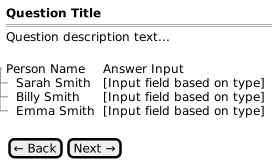
Layer 3: Question panel (question header + person-answer table + navigation)
The question panel follows a consistent layout:
1.2. StepCode vs UI_CODE Mapping
The backend uses StepCode to define question logic, while the frontend uses UI_CODE to determine rendering. Multiple StepCodes can map to the same UI_CODE when they share the same visual presentation but differ in business logic.
| StepCode | UI_CODE | Description |
|---|---|---|
TXT |
TXT |
Free text input |
SEL |
SEL |
Dropdown selection |
RBO |
RAD |
Radio button options (not currently implemented in frontend) |
BCB |
BCB |
Binary checkbox (yes/no) |
ONE |
ONE |
Radio button single selection (pick one person) |
ITC |
ITC |
Terms & conditions acceptance |
MFA |
BCB |
Family adult selection (renders as checkbox) |
MFC |
BCB |
Family child selection (renders as checkbox) |
MFM |
ONE |
Family main member selection (renders as radio) |
ECA |
SEL |
Event category selection (age/gender filtering, matrix filtering) |
ERT |
MRT |
Event race type multi-select (matrix filtering) |
CLV |
SEL |
Custom list value dropdown (entity mode with customListSlot) |
CSI |
TXT |
CSA identification number capture |
CSM |
BCB |
CSA membership validation (external API) |
CSL |
BCB |
CSA license validation (external API) |
2. Core Question Types
2.1. TXT - Text Input
Purpose: Capture free text responses from each person.
Backend:
-
Class:
FreeTextFormField.java -
StepCode:
TXT -
UI_CODE:
TXT
Frontend Rendering:
-
Component: Text input field per person
-
Layout: Person name on left, text input on right
Validation:
-
Required check (if configured)
-
Minimum/maximum length (
valueMin,valueMax) -
Regex pattern matching (
valuePattern)
Example Use Cases:
-
Emergency contact number
-
Medical notes
-
Special dietary requirements
DTO Example:
{
  "title": "Emergency Contact Number",
  "questionType": "TXT",
  "required": true,
  "people": [
    { "id": 1, "firstName": "Sarah", "lastName": "Smith", "answer": null },
    { "id": 2, "firstName": "Billy", "lastName": "Smith", "answer": null }
  ]
}
Mockup: View Text Input Mockup
2.2. SEL - Dropdown Selection
Purpose: Allow users to select one option from a predefined list per person.
Backend:
-
Class:
DropDownOptionFormField.java -
StepCode:
SEL -
UI_CODE:
SEL
Frontend Rendering:
-
Component: Dropdown/select element per person
-
Layout: Person name on left, dropdown on right
-
Options populated from
person.optionsarray
Validation:
-
Required check (if configured)
-
Answer must match one of the available options
Example Use Cases:
-
T-shirt size selection
-
School selection
-
Experience level
-
Communication preference
DTO Example:
{
  "title": "T-Shirt Size",
  "questionType": "SEL",
  "required": true,
  "people": [
    {
      "id": 1,
      "firstName": "Sarah",
      "lastName": "Smith",
      "answer": null,
      "options": [
        { "id": "XS", "value": "XS (Extra Small)" },
        { "id": "S", "value": "S (Small)" },
        { "id": "M", "value": "M (Medium)" },
        { "id": "L", "value": "L (Large)" },
        { "id": "XL", "value": "XL (Extra Large)" }
      ]
    }
  ]
}
Mockups:
2.3. BCB - Binary Checkbox
Purpose: Capture a yes/no response per person.
Backend:
-
Class:
CheckBoxBooleanFormField.java -
StepCode:
BCB -
UI_CODE:
BCB
Frontend Rendering:
-
Component: Single checkbox per person
-
Layout: Checkbox with person name as label
-
Answer values:
"0"(unchecked) or"1"(checked)
Validation:
-
Boolean validation (answer must be "0" or "1")
-
Does NOT enforce required flag
Example Use Cases:
-
Medical conditions declaration
-
Photo consent
-
Newsletter subscription
DTO Example:
{
  "title": "Medical Conditions",
  "description": "Does anyone have any medical conditions we should be aware of?",
  "questionType": "BCB",
  "required": false,
  "people": [
    {
      "id": 1,
      "firstName": "Sarah",
      "lastName": "Smith",
      "answer": "0",
      "options": [{ "id": "1", "value": "Yes, I have medical conditions" }]
    }
  ]
}
Mockup: View Checkbox Mockup
2.4. ONE - Radio Single Selection
Purpose: Allow selection of exactly one person from the group.
Backend:
-
Class:
RadioButtonPickOneFormField.java -
StepCode:
ONE -
UI_CODE:
ONE
Frontend Rendering:
-
Component: Radio button group (all share same
nameattribute) -
Layout: Radio button with person name as label
-
Only one person can have answer
"1"at a time
Validation:
-
At least one person must have answer
"1"(if required) -
All other persons automatically set to
"0"
Example Use Cases:
-
Primary contact selection
-
Main account holder
-
Team captain selection
DTO Example:
{
  "title": "Primary Contact Person",
  "description": "Who will be the primary contact person for this membership?",
  "questionType": "ONE",
  "required": true,
  "people": [
    { "id": 1, "firstName": "Sarah", "lastName": "Smith", "answer": "1" },
    { "id": 2, "firstName": "Billy", "lastName": "Smith", "answer": "0" }
  ]
}
Mockup: View Radio Selection Mockup
2.5. ITC - Terms & Conditions
Purpose: Require acceptance of terms and conditions from all members.
Backend:
-
Class:
IndemnityTermsConditionsFormField.java -
StepCode:
ITC -
UI_CODE:
ITC
Frontend Rendering:
-
Component: Master checkbox + individual checkboxes
-
Layout: Scrollable terms content, master "Accept for all", individual acceptance per person
-
Master checkbox propagates to all individual checkboxes
Validation:
-
All persons must have answer
"1"to proceed -
Does NOT enforce required flag (validation is always applied)
Special Behavior:
-
Terms text displayed in scrollable container
-
Master checkbox toggles all individual checkboxes
-
Individual checkboxes update master state
-
Not included in summary data collection
DTO Example:
{
  "title": "Terms and Conditions",
  "description": "Please read and accept the terms and conditions.",
  "questionType": "ITC",
  "required": true,
  "infoURL": "https://example.com/terms",
  "people": [
    { "id": 1, "firstName": "Sarah", "lastName": "Smith", "answer": "1" },
    { "id": 2, "firstName": "Billy", "lastName": "Smith", "answer": "1" }
  ]
}
Mockup: View Terms & Conditions Mockup
3. Membership-Specific Question Types
These question types are used specifically for family membership workflows. They render using standard UI components but have custom business logic.
3.1. MFA - Family Adult Selection
Purpose: Select which adults will be included in a family membership.
Backend:
-
Class:
MembershipAdultSelectFormField.java -
StepCode:
MFA -
UI_CODE:
BCB(renders as checkbox)
Visibility Rules:
-
Only shown for adults (18+)
-
Only shown when family membership is possible
Validation:
-
Ensures exactly 2 adults are selected for family membership
-
Not included in summary data
Example Context:
When registering multiple people and family membership pricing applies, this question allows users to select which 2 adults will be part of the family unit.
3.2. MFC - Family Child Selection
Purpose: Select which children will be included in a family membership.
Backend:
-
Class:
MembershipChildSelectFormField.java -
StepCode:
MFC -
UI_CODE:
BCB(renders as checkbox)
Visibility Rules:
-
Only shown for children (under 18)
-
Only shown when family membership is possible
Validation:
-
Children selection is optional
-
Not included in summary data
Example Context:
After selecting family adults, users can choose which children to include in the family membership at no additional cost.
3.3. MFM - Family Main Member
Purpose: Select the primary adult for the family membership.
Backend:
-
Class:
MembershipMainSelectFormField.java -
StepCode:
MFM -
UI_CODE:
ONE(renders as radio button)
Visibility Rules:
-
Only shown for selected family adults
-
Only shown after MFA step completes
Validation:
-
Exactly one main member must be selected
-
Not included in summary data
Example Context:
After selecting family adults, users must designate one as the primary member who will receive the main membership number and communications.
Mockup: View Family Main Member Mockup
4. Event-Specific Question Types
These question types are used specifically for event registration workflows. They are registered by EventFormController and operate within the event context (Event, EventCategory, EventRaceType, Race entities).
4.1. ECA - Event Category Selection
Purpose: Select the age/gender category for each participant (e.g., U15 Boys, Senior Men, Elite Women).
Backend:
-
Class:
EventCategorySelectFormField.java -
StepCode:
ECA -
UI_CODE:
SEL(renders as dropdown) -
ProcessData key:
DEFAULT(stores JSON with categoryId and categoryName)
Behaviour:
-
Loads EventCategories for the current Event
-
Filters by participant’s age (from date of birth) and gender
-
Matrix filtering: If ERT was already answered, further filters to categories that have valid
Racerecords for the selected race types -
Auto-selects and skips if only one valid category remains after filtering
-
ECA and ERT can appear in either order; the matrix filtering adapts based on which was answered first
Data Model Constraint:
-
EventParticipant belongs to exactly one EventCategory (single-select)
ProcessData Example:
{"categoryId": 7, "categoryName": "U15 Boys"}4.2. ERT - Event Race Type Selection
Purpose: Select which race types the participant will enter (e.g., Scratch, Elimination, Match Sprint).
Backend:
-
Class:
EventRaceTypeSelectFormField.java -
StepCode:
ERT -
UI_CODE:
MRT(renders as multi-select checkbox list) -
ProcessData key:
DEFAULT(stores JSON array of selected race types)
Behaviour:
-
Loads EventRaceTypes for the current Event
-
Matrix filtering: If ECA was already answered, filters to race types that have valid
Racerecords for the selected category -
Auto-selects and skips if only one valid race type remains
-
Each selected race type + the person’s category identifies a
Race(matrix intersection) -
Each valid Race results in a
StartGroupParticipantentry created duringonDone()
Data Model Constraint:
-
EventParticipant can select multiple EventRaceTypes (multi-select)
-
One EventParticipant → multiple StartGroupParticipant records (one per Race)
ProcessData Example:
{"raceTypes": [{"raceTypeId": 3, "name": "Scratch"}, {"raceTypeId": 5, "name": "Elimination"}]}4.3. CLV (Entity Mode) - Custom List Value
Purpose: Select from a database-backed custom list (e.g., school, club, team) configured per event.
Backend:
-
Class:
CustomListValueFormField.java -
StepCode:
CLV -
UI_CODE:
SEL(renders as dropdown) -
ProcessData key:
DEFAULT(stores CustomListValue ID)
Entity Mode Behaviour (when ProcessStep.customListSlot is set to 1, 2, or 3):
-
Loads options from
Event.customList{N}→CustomListValueentities -
Default value resolution chain: existing
EventParticipant.custom{N}→UserMetaviaCustomList.metaKey→ none -
On save: persists CustomListValue ID to ProcessData AND updates UserMeta for "last used" recall
-
Maps to
EventParticipant.custom1/2/3duringonDone()
When customListSlot is null, CLV falls back to pipe-delimited listOptions stored on the ProcessStep (backward compatibility for membership flows).
|
4.4. CSI - CSA Identification
Purpose: Capture Cycling South Africa (CSA) membership number and identification details for each participant.
Backend:
-
Class:
CsaIdentificationFormField.java -
StepCode:
CSI
Behaviour:
-
Captures the rider’s CSA membership number
-
May capture additional identification details required by CSA
-
Stores data in ProcessData for use by subsequent CSA validation steps (CSM, CSL)
| CSA API integration is documented in CSA Integration. |
4.5. CSM - CSA Membership Check
Purpose: Validate the participant’s CSA membership status via the CSA external API.
Backend:
-
Class:
CsaMembershipCheckFormField.java -
StepCode:
CSM
Behaviour:
-
Reads CSA number from CSI step’s ProcessData
-
Calls CSA external API to validate membership status
-
Gates form progression — participant cannot proceed if membership is invalid
-
Stores validation result in ProcessData
| CSA API integration is documented in CSA Integration. |
4.6. CSL - CSA License Check
Purpose: Validate the participant’s CSA racing license via the CSA external API.
Backend:
-
Class:
CsaLicenseCheckFormField.java -
StepCode:
CSL
Behaviour:
-
Reads CSA number from CSI step’s ProcessData
-
Calls CSA external API to validate racing license status and type
-
Gates form progression — participant cannot proceed without a valid license
-
Stores license type and validation result in ProcessData
| CSA API integration is documented in CSA Integration. |
5. Interactive UI Prototypes
The following interactive HTML prototypes demonstrate the visual design and interaction patterns for question screens.
| Screen | StepCode | UI_CODE | Prototype |
|---|---|---|---|
Text Input |
TXT |
TXT |
|
Binary Checkbox |
BCB |
BCB |
|
Dropdown Selection |
SEL |
SEL |
|
Dropdown (T-Shirt) |
SEL |
SEL |
|
Dropdown (School) |
SEL |
SEL |
|
Radio Single Select |
ONE |
ONE |
|
Terms & Conditions |
ITC |
ITC |
|
Family Adult Selection |
MFA |
BCB |
|
Family Child Selection |
MFC |
BCB |
|
Family Main Member |
MFM |
ONE |
| These prototypes are interactive HTML files that demonstrate the intended user experience. Navigate between screens using the Back/Next buttons. |
6. Backend Implementation Reference

6.2. Source Files
| File | Path |
|---|---|
FormField (Base) |
|
FreeTextFormField |
|
DropDownOptionFormField |
|
CheckBoxBooleanFormField |
|
RadioButtonPickOneFormField |
|
IndemnityTermsConditionsFormField |
|
MembershipAdultSelectFormField |
|
MembershipChildSelectFormField |
|
MembershipMainSelectFormField |
|
EventCategorySelectFormField |
|
EventRaceTypeSelectFormField |
|
CustomListValueFormField |
|
CsaIdentificationFormField |
|
CsaMembershipCheckFormField |
|
CsaLicenseCheckFormField |
|
7. Related Documentation
-
Process Flow - Overall registration process workflow
-
Event Registration - Event registration design with ProcessData flow
-
CSA Integration - Cycling South Africa API and validation workflows
-
Screen Designs - SCR-005 Registration Questions specification
-
Functional Overview - System capabilities