Security Implementation
1. Overview
This document describes the implementation details for security in the Registration Portal. The gateway supports three authentication methods—hash-based, OIDC, and anonymous registration session—all resulting in a backend-issued JWT stored server-side in HTTP sessions.
For security requirements, see Security Requirements. For security architecture, see Security Architecture.
2. Key Components
The security implementation consists of several key components:
| Component | Purpose | Package |
|---|---|---|
|
Shared session attribute names |
|
|
Shared session establishment from backend JWT |
|
|
Hash-based authentication endpoint |
|
|
Anonymous registration session endpoint |
|
|
OIDC success handler with token exchange |
|
|
Calls backend token exchange endpoint |
|
|
Injects JWT into backend requests |
|
|
Spring Security configuration |
|
|
JPA entity for per-tenant IdP configuration |
|
|
Repository for TenantIdentityProvider queries |
|
|
Enum: ENTRA_ID, GOOGLE, FACEBOOK, APPLE, CUSTOM_OIDC |
|
|
Dynamic OAuth2 ClientRegistration loading per tenant |
|
3. Session Attribute Management
3.1. Shared Constants
All components use shared session attribute names defined in SessionConstants:
public final class SessionConstants {
    public static final String BACKEND_JWT = "BACKEND_JWT";
    public static final String BACKEND_JWT_EXPIRY = "BACKEND_JWT_EXPIRY";
}-
BACKEND_JWT- The backend-issued JWT token (set by both hash and OIDC flows) -
BACKEND_JWT_EXPIRY- Token expiry timestamp (OIDC only; null for hash-based)
4. Hash-Based Authentication
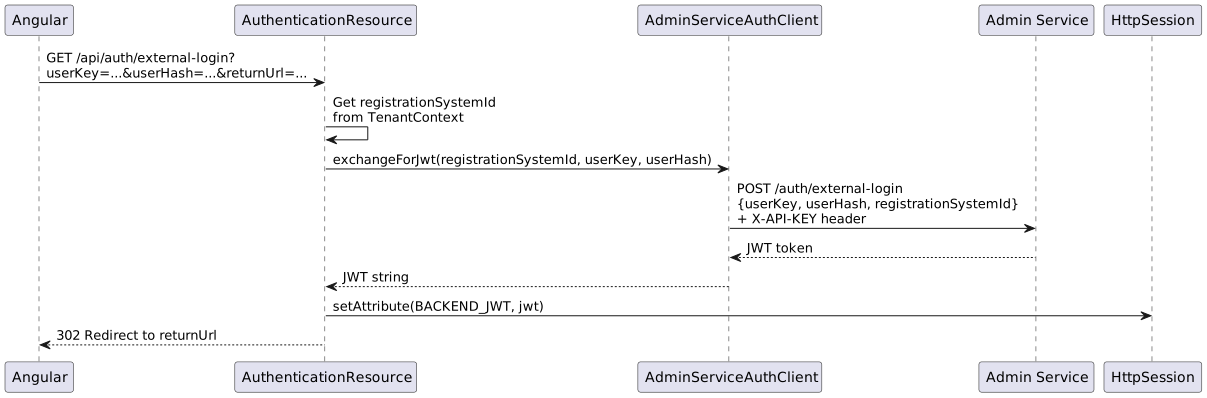
4.2. AuthenticationResource Implementation
The AuthenticationResource handles hash-based authentication from external systems:
Key Implementation Points:
-
Endpoints:
POST /api/auth/external-login(XHR) andGET /api/auth/external-login(redirect) -
Extracts
registrationSystemIdfromTenantContext(populated by TenantResolutionFilter) -
Calls backend via
AdminServiceAuthClientwith X-API-KEY authentication -
Delegates to
SessionAuthenticationService.establishSession()to store JWT and set SecurityContext -
Does NOT set
BACKEND_JWT_EXPIRY(hash-based tokens have no client-side expiry tracking) -
POST returns
200 OKwith empty body; GET redirects back toreturnUrl
4.3. Token Lifecycle (Hash-Based)
-
Token validity: Determined by backend (typically 24 hours)
-
Expiry handling: Backend returns 401 when token expires
-
No refresh: User must obtain new hash from external system
-
Frontend behaviour: Redirect to auth failure or token expiry screen on 401
4.4. Token Expiry Detection and Error Handling
4.4.1. X-Token-Expired Header
The backend distinguishes between token states by including a custom header in 401 responses:
| Token State | Response | Header |
|---|---|---|
Expired Token |
401 Unauthorized |
|
Invalid Token |
401 Unauthorized |
No |
Missing Token |
401 Unauthorized |
No |
4.4.2. JWT Session Preservation
Critical: The JWT must be preserved in the HTTP session even when expired.
The AdminServiceJwtRelayFilter must:
-
NOT null/clear the JWT when it expires
-
Still attempt to relay the token (backend will reject with 401 + X-Token-Expired)
-
This allows the frontend to distinguish expiry from invalid/missing tokens
This enables the frontend to show appropriate error screens:
-
Expired token in session: Show "Session Expired" screen with return-to-origin option
-
No token in session: Show "Access Denied" screen (user never authenticated)
4.4.3. Tenant Configuration for Error Screens
Tenant-specific configuration controls error screen behavior:
New Fields in RegistrationSystem:
@Size(max = 500)
@Column(name = "reset_redirect_url", length = 500)
private String resetRedirectUrl;  // e.g., "https://hnr.co.za/membership"

@Size(max = 100)
@Column(name = "reset_redirect_name", length = 100)
private String resetRedirectName; // e.g., "HNR Membership Site"
TenantConfigResource Endpoint:
GET /api/tenant-config returns:
{
  "resetRedirectUrl": "https://hnr.co.za/membership",
  "resetRedirectName": "HNR Membership Site"
}
When both values are configured, error screens show "Return to {resetRedirectName}" linking to the URL.
5. Anonymous Registration Session
5.1. Flow Overview
Anonymous users accessing event registration pages (e.g., /register?orgId=4&eventId=10) need authenticated sessions to call gateway-protected APIs. The browser’s SessionService UUID is exchanged for a backend JWT via a full-page redirect.
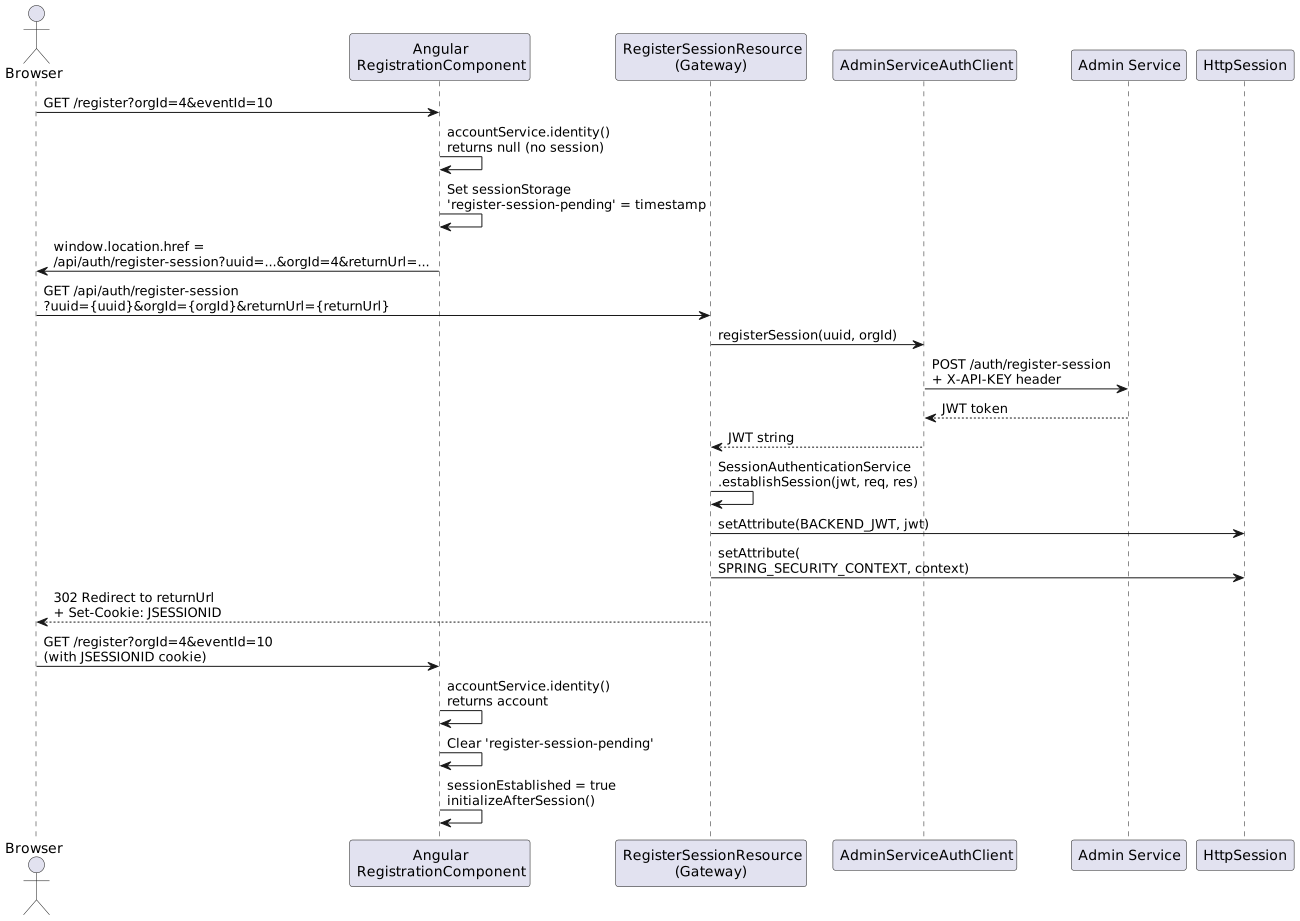
5.2. RegisterSessionResource Implementation
The RegisterSessionResource handles anonymous registration session creation:
Key Implementation Points:
-
Endpoints:
GET /api/auth/register-session(redirect, primary) andPOST /api/auth/register-session(XHR, legacy) -
Accepts
uuid(browser SessionService UUID) andorgId(organisation ID) -
Calls backend via
AdminServiceAuthClient.registerSession()with X-API-KEY authentication -
Delegates to
SessionAuthenticationService.establishSession()to store JWT and set SecurityContext -
GET endpoint validates
returnUrl(must be relative path, no open redirect) then 302 redirects -
Does NOT set
BACKEND_JWT_EXPIRY(anonymous tokens have no client-side expiry tracking)
5.3. Frontend: Redirect-Based Session Establishment
The Angular frontend uses a full-page redirect pattern (mirroring JHipster’s OAuth2 login) to ensure the JSESSIONID cookie is reliably set by the browser:
-
RegistrationComponent.handleNavigation()callsaccountService.identity(true)to check authentication -
If
accountis null andorgIdis present,RegisterSessionService.redirectToRegisterSession()navigates the browser to the GET endpoint -
A
sessionStoragetimestamp flag prevents redirect loops (auto-expires after 10 seconds) -
After the server redirect back,
identity()returns the account and the component proceeds
Why full-page redirect instead of XHR?
The webpack dev proxy (http-proxy-middleware) can drop Set-Cookie headers from XHR responses. Full-page redirects (302) reliably set cookies because the browser handles them as navigation responses, not XHR responses.
5.4. SessionAuthenticationService
Shared service used by both AuthenticationResource and RegisterSessionResource to establish Spring Security sessions from backend JWTs:
@Service
public class SessionAuthenticationService {

    public void establishSession(String jwt, HttpServletRequest request,
                                  HttpServletResponse response) {
        HttpSession session = request.getSession(true);
        session.setAttribute(SessionConstants.BACKEND_JWT, jwt);

        Jwt springJwt = parseJwt(jwt);
        JwtAuthenticationToken authentication =
            new JwtAuthenticationToken(springJwt, extractAuthorities(springJwt));

        SecurityContext context = SecurityContextHolder.createEmptyContext();
        context.setAuthentication(authentication);
        SecurityContextHolder.setContext(context);

        // Write directly to session (see Implementation Note below)
        session.setAttribute(
            HttpSessionSecurityContextRepository.SPRING_SECURITY_CONTEXT_KEY,
            context);
    }
}
5.5. Implementation Note: Direct SecurityContext Session Write
The SecurityContext is written directly to the HTTP session via session.setAttribute(SPRING_SECURITY_CONTEXT_KEY, context) rather than using SecurityContextRepository.saveContext().
Root cause: In Spring Security 6.4.5 (with the default requireExplicitSave=true), SecurityContextRepository.saveContext() silently fails when called from within a controller — it does not persist the SPRING_SECURITY_CONTEXT attribute to the HTTP session. This was verified by:
-
Calling
saveContext()from a controller endpoint -
Inspecting session attributes via a debug endpoint:
BACKEND_JWTwas present, butSPRING_SECURITY_CONTEXTwas absent -
Switching to direct
session.setAttribute():SPRING_SECURITY_CONTEXTwas present and loaded correctly bySecurityContextHolderFilteron subsequent requests
This direct write approach is safe because SecurityContextHolderFilter (the default in Spring Security 6.x) loads the SecurityContext from the session by reading the SPRING_SECURITY_CONTEXT attribute directly, regardless of how it was written.
5.6. Token Lifecycle (Anonymous Registration)
-
Token validity: Determined by backend (typically 24 hours)
-
Expiry handling: Backend returns 401 when token expires
-
No refresh: User’s browser UUID remains stable; a new session can be established by repeating the redirect flow
-
Frontend behaviour: On 401, the redirect-based session establishment retries automatically (timestamp flag auto-expires)
6. OIDC Authentication
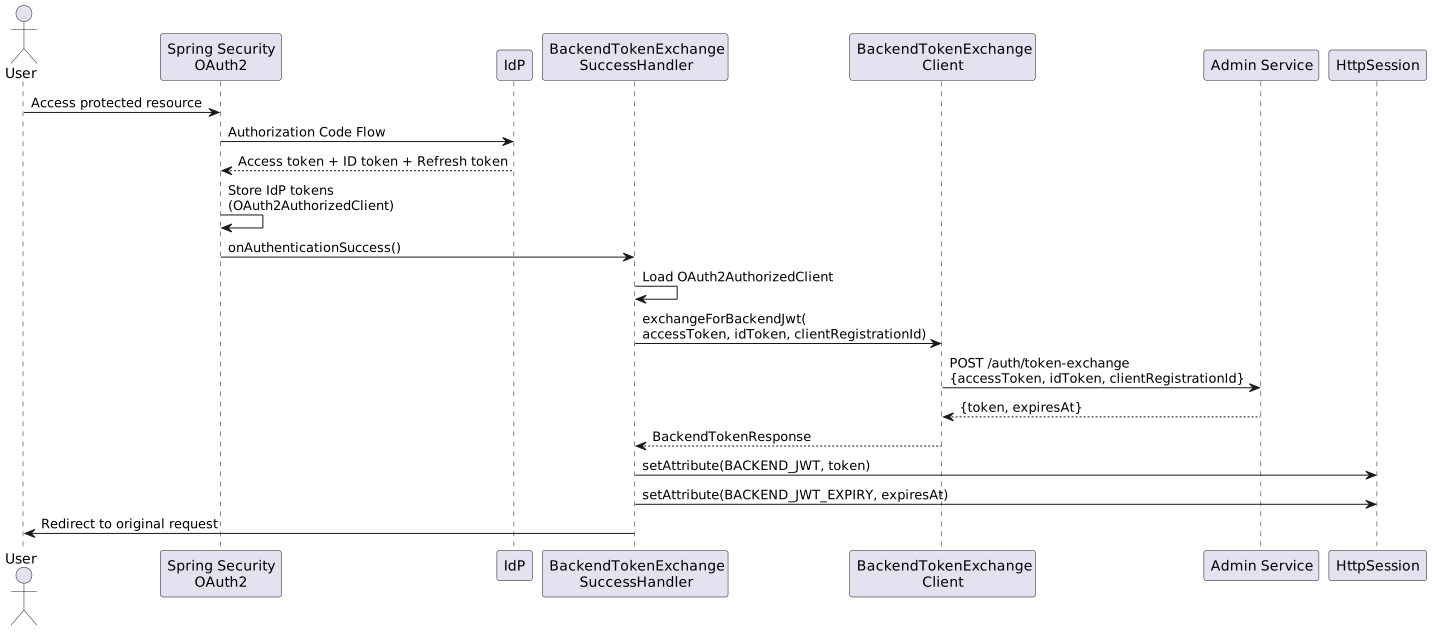
6.2. BackendTokenExchangeSuccessHandler
Extends SavedRequestAwareAuthenticationSuccessHandler to exchange IdP tokens for backend JWT immediately after successful OIDC authentication.
Key Implementation Points:
-
Invoked by Spring Security after successful OAuth2 login
-
Loads
OAuth2AuthorizedClientfromOAuth2AuthorizedClientService -
Extracts IdP access token and ID token (if OIDC)
-
Calls
BackendTokenExchangeClientto exchange for backend JWT -
Stores both token and expiry in session
-
Delegates to parent for redirect handling (preserves original request)
6.3. BackendTokenExchangeClient
Service component that calls the backend token exchange endpoint.
Key Implementation Points:
-
Endpoint called:
POST /auth/token-exchange -
Uses RestTemplate with X-API-KEY header for service authentication
-
Request payload:
{accessToken, idToken, clientRegistrationId} -
Response payload:
{token, expiresAt} -
Throws
BackendTokenExchangeExceptionon failure
6.4. OAuth2AuthorizedClientManager Configuration
Configure refresh token support in SecurityConfiguration:
@Bean
public OAuth2AuthorizedClientManager authorizedClientManager(
    ClientRegistrationRepository clientRegistrationRepository,
    OAuth2AuthorizedClientRepository authorizedClientRepository
) {
    OAuth2AuthorizedClientProvider authorizedClientProvider =
        OAuth2AuthorizedClientProviderBuilder.builder()
            .authorizationCode()
            .refreshToken()  // Enable automatic token refresh
            .build();

    DefaultOAuth2AuthorizedClientManager manager = new DefaultOAuth2AuthorizedClientManager(
        clientRegistrationRepository,
        authorizedClientRepository
    );
    manager.setAuthorizedClientProvider(authorizedClientProvider);
    return manager;
}
The refreshToken() provider enables automatic IdP token refresh when the access token expires.
7. JWT Relay Filter
7.1. AdminServiceJwtRelayFilter
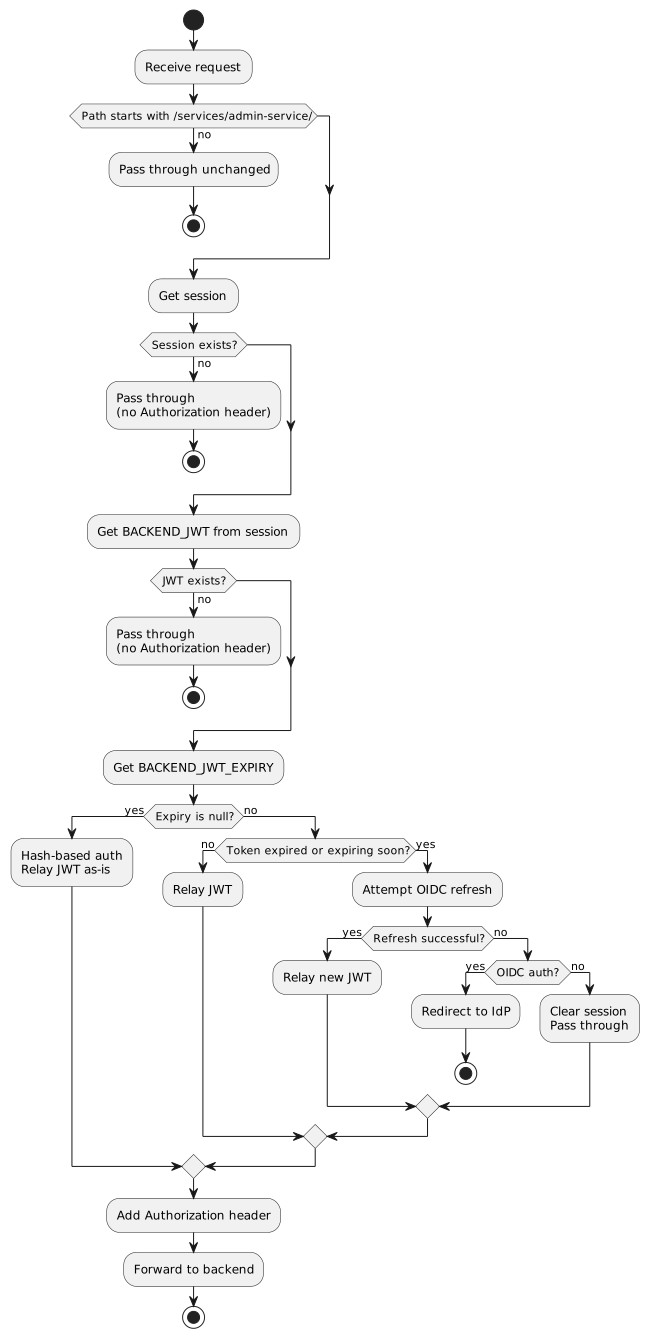
The filter intercepts requests to /services/admin-service/** and injects the backend JWT from session.
Filter Logic:
7.2. Token Expiry Handling
The filter handles token expiry differently based on authentication type:
| Scenario | Detection | Action |
|---|---|---|
Hash-based, no expiry info |
|
Relay token as-is; backend handles expiry |
OIDC, token valid |
Expiry > now + 30 seconds |
Relay token |
OIDC, token expiring soon |
Expiry ≤ now + 30 seconds |
Refresh via IdP, then relay new token |
OIDC, refresh fails |
Exception or null result |
Redirect to IdP login |
No OIDC auth, token expired |
Not |
Clear session, pass through without header |
7.3. OIDC Token Refresh
When the backend JWT is expired and OIDC authentication is present:
-
Get OAuth2AuthorizedClient - Use
OAuth2AuthorizedClientManagerwhich automatically refreshes if needed -
Check IdP token validity - If still expired after manager call, redirect to IdP
-
Exchange for new backend JWT - Call
BackendTokenExchangeClient -
Update session - Store new token and expiry
-
Relay request - Continue with fresh token
8. Security Configuration
8.1. SecurityFilterChain Configuration
Key configuration points in SecurityConfiguration:
@Bean
public SecurityFilterChain filterChain(HttpSecurity http, MvcRequestMatcher.Builder mvc,
        BackendTokenExchangeSuccessHandler successHandler) throws Exception {
    http
        .csrf(csrf -> csrf
            // ...
            .ignoringRequestMatchers(mvc.pattern("/api/auth/external-login"))
            .ignoringRequestMatchers(mvc.pattern("/api/auth/register-session"))
        )
        .authorizeHttpRequests(authz -> authz
            .requestMatchers(mvc.pattern("/api/auth/external-login")).permitAll()
            .requestMatchers(mvc.pattern("/api/auth/register-session")).permitAll()
            .requestMatchers(mvc.pattern("/api/account")).permitAll()
            // ...
            // Gateway endpoints that require authentication
            .requestMatchers(mvc.pattern("/api/**")).authenticated()
            // Proxied requests - let backend decide (gateway just relays)
            .requestMatchers(mvc.pattern("/services/**")).permitAll()
            // ...
        )
        .oauth2Login(oauth2 -> oauth2
            .loginPage("/")
            .userInfoEndpoint(userInfo -> userInfo.oidcUserService(this.oidcUserService()))
            .successHandler(successHandler)  // Token exchange handler
        )
        .oauth2Client(withDefaults());
    return http.build();
}
Important notes:
-
/services/**ispermitAll()because the backend is responsible for all authorization decisions. The gateway just relays the JWT; guests get no Authorization header. -
/api/auth/external-loginand/api/auth/register-sessionarepermitAll()(and CSRF-exempt) because they are entry points for unauthenticated users establishing sessions. -
/api/accountispermitAll()because the Angular frontend calls it to determine authentication state. For unauthenticated users, it returns a minimal response rather than triggering an OAuth2 redirect.
9. Session Cookie Configuration
9.1. Production Configuration
server:
  forward-headers-strategy: native  # Trust X-Forwarded-* headers
  servlet:
    session:
      cookie:
        name: JSESSIONID
        http-only: true      # Prevents JavaScript access
        secure: true         # Cookie only sent over HTTPS
        same-site: strict    # CSRF protection
      timeout: 30m
9.2. Development Configuration
# application-dev.yml
server:
  servlet:
    session:
      cookie:
        secure: false  # Allow over HTTP during development
Never set secure: false in production environments.
|
9.3. Kubernetes and Reverse Proxy Considerations
In production Kubernetes deployments, TLS is typically terminated at the ingress controller:
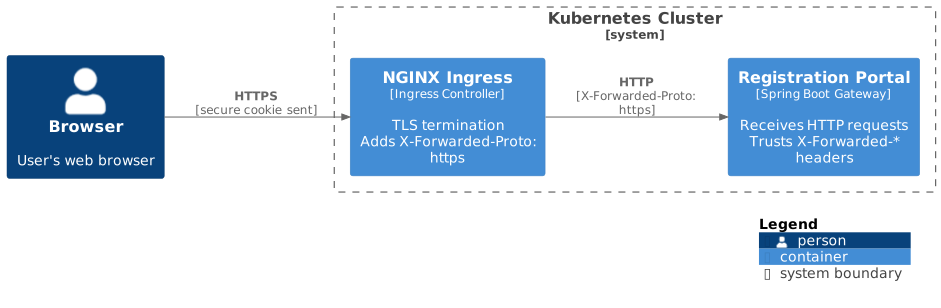
This works correctly with secure: true cookies because:
-
NGINX ingress adds
X-Forwarded-Proto: httpsheader -
With
forward-headers-strategy: native, Spring Boot treats request as HTTPS -
Spring Security sets
secureflag on cookies -
Browser receives cookies over HTTPS and saves them correctly
10. Backend Token Exchange Endpoint
The backend implements a claims-based token exchange endpoint for OAuth2 authentication:
Endpoint: POST /api/auth/token-exchange/oauth2
Request (from Gateway, authenticated via API key):
{
  "registrationSystemId": 5,
  "subjectId": "google-oauth2|abc123",
  "email": "[email protected]",
  "displayName": "John Doe",
  "providerType": "GOOGLE"
}
Response:
{
  "token": "eyJhbG...",
  "expiresAt": "2026-01-30T10:30:00Z"
}
Backend Responsibilities:
-
Resolve
RegistrationSystem→OrganisationfromregistrationSystemId -
Look up
OrgUserby(organisation, externalUserId = subjectId) -
If not found: JIT provisioning — create Person + OrgUser from provided claims
-
Extract
personIdandlinkedOrgClaimsfrom OrgUser -
Mint backend JWT with standard claims (
orgId,personId,linkedOrgIds) -
Return token with expiry timestamp
Key difference from hash-based flow: The Gateway has already validated the IdP token via the standard OAuth2/OIDC flow. The admin-service trusts the Gateway (API key authenticated) and does not re-validate the IdP token. The subjectId value comes from the configurable subjectClaimName (default: sub, Microsoft: oid).
For JIT provisioning details, see OAuth2 User Provisioning.
10.1. Legacy Token Exchange Endpoint
The original endpoint (POST /auth/token-exchange) accepted raw IdP tokens for server-side validation:
{
  "accessToken": "eyJhbG...",
  "idToken": "eyJhbG...",
  "clientRegistrationId": "oidc"
}
This is being replaced by the claims-based endpoint above. The claims-based approach is simpler because:
-
Gateway already validates the IdP token
-
Admin-service doesn’t need IdP JWKS configuration
-
Works consistently across OIDC (JWT) and non-OIDC (Facebook opaque token) providers
11. Why Sessions Instead of Bearer Tokens?
The choice to use session cookies rather than having Angular manage bearer tokens directly:
| Aspect | Session Cookies | Angular-managed Tokens |
|---|---|---|
Storage |
Server-side (HttpSession) |
Client-side (localStorage/sessionStorage) |
XSS Vulnerability |
Low - |
High - Tokens accessible to malicious scripts |
CSRF Vulnerability |
Mitigated with |
N/A (but XSS can steal tokens) |
Token Refresh |
Handled server-side transparently |
Requires client-side refresh logic |
Front-end Complexity |
Minimal - browser handles cookies |
Requires interceptors, storage, refresh logic |
12. Cluster Considerations
For clustered deployments:
Option 1: Distributed Sessions
Use Spring Session with Redis:
spring:
  session:
    store-type: redis
  redis:
    host: redis-server
    port: 6379
Option 2: Sticky Sessions
Configure load balancer for session affinity:
-
Kubernetes: Use sessionAffinity on Service
-
NGINX: Use
ip_hashor sticky cookie
Backend Remains Stateless:
-
Backend only validates JWT tokens
-
No session state required in backend
-
Horizontal scaling without session concerns
13. Testing Configuration
For integration tests, provide mock implementations:
@TestConfiguration
public class TestSecurityConfiguration {

    @Bean
    @Primary
    OAuth2AuthorizedClientManager authorizedClientManager() {
        return mock(OAuth2AuthorizedClientManager.class);
    }

    @Bean
    @Primary
    BackendTokenExchangeClient backendTokenExchangeClient() {
        BackendTokenExchangeClient mockClient = mock(BackendTokenExchangeClient.class);
        when(mockClient.exchangeForBackendJwt(anyString(), anyString(), anyString()))
            .thenReturn(new BackendTokenResponse("test-jwt", Instant.now().plusSeconds(3600)));
        return mockClient;
    }
}