Payment API Design
1. Overview
This document describes the new Payment API design for Phase 2 (P2), which separates order creation from payment initiation. This change enables:
-
Order review before payment commitment
-
Multiple payment method selection (Online, EFT, Manual/Counter)
-
Reference code generation for EFT and manual payments
-
Clear separation of concerns between registration and payment
-
Improved error recovery for payment failures
2. Current State (P1)
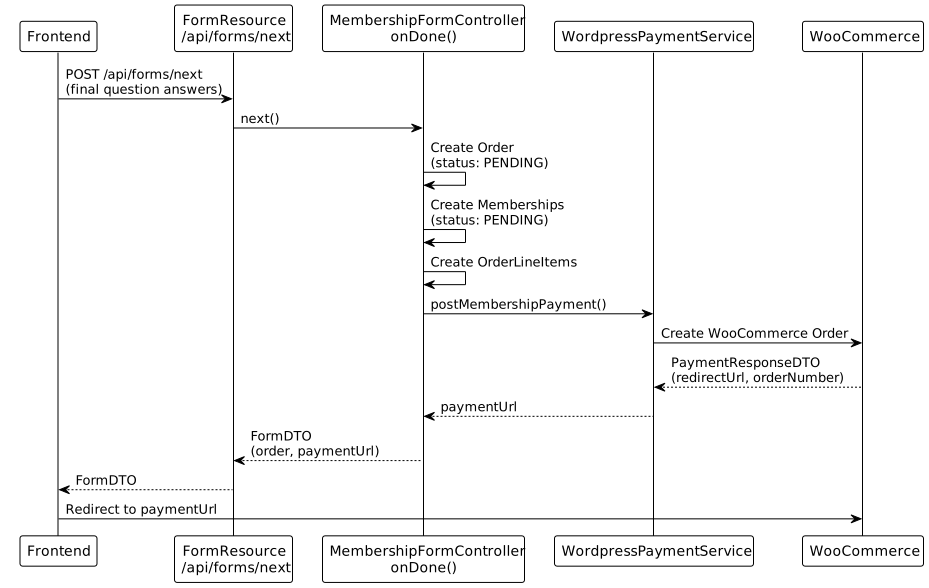
2.2. Current FormDTO Response (on completion)
{
  "processId": "uuid",
  "processState": "DONE",
  "order": {
    "id": 123,
    "number": "WC-45678",
    "status": "PENDING",
    "transactionDateTime": "2025-01-01T10:00:00Z",
    ...
  },
  "paymentUrl": "https://woocommerce.example.com/checkout/order-pay/45678/?key=..."
}
2.3. Issues with P1 Approach
-
Tight coupling: Order creation and payment initiation happen in same transaction
-
No order review: User cannot review order before payment
-
Single payment method: Only online payment via WooCommerce is supported
-
Error recovery: If WooCommerce call fails, order is created but user has no way to retry payment
3. Proposed Design (P2)
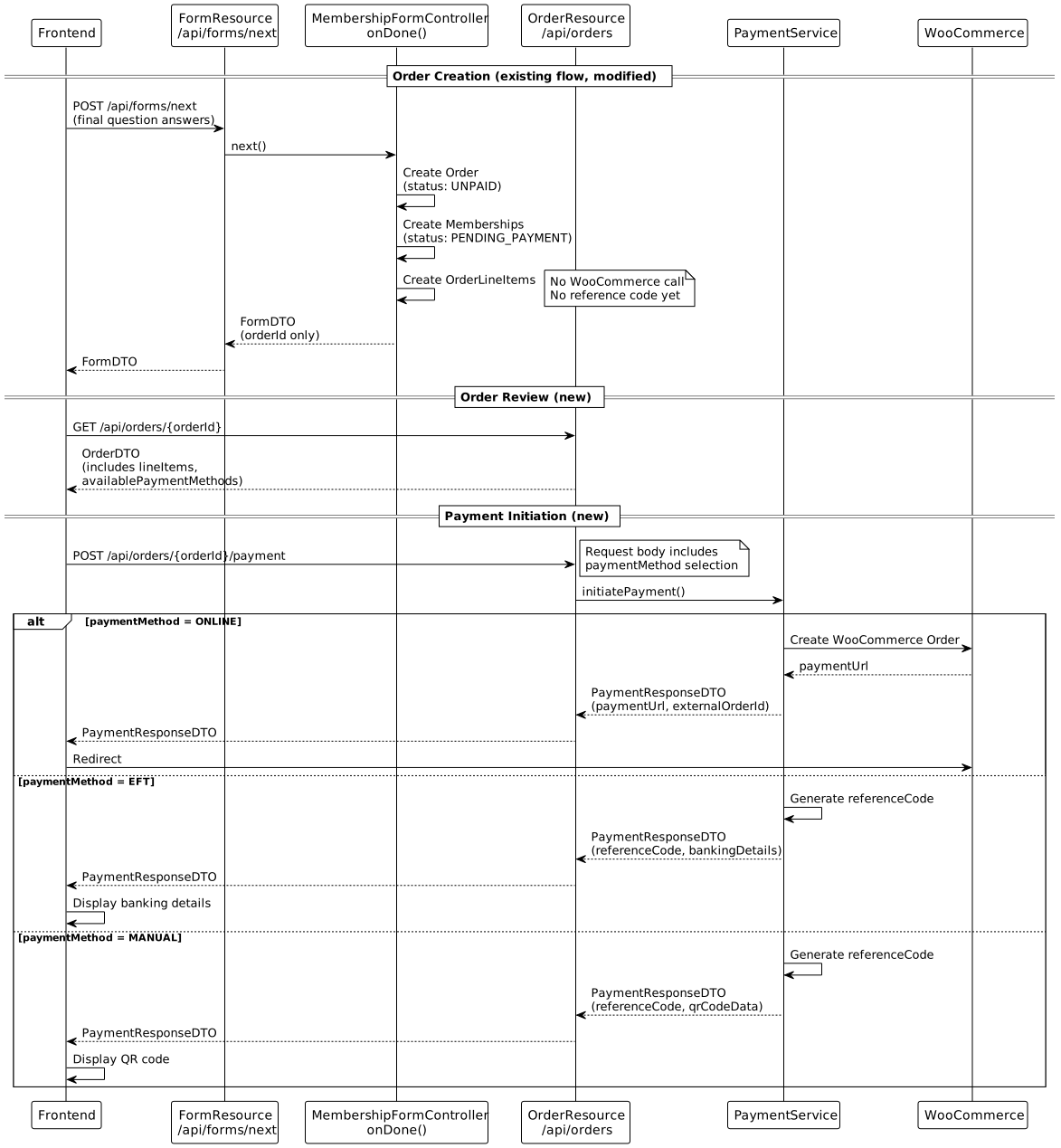
3.2. Key Design Principles
-
Reference codes only for EFT/Manual: Online payments are identified by the external payment system’s order ID. Reference codes are reserved for offline payment methods to keep them short and memorable.
-
Extend existing OrderDTO: Rather than creating a separate
OrderReviewDTO, extendOrderDTOto includelineItemsandavailablePaymentMethodswhen the order is inUNPAIDstatus. -
Deferred reference code generation: Reference codes are generated only when EFT or Manual payment is selected, not at order creation.
4. API Endpoints
4.1. 1. FormDTO Response Change
Endpoint: POST /api/forms/next (existing, modified response)
When the process reaches DONE state, the response changes:
{
  "processId": "uuid",
  "processState": "DONE",
  "order": { /* full OrderDTO */ },
  "paymentUrl": "https://..."
}{
"processId": "uuid",
"processState": "DONE",
"orderId": 123
}Changes to FormDTO:
| Field | Change | Notes |
|---|---|---|
|
REMOVE |
No longer included in response |
|
REMOVE |
Payment URL is now returned from payment initiation API |
|
ADD |
New field (Long), only populated when |
4.2. 2. Get Order for Review
Endpoint: GET /api/orders/{orderId}
Returns order details for the review screen. Uses extended OrderDTO.
Response: OrderDTO (extended)
{
  "id": 123,
  "number": null,
  "referenceCode": null,
  "status": "UNPAID",
  "transactionDateTime": "2025-01-01T10:00:00Z",
  "buyer": {
    "name": "John Smith"
  },
  "organisation": {
    "id": 1,
    "name": "Cycling Club SA"
  },
  "lineItems": [
    {
      "id": 1,
      "description": "Adult Membership 2025",
      "personName": "John Smith",
      "quantity": 1,
      "unitPrice": 500.00,
      "totalPrice": 500.00
    },
    {
      "id": 2,
      "description": "Junior Membership 2025",
      "personName": "Jane Smith",
      "quantity": 1,
      "unitPrice": 250.00,
      "totalPrice": 250.00
    }
  ],
  "totalAmount": 750.00,
  "availablePaymentMethods": ["ONLINE", "EFT", "MANUAL"]
}
OrderDTO Extensions:
| Field | Type | Notes |
|---|---|---|
|
|
Included when status is |
|
|
Calculated sum of line item totals |
|
|
Included when status is |
|
|
Only populated after EFT/Manual payment is initiated |
4.3. 3. Initiate Payment
Endpoint: POST /api/orders/{orderId}/payment
Initiates payment based on selected payment method.
Request: PaymentRequestDTO
{
  "paymentMethod": "ONLINE"
}
Payment Methods:
| Method | Description | Reference Code |
|---|---|---|
|
Credit card payment via WooCommerce |
No (uses external order ID) |
|
Electronic funds transfer - display banking details |
Yes (generated on initiation) |
|
Pay at counter/clubhouse - display QR code for staff |
Yes (generated on initiation) |
Response: PaymentResponseDTO
For ONLINE:
{
  "paymentMethod": "ONLINE",
  "paymentUrl": "https://woocommerce.example.com/checkout/order-pay/45678/?key=...",
  "externalOrderId": "WC-45678"
}
For EFT:
{
  "paymentMethod": "EFT",
  "referenceCode": "B-324",
  "bankingDetails": {
    "bankName": "Standard Bank",
    "accountName": "Cycling Club SA",
    "accountNumber": "1234567890",
    "branchCode": "051001",
    "reference": "B-324"
  }
}
For MANUAL:
{
  "paymentMethod": "MANUAL",
  "referenceCode": "B-324"
}
Note: For manual payments, the frontend generates a QR code from the referenceCode. No separate qrCodeData field is needed.
5. Reference Code Design
5.1. Purpose
Reference codes are used only for EFT and Manual payments to:
-
Allow users to identify their payment when making bank transfers
-
Enable staff to quickly look up orders for counter payments
-
Provide a short, memorable code for verbal communication
Online payments do not require reference codes as they are tracked via the external payment system’s order/invoice number.
5.3. Day Prefix
A single letter representing the day, cycling through the alphabet:
-
Day 1: A
-
Day 2: B
-
Day 3: C
-
…
-
Day 24: Z (skipping O and I)
Excluded letters: O (similar to 0) and I (similar to 1)
This provides a 24-day cycle before prefixes repeat.
5.4. Sequence Number
A 3-character alphanumeric sequence that increments daily:
-
Starts at
001each day -
Increments:
001,002, …999 -
After
999, switches to hexadecimal:A00,A01, …FFF -
Maximum capacity per day: 999 + 3840 = 4839 orders
5.5. Implementation
public class ReferenceCodeGenerator {

    // Alphabet excluding O and I (24 letters)
    private static final String DAY_PREFIXES = "ABCDEFGHJKLMNPQRSTUVWXYZ";

    /**
     * Generate a reference code for the given date and sequence.
     * @param date The date for the day prefix
     * @param dailySequence The sequence number for the day (1-based)
     * @return Reference code like "B-324" or "C-A5F"
     */
    public String generate(LocalDate date, int dailySequence) {
        int dayOfYear = date.getDayOfYear();
        char prefix = DAY_PREFIXES.charAt((dayOfYear - 1) % 24);

        String sequence;
        if (dailySequence <= 999) {
            sequence = String.format("%03d", dailySequence);
        } else {
            // Switch to hex for sequences > 999
            sequence = String.format("%03X", dailySequence - 1000 + 0xA00);
        }

        return prefix + "-" + sequence;
    }
}
5.6. Storage
Reference codes are stored on the Order entity only after EFT or Manual payment is initiated:
@Entity
@Table(name = "sales_order")
public class Order {
    // ... existing fields ...

    @Size(max = 8)
    @Column(name = "reference_code", length = 8)
    private String referenceCode;
}
Note: The referenceCode field is:
-
NULLfor orders with online payment -
Populated when EFT or Manual payment is initiated
-
Not unique globally (repeats after 24 days), but unique within tenant + active period
6. Order Lifecycle and Expiry
6.1. Order States
| Status | Description |
|---|---|
|
Order created, awaiting payment method selection |
|
Payment initiated (for online: WooCommerce order created; for EFT/Manual: reference code generated) |
|
Payment completed successfully |
|
Order cancelled by user or system |
|
Order expired due to non-payment (set by cleanup job) |
6.2. Unpaid Order Cleanup
Orders that remain unpaid should be cleaned up to prevent database bloat and free up reference codes.
Policy: Unpaid orders are marked as EXPIRED after 1 year.
Implementation: A scheduled cron job runs periodically to:
-
Find orders with status
UNPAIDorPENDINGolder than 1 year -
Mark them as
EXPIRED -
Optionally: Revert associated memberships/registrations to previous state
This is a separate user story for implementation.
7. Configuration
7.1. Banking Details
Banking details for EFT payments are stored on RegistrationSystem:
@Embeddable
public class BankingDetails {
    @Column(name = "eft_availability", length = 1)
    @Convert(converter = EftAvailabilityVarChar1Converter.class)
    private EftAvailability availability;

    @Size(max = 100)
    private String bankName;

    @Size(max = 100)
    private String accountName;

    @Size(max = 50)
    private String accountNumber;

    @Size(max = 20)
    private String branchCode;
}
7.1.1. EftAvailability (Enum)
Controls when EFT payment is offered to users:
public enum EftAvailability {
    ALWAYS("A"),      // EFT available to all users
    CONDITIONAL("C"), // EFT available only to selected users (clubs, teams, etc.)
    DISABLED("D");    // EFT not available

    private final String code;

    EftAvailability(String code) {
        this.code = code;
    }

    public String getCode() {
        return code;
    }

    public static EftAvailability fromCode(String code) {
        for (EftAvailability avail : values()) {
            if (avail.code.equals(code)) {
                return avail;
            }
        }
        throw new IllegalArgumentException("Unknown EftAvailability code: " + code);
    }
}| Value | Description |
|---|---|
|
EFT payment option shown to all users |
|
EFT shown only to qualifying users (e.g., club members, team registrations). Criteria defined by business rules. |
|
EFT not offered, even if banking details are configured |
Note: When availability is CONDITIONAL, the availablePaymentMethods returned in OrderDTO will exclude EFT unless the user qualifies. The qualification logic is a future implementation detail.
7.2. Available Payment Methods
Payment methods are configurable per RegistrationSystem:
// In RegistrationSystem entity
@Column(name = "payment_methods", length = 50)
@Convert(converter = PaymentMethodListConverter.class)
private List<PaymentMethod> availablePaymentMethods;
Default: ["ONLINE"] (backward compatible with P1)
8. Data Transfer Objects
8.1. PaymentMethod (Enum)
public enum PaymentMethod {
    ONLINE("O"),   // Credit card via WooCommerce
    EFT("E"),      // Electronic funds transfer
    MANUAL("M");   // Pay at counter/clubhouse

    private final String code;

    PaymentMethod(String code) {
        this.code = code;
    }

    public String getCode() {
        return code;
    }

    public static PaymentMethod fromCode(String code) {
        for (PaymentMethod method : values()) {
            if (method.code.equals(code)) {
                return method;
            }
        }
        throw new IllegalArgumentException("Unknown PaymentMethod code: " + code);
    }
}
Note: Enum includes internal codes for database persistence. Use @Convert(converter = PaymentMethodVarChar1Converter.class) on entity fields, following the pattern established by GenderVarChar1Converter.
8.2. PaymentRequestDTO
public class PaymentRequestDTO {
    @NotNull
    private PaymentMethod paymentMethod;

    // Getters and setters
}
8.3. PaymentResponseDTO
public class PaymentResponseDTO {
    private PaymentMethod paymentMethod;

    // ONLINE only
    private String paymentUrl;
    private String externalOrderId;

    // EFT, MANUAL only
    private String referenceCode;

    // EFT only
    private BankingDetailsDTO bankingDetails;

    // Getters and setters
}
Note: For MANUAL payments, the frontend generates the QR code from the referenceCode. No dedicated qrCodeData field is needed.
8.4. BankingDetailsDTO
public class BankingDetailsDTO {
    private String bankName;
    private String accountName;
    private String accountNumber;
    private String branchCode;
    private String reference;  // The reference code to use

    // Getters and setters
}
8.5. OrderDTO Extensions
Extend existing OrderDTO with:
public class OrderDTO {
    // ... existing fields ...

    // New fields
    private String referenceCode;
    private List<OrderLineItemDTO> lineItems;
    private BigDecimal totalAmount;
    private List<PaymentMethod> availablePaymentMethods;
}
8.6. OrderLineItemDTO Extensions
Extend existing OrderLineItemDTO with:
public class OrderLineItemDTO {
    // ... existing fields ...

    // New/enhanced fields
    private String description;   // Product name or membership type
    private String personName;    // Person this line item is for
    private BigDecimal unitPrice;
    private BigDecimal totalPrice;
}
9. Backend Implementation Summary
9.1. Files to Modify
| File | Action | Changes |
|---|---|---|
|
MODIFY |
Remove |
|
MODIFY |
Map |
|
MODIFY |
Remove WooCommerce call from |
|
MODIFY |
Add |
|
MODIFY |
Add |
|
MODIFY |
Add |
|
MODIFY |
Add |
9.2. Files to Create
| File | Purpose |
|---|---|
|
Enum for payment methods |
|
Request DTO for payment initiation |
|
Response DTO for payment initiation |
|
DTO for banking details |
|
Embeddable entity for banking details |
|
Enum for EFT availability states (ALWAYS, CONDITIONAL, DISABLED) |
|
JPA converter for EftAvailability enum |
|
REST controller for payment endpoints |
|
Service for payment logic |
|
Service for generating reference codes |
9.3. Database Migration
-- Add reference_code to sales_order
ALTER TABLE sales_order
ADD COLUMN reference_code VARCHAR(8);

-- Add banking details to registration_system
ALTER TABLE registration_system
ADD COLUMN eft_availability VARCHAR(1) DEFAULT 'D',
ADD COLUMN bank_name VARCHAR(100),
ADD COLUMN account_name VARCHAR(100),
ADD COLUMN account_number VARCHAR(50),
ADD COLUMN branch_code VARCHAR(20);

-- Add available payment methods to registration_system
ALTER TABLE registration_system
ADD COLUMN payment_methods VARCHAR(50) DEFAULT 'ONLINE';
Note: eft_availability defaults to 'D' (DISABLED) for backward compatibility.
10. Frontend Implementation Summary
10.1. Route Changes
| Route | Purpose | Status |
|---|---|---|
|
Existing registration flow |
MODIFY - redirect to order review on completion |
|
Order review and payment method selection |
NEW |
|
EFT payment details display |
NEW |
|
Manual payment QR display |
NEW |
11. Work Items Summary
11.1. Priority 2: Stub Endpoints for FE Integration
These items create stub endpoints with DTOs so frontend development can proceed in parallel:
| # | Title | Scope |
|---|---|---|
1 |
[BE] Create Payment DTOs and Stub Endpoints |
PaymentMethod enum, PaymentRequestDTO, PaymentResponseDTO, BankingDetailsDTO. Stub POST /api/orders/{id}/payment returning mock data. |
2 |
[BE] Extend OrderDTO for Order Review |
Add lineItems, totalAmount, availablePaymentMethods to OrderDTO. Stub data initially. |
3 |
[FE] Create Order Review Screen |
Display order with line items, payment method selection. Uses stub API. |
4 |
[FE] Create EFT Payment Screen |
Display banking details and reference code. |
5 |
[FE] Create Manual Payment Screen |
Display QR code and reference code. |
11.2. Priority 3: Full Implementation
These items complete the backend implementation:
| # | Title | Scope |
|---|---|---|
6 |
[BE] Decouple Order Creation from Payment |
Modify FormDTO (remove order/paymentUrl, add orderId). Modify MembershipFormController.onDone() to not call WooCommerce. |
7 |
[BE] Implement PaymentService |
Payment method routing, WooCommerce integration (extract from current), EFT/Manual response generation. |
8 |
[BE] Reference Code Generator |
Implement day-prefix + sequence algorithm. Daily sequence tracking. |
9 |
[BE] Add Payment Config to RegistrationSystem |
BankingDetails embeddable, availablePaymentMethods field, migrations. |
10 |
[BE] Order Lookup by Reference Code |
GET /api/orders/reference/{code} endpoint for staff. |
11 |
[FE] Update Registration Completion Flow |
Handle orderId response, navigate to order review. |
12. Integration Points
12.1. Async Communications
This design integrates with the Async Processing and Communication system:
Order Creation Triggers:
When an order is created (status: UNPAID), the payment reminder workflow is initiated:
-
Sends escalating payment reminders (e.g., 24h, 48h, 7d)
-
Respects maximum message limits to prevent spam
-
Automatically stops if event date passes or membership period closes
Payment Completion Triggers:
When payment completes successfully (status: PAID), the associated entity workflows are triggered:
-
Membership: Welcome message, membership card delivery, expiry reminder schedule
-
Event: Registration confirmation, pre-event information schedule, post-event results
The async communications system handles message scheduling, multi-channel delivery (Email/SMS/WhatsApp based on customer preference), and retry logic. This design only needs to ensure the correct order status transitions occur to trigger these workflows.