Architecture
- 1. Overview
- 2. Application Type
- 3. Technology Stack
- 4. Architectural Layers
- 5. Component Structure
- 6. UI Layout Specifications
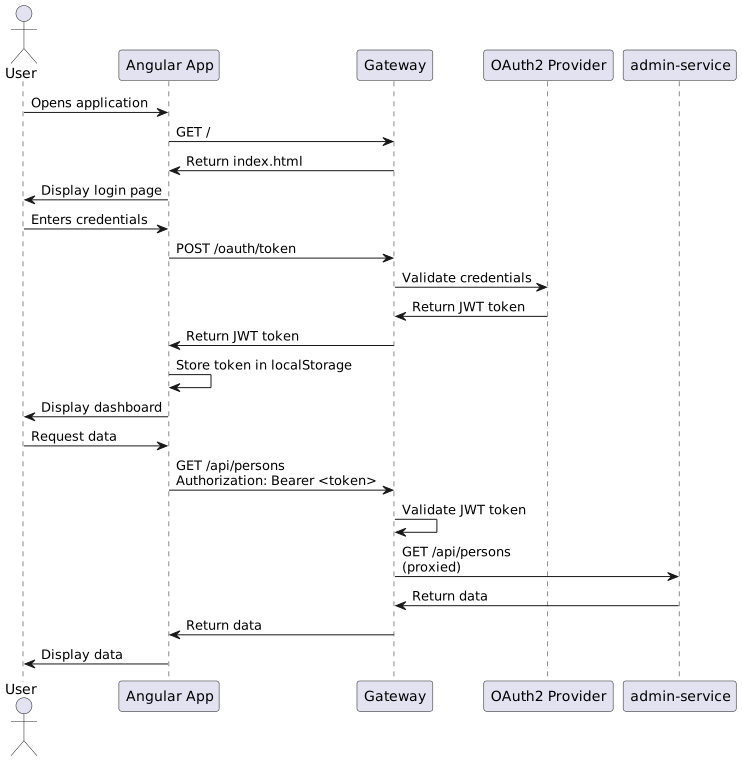
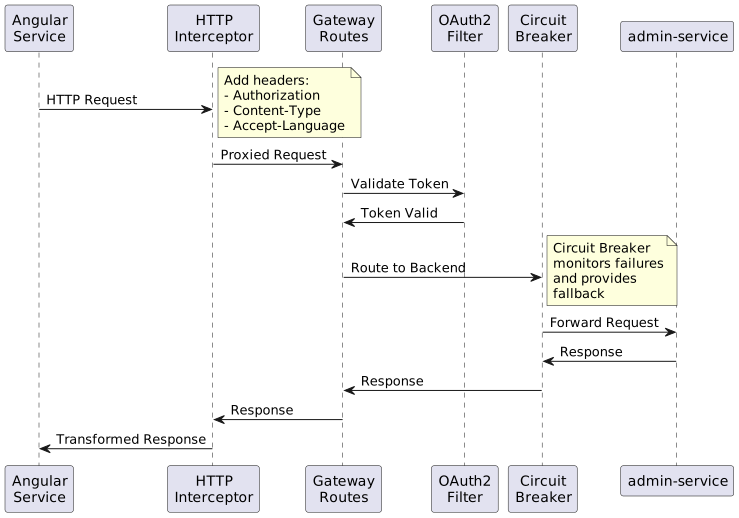
- 7. Request Flow
- 8. Gateway Configuration
- 9. State Management
- 10. Deployment Architecture
- 11. Development Environment
- 12. Performance Considerations
- 13. Security Architecture
- 14. Related Documentation
1. Overview
The Registration Portal is built as a JHipster gateway application, providing a single entry point for user interactions while proxying backend operations to the admin-service. This architecture enables OAuth2 authentication, API routing, and a modern Angular frontend.
2. Application Type
JHipster Gateway Application
The Registration Portal uses the JHipster gateway pattern, which provides:
-
API Gateway - Single entry point for all client requests
-
Service Proxy - Routes requests to backend microservices
-
Authentication - OAuth2/JWT token management
-
Static Content - Serves Angular frontend application
-
Load Balancing - Can distribute requests across service instances
-
Circuit Breaker - Fault tolerance for backend service failures
3. Technology Stack
3.1. Frontend
Framework: Angular 17+
Key Libraries:
-
Angular Router - Client-side routing
-
Angular Forms - Reactive forms for data input
-
RxJS - Reactive programming for async operations
-
Bootstrap 5 - UI component framework
-
NgBootstrap - Angular Bootstrap components
-
Font Awesome - Icon library
Build Tools:
-
Node.js 18+ / npm 9+
-
Angular CLI - Build and development server
-
Webpack - Module bundling (via Angular CLI)
-
TypeScript 5.x - Type-safe JavaScript
3.2. Backend (Gateway)
Framework: Spring Boot 3.1+
Key Components:
-
Spring Cloud Gateway - API gateway routing
-
Spring Security - OAuth2 resource server
-
Spring Data JPA - Database access (minimal, mostly proxied)
-
Liquibase - Database schema management
-
Spring Cloud Netflix - Service discovery (optional)
Java Version: Java 17+
4. Architectural Layers
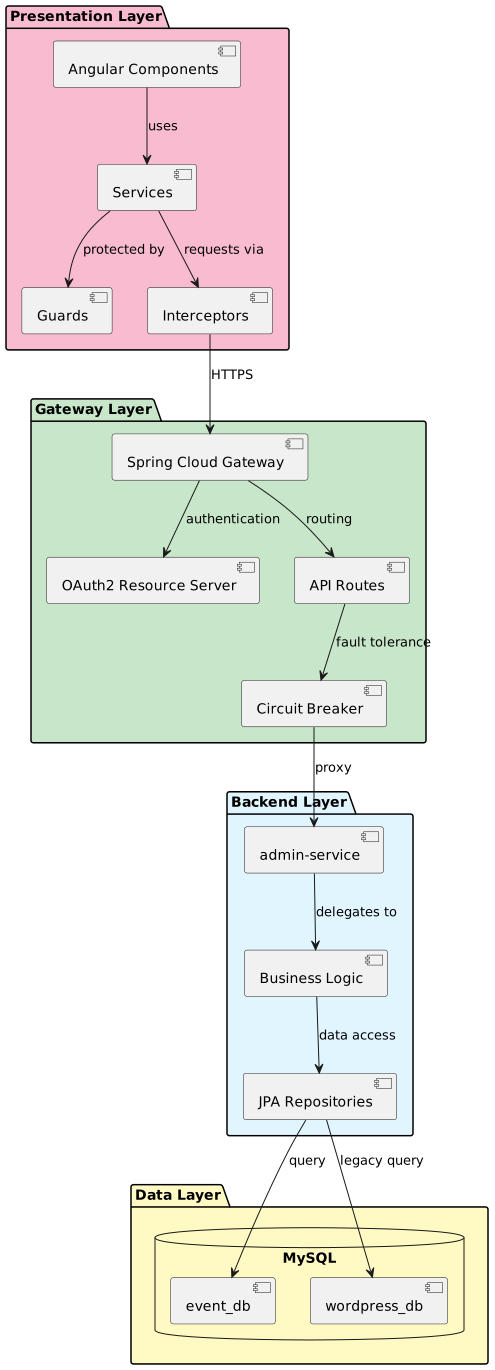
4.1. Presentation Layer
Responsibilities:
-
User interface rendering
-
User interaction handling
-
Client-side validation
-
State management
-
HTTP client operations
Key Components:
-
Components - UI elements (forms, lists, dialogs)
-
Services - API communication, business logic
-
Guards - Route protection based on authentication/authorization
-
Interceptors - HTTP request/response transformation
4.2. Gateway Layer
Responsibilities:
-
API gateway routing
-
OAuth2 token validation
-
Request/response transformation
-
Rate limiting and throttling
-
CORS configuration
-
Circuit breaker patterns
Key Components:
-
Routes - API endpoint routing configuration
-
Filters - Request/response filters for transformation
-
Security - OAuth2 resource server configuration
-
Resilience - Circuit breaker and retry logic
4.3. Backend Layer
Responsibilities:
-
Business logic execution
-
Data validation
-
Entity management
-
Process orchestration
-
External service integration
Handled by: admin-service (see Backend Services)
5. Component Structure
5.1. Frontend Structure
src/main/webapp/app/
├── account/                    # User account management
│   └── settings/              # User settings
├── admin/                      # Admin features
│   └── user-management/       # User administration
├── core/                       # Core services
│   ├── interceptor/           # HTTP interceptors
│   ├── logging/               # Logging service
│   └── services/              # Core business services
│       ├── form.service.ts
│       ├── linked-person-state.service.ts
│       ├── membership.service.ts
│       └── people.service.ts
├── entities/                   # Entity management
│   ├── admin-service/         # Proxied entities
│   │   ├── event/
│   │   ├── event-participant/
│   │   ├── linked-person/
│   │   ├── person/
│   │   └── ...
│   ├── linked-person/         # LinkedPerson workflows
│   │   ├── identity/
│   │   ├── search/
│   │   └── select-add/
│   ├── membership/            # Membership workflows
│   │   ├── guard/
│   │   ├── list/
│   │   └── questions/
│   └── registration/          # Event registration
│       ├── list/
│       └── model/
├── layouts/                    # Layout components
│   ├── main/
│   ├── navbar/
│   └── footer/
├── shared/                     # Shared utilities
│   ├── date/
│   ├── dialog/
│   ├── filter/
│   ├── language/
│   ├── session/
│   └── ...
└── ui/                         # UI-specific components
    ├── membership/
    └── person/
5.2. Backend Structure (Gateway)
src/main/java/za/co/idealogic/event/
├── config/                     # Configuration
│   ├── SecurityConfiguration.java
│   ├── GatewayConfiguration.java
│   ├── OAuth2Configuration.java
│   └── ...
├── security/                   # Security components
│   ├── jwt/
│   ├── oauth2/
│   └── ...
├── web/                        # REST controllers
│   ├── rest/                  # API endpoints
│   └── filter/                # Request filters
└── gateway/                    # Gateway-specific
    ├── ratelimiting/
    └── responserewriting/
6. UI Layout Specifications
The Registration Portal uses a three-level page layout structure based on the context and workflow stage.
6.1. Level 1: Site Header/Body/Footer
The outermost layout provides the application shell with consistent branding and navigation.
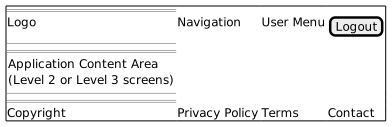
Components:
-
Site Header - Organization logo, main navigation, user menu
-
Body - Dynamic content area (renders Level 2 or Level 3 layouts)
-
Site Footer - Copyright notice, legal links, contact information
Visibility:
-
Always visible across all pages
-
Provides consistent navigation and branding
-
Header remains fixed/sticky during scroll (optional)
6.2. Level 2: Membership Screens
Membership and event registration landing pages that display before entering the questionnaire workflow.
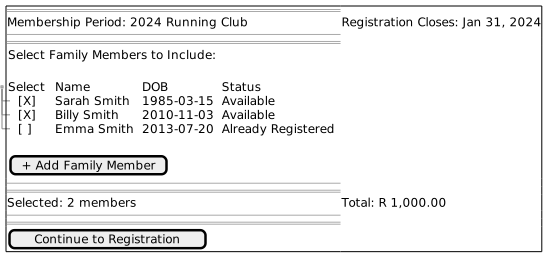
Screens Using This Layout:
-
Membership person selection ([membership-registration.adoc#person-selection](membership-registration.adoc#person-selection))
-
Event participant selection ([event-registration.adoc#participant-selection](event-registration.adoc#participant-selection))
-
Registration summary and pricing
Features:
-
Header displays registration context (period, event name, closing date)
-
Main area for participant/member selection
-
Summary section with counts and pricing
-
Action buttons for navigation
6.3. Level 3: Questionnaire Layout
Sequential question screens displayed during the process-driven workflow.
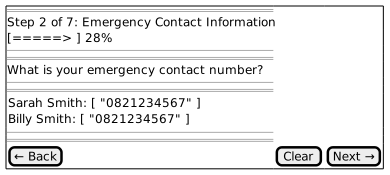
Screens Using This Layout:
-
All process step questions ([membership-registration.adoc#question-workflow](membership-registration.adoc#question-workflow))
-
Text input questions (TXT)
-
Checkbox questions (BCB, ITC)
-
Radio button questions (ONE)
-
Dropdown questions (SEL)
Features:
-
Progress Indicator - Shows current step number and percentage complete
-
Question Header - Displays the question text
-
Answer Section - Person-specific answer inputs (varies by question type)
-
Navigation Buttons - Back, Clear, Next/Submit
Navigation Rules:
-
Back Button - Returns to previous step, preserves answers
-
Clear Button - Resets all answers for current question
-
Next Button - Validates and submits answers, advances to next step
-
Disabled States - Next button disabled until valid answers provided
6.4. Layout Transitions
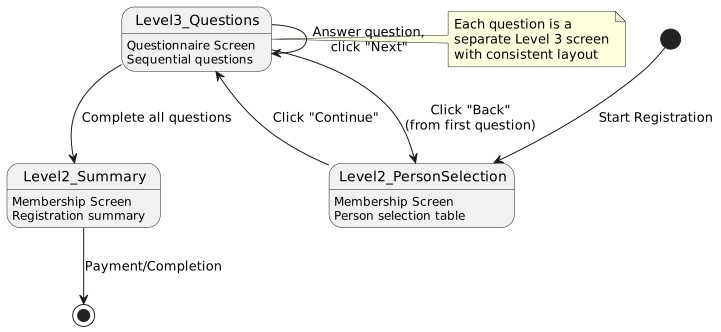
Transition Rules:
-
Entry - User starts at Level 2 (person selection)
-
Question Workflow - Transitions to Level 3 after clicking "Continue"
-
Sequential Navigation - Level 3 questions navigate to next Level 3 question
-
Back to Selection - "Back" button from first question returns to Level 2
-
Completion - Last question transitions to Level 2 summary
-
Exit - Summary leads to payment/confirmation
6.5. Responsive Behavior
Desktop (≥992px):
-
Full three-column layouts where applicable
-
Side-by-side person answer inputs
-
Horizontal navigation buttons
Tablet (768px - 991px):
-
Two-column layouts
-
Stacked person inputs with spacing
-
Full-width buttons
Mobile (<768px):
-
Single-column layout
-
Vertical stack of all elements
-
Full-width buttons with touch-friendly sizing
-
Collapsible sections for long lists
Person Selection Table (Mobile):
-
Converts to card-based layout
-
Each person as a separate card
-
Swipe gestures for actions
8. Gateway Configuration
8.1. Route Configuration
The gateway routes requests based on path patterns:
spring:
  cloud:
    gateway:
      routes:
        - id: admin-service
          uri: http://localhost:8080
          predicates:
            - Path=/api/**,/services/**
          filters:
            - RewritePath=/(?<segment>.*), /$\{segment}
            - name: Retry
              args:
                retries: 3
                statuses: BAD_GATEWAY,GATEWAY_TIMEOUT
                methods: GET,POST,PUT,DELETE
                backoff:
                  firstBackoff: 10ms
                  maxBackoff: 50ms
                  factor: 2
                  basedOnPreviousValue: false
        - id: admin-service-websocket
          uri: ws://localhost:8080
          predicates:
            - Path=/websocket/**
Route Patterns:
-
/api/**→ Proxied to admin-service -
/services/**→ Proxied to admin-service -
/websocket/**→ WebSocket connections -
/oauth/**→ OAuth2 authentication (local) -
/management/**→ Gateway management endpoints (local)
8.2. OAuth2 Configuration
spring:
  security:
    oauth2:
      client:
        provider:
          oidc:
            issuer-uri: http://localhost:9080/realms/jhipster
        registration:
          oidc:
            client-id: web_app
            client-secret: web_app
            scope: openid,profile,email
      resourceserver:
        jwt:
          issuer-uri: http://localhost:9080/realms/jhipster
          jwk-set-uri: http://localhost:9080/realms/jhipster/protocol/openid-connect/certs
8.3. CORS Configuration
@Configuration
public class CorsConfiguration {

    @Bean
    public CorsFilter corsFilter() {
        UrlBasedCorsConfigurationSource source =
            new UrlBasedCorsConfigurationSource();

        CorsConfiguration config = new CorsConfiguration();
        config.setAllowCredentials(true);
        config.addAllowedOriginPattern("*");
        config.addAllowedHeader("*");
        config.addAllowedMethod("*");

        source.registerCorsConfiguration("/api/**", config);
        source.registerCorsConfiguration("/management/**", config);
        source.registerCorsConfiguration("/v3/api-docs", config);

        return new CorsFilter(source);
    }
}
9. State Management
9.1. Session Storage
Client-Side State:
-
localStorage - JWT token, user preferences, language
-
sessionStorage - Temporary form data, navigation state
-
Angular Services - Application state (LinkedPerson selection, form progress)
State Services:
@Injectable({ providedIn: 'root' })
export class LinkedPersonStateService {
  private selectedPersonsSubject = new BehaviorSubject<Person[]>([]);
  selectedPersons$ = this.selectedPersonsSubject.asObservable();

  setSelectedPersons(persons: Person[]): void {
    this.selectedPersonsSubject.next(persons);
  }

  getSelectedPersons(): Person[] {
    return this.selectedPersonsSubject.value;
  }
}
9.2. Process State
Process workflow state is managed server-side via ProcessInstance entities:
-
Current step number
-
Form data for each step
-
Completion status
-
Validation errors
See Process Flow Integration for details.
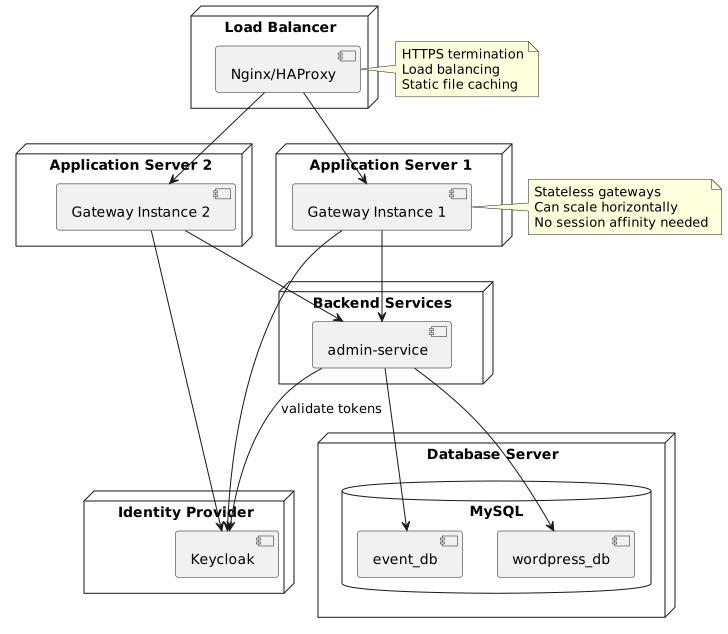
10. Deployment Architecture
10.1. Scaling Considerations
Horizontal Scaling:
-
Gateway instances are stateless
-
No session affinity required
-
Can add/remove instances dynamically
-
Load balancer distributes traffic
Vertical Scaling:
-
JVM heap tuning for gateway instances
-
Connection pool sizing
-
Thread pool configuration
Caching:
-
Static content caching at load balancer
-
API response caching (selective)
-
OAuth2 token caching (short TTL)
11. Development Environment
11.1. Prerequisites
-
JDK 17 or later
-
Node.js 18.x or later
-
npm 9.x or later
-
MySQL 8.0 or later
-
Keycloak (or OAuth2 provider)
11.2. Running Locally
Backend (Gateway):
# Start MySQL
docker-compose -f src/main/docker/mysql.yml up -d

# Start Keycloak
docker-compose -f src/main/docker/keycloak.yml up -d

# Run gateway
./mvnw spring-boot:run
Frontend (Angular):
# Install dependencies
npm install

# Start dev server
npm start
Access:
-
Application: http://localhost:4200
-
Gateway API: http://localhost:8081
-
Keycloak: http://localhost:9080
12. Performance Considerations
12.1. Frontend Optimization
-
Lazy Loading - Modules loaded on demand
-
AOT Compilation - Ahead-of-time compilation for production
-
Tree Shaking - Remove unused code
-
Code Splitting - Separate bundles for routes
-
Service Workers - Offline capability (optional)
13. Security Architecture
See Security for detailed security documentation including:
-
OAuth2 authentication flow
-
JWT token validation
-
Role-based access control
-
Organisation-scoped security
-
Person-level data access