LinkedPerson Management
1. Overview
The LinkedPerson feature enables users to manage groups of people who have relationships with each other. This is a fundamental building block for both membership registration (family memberships) and event registration (registering multiple participants together).
Primary Use Cases:
-
Family Memberships - Parents linking children for family membership applications
-
Group Event Registration - Friends or team members registering together for events
-
Club/Team Management - Club members linking to their organization
-
Organizational Relationships - Managing people within organizational contexts
2. Concept
2.1. LinkedPerson Entity
A LinkedPerson represents a relationship between two Person entities within an organizational context:
export interface ILinkedPerson {
  id: number;
  type?: keyof typeof LinkedPersonType | null;
  principal?: Pick<IPerson, 'id' | 'name'> | null;
  linkedPerson?: IPerson | NewPerson | null;
  firstName?: string;
  lastName?: string;
}
Key Properties:
-
principal - The primary person (e.g., parent, team leader, account holder)
-
linkedPerson - The secondary person (e.g., child, team member, dependent)
-
type - The relationship type (FAMILY, FRIEND, CLUB_MEMBER, TEAM_MEMBER, etc.)
2.2. Person Entity
Person entities represent individuals with identity information:
Core Identity Fields:
-
identityType - NATIONAL (ID number), PASSPORT, OTHER
-
identityNumber - ID/passport number
-
identityCountry - Country code for identity document
-
dateOfBirth - Birth date
-
gender - MALE, FEMALE, OTHER
Contact Fields:
-
firstName, lastName, name
-
email, contactNumber
-
school - For children/students
3. LinkedPerson Workflow
3.1. Search Workflow
The LinkedPerson workflow begins with searching for existing persons before creating new ones. This prevents duplicate person records.

3.2. Search Types
Three search methods are available:
| Search Type | Input Required | Behavior | Auto-Select |
|---|---|---|---|
ID Number |
South African ID number (13 digits) |
Validates format, auto-extracts DOB and gender |
Yes (single match) |
Date of Birth |
Birth date (YYYY-MM-DD) |
Broad search, often returns multiple results |
No |
Membership Number |
Existing membership number |
Looks up person via membership records |
Yes (single match) |
3.3. Three-Stage UI Workflow
3.3.1. Stage 1: Search Type Selection
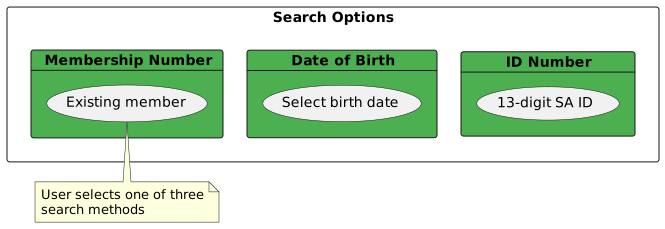
Component: LinkedPersonSearchComponent
selectSearch(value: SearchType): void {
  if (value === SearchType.IDNUMBER) {
    this.searchForm.patchValue({
      type: SearchType.IDNUMBER,
      dob: null,
      membershipNumber: null
    });
  } else if (value === SearchType.DOB) {
    this.searchForm.patchValue({
      type: SearchType.DOB,
      idNumber: null,
      membershipNumber: null
    });
  } else if (value === SearchType.MEMBERSHIP) {
    this.searchForm.patchValue({
      type: SearchType.MEMBERSHIP,
      idNumber: null,
      dob: null
    });
  }
}
3.3.2. Stage 2: Search Execution
Search Logic:
search(): void {
  const searchDetails = this.identityFromSearchForm();
  const searchType = this.searchForm.get('type')?.value;

  this.isSearching = true;
  this.linkedPersonStateService.clear();
  this.searchIdentityDetails = searchDetails ?? undefined;

  // Save search state
  this.linkedPersonStateService.setSearchState(searchType);

  this.searchPerson(searchDetails, searchDetails)
    .pipe(finalize(() => {
      this.isSearching = false;
      this.searchEnabled = false;
    }))
    .subscribe({
      next: persons => {
        if (persons.length === 0) {
          // Create new person
          const newPerson = this.linkedPersonStateService
            .createNewPerson(searchDetails);
          this.linkedPersonStateService.setPerson(newPerson);
        } else if (persons.length === 1 &&
                   searchType !== SearchType.DOB) {
          // Auto-select for ID/Membership searches
          this.linkedPersonStateService.setPerson(persons[0]);
        } else {
          // Show selection screen
          this.linkedPersonStateService.setPersons(persons);
        }
      },
      error: () => {
        this.linkedPersonStateService.clear();
        this.onSearchFinalize();
      }
    });
}
Search API Calls:
| Search Type | API Endpoint | Method |
|---|---|---|
ID Number |
|
POST with |
Date of Birth |
|
POST with |
Membership Number |
|
GET membership, then GET person |
3.3.3. Stage 3: Person Selection/Creation
Three possible outcomes:
-
No Results → Show create form with pre-populated search criteria
-
Single Result → Auto-select (ID/Membership) or show for confirmation (DOB)
-
Multiple Results → Display table for user selection
Selection Table (Multiple Results):
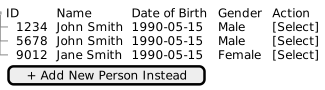
Component: LinkedPersonSelectAddComponent
3.4. State Management
LinkedPerson workflow state is managed by LinkedPersonStateService:
@Injectable({ providedIn: 'root' })
export class LinkedPersonStateService {
  private personsSubject = new BehaviorSubject<IPerson[] | undefined>(undefined);
  private personSubject = new BehaviorSubject<IPerson | undefined>(undefined);
  private searchStateSubject = new BehaviorSubject<SearchType | undefined>(undefined);

  // Public observables
  persons$ = this.personsSubject.asObservable();
  person$ = this.personSubject.asObservable();
  searchState$ = this.searchStateSubject.asObservable();

  setPersons(persons: IPerson[] | undefined): void {
    this.personsSubject.next(persons);
  }

  setPerson(person: IPerson | undefined): void {
    this.personSubject.next(person);
  }

  setSearchState(searchType: SearchType | undefined): void {
    this.searchStateSubject.next(searchType);
  }

  createNewPerson(searchDetails?: IPersonIdentity): NewPerson {
    return {
      id: null,
      ...searchDetails,
    };
  }

  linkPerson(id: number, type: string, userKey: string): Observable<ILinkedPerson> {
    return this.http.post<ILinkedPerson>(
      `${this.linkEdPersonUrl}/${id}/${type}?userKey=${userKey}&organisationId=8`,
      { observe: 'response' }
    );
  }

  clear(): void {
    this.setPersons(undefined);
    this.setPerson(undefined);
    this.searchStateSubject.next(undefined);
  }
}
State Flow:
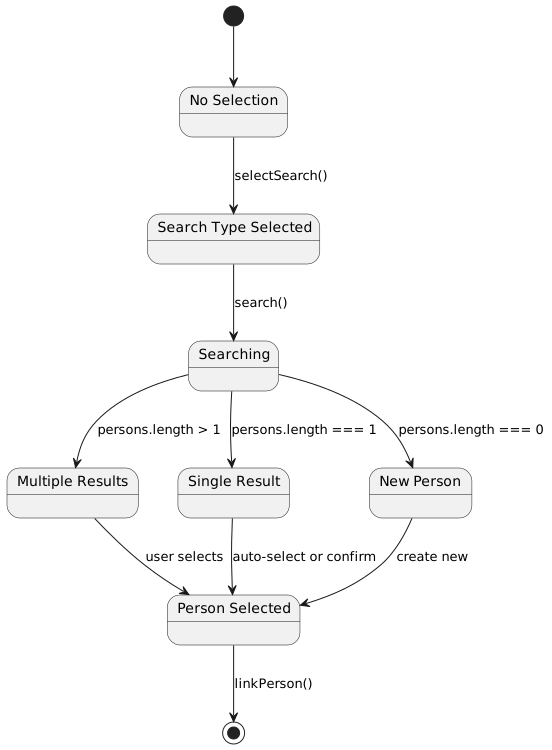
4. Person Identity Component
4.1. Identity Form
The identity component captures and validates person identity information:
Component: Identity (implements ControlValueAccessor and Validator)
@Component({
  selector: 'identity',
  standalone: true,
  providers: [
    { provide: NG_VALUE_ACCESSOR, multi: true, useExisting: Identity },
    { provide: NG_VALIDATORS, multi: true, useExisting: Identity }
  ]
})
export class Identity implements ControlValueAccessor, Validator {
  editForm!: FormGroup;

  initializeForm(): void {
    this.editForm = this.fb.group({
      identityType: ['', Validators.required],
      identityNumber: ['', IDNumberService.validateIdentityNumber],
      identityCountry: ['', Validators.required],
      dateOfBirth: ['', Validators.required],
      gender: ['', Validators.required],
    });
  }
}
4.2. South African ID Number Validation
ID Number Format:
-
13 digits:
YYMMDD SSSS C A Z -
YYMMDD- Date of birth (year, month, day) -
SSSS- Sequence number (0000-4999 = female, 5000-9999 = male) -
C- Citizenship (0 = SA citizen, 1 = permanent resident) -
A- Unused (always 8 before 1986, after 1986 race was removed) -
Z- Checksum digit
Validation Service:
export class IDNumberService {
  static validate(idNumber: string): boolean {
    if (!idNumber || idNumber.length !== 13) {
      return false;
    }

    // Validate date components
    const year = parseInt(idNumber.substring(0, 2), 10);
    const month = parseInt(idNumber.substring(2, 4), 10);
    const day = parseInt(idNumber.substring(4, 6), 10);

    if (month < 1 || month > 12) return false;
    if (day < 1 || day > 31) return false;

    // Validate checksum using Luhn algorithm
    return this.validateChecksum(idNumber);
  }

  static extract(idNumber: string): IIDNumberDetails {
    const year = parseInt(idNumber.substring(0, 2), 10);
    const month = parseInt(idNumber.substring(2, 4), 10) - 1;
    const day = parseInt(idNumber.substring(4, 6), 10);
    const sequence = parseInt(idNumber.substring(6, 10), 10);

    const currentYear = new Date().getFullYear();
    const century = year > (currentYear % 100) ? 1900 : 2000;
    const fullYear = century + year;

    const birthDate = new Date(fullYear, month, day);
    const male = sequence >= 5000;

    return {
      idNumber,
      birthDate,
      male,
      valid: true
    };
  }
}
4.3. Field Locking
When searching by ID number, identity fields are locked to prevent modification:
setIdentityControlState(value: IdentityType): void {
  const identityNumberControl = this.getIdentityNumberControl();
  const identityTypeControl = this.getIdentityTypeControl();
  const dobControl = this.getDOBControl();
  const genderControl = this.getGenderControl();
  const countryControl = this.getCountryControl();

  if (value === IdentityType.NATIONAL &&
      this.searchType === SearchType.IDNUMBER &&
      identityNumberControl.value) {
    // For SA ID Number - lock all derived fields
    genderControl.disable();
    identityNumberControl.disable();
    identityTypeControl.disable();
    countryControl.setValue(this.ZA);
    countryControl.disable();

    const idDetails = this.getIDNumberDetails();
    if (idDetails.valid) {
      dobControl.disable();
      this.updateGenderDOBControls();
    } else {
      dobControl.enable();
    }
  } else {
    // For other types, enable manual input
    dobControl.enable();
    genderControl.enable();
    identityNumberControl.enable();
    countryControl.enable();
    identityTypeControl.enable();
  }
}
Field Lock Table:
| Search Type | ID Number | DOB | Gender |
|---|---|---|---|
ID Number (valid) |
🔒 Locked |
🔒 Locked |
🔒 Locked |
ID Number (invalid) |
🔒 Locked |
✅ Editable |
✅ Editable |
Date of Birth |
✅ Editable |
✅ Editable |
✅ Editable |
Membership Number |
✅ Editable |
✅ Editable |
✅ Editable |
5. Create/Edit Person Form
5.1. Identity Type Field Locking
Based on the search method used, certain identity fields are automatically locked to prevent data inconsistency:
Field Locking Rules:
| Scenario | Identity Type | ID Number | Date of Birth | Gender | Country |
|---|---|---|---|---|---|
SA ID Number (valid format) |
🔒 Locked to NATIONAL |
🔒 Locked |
🔒 Auto-populated, locked |
🔒 Auto-extracted, locked |
🔒 Locked to ZA |
SA ID Number (invalid format) |
🔒 Locked to NATIONAL |
🔒 Locked |
✅ Editable |
✅ Editable |
🔒 Locked to ZA |
Date of Birth search |
✅ Editable |
✅ Editable |
🔒 Pre-filled from search |
✅ Editable |
✅ Editable |
Membership Number search |
🔒 Based on existing record |
🔒 Based on existing record |
🔒 Based on existing record |
🔒 Based on existing record |
🔒 Based on existing record |
Creating new person (no search) |
✅ Editable |
✅ Editable |
✅ Editable |
✅ Editable |
✅ Editable |
South African ID Number Auto-Extraction:
When a valid 13-digit SA ID number is entered:
-
Date of Birth Extraction - Digits 1-6 encode YYMMDD
-
900515→ 1990-05-15 or 2090-05-15 (century determined by proximity to current date)
-
-
Gender Extraction - Digits 7-10 encode gender sequence
-
0000-4999→ Female -
5000-9999→ Male
-
-
Field Locking - Extracted values become read-only
-
Identity Type locked to "South African ID"
-
Country locked to "ZA"
-
Date of Birth locked to extracted value
-
Gender locked to extracted value
-
Example:
ID Number: 9005150123089
  ↓
Date of Birth: 1990-05-15 (digits 1-6: 900515)
Gender: Male (digit 7-10: 0123 < 5000)
Identity Type: South African ID (locked)
Country: ZA (locked)
Field Locking Implementation:
// In Identity component
if (this.identity.identityType === 'NATIONAL' &&
    this.isValidSAIDNumber(this.identity.identityNumber)) {
  // Lock all ID-derived fields
  this.identityForm.get('identityType')?.disable();
  this.identityForm.get('identityNumber')?.disable();
  this.identityForm.get('dateOfBirth')?.disable();
  this.identityForm.get('gender')?.disable();
  this.identityForm.get('identityCountry')?.disable();
}
5.2. Form Structure
When creating or editing a person, the form combines identity fields with contact information:
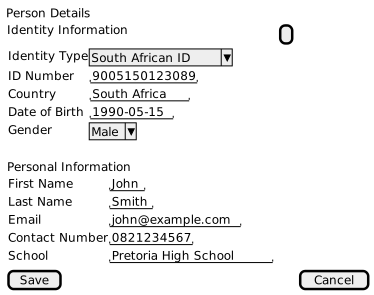
5.3. Form Validation
private initializeForm(): void {
  this.editForm = this.fb.group({
    id: ['', [Validators.required]],
    firstName: ['', [
      ...this.nameValidators,
      this.restrictedNameValidator('anonymous')
    ]],
    lastName: ['', [
      ...this.nameValidators,
      this.restrictedNameValidator('user')
    ]],
    email: ['', [Validators.email, Validators.maxLength(254)]],
    contactNumber: [''],
    identity: [null, [Validators.required]],
    school: [null],
  });
}

nameValidators = [
  Validators.required,
  Validators.minLength(2),
  Validators.maxLength(50),
  this.noSpecialCharactersValidator()
];

restrictedNameValidator(restrictedName: string) {
  return (control: FormControl): { [key: string]: boolean } | null => {
    return control.value?.toLowerCase() === restrictedName
      ? { restrictedName: true }
      : null;
  };
}

noSpecialCharactersValidator() {
  return (control: FormControl): { [key: string]: boolean } | null => {
    return control.value?.includes('*')
      ? { specialCharacters: true }
      : null;
  };
}
Validation Rules:
| Field | Rules | Error Messages |
|---|---|---|
First Name |
Required, 2-50 chars, no asterisks, not "anonymous" |
required, minlength, specialCharacters, restrictedName |
Last Name |
Required, 2-50 chars, no asterisks, not "user" |
required, minlength, specialCharacters, restrictedName |
Valid email format, max 254 chars |
email, maxlength |
|
Contact Number |
Optional |
- |
Identity |
Required, must pass identity validation |
required, identity validation errors |
School |
Optional |
- |
5.4. Create vs Update
Create Person:
createPerson(person: IPerson, userKey: string): Observable<IPerson> {
  return this.http.post<IPerson>(
    `${this.peopleUrl}?userKey=${userKey}`,
    person
  ).pipe(map(response => response));
}
Update Person:
updatePerson(person: IPerson, userKey: string): Observable<IPerson> {
  return this.personResourceService
    .updatePerson(person.id ?? 0, person as any, 8, userKey, 'response')
    .pipe(mergeMap(response => this.blobUtils.parseBlob<IPerson>(response)));
}
6. Linking Persons
6.1. Link Operation
After selecting or creating a person, they must be linked to the principal:
linkPerson(id: number, type: string, userKey: string): Observable<ILinkedPerson> {
  return this.http.post<ILinkedPerson>(
    `${this.linkEdPersonUrl}/${id}/${type}?userKey=${userKey}&organisationId=8`,
    { observe: 'response' }
  );
}
API Endpoint: POST /api/linked-people/link/{personId}/{type}
Parameters:
-
personId- ID of person to link -
type- Relationship type (GENERAL, FAMILY, FRIEND, etc.) -
userKey- Security context for current user -
organisationId- Organization context
6.2. LinkedPerson Types
export enum LinkedPersonType {
  GENERAL = 'GENERAL',
  FAMILY = 'FAMILY',
  FRIEND = 'FRIEND',
  CLUB_MEMBER = 'CLUB_MEMBER',
  TEAM_MEMBER = 'TEAM_MEMBER',
  COLLEAGUE = 'COLLEAGUE',
  OTHER = 'OTHER'
}
Usage Examples:
-
Membership Registration - Parent links children as FAMILY type
-
Event Registration - Friends register together as FRIEND type
-
Club Management - Members linked as CLUB_MEMBER type
-
Team Events - Athletes linked as TEAM_MEMBER type
7. UI Components

7.2. Routing
Routes:
export const linkedPersonRoute: Routes = [
  {
    path: 'search',
    component: LinkedPersonSearchComponent,
    canActivate: [UserRouteAccessService],
  },
  {
    path: 'select-add',
    component: LinkedPersonSelectAddComponent,
    canActivate: [UserRouteAccessService],
  },
];
Navigation Flow:
/linked-person/search → (search) → /linked-person/select-add → (link) → /membership/register7.3. Component Files
Search Component:
-
src/main/webapp/app/entities/linked-person/search/search.ts -
src/main/webapp/app/entities/linked-person/search/search.html
Select/Add Component:
-
src/main/webapp/app/entities/linked-person/select-add/select-add.ts -
src/main/webapp/app/entities/linked-person/select-add/select-add.html
Identity Component:
-
src/main/webapp/app/entities/linked-person/identity/identity.ts -
src/main/webapp/app/entities/linked-person/identity/identity.html
Services:
-
src/main/webapp/app/core/services/linked-person-state.service.ts -
src/main/webapp/app/core/services/people.service.ts -
src/main/webapp/app/entities/admin-service/person/service/person.service.ts
8. Integration with Membership Registration
LinkedPerson management integrates with membership registration workflows:
-
User selects membership type → Navigates to
/membership/register -
User adds family members → Navigates to
/linked-person/search -
User searches/creates persons → Workflow managed by LinkedPersonStateService
-
Persons are linked → Returns to
/membership/register -
Membership created with linked persons
See Membership Registration for full workflow details.
9. Integration with Event Registration
LinkedPerson management also supports event registration:
-
User selects event → Navigates to
/registration/event -
User adds participants → Navigates to
/linked-person/search -
User searches/creates persons → Same workflow as membership
-
Persons are linked → Returns to
/registration/event -
Event participants created for linked persons
See Event Registration for full workflow details.
10. Security Considerations
10.1. User Key Context
All LinkedPerson operations require a userKey parameter for security:
userKey$ = this.sessionService.getUserKey$();

this.userKey$.subscribe(userKey => {
  if (userKey) {
    this.userKey = userKey;
  }
});
User Key Usage:
-
Create Person:
POST /api/people?userKey={key} -
Update Person:
PUT /api/people/{id}?userKey={key} -
Link Person:
POST /api/linked-people/link/{id}/{type}?userKey={key}
10.2. Organisation Scoping
LinkedPerson operations are scoped to the current organisation:
linkPerson(id: number, type: string, userKey: string): Observable<ILinkedPerson> {
  return this.http.post<ILinkedPerson>(
    `${this.linkEdPersonUrl}/${id}/${type}?userKey=${userKey}&organisationId=8`,
    { observe: 'response' }
  );
}
Organisation ID:
-
Currently hardcoded to
organisationId=8in the frontend -
Should be derived from user session context
-
Ensures person links are scoped to correct organization
See Security for multi-dimensional security details.
11. Best Practices
11.1. Search Before Create
Always search before creating:
-
Prevents duplicate person records
-
Maintains data integrity
-
Improves user experience (finds existing records)
11.2. ID Number Validation
For South African users:
-
Use ID number search as primary method
-
Validates ID format and checksum
-
Auto-extracts DOB and gender
-
Locks fields to prevent data corruption