Process Flow Integration
1. Overview
The Registration Portal integrates with the Process entity system to provide flexible, multi-step workflows for membership registration. The process engine enables dynamic question sequences, conditional branching, and state management for complex registration scenarios.
Key Integration Points:
-
Membership Registration - Process-driven question workflow
-
Event Registration - Currently direct registration (no process used)
-
Future Extensions - Any multi-step workflow can leverage process system
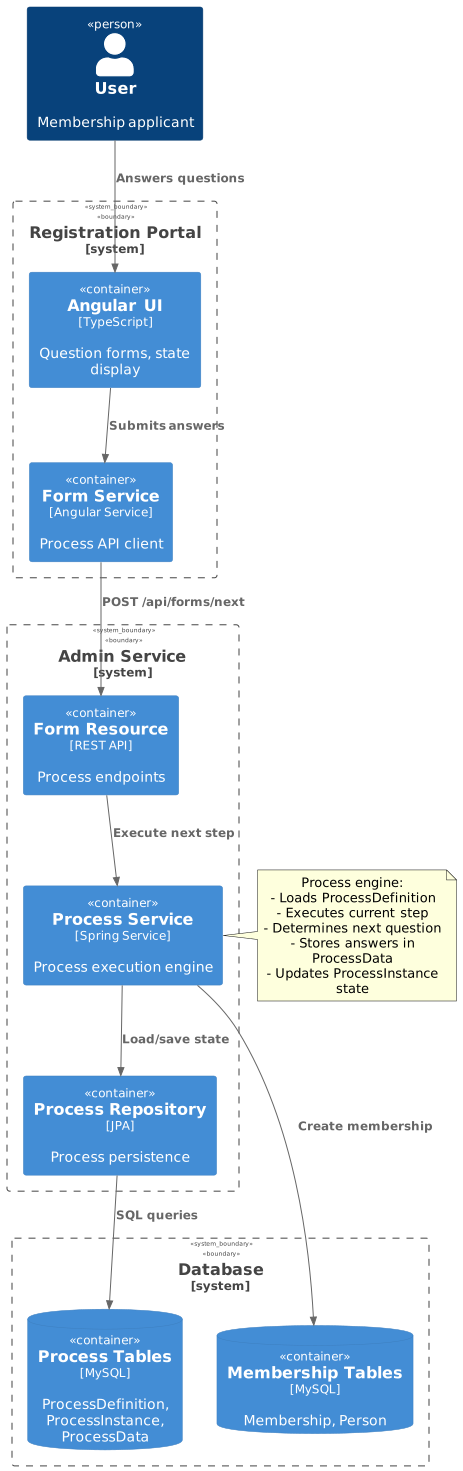
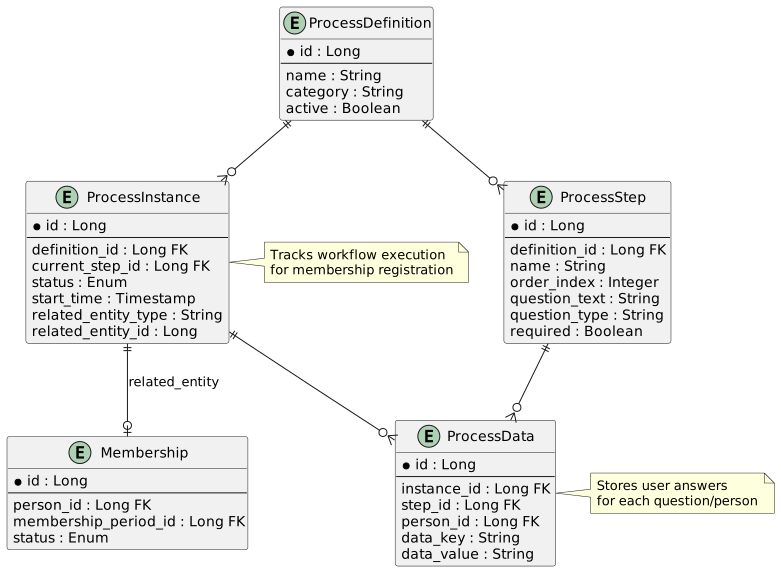
3. Form DTO
3.1. FormDTO Structure
The FormDTO is the primary data transfer object for process workflows:
export interface FormDTO {
  processId: string;
  step: number;
  processState: ProcessInstanceDTO.StatusEnum;
  question?: string;
  questionType?: string;
  required?: boolean;
  options?: string[];
  people?: Set<FormPersonDTO>;
  paymentUrl?: string;
}

export interface FormPersonDTO {
  id?: number;
  firstName?: string;
  lastName?: string;
  dateOfBirth?: string;
  answer?: string;
  hide?: boolean;
  selected?: boolean;
  canSelect?: boolean;
  status?: string;
  paymentUrl?: string;
}
FormDTO Properties:
| Property | Type | Description |
|---|---|---|
|
string |
Unique process instance identifier |
|
number |
Current step number (1-indexed) |
|
enum |
NONE, RUNNING, RESUME, DONE, etc. |
|
string |
Question text for current step |
|
string |
TXT, NUM, BCB, ITC, ONE, etc. |
|
boolean |
Whether answer is mandatory |
|
string[] |
Options for dropdown/radio questions |
|
Set<FormPersonDTO> |
People selected for registration |
|
string |
Payment gateway URL (when complete) |
3.2. Process States

Status Enum:
export enum ProcessState {
  NONE = 'NONE',           // No process started
  RUNNING = 'RUNNING',     // Process executing
  RESUME = 'RESUME',       // Resuming from suspended
  SUSPENDED = 'SUSPENDED', // Paused (browser closed)
  DONE = 'DONE',          // Questions complete
  PENDING_PAYMENT = 'PENDING_PAYMENT',
  COMPLETED = 'COMPLETED', // Fully complete
  CANCELLED = 'CANCELLED', // User cancelled
  FAILED = 'FAILED'        // Error occurred
}
4. Process Lifecycle
4.1. Initialization
1. User Accesses Membership Registration
URL: /membership/register/42?u=abc123&h=5d41402a…
2. Load Membership Form State
this.formService.getFormMembership(this.membershipPeriodId, this.userKey)
  .subscribe(formState => {
    this.formDTO = formState;
    this.linkedPersons = Array.from(formState.people || []);
    this.processId = formState.processId;

    if (formState.processState === ProcessInstanceDTO.StatusEnum.Running ||
        formState.processState === ProcessInstanceDTO.StatusEnum.Resume) {
      this.showProcessDialog(); // Ask to resume or start fresh
    }
  });
API Endpoint: GET /api/forms/membership/{periodId}?userKey={key}
Initial Response (No Process):
{
  "processId": "proc-12345",
  "step": 0,
  "processState": "NONE",
  "people": [
    {
      "id": 1,
      "firstName": "John",
      "lastName": "Smith",
      "selected": false,
      "canSelect": true,
      "status": "Available"
    },
    {
      "id": 3,
      "firstName": "Billy",
      "lastName": "Smith",
      "selected": false,
      "canSelect": true,
      "status": "Available"
    }
  ]
}
4.2. Person Selection
User Selects Persons:
User checks boxes for John and Billy Smith, then clicks "Register".
Submit Selection:
this.formService.next({
  processId: this.processId,
  step: this.formDTO.step,
  people: [
    { id: 1 },
    { id: 3 }
  ]
}).subscribe(response => {
  this.formDTO = response;
  this.showQuestionBox = true;
});
API Endpoint: POST /api/forms/next
Request:
{
  "processId": "proc-12345",
  "step": 0,
  "people": [
    { "id": 1 },
    { "id": 3 }
  ]
}
Response (First Question):
{
  "processId": "proc-12345",
  "step": 1,
  "processState": "RUNNING",
  "question": "Does anyone have any medical conditions?",
  "questionType": "BCB",
  "required": true,
  "people": [
    {
      "id": 1,
      "firstName": "John",
      "lastName": "Smith",
      "answer": null,
      "hide": false
    },
    {
      "id": 3,
      "firstName": "Billy",
      "lastName": "Smith",
      "answer": null,
      "hide": false
    }
  ]
}
4.3. Question Workflow
Backend Process Flow:
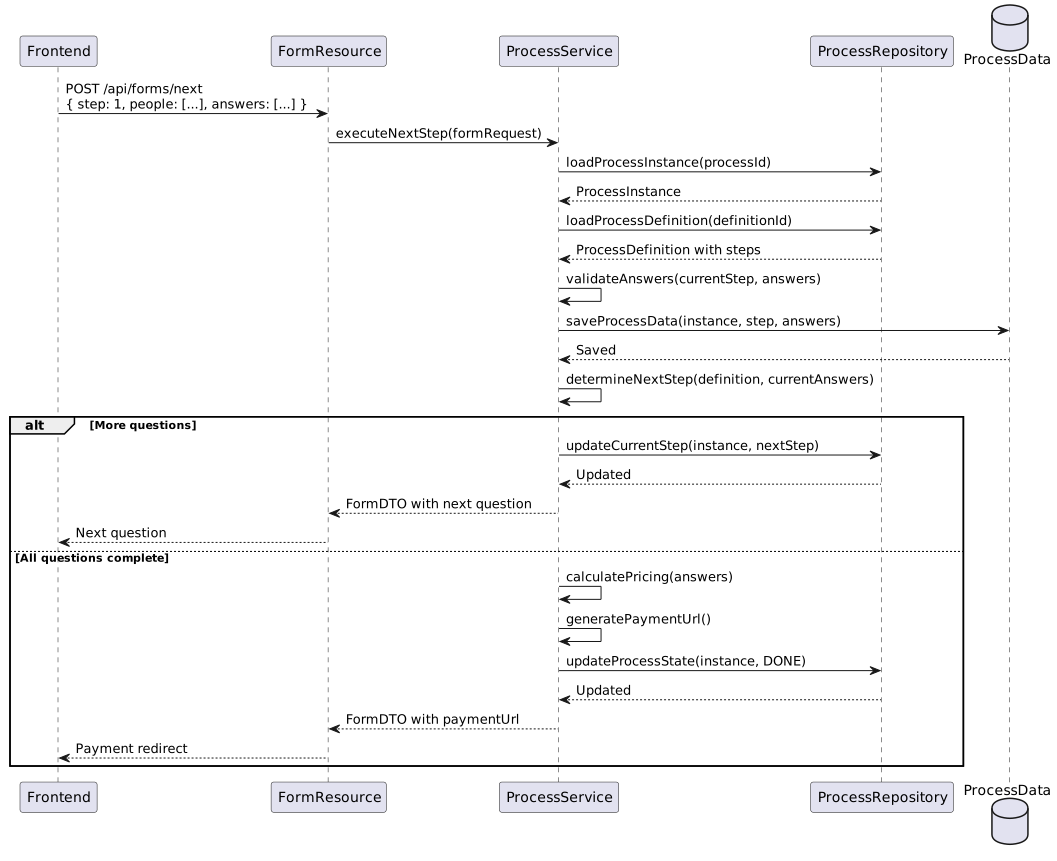
Sequential Question Answering:
// Question 1: Medical conditions
next({
  processId: "proc-12345",
  step: 1,
  people: [
    { id: 1, answer: "0" },  // John: No
    { id: 3, answer: "1" }   // Billy: Yes
  ]
})

// Question 2: Emergency contact (shown because step 1 answered)
next({
  processId: "proc-12345",
  step: 2,
  people: [
    { id: 1, answer: "0821234567" },
    { id: 3, answer: "0821234567" }
  ]
})

// Question 3: Terms and conditions
next({
  processId: "proc-12345",
  step: 3,
  people: [
    { id: 1, answer: "1" },  // Accepted
    { id: 3, answer: "1" }   // Accepted
  ]
})
4.4. Completion
Final Response:
{
  "processId": "proc-12345",
  "step": 3,
  "processState": "DONE",
  "people": [
    {
      "id": 1,
      "firstName": "John",
      "lastName": "Smith",
      "status": "Pending Payment",
      "paymentUrl": null
    },
    {
      "id": 3,
      "firstName": "Billy",
      "lastName": "Smith",
      "status": "Pending Payment",
      "paymentUrl": null
    }
  ],
  "paymentUrl": "https://payment.gateway.com/pay?reference=ORD-892&amount=800.00"
}
Frontend Payment Redirect:
if (this.questionData.paymentUrl) {
  this.messageService.add({
    severity: 'info',
    summary: 'Payment Portal',
    detail: 'Redirecting to payment portal...',
    life: 5000
  });

  setTimeout(() => {
    window.location.href = this.questionData.paymentUrl;
  }, 5000);
}
5. Process Actions
5.1. Reset Process
User Action: User clicks "Start Fresh" when prompted to resume.
Frontend:
this.formService.reset(this.formDTO.processId)
  .subscribe(_formDTO => {
    if (_formDTO.processState === ProcessInstanceDTO.StatusEnum.Running) {
      this.updateFormWithData(_formDTO);
    }
  });
API Endpoint: POST /api/forms/processes/{processId}/reset
Backend Operations:
-
Load ProcessInstance
-
Delete all ProcessData for instance
-
Reset current_step to first step
-
Set status to RUNNING
-
Clear related Membership records (if any)
-
Return initial FormDTO
5.2. Resume Process
User Action: User clicks "Resume" when prompted.
Frontend:
this.formService.resume(this.formDTO.processId)
  .subscribe(_formDTO => {
    if (_formDTO.processState === ProcessInstanceDTO.StatusEnum.Running) {
      this.updateFormWithData(_formDTO);
      this.showQuestionBox = true; // Jump to questions
    }
  });
API Endpoint: POST /api/forms/processes/{processId}/resume
Backend Operations:
-
Load ProcessInstance
-
Load ProcessData for current step
-
Reconstruct FormDTO with saved answers
-
Set status to RUNNING (from SUSPENDED)
-
Return FormDTO for current question
Resume Behavior:
-
Resumes from last completed step
-
Pre-populates previous answers
-
Allows back navigation through completed steps
-
Preserves person selection
6. Question Types
6.1. Text Input (TXT)
Example Question: "What is your emergency contact number?"
Question DTO:
{
  "question": "What is your emergency contact number?",
  "questionType": "TXT",
  "required": true,
  "people": [
    { "id": 1, "firstName": "John", "lastName": "Smith", "answer": null }
  ]
}
Answer Submission:
{
  "people": [
    { "id": 1, "answer": "0821234567" }
  ]
}
Validation:
-
Required: Answer must not be empty
-
Format: No specific format (free text)
6.2. Binary Checkbox (BCB)
Example Question: "Does anyone have any medical conditions?"
Question DTO:
{
  "question": "Does anyone have any medical conditions?",
  "questionType": "BCB",
  "required": false,
  "people": [
    { "id": 1, "firstName": "John", "lastName": "Smith", "answer": null },
    { "id": 3, "firstName": "Billy", "lastName": "Smith", "answer": null }
  ]
}
UI:
Does anyone have any medical conditions?

☐ John Smith
☐ Billy Smith
Answer Submission:
{
  "people": [
    { "id": 1, "answer": "0" },  // No (unchecked)
    { "id": 3, "answer": "1" }   // Yes (checked)
  ]
}
Answer Values:
-
"0"= No / Unchecked / False -
"1"= Yes / Checked / True
6.3. I Accept Terms (ITC)
Example Question: "I accept the terms and conditions of membership"
Question DTO:
{
  "question": "I accept the terms and conditions of membership",
  "questionType": "ITC",
  "required": true,
  "people": [
    { "id": 1, "firstName": "John", "lastName": "Smith", "answer": null },
    { "id": 3, "firstName": "Billy", "lastName": "Smith", "answer": null }
  ]
}
UI Features:
-
Master checkbox: "Accept for all members"
-
Individual checkboxes per person
-
All must accept if required
Validation:
isValid(): boolean {
  if (this.questionData.questionType === 'ITC') {
    // All people must have answer '1' (accepted)
    return this.people.every(person => person.answer === '1');
  }
  return true;
}
6.4. Select One (ONE)
Example Question: "Who will be the primary contact person?"
Question DTO:
{
  "question": "Who will be the primary contact person?",
  "questionType": "ONE",
  "required": true,
  "people": [
    { "id": 1, "firstName": "John", "lastName": "Smith", "answer": null },
    { "id": 3, "firstName": "Billy", "lastName": "Smith", "answer": null }
  ]
}
UI:
Who will be the primary contact person?

(○) John Smith
(○) Billy Smith
Answer Submission:
{
  "people": [
    { "id": 1, "answer": "1" },  // Selected
    { "id": 3, "answer": "0" }   // Not selected
  ]
}
Validation:
if (this.questionData.questionType === 'ONE') {
  // Exactly one person should have answer '1'
  return this.people.some(p => p.answer === '1');
}
6.5. Dropdown (DRP)
Example Question: "What is your T-shirt size?"
Question DTO:
{
  "question": "What is your T-shirt size?",
  "questionType": "DRP",
  "required": true,
  "options": ["XS", "S", "M", "L", "XL", "XXL"],
  "people": [
    { "id": 1, "firstName": "John", "lastName": "Smith", "answer": null },
    { "id": 3, "firstName": "Billy", "lastName": "Smith", "answer": null }
  ]
}
Answer Submission:
{
  "people": [
    { "id": 1, "answer": "L" },
    { "id": 3, "answer": "M" }
  ]
}
7. Process Data Storage
7.1. Database Schema
ProcessInstance Table:
| Column | Type | Description |
|---|---|---|
id |
BIGINT |
Primary key |
definition_id |
BIGINT |
FK to ProcessDefinition |
current_step_id |
BIGINT |
FK to ProcessStep |
status |
VARCHAR |
NONE, RUNNING, DONE, etc. |
start_time |
TIMESTAMP |
When process started |
end_time |
TIMESTAMP |
When process completed |
related_entity_type |
VARCHAR |
"MEMBERSHIP", "EVENT", etc. |
related_entity_id |
BIGINT |
FK to Membership, Event, etc. |
user_key |
VARCHAR |
Security context |
ProcessData Table:
| Column | Type | Description |
|---|---|---|
id |
BIGINT |
Primary key |
instance_id |
BIGINT |
FK to ProcessInstance |
step_id |
BIGINT |
FK to ProcessStep |
person_id |
BIGINT |
FK to Person (nullable) |
data_key |
VARCHAR |
"answer", "selected", etc. |
data_value |
TEXT |
JSON or string value |
created_at |
TIMESTAMP |
When data was saved |
7.2. Data Storage Example
After Question 1 (Medical conditions):
INSERT INTO process_data (instance_id, step_id, person_id, data_key, data_value)
VALUES
  (12345, 1, 1, 'answer', '0'),
  (12345, 1, 3, 'answer', '1');
After Question 2 (Emergency contact):
INSERT INTO process_data (instance_id, step_id, person_id, data_key, data_value)
VALUES
  (12345, 2, 1, 'answer', '0821234567'),
  (12345, 2, 3, 'answer', '0821234567');
Query All Answers:
SELECT
  ps.name AS step_name,
  ps.question_text,
  p.first_name || ' ' || p.last_name AS person_name,
  pd.data_value AS answer
FROM process_data pd
JOIN process_step ps ON pd.step_id = ps.id
JOIN person p ON pd.person_id = p.id
WHERE pd.instance_id = 12345
ORDER BY ps.order_index, p.id;
Result:
step_name              | question_text                        | person_name  | answer
-----------------------|--------------------------------------|--------------|------------
Medical Condition      | Does anyone have medical conditions? | John Smith   | 0
Medical Condition      | Does anyone have medical conditions? | Billy Smith  | 1
Emergency Contact      | Emergency contact number?            | John Smith   | 0821234567
Emergency Contact      | Emergency contact number?            | Billy Smith  | 0821234567
8. Process Definition Structure
8.1. Membership Application Process
ProcessDefinition:
{
  "id": 42,
  "name": "Standard Membership Application",
  "category": "MEMBERSHIP",
  "version": 1,
  "active": true,
  "organisationId": 8
}
ProcessSteps:
[
  {
    "id": 1,
    "definitionId": 42,
    "orderIndex": 1,
    "name": "Medical Conditions",
    "questionText": "Does anyone have any medical conditions?",
    "questionType": "BCB",
    "required": false
  },
  {
    "id": 2,
    "definitionId": 42,
    "orderIndex": 2,
    "name": "Emergency Contact",
    "questionText": "What is your emergency contact number?",
    "questionType": "TXT",
    "required": true
  },
  {
    "id": 3,
    "definitionId": 42,
    "orderIndex": 3,
    "name": "Primary Contact",
    "questionText": "Who will be the primary contact person?",
    "questionType": "ONE",
    "required": true
  },
  {
    "id": 4,
    "definitionId": 42,
    "orderIndex": 4,
    "name": "Terms and Conditions",
    "questionText": "I accept the terms and conditions of membership",
    "questionType": "ITC",
    "required": true
  }
]
8.2. Conditional Steps
Future Enhancement: Process engine can support conditional branching:
Step 1: "Does anyone have medical conditions?"
  Answer = "0" (No) → Skip to Step 3
  Answer = "1" (Yes) → Continue to Step 2

Step 2: "Please describe medical conditions"
  Type: TXT
  Required: true

Step 3: "Emergency contact number"
  ...
Implementation:
-
ProcessStepOption entities define branches
-
Backend evaluates conditions based on answers
-
FormDTO returns appropriate next step
9. Form Service API
9.1. Service Interface
@Injectable({ providedIn: 'root' })
export class FormService {
  /**
   * Get initial form state for membership
   */
  getFormMembership(membershipPeriodId: number, userKey: string):
    Observable<FormDTO>

  /**
   * Submit current step and get next
   */
  next(data: { processId: string, step: number, people: any[] }):
    Observable<FormDTO>

  /**
   * Reset process to beginning
   */
  reset(processId: string): Observable<FormDTO>

  /**
   * Resume suspended process
   */
  resume(processId: string): Observable<FormDTO>
}
9.2. REST Endpoints
| Method | Endpoint | Purpose | Response |
|---|---|---|---|
GET |
|
Get initial form state |
FormDTO with people, processId |
POST |
|
Submit step, get next |
FormDTO with next question or completion |
POST |
|
Reset to start |
FormDTO with initial state |
POST |
|
Resume from suspension |
FormDTO with current question |
9.3. Detailed API Examples
9.3.1. GET /api/forms/membership/{periodId}
Purpose: Initialize a membership registration workflow
URL Parameters:
-
periodId- MembershipPeriod ID (e.g.,42) -
userKey- User security token (query param) -
organisationId- Organization ID (query param)
Example Request:
GET /api/forms/membership/42?userKey=abc123xyz&organisationId=8
Accept: application/json
Example Response - New Process:
{
  "processId": "proc-12345-67890",
  "step": 0,
  "processState": "INIT",
  "question": null,
  "questionType": null,
  "people": [
    {
      "id": 1,
      "firstName": "Sarah",
      "lastName": "Smith",
      "dateOfBirth": "1985-03-15",
      "selected": false,
      "canSelect": true,
      "status": "Available"
    },
    {
      "id": 3,
      "firstName": "Billy",
      "lastName": "Smith",
      "dateOfBirth": "2010-11-03",
      "selected": false,
      "canSelect": true,
      "status": "Available"
    },
    {
      "id": 5,
      "firstName": "Emma",
      "lastName": "Smith",
      "dateOfBirth": "2013-07-20",
      "selected": false,
      "canSelect": false,
      "status": "Already Registered"
    }
  ],
  "paymentUrl": null
}
Example Response - Existing Process (Suspended):
{
  "processId": "proc-12345-67890",
  "step": 2,
  "processState": "SUSPENDED",
  "question": "What is your emergency contact number?",
  "questionType": "TXT",
  "people": [
    {
      "id": 1,
      "firstName": "Sarah",
      "lastName": "Smith",
      "selected": true,
      "answer": "0821234567"
    },
    {
      "id": 3,
      "firstName": "Billy",
      "lastName": "Smith",
      "selected": true,
      "answer": ""
    }
  ],
  "paymentUrl": null
}
9.3.2. POST /api/forms/next
Purpose: Submit current step answers and retrieve next question
Request Body:
{
  "processId": "proc-12345-67890",
  "step": 0,
  "people": [
    {
      "id": 1,
      "selected": true
    },
    {
      "id": 3,
      "selected": true
    }
  ]
}
Response - First Question:
{
  "processId": "proc-12345-67890",
  "step": 1,
  "processState": "RUNNING",
  "question": "Does anyone have any medical conditions?",
  "questionType": "BCB",
  "required": false,
  "options": null,
  "people": [
    {
      "id": 1,
      "firstName": "Sarah",
      "lastName": "Smith",
      "answer": null,
      "hide": false
    },
    {
      "id": 3,
      "firstName": "Billy",
      "lastName": "Smith",
      "answer": null,
      "hide": false
    }
  ],
  "paymentUrl": null
}
Submitting Answer:
{
  "processId": "proc-12345-67890",
  "step": 1,
  "people": [
    {
      "id": 1,
      "answer": "0"
    },
    {
      "id": 3,
      "answer": "1"
    }
  ]
}
Response - Next Question:
{
  "processId": "proc-12345-67890",
  "step": 2,
  "processState": "RUNNING",
  "question": "What is your emergency contact number?",
  "questionType": "TXT",
  "required": true,
  "options": null,
  "people": [
    {
      "id": 1,
      "firstName": "Sarah",
      "lastName": "Smith",
      "answer": null,
      "hide": false
    },
    {
      "id": 3,
      "firstName": "Billy",
      "lastName": "Smith",
      "answer": null,
      "hide": false
    }
  ],
  "paymentUrl": null
}
Response - Last Question (Payment Required):
{
  "processId": "proc-12345-67890",
  "step": 5,
  "processState": "DONE",
  "question": null,
  "questionType": null,
  "required": null,
  "options": null,
  "people": [
    {
      "id": 1,
      "firstName": "Sarah",
      "lastName": "Smith",
      "paymentUrl": "https://payment.gateway.com/pay?ref=M2024-1523&amt=500.00"
    },
    {
      "id": 3,
      "firstName": "Billy",
      "lastName": "Smith",
      "paymentUrl": "https://payment.gateway.com/pay?ref=M2024-1524&amt=300.00"
    }
  ],
  "paymentUrl": "https://payment.gateway.com/pay?ref=ORDER-12345&amt=800.00"
}
9.3.3. POST /api/forms/processes/{processId}/reset
Purpose: Reset process to initial state, clear all answers
URL Parameters:
-
processId- Process instance ID
Example Request:
POST /api/forms/processes/proc-12345-67890/reset
Content-Type: application/json
Response:
{
  "processId": "proc-12345-67890",
  "step": 0,
  "processState": "INIT",
  "question": null,
  "questionType": null,
  "people": [
    {
      "id": 1,
      "firstName": "Sarah",
      "lastName": "Smith",
      "selected": false,
      "canSelect": true,
      "status": "Available"
    },
    {
      "id": 3,
      "firstName": "Billy",
      "lastName": "Smith",
      "selected": false,
      "canSelect": true,
      "status": "Available"
    }
  ],
  "paymentUrl": null
}
Backend Operations:
-
Load ProcessInstance by ID
-
Delete all ProcessData records for this instance
-
Reset
current_step_idto null -
Set status to INIT
-
Return fresh FormDTO with person selection
9.3.4. POST /api/forms/processes/{processId}/resume
Purpose: Resume a suspended process from current step
URL Parameters:
-
processId- Process instance ID
Example Request:
POST /api/forms/processes/proc-12345-67890/resume
Content-Type: application/json
Response:
{
  "processId": "proc-12345-67890",
  "step": 3,
  "processState": "RESUME",
  "question": "Who will be the primary contact person?",
  "questionType": "ONE",
  "required": true,
  "options": null,
  "people": [
    {
      "id": 1,
      "firstName": "Sarah",
      "lastName": "Smith",
      "answer": null,
      "hide": false
    },
    {
      "id": 3,
      "firstName": "Billy",
      "lastName": "Smith",
      "answer": null,
      "hide": false
    }
  ],
  "paymentUrl": null
}
Backend Operations:
-
Load ProcessInstance by ID
-
Load ProcessData for current step
-
Load previous step answers (steps 1-2 already completed)
-
Set status to RESUME
-
Return FormDTO with current question and people
9.4. HTTP Status Codes
| Code | Status | Meaning |
|---|---|---|
200 |
OK |
Request successful, FormDTO returned |
201 |
Created |
New ProcessInstance created |
400 |
Bad Request |
Invalid request body or parameters |
401 |
Unauthorized |
Missing or invalid userKey/authentication |
404 |
Not Found |
ProcessInstance or MembershipPeriod not found |
409 |
Conflict |
Process already completed or in invalid state |
422 |
Unprocessable Entity |
Validation errors in submitted answers |
500 |
Internal Server Error |
Server-side error during processing |
Error Response Format:
{
  "timestamp": "2024-01-31T10:15:30Z",
  "status": 422,
  "error": "Unprocessable Entity",
  "message": "Validation failed for question answers",
  "path": "/api/forms/next",
  "errors": [
    {
      "field": "people[0].answer",
      "message": "Emergency contact number is required"
    },
    {
      "field": "people[1].answer",
      "message": "Phone number must be 10 digits"
    }
  ]
}
10. Integration Scenarios
10.1. Scenario 1: New Membership Registration
-
User accesses
/membership/register/42?u=abc123&h=… -
System creates ProcessInstance in NONE state
-
User selects 2 family members
-
System transitions to RUNNING, loads first question
-
User answers 4 questions sequentially
-
System transitions to DONE, generates payment URL
-
User redirects to payment gateway
-
After payment, system transitions to COMPLETED
-
Membership records created for both persons
10.2. Scenario 2: Resume Registration
-
User accesses same URL 2 days later
-
System loads ProcessInstance in SUSPENDED state
-
System prompts: "Resume or Start Fresh?"
-
User clicks "Resume"
-
System loads step 3 of 4 (last completed: step 2)
-
User sees Question 3 with previous persons pre-selected
-
User completes Questions 3 and 4
-
Normal completion flow continues
11. Error Handling
11.1. Process Errors
Scenarios:
| Error | Cause | Recovery |
|---|---|---|
ProcessInstance not found |
Invalid processId |
Create new instance |
ProcessDefinition inactive |
Definition was deactivated |
Show error, link to support |
Step validation failed |
Invalid answer format |
Return validation errors |
Person not eligible |
Age/membership restrictions |
Show error, allow changes |
Payment generation failed |
Gateway unavailable |
Complete registration, email payment link later |
Error Response:
{
  "processId": "proc-12345",
  "step": 2,
  "processState": "ERROR",
  "message": "Invalid answer format for emergency contact",
  "errors": {
    "people": [
      {
        "id": 1,
        "error": "Phone number must be 10 digits"
      }
    ]
  }
}12. Performance Considerations
12.1. Caching
ProcessDefinition Caching:
-
Cache active definitions in memory
-
Cache ProcessSteps for each definition
-
Refresh cache on definition updates
ProcessInstance Optimization:
-
Load only current step data (not full history)
-
Use database indexes on instance_id, status
-
Archive completed instances after 90 days
12.2. Query Optimization
Efficient Queries:
-- Load current step with answer data
SELECT ps.*, pd.data_value
FROM process_step ps
LEFT JOIN process_data pd ON ps.id = pd.step_id
  AND pd.instance_id = ?
WHERE ps.id = (
  SELECT current_step_id FROM process_instance WHERE id = ?
);
Indexes:
-
process_instance(user_key, status) -
process_data(instance_id, step_id, person_id) -
process_step(definition_id, order_index)