Membership Registration
- 1. Overview
- 2. Membership Concepts
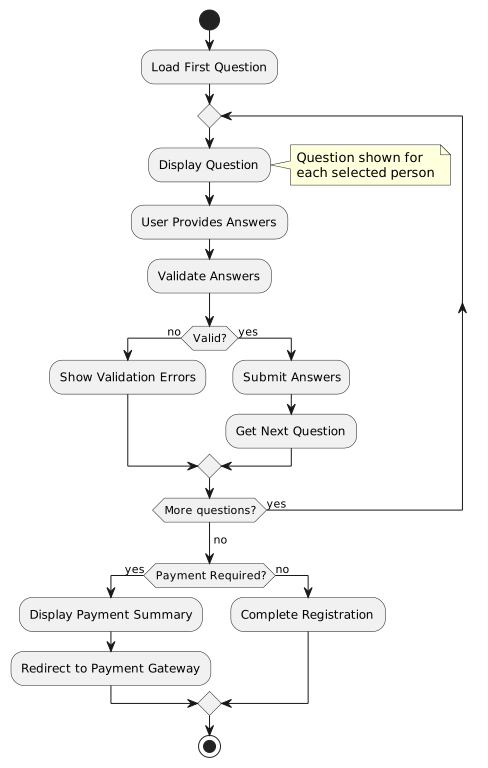
- 3. Registration Workflow
- 4. Person Selection Stage
- 5. Process-Driven Questions
- 6. Payment Integration
- 7. Process State Management
- 8. Session Management
- 9. Component Interactions
- 10. Error Handling
- 11. Integration with Process Entities
- 12. Best Practices
- 13. Related Documentation
1. Overview
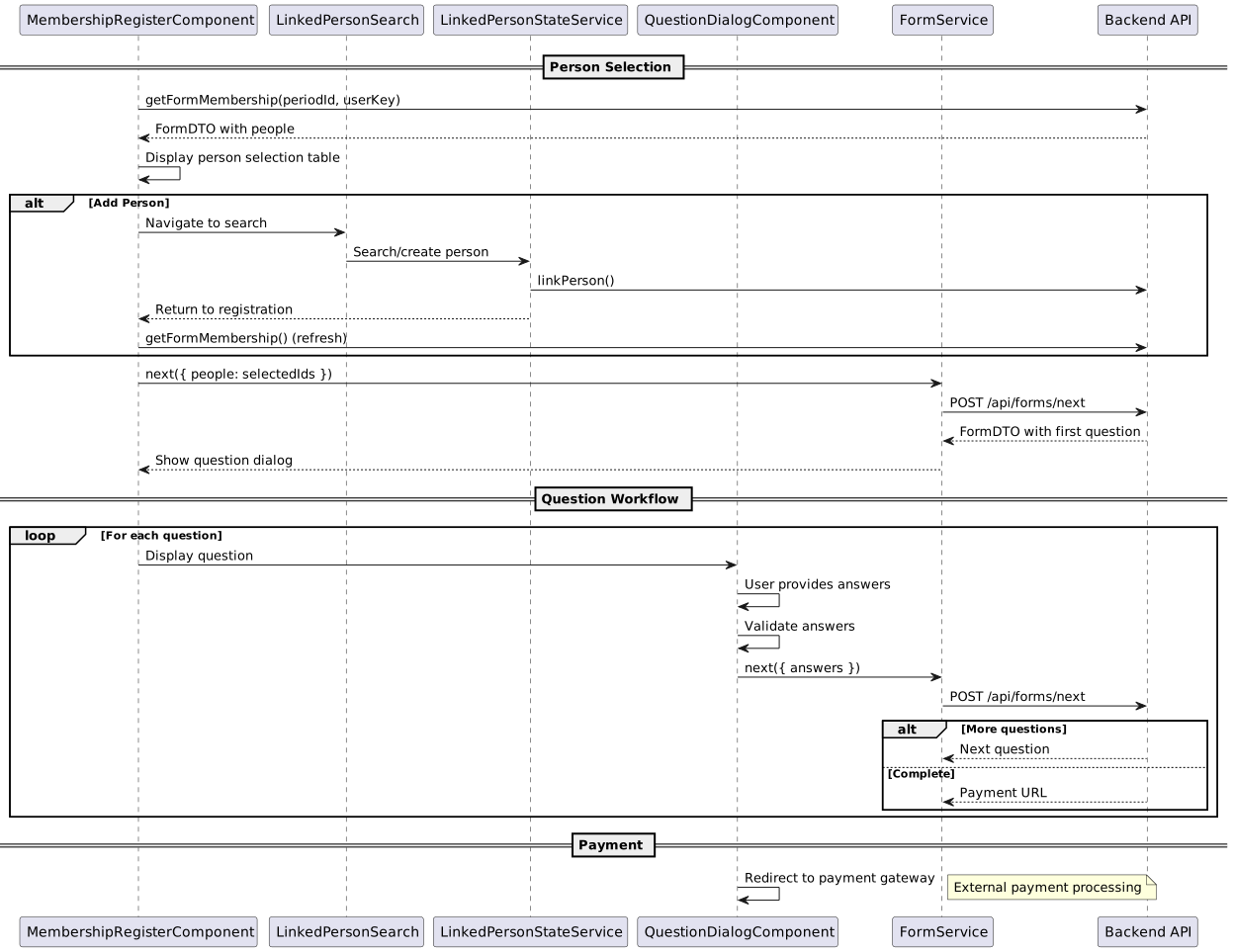
The Membership Registration workflow enables users to apply for membership in an organization. It supports various membership types with different pricing tiers, family memberships with multiple linked persons, and a process-driven question workflow that adapts based on user responses.
Key Features:
-
Multi-person Registration - Register multiple family members in single application
-
Process-Driven Workflow - Sequential question-based forms with back navigation
-
Dynamic Questions - Questions adapt based on membership type and previous answers
-
Payment Integration - External payment gateway integration
-
Resume Capability - Resume incomplete registrations from any step
2. Membership Concepts
2.1. Membership Entities
The membership system uses three key entity types:
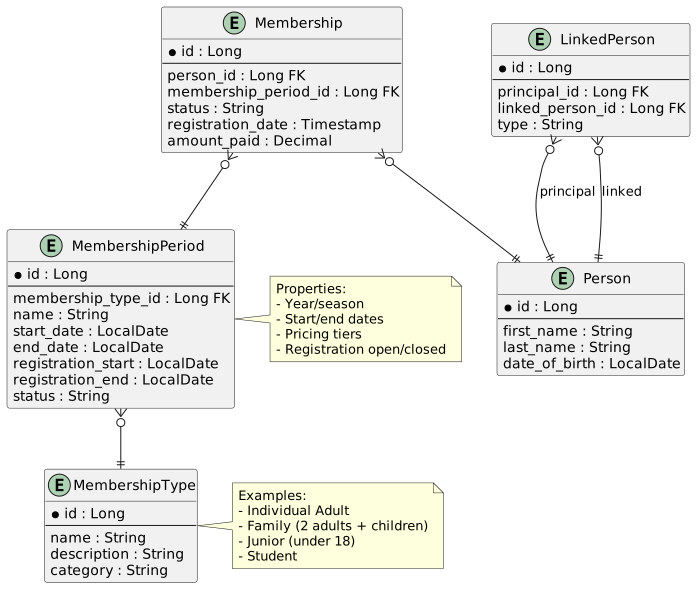
MembershipType
Defines the category of membership (Individual, Family, Junior, Student, etc.)
MembershipPeriod
Defines an active registration period for a specific membership type:
-
Year or season (e.g., "2024 Season")
-
Start and end dates for registration
-
Pricing information
-
Status (open/closed)
Membership
An individual membership instance:
-
Links a Person to a MembershipPeriod
-
Tracks registration status
-
Stores payment information
-
Records membership details
2.2. Pricing Tiers
Membership pricing varies based on multiple criteria:
| Criteria | Examples |
|---|---|
Number of Persons |
Single person vs. family of 4 |
Age Groups |
Adult (18+), Junior (under 18), Senior (65+) |
Registration Timing |
Early bird, standard, late registration |
Member Type |
New member, renewal, transfer |
Additional Options |
With insurance, with magazine subscription |
Example Pricing Structure:
-
Individual Adult: R500
-
Family (2 adults): R800
-
Family (2 adults + 2 children): R1000
-
Junior (under 18): R300
-
Student (with proof): R350
3. Registration Workflow
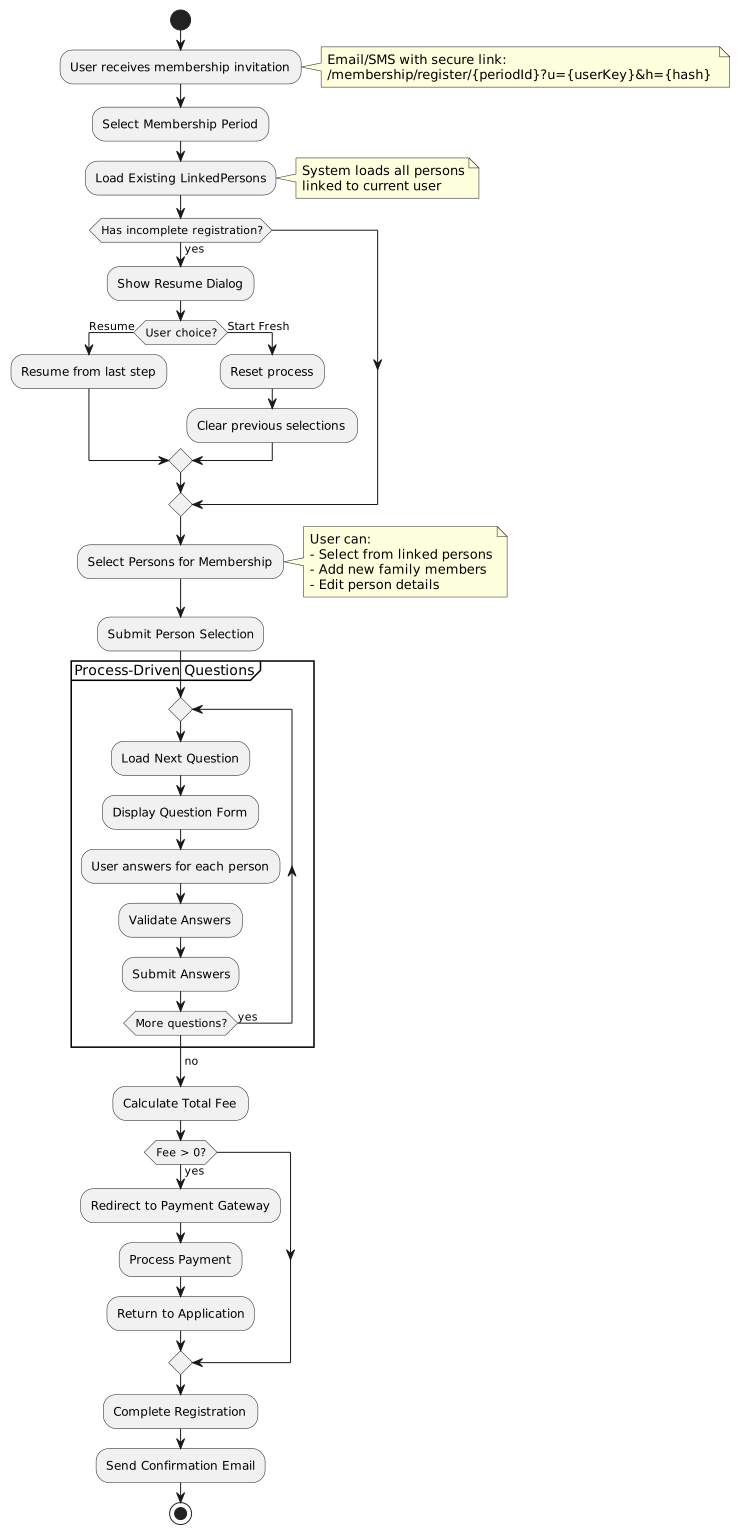
3.2. URL Parameters
Route Pattern:
/membership/register/:membershipPeriodIdQuery Parameters:
| Parameter | Description | Required | Example |
|---|---|---|---|
|
User key (security context) |
Yes |
|
|
Hash (MD5 of secret + userKey) |
Yes |
|
Example URL:
https://app.example.com/membership/register/42?u=abc123xyz&h=5d41402abc4b2a76b9719d911017c5923.3. Security Guard
Access to membership registration is protected by membershipGuard:
export const membershipGuard: CanActivateFn = (route: ActivatedRouteSnapshot) => {
  const router = inject(Router);
  const membershipPeriodId = route.paramMap.get('membershipPeriodId');
  const pathUserKey = route.paramMap.get('u');
  const queryUserKey = route.queryParamMap.get('u');
  const userKey = pathUserKey || queryUserKey;
  const providedHash = route.queryParamMap.get('h');
  const requiresHash = route.data['requiresHash'];

  // Both userKey and hash must be present
  if (!userKey || !providedHash) {
    router.navigate(['/membership/register', membershipPeriodId], {
      queryParams: { error: 'Missing security verification parameters' }
    });
    return false;
  }

  // Verify hash
  const expectedHash = Md5.hashStr(SECRET_KEY + userKey);
  if (expectedHash !== providedHash) {
    router.navigate(['/membership/register', membershipPeriodId], {
      queryParams: { error: 'Invalid security verification' }
    });
    return false;
  }

  return true;
};
Hash Verification:
-
expectedHash = MD5(SECRET_KEY + userKey) -
Prevents unauthorized access to membership registration
-
SECRET_KEY stored in environment configuration
-
User key uniquely identifies the registering user/organization
4. Person Selection Stage
4.1. Component: MembershipRegisterComponent
The first stage of membership registration displays linked persons and allows selection.
File: src/main/webapp/app/entities/membership/list/membership-register.ts
4.2. Loading Membership State
When the component initializes, it loads the membership form state:
private loadMembership(): void {
  this.loading = true;
  this.formService
    .getFormMembership(this.membershipPeriodId, this.userKey)
    .pipe(
      tap(formState => {
        this.formDTO = formState;
        this.linkedPersons = formState.people
          ? Array.from(formState.people)
          : [];
        this.processId = formState.processId;

        // Set selected persons based on API response
        this.selectedPersons = this.linkedPersons
          .filter(person => person.selected);

        if (formState.processState === ProcessInstanceDTO.StatusEnum.Running ||
            formState.processState === ProcessInstanceDTO.StatusEnum.Resume) {
          this.showProcessDialog();
        }
      }),
      takeUntil(this.destroy$),
      finalize(() => (this.loading = false))
    )
    .subscribe();
}
API Endpoint: GET /api/forms/membership/{periodId}?userKey={key}
Response (FormDTO):
{
  "processId": "proc-123",
  "step": 1,
  "processState": "NONE",
  "people": [
    {
      "id": 1,
      "firstName": "John",
      "lastName": "Smith",
      "dateOfBirth": "1985-03-15",
      "status": "Available",
      "canSelect": true,
      "selected": false
    },
    {
      "id": 2,
      "firstName": "Jane",
      "lastName": "Smith",
      "dateOfBirth": "1987-07-20",
      "status": "Available",
      "canSelect": true,
      "selected": false
    },
    {
      "id": 3,
      "firstName": "Billy",
      "lastName": "Smith",
      "dateOfBirth": "2010-11-03",
      "status": "Available",
      "canSelect": true,
      "selected": false
    }
  ]
}
4.3. Person Selection Table
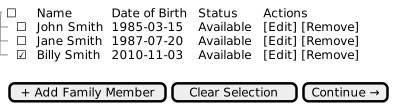
Selection Logic:
toggleSelection(person: FormPersonDTO): void {
  // Only allow selection if canSelect is true
  if (!person.canSelect) {
    return;
  }

  if (this.isSelected(person)) {
    this.selectedPersons = this.selectedPersons.filter(p => p.id !== person.id);
    person.selected = false;
  } else {
    this.selectedPersons.push(person);
    person.selected = true;
  }
}
Person Status:
| Status | Meaning | Can Select? |
|---|---|---|
Available |
Can be added to membership |
Yes |
Registered |
Already has active membership |
No |
Pending Payment |
Registration pending payment |
No |
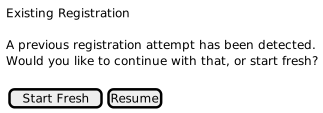
4.4. Resume Incomplete Registration
If a process is already running, the user is prompted to resume or start fresh:
showProcessDialog(): void {
  this.sharedDialogService
    .show({
      header: 'Existing Registration',
      message: 'A previous registration attempt has been detected. ' +
               'Would you like to continue with that, or start fresh?',
      buttons: [
        {
          label: 'Start Fresh',
          action: ProcessAction.RESET,
          class: 'p-button-success',
        },
        {
          label: 'Resume',
          action: ProcessAction.RESUME,
          class: 'p-button-primary',
        },
      ],
    })
    .pipe(takeUntil(this.destroy$))
    .subscribe(result => {
      if (result === ProcessAction.RESET || result === ProcessAction.RESUME) {
        this.handleProcessAction(result as ProcessAction);
      }
    });
}
Process Actions:
handleProcessAction(action: ProcessAction): void {
  if (!this.formDTO) return;

  this.formService[action === ProcessAction.RESET ? 'reset' : 'resume'](
    this.formDTO.processId
  )
    .pipe(takeUntil(this.destroy$))
    .subscribe(_formDTO => {
      if (_formDTO.processState === ProcessInstanceDTO.StatusEnum.Running ||
          _formDTO.processState === ProcessInstanceDTO.StatusEnum.Resume) {
        this.updateFormWithData(_formDTO);
      }
    });
}
API Endpoints:
-
Reset:
POST /api/forms/processes/{processId}/reset -
Resume:
POST /api/forms/processes/{processId}/resume
4.5. Submitting Person Selection
register(): void {
  this.loading = true;
  const selectedPersonsDTO = this.linkedPersons
    .filter(person => person.selected)
    .map(person => ({ id: person.id }) as FormPersonDTO);

  this.formService
    .next({
      processId: this.processId,
      step: this.formDTO.step,
      people: selectedPersonsDTO,
    })
    .pipe(
      tap(response => this.handleNextFormResponse(response)),
      takeUntil(this.destroy$),
      finalize(() => {
        this.loading = false;
      })
    )
    .subscribe({
      next: () => {
        this.showQuestionBox = true;
      },
      error: error => {
        this.showQuestionBox = false;
        this.handleError(error);
      }
    });
}
API Endpoint: POST /api/forms/next
Request Body:
{
  "processId": "proc-123",
  "step": 1,
  "people": [
    { "id": 1 },
    { "id": 3 }
  ]
}
5. Process-Driven Questions
5.1. Question Component
After person selection, the application enters a process-driven question workflow.
Component: QuestionDialogComponent
File: src/main/webapp/app/entities/membership/questions/membership-question.ts
5.2. Question Types
The system supports multiple question types with specific behaviors and validation rules:
| Type Code | Name | UI Component | Validation |
|---|---|---|---|
|
Text Input |
Input field per person |
Required/Optional text |
|
Number Input |
Number field per person |
Numeric validation |
|
Dropdown |
Select menu per person |
Required selection |
|
Binary Checkbox |
Checkbox per person |
Yes (1) / No (0) |
|
I Accept (Terms) |
Master checkbox |
All must accept (1) |
|
Select One |
Radio buttons |
Exactly one person must be selected |
|
Radio Options |
Radio per person |
Required selection per person |
|
Multi-Select |
Checkbox group per person |
Multiple selections allowed |
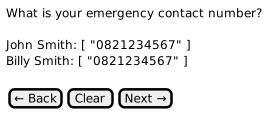
5.2.1. TXT - Text Input
Purpose: Collect free-form text responses from each participant.
UI Behavior:
-
One text input field displayed per person
-
Optional placeholder text
-
Character limit validation if specified
Data Format:
-
Answer stored as plain text string
-
Empty string for no answer
Example Questions:
-
"What is your emergency contact number?"
-
"Please specify your dietary requirements"
-
"Enter your team name"
Validation:
-
Required questions: Answer must be non-empty
-
Optional questions: Empty answers allowed
5.2.2. SEL - Multi-Select (Dropdown)
Purpose: Present predefined options to user in a dropdown list.
UI Behavior:
-
Dropdown select field per person
-
Options loaded from
optionsarray in FormDTO -
First option often blank or "Please select…"
Data Format:
-
Answer is the index of the selected option (0-based)
-
Stored as string number: "0", "1", "2", etc.
Example Questions:
-
"What is your T-shirt size?" - Options: ["S", "M", "L", "XL", "XXL"]
-
"Select your preferred race distance" - Options: ["5km", "10km", "21km"]
Validation:
-
Must select a valid option index
-
Cannot submit with default/blank selection if required
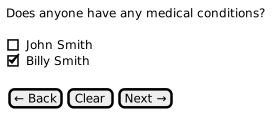
5.2.3. BCB - Binary Checkbox
Purpose: Yes/No question for each participant independently.
UI Behavior:
-
Individual checkbox per person
-
Unchecked = "0", Checked = "1"
-
No "select all" option (each person independent)
Data Format:
-
Answer: "0" (unchecked) or "1" (checked)
-
Defaults to "0" if not answered
Example Questions:
-
"Does anyone have any medical conditions?"
-
"Will you require transport?"
-
"Do you have a valid racing license?"
Validation:
-
Always valid (can be checked or unchecked)
-
If required, at least one person should have answer
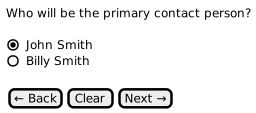
5.2.4. ONE - Select One Person
Purpose: Designate exactly one person from the group.
UI Behavior:
-
Radio buttons (only one can be selected)
-
All participants displayed
-
Exactly one must be selected
Data Format:
-
Selected person: answer = "1"
-
All others: answer = "0"
-
Only one person can have answer = "1"
Example Questions:
-
"Who will be the primary contact person?"
-
"Who is the team captain?"
-
"Which participant is the account holder?"
Validation:
-
Required: Exactly one person must have answer = "1"
-
Optional: Zero or one person can have answer = "1"
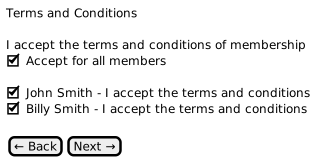
5.2.5. ITC - I Accept Terms
Purpose: Terms and conditions acceptance for all participants.
UI Behavior:
-
Master "Accept for all members" checkbox at top
-
Individual acceptance checkbox per person below
-
Checking master checkbox sets all individual checkboxes to "1"
-
All individuals must be checked to proceed
Data Format:
-
Each person must have answer = "1"
-
Any person with answer = "0" blocks progression
Example Questions:
-
"I accept the terms and conditions of membership"
-
"I acknowledge the event indemnity form"
-
"I agree to the privacy policy"
Validation:
-
Strict validation: All people must have answer = "1"
-
Cannot proceed if any person has answer = "0"
-
Used for legal/compliance requirements
Implementation:
// Master checkbox behavior
onMasterCheckChange(checked: boolean): void {
  this.people.forEach(person => {
    person.answer = checked ? '1' : '0';
  });
}

// Validation
isValid(): boolean {
  if (this.questionData.questionType === 'ITC') {
    return this.people.every(person => person.answer === '1');
  }
  // ... other validations
}
5.4. Question DTO Structure
{
  "processId": "proc-123",
  "step": 2,
  "processState": "RUNNING",
  "question": "Does anyone have any medical conditions?",
  "questionType": "BCB",
  "required": true,
  "options": null,
  "people": [
    {
      "id": 1,
      "firstName": "John",
      "lastName": "Smith",
      "answer": null,
      "hide": false
    },
    {
      "id": 3,
      "firstName": "Billy",
      "lastName": "Smith",
      "answer": null,
      "hide": false
    }
  ],
  "paymentUrl": null
}
5.6. Answer Submission
next() {
  this.loading = true;
  this.selectedPeople = this.people.map(_person => ({
    answer: _person.answer || '0',
    id: _person.id,
  }));

  this.formService
    .next({
      processId: this.questionData.processId,
      step: this.questionData.step,
      people: this.selectedPeople,
    })
    .pipe(finalize(() => (this.loading = false)))
    .subscribe(_response => {
      this.questionData = _response;
      this.people = Array.from(this.questionData?.people || [])
        .map(p => ({
          ...p,
          answer: p.answer || '',
        })) || [];
    });
}
Request Body:
{
  "processId": "proc-123",
  "step": 2,
  "people": [
    { "id": 1, "answer": "0" },
    { "id": 3, "answer": "1" }
  ]
}
5.7. Answer Validation
isValid(): boolean {
  if (!this.questionData.required) {
    return true;
  }

  if (this.questionData.questionType === 'ITC') {
    // For ITC (Terms), all people must have answer '1' (checked)
    return this.people.every(person => person.answer === '1');
  }

  return this.people.every(person => {
    if (person.hide) {
      return true;
    }

    if (this.questionData.questionType === 'BCB') {
      return true; // Binary checkboxes are always valid
    }

    if (this.questionData.questionType === 'ONE') {
      // For required ONE type, at least one person should have answer '1'
      return this.people.some(p => p.answer === '1');
    }

    return person.answer !== null &&
           person.answer !== undefined &&
           person.answer !== '';
  });
}
Validation Rules:
| Question Type | Validation Rule | Error Condition |
|---|---|---|
|
All must accept |
Any person has answer ≠ '1' |
|
Exactly one selected |
No person has answer = '1' |
|
Answer required (if required=true) |
Any person has empty answer |
|
Always valid |
(No error condition) |
5.8. Master Checkbox (ITC Questions)
For "I Accept" questions, a master checkbox allows accepting for all people at once:
handleMasterCheckbox(checked: boolean): void {
  // Update all people's answers when master checkbox changes
  this.people.forEach(person => {
    person.answer = checked ? '1' : '0';
  });
}
UI Implementation:
<div *ngIf="questionData.questionType === 'ITC'">
  <p-checkbox
    [(ngModel)]="masterCheckbox"
    (onChange)="handleMasterCheckbox(masterCheckbox)"
    [binary]="true"
    label="Accept for all members">
  </p-checkbox>

  <div *ngFor="let person of people">
    <p-checkbox
      [(ngModel)]="person.answer"
      [binary]="true"
      [label]="person.firstName + ' ' + person.lastName">
    </p-checkbox>
  </div>
</div>
6. Payment Integration
6.1. Payment Summary
When all questions are answered, the process completes and displays a payment summary:

6.2. Payment Redirect
pay() {
  if (this.questionData.paymentUrl) {
    this.messageService.add({
      severity: 'info',
      summary: 'Payment Portal',
      detail: 'Redirecting to payment portal...',
      sticky: true,
      life: 5000,
    });

    setTimeout(() => {
      if (this.questionData.paymentUrl) {
        window.location.href = this.questionData.paymentUrl;
      }
    }, 5000);
  }
}
Payment URL Format:
https://payment.gateway.com/pay?reference=REF123&amount=800.00&return=https://app.example.com/membership/payment-returnFlow:
-
User clicks "Pay Now"
-
Show redirect message (5 seconds)
-
Redirect to external payment gateway
-
User completes payment
-
Gateway redirects back to return URL
-
Application updates membership status
6.3. Payment Return Handling
Return URL: /membership/payment-return
Query Parameters:
-
reference- Payment reference -
status- Payment status (success, failed, cancelled) -
transactionId- Payment transaction ID
Status Updates:
| Status | Description | Next Step |
|---|---|---|
success |
Payment successful |
Activate membership, send confirmation |
failed |
Payment failed |
Show error, allow retry |
cancelled |
User cancelled payment |
Return to registration, allow resume |
7. Process State Management
7.1. Process States
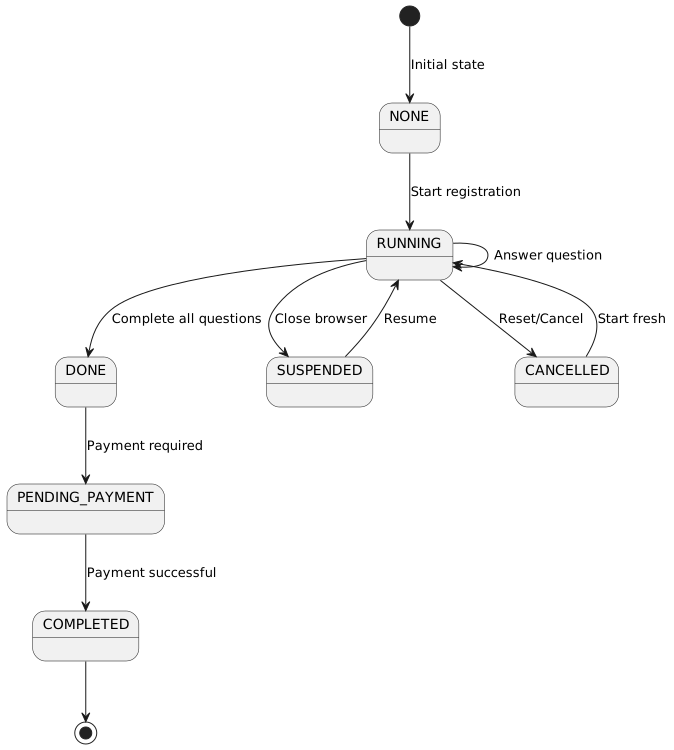
Process State Enum:
export enum ProcessState {
  NONE = 'NONE',
  RUNNING = 'RUNNING',
  SUSPENDED = 'SUSPENDED',
  DONE = 'DONE',
  PENDING_PAYMENT = 'PENDING_PAYMENT',
  COMPLETED = 'COMPLETED',
  CANCELLED = 'CANCELLED',
  RESUME = 'RESUME'
}
7.2. Form Service
The FormService manages process state and progression:
@Injectable({ providedIn: 'root' })
export class FormService {
  private formResourceService = inject(FormResourceService);
  private blobUtils = inject(BlobUtilsService);

  /**
   * Get form membership details
   */
  getFormMembership(membershipPeriodId: number, userKey: string): Observable<FormDTO> {
    return this.formResourceService
      .getFormMembership(membershipPeriodId, userKey)
      .pipe(
        mergeMap(response => this.blobUtils.parseBlob<FormDTO>(response)),
        map(formDTO => this.convertToExtendedFormDTO(formDTO))
      );
  }

  /**
   * Reset an existing form process
   */
  reset(processId: string): Observable<FormDTO> {
    return this.formResourceService.reset(processId)
      .pipe(
        mergeMap(response => this.blobUtils.parseBlob<FormDTO>(response)),
        map(formDTO => this.convertToExtendedFormDTO(formDTO))
      );
  }

  /**
   * Resume an existing form process
   */
  resume(processId: string): Observable<FormDTO> {
    return this.formResourceService.resume(processId)
      .pipe(
        mergeMap(response => this.blobUtils.parseBlob<FormDTO>(response)),
        map(formDTO => this.convertToExtendedFormDTO(formDTO))
      );
  }

  /**
   * Submit form data and get next step
   */
  next(data: any): Observable<FormDTO> {
    const headers = TimeoutInterceptor.getHeadersWithTimeout(15000);

    const options = {
      httpHeaderAccept: '*/*' as const,
      headers,
    };

    return this.formResourceService.next(data, 'body', false, options)
      .pipe(
        mergeMap(response => this.blobUtils.parseBlob<FormDTO>(response)),
        map(formDTO => this.convertToExtendedFormDTO(formDTO))
      );
  }
}
7.3. API Endpoints
| Method | Endpoint | Purpose | Response |
|---|---|---|---|
GET |
|
Get membership form state |
FormDTO with people and process state |
POST |
|
Submit form step, get next |
FormDTO with next question or completion |
POST |
|
Reset process to start |
FormDTO with initial state |
POST |
|
Resume suspended process |
FormDTO with current step |
8. Session Management
8.1. Session Service
The SessionService manages user session data:
@Injectable({ providedIn: 'root' })
export class SessionService {
  private userKeySubject = new BehaviorSubject<string>('');
  private membershipIdSubject = new BehaviorSubject<number | null>(null);

  userKey$ = this.userKeySubject.asObservable();
  membershipId$ = this.membershipIdSubject.asObservable();

  setUserKey(userKey: string): string {
    this.userKeySubject.next(userKey);
    sessionStorage.setItem('userKey', userKey);
    return userKey;
  }

  getUserKey(): string {
    return this.userKeySubject.value ||
           sessionStorage.getItem('userKey') || '';
  }

  setMembershipId(membershipId: number): number {
    this.membershipIdSubject.next(membershipId);
    sessionStorage.setItem('membershipId', membershipId.toString());
    return membershipId;
  }

  getMembershipId(): number | null {
    return this.membershipIdSubject.value ||
           parseInt(sessionStorage.getItem('membershipId') || '0', 10) ||
           null;
  }
}
Storage:
-
userKey- Stored in sessionStorage -
membershipId- Stored in sessionStorage -
Persists across page refreshes within same browser session
-
Cleared when browser is closed
10. Error Handling
10.1. Access Denied
ngOnInit(): void {
  // Check for error in query params
  const error = this.route.snapshot.queryParamMap.get('error');
  if (error) {
    this.accessDenied = true;
    return;
  }

  // Check for access denied from route data
  if (this.route.snapshot.data['accessDenied']) {
    this.accessDenied = true;
    return;
  }

  this.initializeComponentData();
}
Access Denied Scenarios:
-
Missing user key (
uparameter) -
Missing or invalid hash (
hparameter) -
Expired or invalid membership period
-
User not authorized for organization
10.2. Form Validation Errors
private handleError(error: any): void {
  this.messageService.add({
    severity: 'error',
    summary: 'Error',
    detail: error.message || 'An error occurred during the operation',
    life: 5000,
  });
}
10.3. Network Timeouts
Form submissions use extended timeouts for long-running operations:
next(data: any): Observable<FormDTO> {
  const headers = TimeoutInterceptor.getHeadersWithTimeout(15000);

  const options = {
    httpHeaderAccept: '*/*' as const,
    headers,
  };

  return this.formResourceService.next(data, 'body', false, options)
    .pipe(
      mergeMap(response => this.blobUtils.parseBlob<FormDTO>(response)),
      map(formDTO => this.convertToExtendedFormDTO(formDTO))
    );
}
Timeout: 15 seconds for question submission (allows backend processing time)
11. Integration with Process Entities
The membership registration workflow integrates with the Process entity system:
-
ProcessDefinition - Defines the question workflow template
-
ProcessInstance - Tracks individual registration progress
-
ProcessStep - Each question is a step in the process
-
ProcessStepAnswer - Stores user answers for each step
See Process Flow Integration for complete details on the process engine.
12. Best Practices
12.1. User Experience
Progress Indication:
-
Show current step number and total steps
-
Display progress bar during questions
-
Provide clear "Back" navigation
Validation Feedback:
-
Client-side validation for immediate feedback
-
Clear error messages for each field
-
Highlight invalid fields visually
Mobile Responsiveness:
-
Responsive tables for person selection
-
Touch-friendly checkboxes and radio buttons
-
Optimized layout for mobile screens
12.2. Performance
Lazy Loading:
-
Load question component only when needed
-
Defer payment gateway scripts until payment stage
Caching:
-
Cache membership period details
-
Store form state in sessionStorage for recovery
Optimistic UI:
-
Show loading spinners during API calls
-
Disable submit buttons to prevent double-submission
12.3. Security
User Key Validation:
-
Always validate user key and hash
-
Check expiry timestamps if applicable
-
Log access attempts for audit
CSRF Protection:
-
Include CSRF tokens in form submissions
-
Validate origin for payment returns
Data Sanitization:
-
Sanitize all user inputs before submission
-
Validate answer formats on client and server