Event Registration
- 1. Overview
- 2. Event Concepts
- 3. Registration Workflow
- 4. Component: RegistrationComponent
- 5. Loading LinkedPersons
- 6. Person Selection UI
- 7. Registration Submission
- 8. Backend Processing
- 9. Payment Flow
- 10. Adding Participants
- 11. Differences from Membership Registration
- 12. Error Handling
- 13. Integration Points
- 14. Best Practices
- 15. Related Documentation
1. Overview
The Event Registration workflow enables users to register participants for events such as races, tournaments, and competitions. Unlike membership registration, event registration is simpler with a single-page person selection and immediate registration submission.
Key Features:
-
Multi-participant Registration - Register multiple people in a single transaction
-
LinkedPerson Integration - Select from existing linked persons
-
Order-based System - Creates Order entity for payment tracking
-
Immediate Registration - No multi-step process, instant registration
-
Payment Gateway Integration - Redirect to payment portal after registration
2. Event Concepts
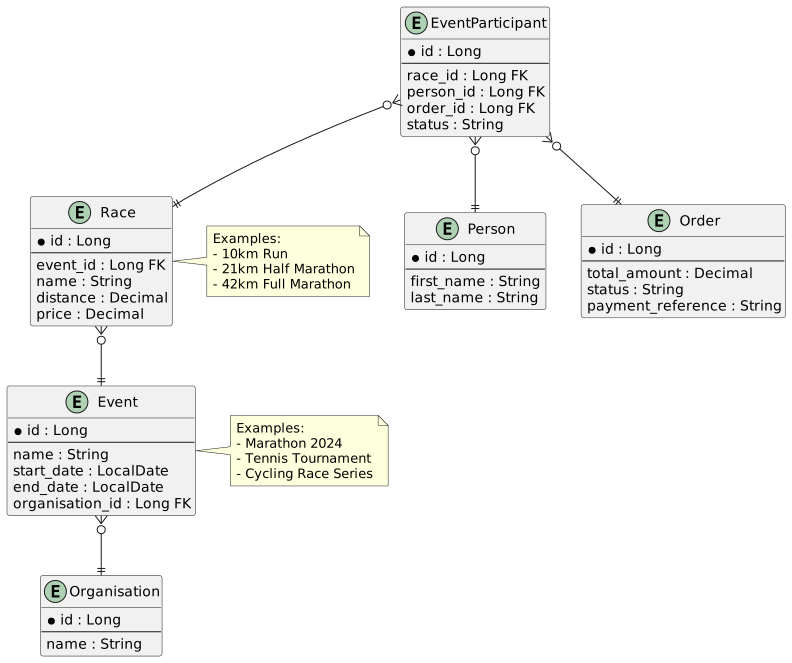
2.1. Event Entities
Event
Defines the overall competition or activity:
-
Name, description, dates
-
Location and venue
-
Organizer (Organisation)
-
Registration open/close dates
-
Status (upcoming, active, completed, cancelled)
Race
Specific category or distance within an event:
-
Name (e.g., "10km Run", "21km Half Marathon")
-
Distance, difficulty level
-
Age restrictions
-
Maximum participants
-
Price per participant
EventParticipant
Individual participant registration:
-
Links Person to Race
-
Stores participant-specific details
-
Tracks registration status
-
References Order for payment
-
Can include additional participant information (bib number, start time, etc.)
Order
Payment transaction container:
-
Groups multiple EventParticipants
-
Tracks payment status
-
Links to buyer (Person via userKey)
-
Total amount
-
Payment gateway reference
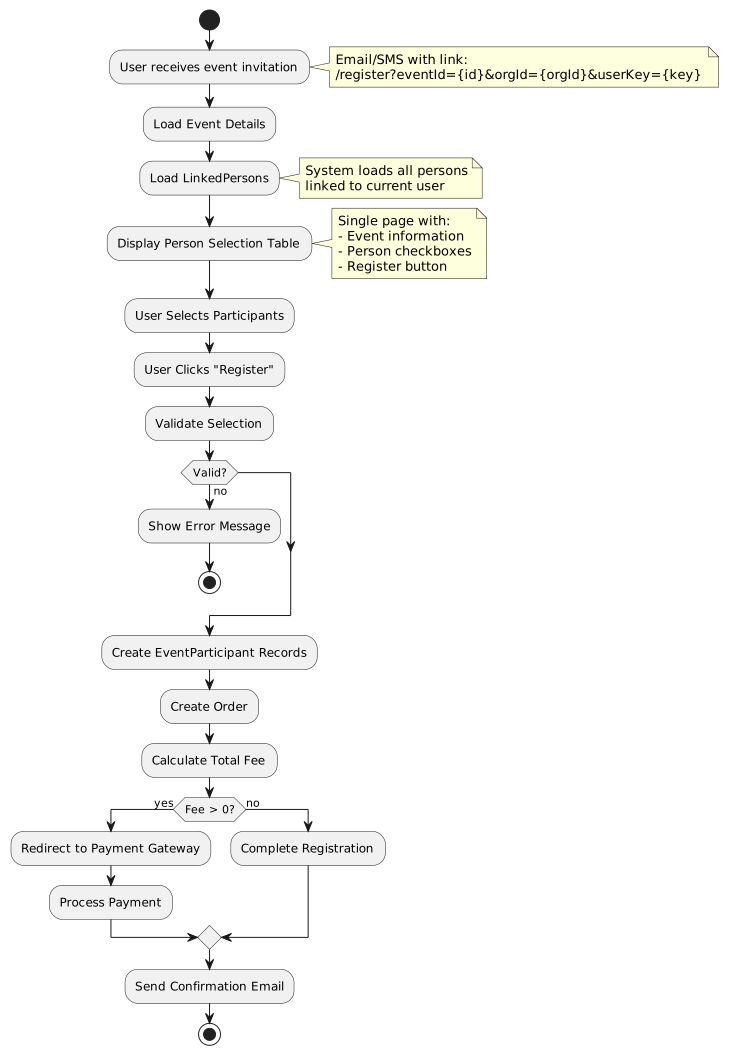
3. Registration Workflow
3.2. URL Parameters
Route Pattern:
/registerQuery Parameters:
| Parameter | Description | Required | Example |
|---|---|---|---|
|
Event ID to register for |
Yes |
|
|
Organisation ID (organizer) |
Yes |
|
|
User key (security context) |
Optional |
|
Example URLs:
https://app.example.com/register?eventId=42&orgId=8&userKey=abc123xyz
https://app.example.com/register?eventId=42&orgId=8
Session vs URL userKey:
-
If
userKeyprovided in URL → Use URL parameter (external link scenario) -
If no
userKeyin URL → Use sessionuserKey(logged-in user scenario)
4. Component: RegistrationComponent
4.1. Component Structure
File: src/main/webapp/app/entities/registration/list/registration.component.ts
Key Properties:
export class RegistrationComponent implements OnInit, OnDestroy {
  persons: IPersonSelect[] = [];
  selectForm!: FormGroup;
  selectCount = 0;
  isLoading = false;
  isSaving = false;

  _eventId: number | undefined;
  event: IEvent | undefined;
  _organisationId: number | undefined;
  organisation: IOrganisation | undefined;
  _userKey: string | undefined;
  principal: IPerson | undefined;
  sessionUserId: boolean = true;
}
4.2. Initialization
ngOnInit(): void {
  this.selectForm = this.fb.group({
    selection: this.fb.array([]),
  });

  // Subscribe to checkbox changes for count
  this.selectionChangeSubscription = this.selectForm.valueChanges
    .subscribe(data => {
      const arr: boolean[] = data.selection;
      this.selectCount = arr.reduce((n, checkbox) =>
        (checkbox ? n + 1 : n), 0);
    });

  this.handleNavigation();
}
4.3. Navigation Handler
protected handleNavigation(): void {
  combineLatest([this.activatedRoute.data, this.activatedRoute.queryParamMap])
    .subscribe(([data, params]) => {
      const eventId = params.get('eventId');
      if (eventId) {
        this.eventId = +eventId;
      }

      const organisationId = params.get('orgId');
      if (organisationId) {
        this.organisationId = +organisationId;
      }

      const userKey = params.get('userKey');
      if (userKey) {
        this.userKey = userKey;
        this.sessionUserId = false;
      } else {
        this.userKey = this.sessionService.getUserKey();
        this.sessionUserId = true;
      }

      this.loadPage(pageNumber, true);
    });
}
Property Setters with Side Effects:
set eventId(id) {
  if (this._eventId !== id) {
    this._eventId = id;
    this.filterChanged = true;
    if (id) {
      this.eventService.find(id).subscribe((res: HttpResponse<IEvent>) => {
        this.event = res.body ?? undefined;
      });
    }
  }
}

set organisationId(id) {
  if (this._organisationId !== id) {
    this._organisationId = id;
    this.filterChanged = true;
    if (id) {
      this.organisationService.find(id).subscribe(
        (res: HttpResponse<IOrganisation>) => {
          this.organisation = res.body ?? undefined;
        });
    }
  }
}

set userKey(userKey) {
  if (this._userKey !== userKey) {
    this._userKey = userKey;
    this.filterChanged = true;
    if (userKey) {
      this.personService.findByUserKeyOrCreate(userKey).subscribe(
        (res: HttpResponse<IPerson>) => {
          this.principal = res.body ?? undefined;
        });
    }
  }
}
API Endpoints Called:
-
GET /api/events/{id}- Load event details -
GET /api/organisations/{id}- Load organisation details -
GET /api/people/userkey/{userKey}- Load or create principal person
5. Loading LinkedPersons
loadPage(page?: number, dontNavigate?: boolean): void {
  const pageToLoad: number = page ?? this.page ?? 1;

  if (this.organisationId && this.userKey) {
    this.isLoading = true;
    this.personService.getAllLinkedOrgUsersByPrincipal(
      this.userKey,
      this.organisationId
    ).subscribe(
      (res: EmbeddedLinkedPersonDTO[]) => {
        this.isLoading = false;
        this.persons = res;
        this.selectForm.setControl('selection', this.buildSelection());
      },
      () => {
        this.isLoading = false;
        this.onError();
      }
    );
  }
}
API Endpoint: GET /api/people/linked?userKey={key}&organisationId={orgId}
Response:
[
  {
    "id": 1,
    "firstName": "John",
    "lastName": "Smith",
    "dateOfBirth": "1985-03-15",
    "gender": "MALE",
    "email": "[email protected]",
    "contactNumber": "0821234567"
  },
  {
    "id": 3,
    "firstName": "Billy",
    "lastName": "Smith",
    "dateOfBirth": "2010-11-03",
    "gender": "MALE",
    "email": null,
    "contactNumber": null
  }
]
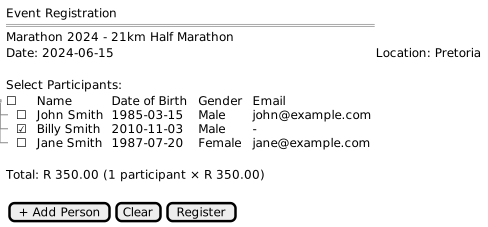
6. Person Selection UI
6.2. Form Array for Selection
buildSelection(clear?: boolean): FormArray<FormControl<boolean | null>> {
  const arr = this.persons.map(person => {
    return this.fb.control(!clear ? !!person.selected : false);
  });
  return this.fb.array(arr);
}

get selectionControl(): FormArray<FormControl<boolean | null | undefined>> {
  return this.selectForm.get('selection') as FormArray;
}
Selection Count Tracking:
this.selectionChangeSubscription = this.selectForm.valueChanges
  .subscribe(data => {
    const arr: boolean[] = data.selection;
    this.selectCount = arr.reduce((n, checkbox) =>
      (checkbox ? n + 1 : n), 0);
  });
Display Selection Count:
<div>
  Selected: {{ selectCount }} participant{{ selectCount !== 1 ? 's' : '' }}
</div>
6.3. Validation
get canRegister(): boolean {
  return !!this.event &&
         this.selectForm.valid &&
         this.selectCount > 0 &&
         !this.isLoading &&
         !this.isSaving;
}
Validation Conditions:
-
Event must be loaded (
!!this.event) -
Form must be valid (
this.selectForm.valid) -
At least one person selected (
this.selectCount > 0) -
Not currently loading (
!this.isLoading) -
Not currently saving (
!this.isSaving)
7. Registration Submission
7.1. Building Registration Payload
register(value: boolean[]) {
  if (this.canRegister) {
    const participants: IParticipantCandidate[] = [];

    this.selectionControl.value.forEach((checkbox, i) => {
      if (!!checkbox) {
        const person: IPerson = this.persons[i];
        const participant: IParticipantCandidate = {
          id: null,
          person
        };
        participants.push(participant);
      }
    });

    const order: NewOrder = {
      id: null,
      organisation: this.organisation ?? null,
      buyer: { id: null, userKey: this.userKey ?? null },
    };

    const registration: IEventParticipantRegistration = {
      event: this.event!,
      participants,
      order,
    };

    this.isSaving = true;
    this.registrationService.register(registration).subscribe(
      (res: HttpResponse<IEventParticipantRegistration>) => {
        this.log.debug('Registration', res.body);
        this.clear();
        this.isSaving = false;
        if (res.body?.infoURL) {
          location.href = res.body.infoURL;
        }
      },
      () => {
        this.clear();
        this.isSaving = false;
      }
    );
  }
}
7.2. Registration Model
File: src/main/webapp/app/entities/registration/model/event-participant-registration.model.ts
export interface IParticipantCandidate extends NewEventParticipant {
  questions?: IQuestion[];
  answer?: string;
  valid?: boolean;
  message?: string;
}

export interface IEventParticipantRegistration {
  event: IEvent;
  participants: IParticipantCandidate[];
  order?: IOrder | NewOrder;
  phase?: string;
  title?: string;
  message?: string;
  infoURL?: string;
  questionType?: string;
}
7.3. Request Payload Example
{
  "event": {
    "id": 42,
    "name": "Marathon 2024",
    "startDate": "2024-06-15T08:00:00Z"
  },
  "participants": [
    {
      "id": null,
      "person": {
        "id": 3,
        "firstName": "Billy",
        "lastName": "Smith",
        "dateOfBirth": "2010-11-03",
        "gender": "MALE"
      }
    }
  ],
  "order": {
    "id": null,
    "organisation": {
      "id": 8,
      "name": "Running Club"
    },
    "buyer": {
      "id": null,
      "userKey": "abc123xyz"
    }
  }
}
7.4. API Endpoint
Endpoint: POST /api/event-participants/register
Service:
@Injectable({ providedIn: 'root' })
export class EventParticipantRegistrationService {
  protected resourceUrl = this.applicationConfigService
    .getEndpointFor('api/event-participants/register', 'admin-service');

  register(registration: IEventParticipantRegistration):
    Observable<HttpResponse<IEventParticipantRegistration>> {
    return this.http.post<IEventParticipantRegistration>(
      this.resourceUrl,
      registration,
      { observe: 'response' }
    );
  }
}
8. Backend Processing
8.1. Registration Response
{
  "event": {
    "id": 42,
    "name": "Marathon 2024"
  },
  "participants": [
    {
      "id": 1523,
      "person": {
        "id": 3,
        "firstName": "Billy",
        "lastName": "Smith"
      },
      "bibNumber": "B1523",
      "status": "PENDING_PAYMENT"
    }
  ],
  "order": {
    "id": 892,
    "reference": "ORD-892-2024",
    "totalAmount": 350.00,
    "status": "PENDING"
  },
  "infoURL": "https://payment.gateway.com/pay?reference=ORD-892-2024&amount=350.00&return=https://app.example.com/registration/payment-return"
}
Response Properties:
-
participants- Created EventParticipant records with IDs -
order- Created Order with reference and total -
infoURL- Payment gateway URL (if payment required) -
phase- Current registration phase (optional) -
message- Status or error message (optional)
8.2. Backend Operations
Backend Flow:
-
Validate Registration
-
Check event registration is open
-
Verify person eligibility
-
Check age restrictions for race
-
Verify maximum participants not exceeded
-
-
Create EventParticipant Records
-
One EventParticipant per selected person
-
Link to Race (derived from Event)
-
Assign bib numbers (if applicable)
-
Set status to PENDING_PAYMENT
-
-
Create Order
-
Calculate total amount (participants × race price)
-
Generate order reference
-
Link to Organisation
-
Store buyer userKey
-
-
Payment Integration
-
If amount > 0, generate payment URL
-
Include order reference and return URL
-
Return infoURL in response
-
-
Free Registration
-
If amount = 0, mark participants as REGISTERED
-
Send confirmation email
-
No payment redirect needed
-
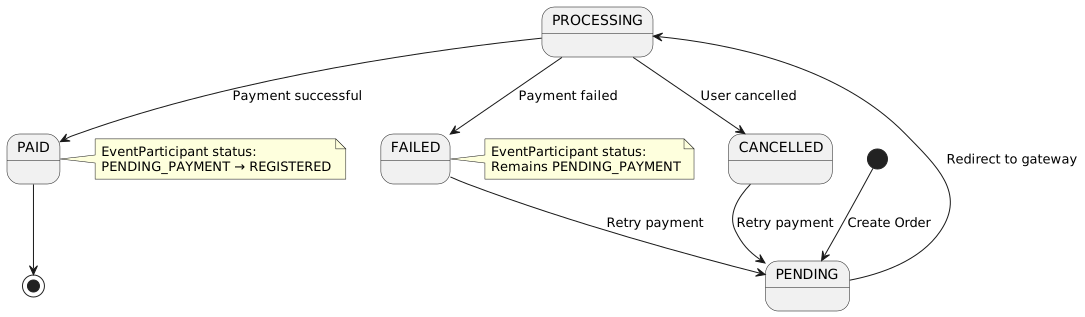
9. Payment Flow
9.1. Payment Redirect
if (res.body?.infoURL) {
  location.href = res.body.infoURL;
}
Payment Gateway URL Example:
https://payment.gateway.com/pay?
  reference=ORD-892-2024&
  amount=350.00&
  return=https://app.example.com/registration/payment-return&
  cancel=https://app.example.com/registration/payment-cancel
9.2. Payment Return
Return URL: /registration/payment-return
Query Parameters:
| Parameter | Description | Example |
|---|---|---|
|
Order reference |
|
|
Payment status |
|
|
Gateway transaction ID |
|
Backend Processing on Return:
-
Verify payment status with gateway
-
Update Order status
-
Update EventParticipant status
-
Send confirmation email
-
Display success/failure message
10. Adding Participants
10.1. Add Person Button
The UI includes an "Add Person" button to navigate to LinkedPerson workflow:
<a routerLink="/linked-person/search">
  <button type="button" class="btn btn-primary">
    <fa-icon icon="plus"></fa-icon>
    Add Person
  </button>
</a>
Flow:
-
User clicks "Add Person"
-
Navigate to
/linked-person/search -
User searches/creates person
-
Person is linked to principal
-
Return to
/registerwith updated person list
See LinkedPerson Management for details.
11. Differences from Membership Registration
| Aspect | Membership Registration | Event Registration |
|---|---|---|
Workflow |
Multi-step process with questions |
Single-page selection |
Process Engine |
Uses ProcessDefinition and ProcessInstance |
Direct registration (no process) |
Questions |
Dynamic question workflow per person |
No questions (or minimal via backend) |
Payment Timing |
After all questions answered |
Immediately after selection |
Resume Capability |
Can resume from any step |
No resume (single atomic operation) |
Back Navigation |
Back button through questions |
No back navigation needed |
State Management |
Complex (FormDTO, ProcessState) |
Simple (selection checkboxes) |
Entity Created |
Membership |
EventParticipant |
Typical Use Case |
Annual membership with family |
Race/tournament registration |
12. Error Handling
12.1. Validation Errors
Client-Side:
-
No event loaded → Disable register button
-
No persons selected → Disable register button
-
Form invalid → Display validation messages
Server-Side:
{
  "phase": "VALIDATION_ERROR",
  "title": "Registration Error",
  "message": "One or more participants are not eligible for this event",
  "participants": [
    {
      "id": null,
      "person": { "id": 3, "firstName": "Billy", "lastName": "Smith" },
      "valid": false,
      "message": "Participant is under minimum age requirement (18 years)"
    }
  ]
}
Error Display:
<div *ngIf="registration.phase === 'VALIDATION_ERROR'" class="alert alert-danger">
  <h4>{{ registration.title }}</h4>
  <p>{{ registration.message }}</p>
  <ul>
    <li *ngFor="let p of registration.participants">
      <span *ngIf="!p.valid">
        {{ p.person.firstName }} {{ p.person.lastName }}: {{ p.message }}
      </span>
    </li>
  </ul>
</div>
12.2. Registration Failures
Common Failure Scenarios:
| Scenario | Cause | Resolution |
|---|---|---|
Event Full |
Maximum participants reached |
Show waitlist option |
Registration Closed |
Outside registration window |
Display event information only |
Duplicate Registration |
Person already registered |
Show existing registration |
Payment Gateway Down |
External service unavailable |
Allow registration, mark as pending payment |
Network Error |
Connection timeout |
Show retry button, preserve selection |
12.3. Loading States
<div *ngIf="isLoading" class="text-center">
  <div class="spinner-border" role="status">
    <span class="sr-only">Loading persons...</span>
  </div>
</div>

<div *ngIf="isSaving" class="text-center">
  <div class="spinner-border" role="status">
    <span class="sr-only">Processing registration...</span>
  </div>
</div>
13. Integration Points
13.1. LinkedPerson Workflow
Event registration integrates with LinkedPerson management:
-
User accesses registration URL
-
System loads linked persons for user
-
User can add more persons via LinkedPerson workflow
-
User selects participants from linked persons
-
Registration creates EventParticipant records
13.2. Order System
Event registration creates Order entities:
-
Order - Container for transaction
-
OrderLine - Individual line items (one per participant)
-
Payment - Payment record after gateway processing
See Financial Entities for details.
13.3. Email Notifications
Registration Confirmation:
-
Sent after successful registration (free events)
-
Sent after successful payment (paid events)
-
Includes participant details, event information
-
Includes payment receipt (if applicable)
Payment Receipt:
-
Sent after successful payment
-
Includes order reference, amount paid
-
Itemized list of participants
14. Best Practices
14.1. User Experience
Clear Event Information:
-
Display event name, date, location prominently
-
Show race details (distance, difficulty, restrictions)
-
Display price per participant
-
Calculate and show total as users select
Participant Management:
-
Allow easy addition of participants via LinkedPerson workflow
-
Display participant information clearly in table
-
Show eligibility warnings before registration
Loading Indicators:
-
Show spinner while loading persons
-
Show spinner during registration submission
-
Disable buttons during operations
14.2. Performance
Lazy Loading:
-
Load event and organisation details on demand
-
Use caching for frequently accessed data
Batch Operations:
-
Register all participants in single API call
-
Create all EventParticipant records in transaction
Payment Optimization:
-
Generate payment URL on server side
-
Use direct redirect (no intermediate pages)
14.3. Security
URL Parameter Validation:
-
Validate eventId exists and is accessible
-
Validate organisationId matches event
-
Verify userKey authorization
Order Security:
-
Verify buyer matches userKey
-
Validate order total matches calculated amount
-
Check for duplicate registrations
Payment Security:
-
Use HTTPS for all payment redirects
-
Verify payment gateway signatures on return
-
Validate order reference matches transaction