Security
- 1. Overview
- 2. Authentication Architecture
- 3. User Key Authorization (Anonymous Access)
- 4. User Key Authorization
- 5. Session Management
- 6. Organisation-Scoped Security
- 7. Person-Level Security
- 8. Authorization
- 9. Security Best Practices
- 10. Audit Logging
- 11. Future Security Enhancements
- 12. Related Documentation
1. Overview
The Registration Portal implements a multi-layered security architecture combining authentication (JWT or OAuth2), session management, user key authorization, and organization-scoped data access.
Security Layers:
-
Authentication - Hash-based JWT (JWT Authentication and Token Flow) or OAuth2/OIDC (OAuth2/OIDC Authentication (Work in Progress), work in progress)
-
User Key Authorization - Secure registration link access for anonymous users
-
Organisation Scoping - Multi-tenant data isolation
-
Person-Level Access - Row-level security for person data (see Multi-Dimensional Security)
2. Authentication Architecture
The Registration Portal supports two authentication methods depending on the organization’s infrastructure:
| Method | Use Case | Status |
|---|---|---|
Hash-Based JWT |
WordPress sites without OAuth2/OIDC capability |
Production |
OAuth2/OIDC |
Organizations with external IdP/SSO (Keycloak, Azure AD, etc.) |
Work in Progress |
Both authentication methods store JWT tokens server-side in HTTP sessions, never exposing them to the Angular frontend. This approach provides better security by keeping tokens within proper trust boundaries.
2.1. Hash-Based JWT Authentication
For organizations without OAuth2/OIDC infrastructure (e.g., WordPress sites with custom plugin), the system uses hash-based authentication where the customer website sends a userId and computed hash.
Full Documentation:
Flow Summary:
2.1.1. JWT Authentication Flow
The system uses a JWT-based security architecture with session-backed token storage, involving three primary components:
-
Customer Website/Portal - Holds userId and userHash credentials
-
Registration Portal - Angular frontend + Spring Boot gateway (JHipster)
-
Admin Service - JWT issuer and validator (backend)
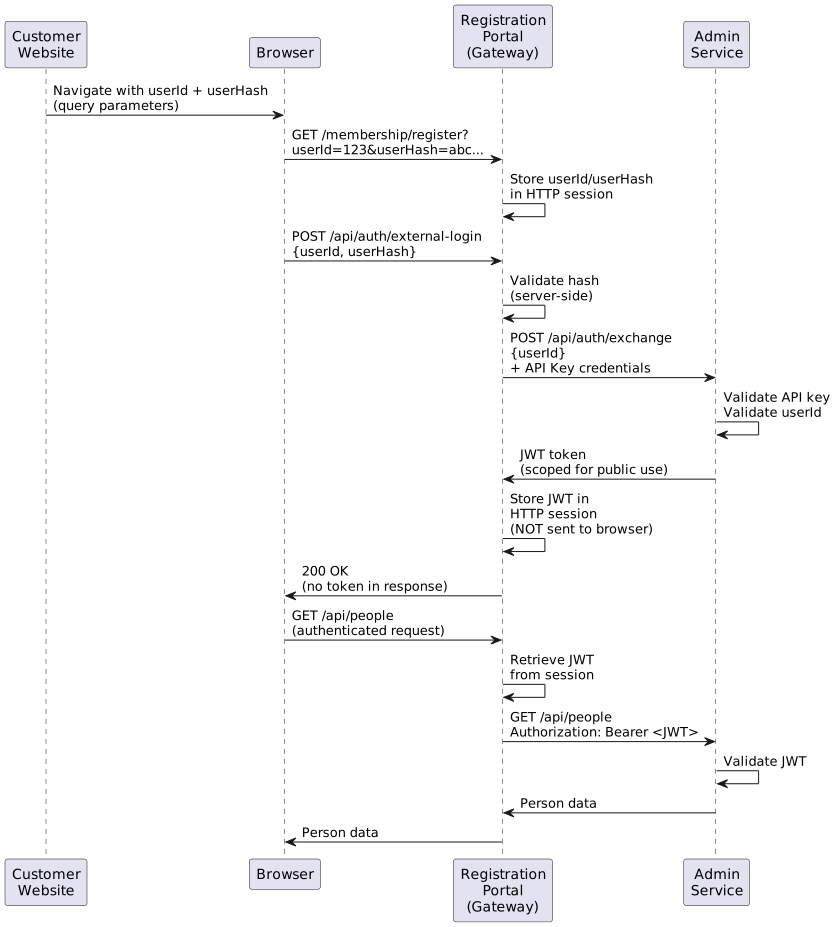
Authentication Steps
Step 1: Initial Navigation with Credentials
The customer website directs users to the Registration Portal with credentials via standard browser navigation:
https://registration.example.com/membership/register/42?userId=123&userHash=5d41402abc4b2a76b9719d911017c592&h=...Parameters:
-
userId- User identifier from customer system -
userHash- Hash of userId + secret for validation -
h- Additional hash for registration link security (userKey-based)
Step 2: Token Exchange
Frontend Request:
Angular calls the gateway’s external login endpoint:
POST /api/auth/external-login
Content-Type: application/json

{
  "userId": "123",
  "userHash": "5d41402abc4b2a76b9719d911017c592"
}
Gateway Processing:
-
Validates userHash using secret from application.properties
-
Exchanges credentials with Admin Service using gateway’s own API key
-
Receives JWT token from Admin Service
-
Stores JWT in HTTP session (not exposed to Angular)
-
Returns success response without token
@PostMapping("/api/auth/external-login")
public ResponseEntity<Void> externalLogin(@RequestBody ExternalLoginRequest request,
                                          HttpSession session) {
    // Validate hash server-side
    String expectedHash = hashService.generateHash(request.getUserId());
    if (!expectedHash.equals(request.getUserHash())) {
        throw new UnauthorizedException("Invalid credentials");
    }

    // Exchange with Admin Service using API key
    String jwt = adminServiceClient.exchangeCredentials(
        request.getUserId(),
        apiKeyCredentials
    );

    // Store in session (NOT sent to client)
    session.setAttribute("JWT_TOKEN", jwt);

    return ResponseEntity.ok().build();
}
Admin Service Token Exchange:
POST /api/auth/exchange
Authorization: ApiKey <gateway-api-key>
Content-Type: application/json

{
  "userId": "123"
}

Response:
{
  "token": "eyJhbGciOiJIUzI1NiIsInR5cCI6IkpXVCJ9...",
  "expiresIn": 3600
}
JWT Token Structure:
{
  "sub": "user123",
  "iss": "event-admin-service",
  "aud": "registration-portal",
  "exp": 1706789123,
  "iat": 1706785523,
  "userId": "123",
  "scope": "public",
  "authorities": ["ROLE_USER"]
}
Step 3: Session-Based JWT Storage
Key Security Principle: The JWT token is never exposed to the Angular frontend.
-
Gateway stores JWT in
HttpSession(server-side) -
Requires either:
-
Redis-backed Spring Session (for distributed deployments)
-
Sticky load balancing (for session affinity)
-
-
API responses contain no token information
Session Configuration:
spring:
  session:
    store-type: redis
    redis:
      namespace: registration-portal:session
    timeout: 30m
Step 4: Gateway Filter JWT Injection
A custom filter intercepts requests to admin-service routes and injects the JWT:
@Component
public class JwtSessionFilter extends OncePerRequestFilter {

    @Override
    protected void doFilterInternal(HttpServletRequest request,
                                   HttpServletResponse response,
                                   FilterChain filterChain) {
        HttpSession session = request.getSession(false);

        if (session != null) {
            String jwt = (String) session.getAttribute("JWT_TOKEN");

            if (jwt != null && isAdminServiceRoute(request)) {
                // Inject JWT as Authorization header for proxied requests
                request.setAttribute("PROXIED_JWT", jwt);
            }
        }

        filterChain.doFilter(request, response);
    }

    private boolean isAdminServiceRoute(HttpServletRequest request) {
        String path = request.getRequestURI();
        return path.startsWith("/api/") || path.startsWith("/services/");
    }
}
Spring Cloud Gateway Filter:
@Component
public class JwtGatewayFilter implements GlobalFilter, Ordered {

    @Override
    public Mono<Void> filter(ServerWebExchange exchange, GatewayFilterChain chain) {
        return exchange.getSession()
            .flatMap(session -> {
                String jwt = session.getAttribute("JWT_TOKEN");

                if (jwt != null) {
                    // Add Authorization header to proxied request
                    ServerHttpRequest modifiedRequest = exchange.getRequest()
                        .mutate()
                        .header("Authorization", "Bearer " + jwt)
                        .build();

                    return chain.filter(exchange.mutate()
                        .request(modifiedRequest)
                        .build());
                }

                return chain.filter(exchange);
            });
    }

    @Override
    public int getOrder() {
        return -100; // High priority, before routing
    }
}
Step 5: Admin Service JWT Validation
Admin Service validates the JWT bearer token for all authenticated requests:
@Configuration
@EnableWebSecurity
public class SecurityConfiguration {

    @Bean
    public SecurityFilterChain filterChain(HttpSecurity http) throws Exception {
        http
            .oauth2ResourceServer(oauth2 -> oauth2
                .jwt(jwt -> jwt
                    .jwtAuthenticationConverter(jwtAuthenticationConverter())
                )
            )
            .authorizeHttpRequests(authz -> authz
                .requestMatchers("/api/auth/exchange").hasAuthority("SCOPE_api-key")
                .requestMatchers("/api/**").authenticated()
                .anyRequest().permitAll()
            );

        return http.build();
    }
}
Security Advantages
No Client-Side Token Exposure:
-
JWT never sent to Angular application
-
Prevents XSS attacks from stealing tokens
-
Reduces attack surface for token theft
Server-Side Validation:
-
Hash validation occurs server-side using secrets from application.properties
-
Client cannot bypass validation
-
Customer website secrets never exposed to browser
Proper Trust Boundaries:
-
Gateway acts as security boundary
-
Admin Service remains stateless (validates JWT only)
-
Clear separation of concerns
Session Management:
-
Standard HTTP session security
-
CSRF protection via session cookies
-
Familiar security patterns for web applications
Configuration Requirements
Gateway (Registration Portal):
# application.yml
security:
  external-auth:
    secret-key: ${EXTERNAL_AUTH_SECRET}  # For userHash validation

  admin-service:
    api-key: ${ADMIN_SERVICE_API_KEY}    # For token exchange
    base-url: http://localhost:8080

spring:
  session:
    store-type: redis
    timeout: 30m
Admin Service:
# application.yml
spring:
  security:
    oauth2:
      resourceserver:
        jwt:
          issuer-uri: http://localhost:8080
          jwk-set-uri: http://localhost:8080/.well-known/jwks.json

security:
  api-keys:
    registration-portal: ${REGISTRATION_PORTAL_API_KEY}
Session and Token Lifecycle
Session Creation:
-
User navigates from customer website
-
Gateway creates HTTP session
-
Stores userId/userHash in session
-
Exchanges for JWT and stores in session
Session Active:
-
All API requests include session cookie
-
Gateway retrieves JWT from session
-
JWT injected into proxied requests
-
Admin Service validates JWT
Session Expiry:
-
After 30 minutes of inactivity (configurable)
-
User must re-authenticate via customer website
-
JWT becomes invalid after expiration time
Token Refresh:
-
Gateway can refresh JWT before expiration
-
Transparent to Angular application
-
Maintains user session continuity
Error Scenarios
Invalid UserHash:
POST /api/auth/external-login
{
  "userId": "123",
  "userHash": "invalid_hash"
}

Response: 401 Unauthorized
{
  "error": "Invalid credentials",
  "message": "Hash validation failed"
}
Expired JWT:
GET /api/people
Session contains expired JWT

Gateway Response: 401 Unauthorized
{
  "error": "Token expired",
  "message": "Please re-authenticate"
}
Missing Session:
GET /api/people
No session or JWT in session

Gateway Response: 401 Unauthorized
{
  "error": "Not authenticated",
  "message": "Session not found or expired"
}
Deployment Considerations
Load Balancing:
-
Option 1: Redis-backed Spring Session (recommended)
-
Sessions shared across gateway instances
-
No sticky sessions required
-
Horizontal scaling support
-
-
Option 2: Sticky Sessions
-
Session affinity at load balancer
-
Simpler configuration
-
Limited scaling (session loss on instance failure)
-
High Availability:
-
Redis cluster for session store
-
Multiple gateway instances
-
JWT validation stateless at Admin Service
Security Hardening:
-
HTTPS only in production
-
Secure session cookies (
httpOnly,secure,sameSite) -
Short JWT expiration times (15-30 minutes)
-
Regular token refresh
-
API key rotation strategy
2.2. OAuth2/OIDC Authentication (Work in Progress)
For organizations with external Identity Providers supporting Single Sign-On (SSO), the system can authenticate users via OAuth2/OIDC and exchange the IdP token for an internal JWT.
Key Features:
-
External IdP Integration - Keycloak, Azure AD, Okta, Auth0, etc.
-
Token Exchange - IdP JWT exchanged for internal JWT with OrgUser claims
-
OrgUser Mapping - IdP
subclaim mapped toOrgUser.externalUserId -
Session Storage - Internal JWT stored in HTTP session (same as hash-based auth)
Full Documentation:
-
OAuth2/OIDC Authentication (under development)
High-Level Flow:
-
User clicks "Login with SSO" → Gateway redirects to external IdP
-
User authenticates with IdP credentials → IdP returns JWT
-
Gateway receives IdP JWT → Exchanges with Admin Service for internal JWT
-
Admin Service looks up OrgUser by (RegistrationSystemId + IdP
subclaim) -
Internal JWT stored in HTTP session → User authenticated
|
OAuth2/OIDC authentication is currently under development. The design documented in OAuth2/OIDC Authentication (Work in Progress) represents planned functionality subject to change. |
3. User Key Authorization (Anonymous Access)
In addition to authenticated access (JWT or OAuth2), the Registration Portal supports anonymous access via user keys for registration workflows.
4. User Key Authorization
4.1. User Key Concept
A user key is a secure, unique identifier used for registration workflows without requiring full authentication. It enables:
-
Email/SMS Registration Links - Send secure links to users
-
Temporary Access - Limited access for specific operations
-
Organisation Context - Scoped to specific organisation
-
Person Context - Associated with specific person/family
4.2. User Key Generation
Backend Generation:
public String generateUserKey(Long personId, Long organisationId) {
  String data = personId + ":" + organisationId + ":" + System.currentTimeMillis();
  return Base64.getUrlEncoder().encodeToString(data.getBytes());
}
Hash Verification:
public String generateHash(String userKey) {
  return DigestUtils.md5Hex(SECRET_KEY + userKey);
}

public boolean verifyHash(String userKey, String providedHash) {
  String expectedHash = generateHash(userKey);
  return expectedHash.equals(providedHash);
}
4.3. Membership Guard
Frontend Guard:
export const membershipGuard: CanActivateFn = (route: ActivatedRouteSnapshot) => {
  const router = inject(Router);
  const membershipPeriodId = route.paramMap.get('membershipPeriodId');
  const pathUserKey = route.paramMap.get('u');
  const queryUserKey = route.queryParamMap.get('u');
  const userKey = pathUserKey || queryUserKey;
  const providedHash = route.queryParamMap.get('h');

  // Both userKey and hash must be present
  if (!userKey || !providedHash) {
    router.navigate(['/membership/register', membershipPeriodId], {
      queryParams: { error: 'Missing security verification parameters' }
    });
    return false;
  }

  // Verify hash
  const expectedHash = Md5.hashStr(SECRET_KEY + userKey);
  if (expectedHash !== providedHash) {
    router.navigate(['/membership/register', membershipPeriodId], {
      queryParams: { error: 'Invalid security verification' }
    });
    return false;
  }

  return true;
};
Security Properties:
-
User key alone is insufficient (requires hash)
-
Hash prevents tampering with user key
-
Secret key stored in environment config
-
Invalid attempts logged for security monitoring
4.4. User Key URLs
Membership Registration URL:
https://app.example.com/membership/register/42?u=abc123xyz&h=5d41402abc4b2a76b9719d911017c592Event Registration URL:
https://app.example.com/register?eventId=15&orgId=8&userKey=abc123xyzURL Components:
| Component | Example | Purpose |
|---|---|---|
Domain |
|
Application host |
Path |
|
Registration type and ID |
userKey ( |
|
User identification |
Hash ( |
|
Integrity verification |
5. Session Management
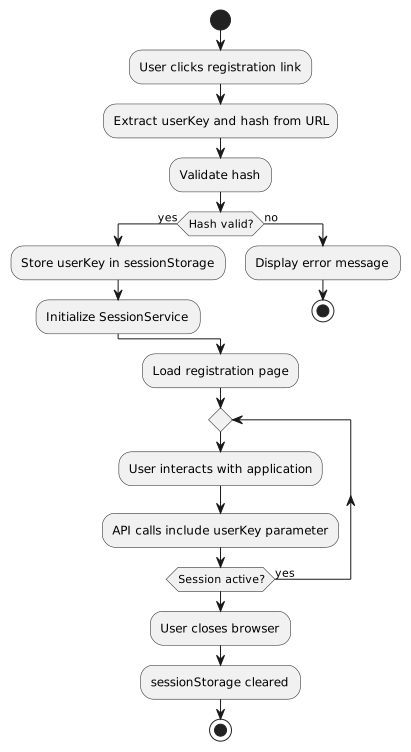
5.1. Session Service
@Injectable({ providedIn: 'root' })
export class SessionService {
  private userKeySubject = new BehaviorSubject<string>('');
  userKey$ = this.userKeySubject.asObservable();

  setUserKey(userKey: string): string {
    this.userKeySubject.next(userKey);
    sessionStorage.setItem('userKey', userKey);
    return userKey;
  }

  getUserKey(): string {
    return this.userKeySubject.value ||
           sessionStorage.getItem('userKey') || '';
  }

  getUserKey$(): Observable<string> {
    return this.userKey$;
  }
}
Storage:
-
sessionStorage- Cleared when browser closes -
BehaviorSubject- Reactive updates across components -
Fallback to URL parameter if session empty
6. Organisation-Scoped Security
6.1. Multi-Tenant Architecture
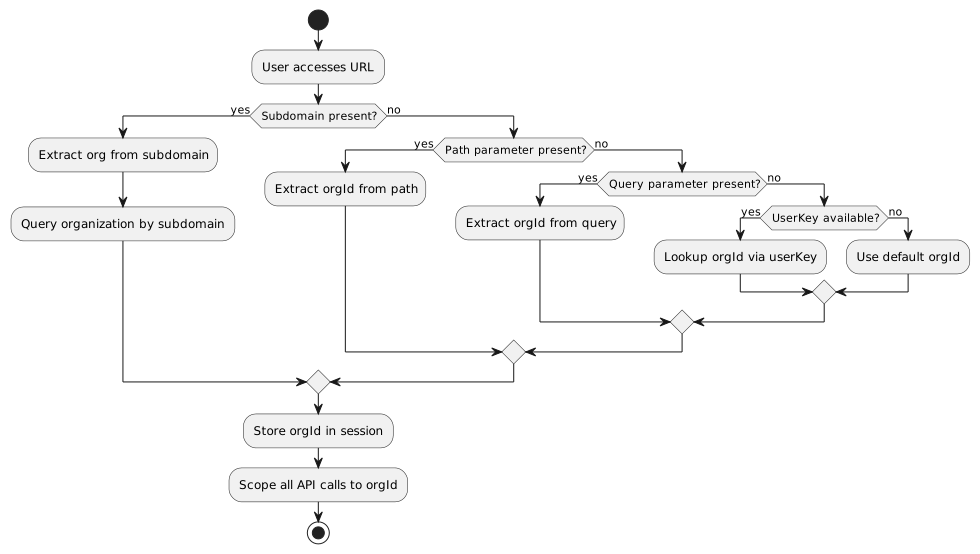
The Registration Portal supports multi-tenant operation where a single application instance serves multiple organizations with complete data isolation.
Tenant Determination Methods:
| Method | Source | Example | Priority |
|---|---|---|---|
URL Subdomain |
DNS-based |
1 (Highest) |
|
URL Path Parameter |
Route parameter |
2 |
|
Query Parameter |
URL query string |
3 |
|
UserKey Lookup |
Backend resolution |
Derived from userKey via database lookup |
4 |
Default (Fallback) |
Configuration |
From application.yml or environment |
5 (Lowest) |
Tenant Resolution Flow:
URL Examples:
# Subdomain-based (production)
https://runningclub.myapp.com/membership/register/42?u=abc123&h=5d41...
→ Organization: "runningclub" (resolved via subdomain lookup)

# Path-based (alternative)
https://myapp.com/org/runningclub/membership/register/42?u=abc123&h=5d41...
→ Organization: "runningclub" (from path segment)

# Query parameter (development/testing)
https://localhost:4200/membership/register/42?orgId=8&u=abc123&h=5d41...
→ Organization ID: 8 (explicit)

# UserKey lookup (email/SMS links)
https://myapp.com/membership/register/42?u=abc123&h=5d41...
→ Organization ID: resolved from userKey "abc123" lookup
6.2. Organisation Context
All registration operations are scoped to an organisation:
linkPerson(id: number, type: string, userKey: string): Observable<ILinkedPerson> {
  return this.http.post<ILinkedPerson>(
    `${this.linkEdPersonUrl}/${id}/${type}?userKey=${userKey}&organisationId=8`,
    { observe: 'response' }
  );
}
Organisation ID Sources:
-
URL Subdomain - Primary method for production deployments
-
URL Path Parameter - Alternative routing strategy
-
Query Parameter (
orgId) - Explicit specification for testing -
UserKey Lookup - Backend derives orgId from userKey database record
-
Session Storage - Cached from previous determination
-
Default Configuration - Fallback for development environments
6.3. Multi-Tenant Isolation
Backend Enforcement:
@PreAuthorize("hasPermission(#organisationId, 'Organisation', 'READ')")
public List<Person> getLinkedPersons(String userKey, Long organisationId) {
  // Query scoped to organisationId
  return personRepository.findByUserKeyAndOrganisation(userKey, organisationId);
}
Security Rules:
-
Users can only access data within their organisation
-
Organisation ID validated against user permissions
-
Cross-organisation queries blocked
-
Audit logging for access attempts
7. Person-Level Security
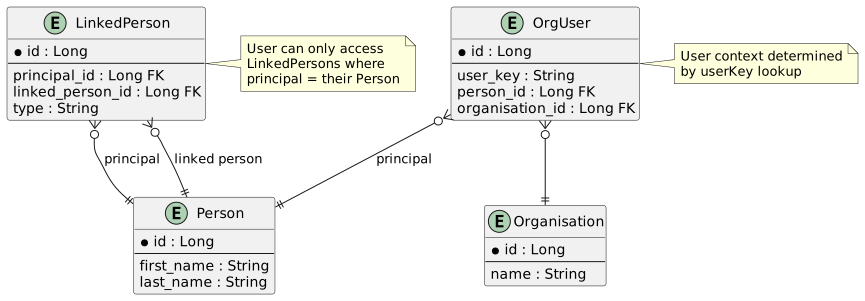
7.1. LinkedPerson Access Control
Access Rules:
-
User can access persons they created (via userKey)
-
User can access persons linked to them
-
Organisation admins can access all persons in their org
-
System admins can access all persons
Backend Query:
public List<EmbeddedLinkedPersonDTO> getLinkedPersons(String userKey, Long orgId) {
  OrgUser orgUser = orgUserRepository.findByUserKey(userKey)
    .orElseThrow(() -> new EntityNotFoundException("OrgUser not found"));

  return linkedPersonRepository
    .findByPrincipalAndOrganisation(orgUser.getPerson(), orgId)
    .stream()
    .map(this::toDTO)
    .collect(Collectors.toList());
}
8. Authorization
8.1. Role-Based Access Control
Roles:
| Role | Access Level | Capabilities |
|---|---|---|
|
Standard user |
Register self/family, view own data |
|
Organisation member |
Member benefits, additional features |
|
Organisation admin |
Manage organisation, view reports |
|
System administrator |
Full system access, all organisations |
Frontend Role Checks:
@Injectable({ providedIn: 'root' })
export class UserRouteAccessService {
  canActivate(route: ActivatedRouteSnapshot): boolean {
    const authorities = route.data['authorities'];

    if (!authorities || authorities.length === 0) {
      return true;
    }

    return this.accountService.hasAnyAuthority(authorities);
  }
}
Route Guards:
{
  path: 'admin',
  component: AdminComponent,
  canActivate: [UserRouteAccessService],
  data: { authorities: ['ROLE_ADMIN'] }
}
8.2. Backend Authorization
Method Security:
@PreAuthorize("hasRole('ADMIN')")
public void deleteAllMemberships(Long organisationId) {
  membershipRepository.deleteByOrganisation(organisationId);
}

@PreAuthorize("@securityService.canAccessPerson(#personId, authentication)")
public Person updatePerson(Long personId, Person person) {
  return personRepository.save(person);
}
9. Security Best Practices
9.1. Input Validation
Frontend Validation:
this.editForm = this.fb.group({
  firstName: ['', [
    Validators.required,
    Validators.minLength(2),
    Validators.maxLength(50),
    this.noSpecialCharactersValidator()
  ]],
  email: ['', [Validators.email, Validators.maxLength(254)]],
  identityNumber: ['', IDNumberService.validateIdentityNumber]
});
Backend Validation:
@Entity
public class Person {
  @NotNull
  @Size(min = 2, max = 50)
  @Pattern(regexp = "^[a-zA-Z\\s'-]+$")
  private String firstName;

  @Email
  @Size(max = 254)
  private String email;

  @Pattern(regexp = "^\\d{13}$")
  private String identityNumber;
}
9.2. CSRF Protection
Configuration:
@Configuration
public class SecurityConfiguration {
  @Bean
  public SecurityFilterChain filterChain(HttpSecurity http) throws Exception {
    http
      .csrf()
        .csrfTokenRepository(CookieCsrfTokenRepository.withHttpOnlyFalse())
      .and()
      .authorizeHttpRequests()
        .requestMatchers("/api/**").authenticated();
    return http.build();
  }
}
Angular Interceptor:
export class CsrfInterceptor implements HttpInterceptor {
  intercept(req: HttpRequest<any>, next: HttpHandler):
    Observable<HttpEvent<any>> {
    const token = this.getCsrfToken();
    if (token) {
      req = req.clone({
        setHeaders: { 'X-XSRF-TOKEN': token }
      });
    }
    return next.handle(req);
  }
}
9.3. CORS Configuration
@Configuration
public class CorsConfiguration {
  @Bean
  public CorsFilter corsFilter() {
    UrlBasedCorsConfigurationSource source =
      new UrlBasedCorsConfigurationSource();

    CorsConfiguration config = new CorsConfiguration();
    config.setAllowCredentials(true);
    config.addAllowedOriginPattern("https://*.example.com");
    config.addAllowedHeader("*");
    config.addAllowedMethod("*");

    source.registerCorsConfiguration("/api/**", config);
    return new CorsFilter(source);
  }
}10. Audit Logging
10.1. Security Events
Logged Events:
-
Login attempts (success/failure)
-
User key validation failures
-
Unauthorized access attempts
-
Data modification operations
-
Admin actions
-
Process state changes
Log Format:
{
  "timestamp": "2024-01-31T10:15:30Z",
  "level": "WARN",
  "event": "INVALID_USER_KEY",
  "userKey": "abc123xyz",
  "providedHash": "invalid_hash",
  "ip": "192.168.1.100",
  "userAgent": "Mozilla/5.0 ..."
}
11. Future Security Enhancements
11.1. Planned Improvements
Multi-Factor Authentication:
-
SMS verification codes
-
Email verification links
-
TOTP authenticator apps
Enhanced Person-Level Security:
-
Implement full multi-dimensional security from security module
-
Person-scoped data access controls
-
Relationship-based permissions
Rate Limiting:
-
Limit registration attempts per IP
-
Prevent brute force attacks on user keys
-
API throttling per user
Token Rotation:
-
Automatic token refresh
-
Revocation on suspicious activity
-
Short-lived access tokens with refresh tokens