MCP Pattern — Resource Server for LLM Tool Calls
1. Overview
An MCP server is a standalone Spring Boot service that exposes a curated set of admin-service operations as Model Context Protocol tools, so that LLM-driven clients (Anthropic Cowork; future MCP-aware tooling) can interact with EMS through structured tool calls rather than the web UI or direct REST. It is the LLM-facing equivalent of a portal — a deliberate adapter sitting between an external client model and admin-service — but it is structurally distinct enough from a browser-facing portal that it warrants its own pattern.
This page documents the pattern. It is a specialisation of Microservice Pattern, which establishes the EMS-wide deployment baseline (Maven module shape, Jib, Helm, ArgoCD, GitHub Actions, OTel, probes, profiles). Read the microservice pattern first; this page focuses only on the MCP-specific deltas — OAuth resource-server posture, MCP transport, tool surface, audit, and per-organisation API keys for the call to admin-service. Portal Pattern is a sibling specialisation for browser-facing frontends.
The first MCP server — mcp-server — is a read-only adapter exposing Organisation and Event metadata to Cowork. See design-journal/2026-04/mcp-server.adoc for the active design thread and build sequence.
2. Relationship to the Portal Pattern
| Concern | Portal | MCP Server |
|---|---|---|
Primary client |
A web browser (human user) |
An LLM-driven MCP client (e.g. Cowork) — the human is one step removed |
Auth posture |
OAuth2 client ( |
OAuth2 resource server ( |
Session |
Server-side HTTP session keyed by |
Stateless. Each tool call carries its own bearer JWT; no server-side session |
Outbound to admin-service |
User’s session JWT + service-shared |
Per-organisation API key map (no per-user JWT in the initial release; see DD-7 for pass-through identity prerequisite) |
User-facing surface |
Static SPA + portal-local endpoints (session bootstrap, tenant switch) + reverse-proxy to admin-service |
Single MCP HTTP endpoint + |
Tenant resolution |
Server-side, on every request, persisted in session |
Per tool call — the |
State across pods |
Hazelcast session replication (sticky ingress + replicated HTTP session) |
None needed — service is stateless |
Build and deployment |
Jib + Helm + ArgoCD baseline |
Same Jib + Helm + ArgoCD baseline (Portal Pattern § Further Reading) |
The deployment shell — Maven module structure, Jib image, Helm chart shape, ArgoCD manifest layout, OpenTelemetry wiring — is reused verbatim. The application shell (Spring Cloud Gateway routes, JWT relay filter, tenant resolution filter, static resources, Hazelcast) is dropped.
3. Architecture Principles
3.1. Resource Server, Not BFF
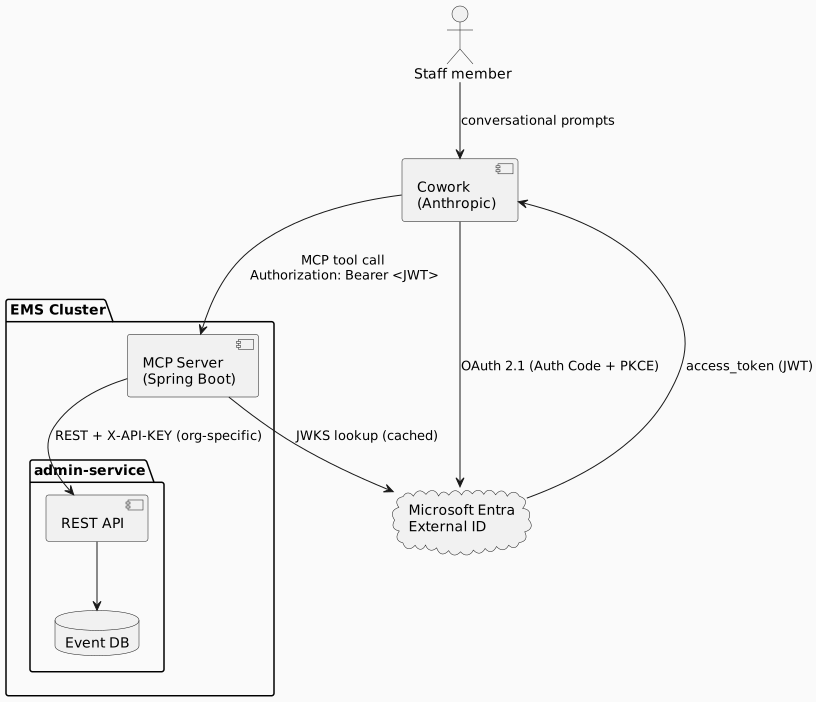
The MCP server validates incoming bearer tokens. It does not orchestrate login. It does not redirect to an authorization server. It does not store user credentials. The MCP client (Cowork) handles the user-facing OAuth flow against Microsoft Entra External ID; the MCP server’s job begins at "JWT arrives, validate it, accept or reject the tool call".
This drops a large swath of complexity (OIDC redirect handling, refresh-token storage, session cookies, CSRF) and gives the MCP server a posture that aligns with how the MCP spec models remote servers.
3.2. Stateless
No server-side session. No sticky ingress. No Hazelcast. Each tool call is independently authenticated by its bearer token and independently routed to admin-service. The benefit: pods scale linearly, restarts drop only in-flight tool calls (typically sub-second), and the operational surface shrinks substantially.
The trade-off is per-pod state for things like rate-limit buckets — see § Rate Limiting below.
3.3. Tools Are Designed Around Staff Tasks
Tool definitions are not a mechanical projection of REST endpoints. They are shaped around how staff describe their work — find_event, not searchEventsWithComplexFilter — and their descriptions are the LLM’s primary signal for selection. Tool descriptions are part of the prompt surface and must be reviewed with the same discipline as a backend API contract.
The catalogue is kept small. Initial release: three read-only tools. Each tool added to the catalogue degrades selection accuracy for the others, so additions are deliberate, not reflexive.
3.4. Per-Organisation Outbound Authentication
Even read-only Organisation/Event metadata is org-scoped on admin-service. A single shared service-principal API key would be either over-privileged (admin-wide read) or under-scoped (one org). The MCP server therefore holds a map of orgId → admin-service API key, sourced from a Kubernetes Secret, and selects the right key per tool invocation. list_organisations returns the set of orgs the MCP server has a key for.
This is a temporary shape. Once write-side tools or row-level-restricted reads are added, the pattern must move to pass-through identity — the MCP server forwards an assertion of the end-user’s identity to admin-service, and admin-service applies its existing row-level security. See Open Evolution below.
5. Components
5.1. MCP Server (Spring Boot)
Single Maven module at the workspace root, parented to za.co.idealogic:event:1.3.1. No dependency on common-db or database — the MCP server is a pure HTTP client to admin-service.
Key technical choices:
| Concern | Choice |
|---|---|
MCP framework |
Spring AI MCP Server ( |
Transport |
Streamable HTTP (current MCP spec). Single endpoint supports request/response and SSE; supersedes the deprecated HTTP+SSE transport |
Inbound auth |
Spring Security 6 |
Backend client |
|
Observability |
Spring Boot Actuator + OpenTelemetry javaagent (under the |
Rate limiting |
Bucket4j with an in-memory Caffeine cache, keyed by JWT |
The MCP server exposes:
-
POST /mcp(and the SSE complement) — the MCP protocol endpoint, behind OAuth. -
GET /.well-known/oauth-protected-resource— RFC 9728 metadata for client discovery. -
GET /livez,GET /readyz— Actuator health probes for Helm. -
GET /actuator/health/**— for diagnostic use; not exposed via Ingress.
5.2. Microsoft Entra External ID
The same tenant already used by admin-service’s OAuth2AuthService. Two App Registrations are involved:
-
The MCP Server (the "API"). Owned by EMS. Defines an Application ID URI (e.g.
api://ems-mcp-server.myriadevents.co.za— see verified-domain note below) and exposes a single scope,mcp:invoke. No redirect URIs (it isn’t a client app). -
The MCP Client (Cowork). Either owned by EMS (a confidential client registered for Cowork’s connector) or a public Anthropic-side client granted permission to the
mcp:invokescope — depends on Cowork’s connector model. Configured for Authorization Code + PKCE.
Cowork performs the OAuth flow user-side; the MCP server only ever sees the resulting JWT.
6. OAuth Resource Server
This section covers what to set up in Entra and what to wire on the backend. Detailed code below; the design journal entry tracks open questions and refinements.
6.1. Entra App Registration (User-Side Steps)
In the Entra External ID tenant:
-
Register the MCP server as an API.
-
App registrations → New registration → name "Event MCP Server".
-
After registration: Expose an API → Add an Application ID URI. Tenant policy may require a verified-domain URI; the EMS pattern is
api://ems-<service>.<verified-domain>— for the first MCP server:api://ems-mcp-server.myriadevents.co.za. The plainapi://ems-mcp-serverform is rejected by tenants that enforce the verified-domain rule. -
Add a scope: name
mcp:invoke, admin/user consent display "Invoke MCP tools", state "Enabled". Note the full scope identifier (api://ems-mcp-server.myriadevents.co.za/mcp:invoke) — Cowork will request this.
-
-
Register / configure the MCP client (Cowork’s connector). Two paths:
-
Cowork connector self-registers (preferred if Anthropic supports it for Entra External ID): user grants admin consent for the
mcp:invokescope on first connection. -
EMS pre-registers the client: New registration → name "Cowork MCP Connector" → Public/SPA platform → Cowork’s redirect URI → API permissions → add
mcp:invokefrom the Event MCP Server registration → grant admin consent.
-
The exact Cowork connector model is a Cowork-side detail; either Entra path satisfies the MCP spec.
6.2. Spring Configuration (Backend)
Resource-server validation is a single dependency plus a small config block.
pom.xml:
<dependency>
    <groupId>org.springframework.boot</groupId>
    <artifactId>spring-boot-starter-oauth2-resource-server</artifactId>
</dependency>
<dependency>
    <groupId>org.springframework.ai</groupId>
    <artifactId>spring-ai-mcp-server-webmvc-spring-boot-starter</artifactId>
    <version>${spring-ai.version}</version>
</dependency>application-prod.yml:
spring:
  security:
    oauth2:
      resourceserver:
        jwt:
          # Entra External ID v2 issuer URL — same tenant as admin-service's OAuth2AuthService.
          issuer-uri: https://${entra.tenant-id}.ciamlogin.com/${entra.tenant-id}/v2.0
          audiences:
- api://ems-mcp-server.myriadevents.co.za # the App ID URI of the MCP Server registrationSecurityConfig.java:
@Bean
public SecurityFilterChain mcpFilterChain(HttpSecurity http) throws Exception {
    return http
        .authorizeHttpRequests(auth -> auth
            .requestMatchers("/livez", "/readyz", "/actuator/health/**").permitAll()
            .requestMatchers("/.well-known/oauth-protected-resource").permitAll()
            .requestMatchers("/mcp/**").hasAuthority("SCOPE_mcp:invoke")
            .anyRequest().authenticated())
        .oauth2ResourceServer(oauth2 -> oauth2.jwt(Customizer.withDefaults()))
        .csrf(AbstractHttpConfigurer::disable)             // bearer-token API, no cookies
        .sessionManagement(s -> s.sessionCreationPolicy(SessionCreationPolicy.STATELESS))
        .build();
}
Spring Security’s default JwtAuthenticationConverter lifts scope claims into SCOPE_* authorities, so hasAuthority("SCOPE_mcp:invoke") matches the scope exposed by the Entra registration. No converter customisation is needed initially.
6.3. OAuth Protected Resource Metadata (RFC 9728)
The current MCP spec requires remote servers to publish a Protected Resource Metadata document so clients can auto-discover the authorization server and the required scope. Whether the Spring AI MCP starter auto-publishes this varies by version — the safe path is an explicit controller:
@RestController
public class OAuthProtectedResourceMetadataController {

    private final String issuerUri;
    private final String resource;

    public OAuthProtectedResourceMetadataController(
            @Value("${spring.security.oauth2.resourceserver.jwt.issuer-uri}") String issuerUri,
            @Value("${application.public-base-url}") String resource) {
        this.issuerUri = issuerUri;
        this.resource = resource;
    }

    @GetMapping(path = "/.well-known/oauth-protected-resource",
                produces = MediaType.APPLICATION_JSON_VALUE)
    public Map<String, Object> metadata() {
        return Map.of(
            "resource", resource,                              // e.g. https://mcp.event.idealogic.co.za
            "authorization_servers", List.of(issuerUri),
            "scopes_supported", List.of("mcp:invoke"),
            "bearer_methods_supported", List.of("header")
        );
    }
}
Permitted by the security filter chain above.
6.4. Logout, Refresh, CSRF — None
The MCP server has no notion of logout — there is no session to invalidate. Token refresh is the client’s responsibility; the MCP server simply rejects expired tokens with 401. CSRF protection is unnecessary because the API is bearer-authenticated; no cookies are accepted or set.
7. Per-Organisation API Keys
The MCP server’s outbound calls to admin-service use organisation-specific API keys. Keys are sensitive, so they live in a Kubernetes Secret — never in values.yaml (which lands in git via the ArgoCD manifest), never in a ConfigMap.
7.1. Configuration Shape
A Map<Long, String> of orgId → apiKey mounted as a YAML config file via spring.config.import. Adding a new organisation is a Secret edit, not a Helm chart change.
application.yml:
spring:
  config:
    import:
      - optional:file:/etc/mcp/keys/api-keys.yml
application:
  admin-service:
    base-url: ${ADMIN_SERVICE_URL:http://prod-event-admin-service}
    api-keys: {}                                         # populated by the imported file
The mounted file (the Secret content):
application:
  admin-service:
    api-keys:
      "1": "<key for Org 1 — e.g. WP Cycling>"
      "4": "<key for Org 4 — e.g. Myriad Events>"
"8": "<key for Org 8 — e.g. HNR>"AdminServiceProperties.java:
@ConfigurationProperties(prefix = "application.admin-service")
public record AdminServiceProperties(
        String baseUrl,
        Map<Long, String> apiKeys) {

    public String requireApiKey(Long orgId) {
        String key = apiKeys.get(orgId);
        if (key == null) {
            throw new ToolAccessException(
                "MCP server is not configured for organisation " + orgId);
        }
        return key;
    }
}
7.2. Helm Chart Wiring
Per the standard chart schema (see Helm Chart Structure), the chart references existingsecret: ems-mcp-server. The Secret is created out-of-band per environment:
kubectl create secret generic ems-mcp-server \
  -n event-prod \
  --from-file=api-keys.yml=./api-keys.yml
Mounted in the Deployment as a volume:
volumes:
  - name: mcp-keys
    secret:
      secretName: {{ .Values.config.existingsecret }}
volumeMounts:
  - name: mcp-keys
    mountPath: /etc/mcp/keys
    readOnly: true
Rotation is a runbook activity — replace the file in the Secret, restart the Deployment.
8. Tool Invocation Flow
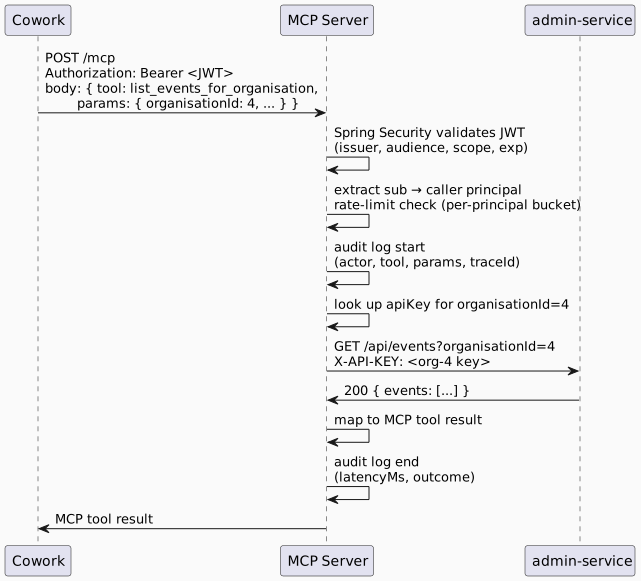
Failure modes (returned to Cowork as MCP errors with sanitised messages):
-
JWT invalid/expired → 401, audit log records
outcome=auth_failure. -
organisationIdnot configured → tool error "organisation not accessible", audit log recordsoutcome=config_missing. -
admin-service 4xx/5xx → tool error reflecting the upstream class, full detail in the trace not in the response.
-
Rate limit exceeded → 429, retry hint in the response.
9. Audit Logging
Every tool invocation produces a structured log entry. Field names align with admin-service’s LoggingAspect so Elastic EDOT picks up the same shape:
| Field | Source |
|---|---|
|
JWT |
|
JWT |
|
Tool name ( |
|
Tool parameters with sensitive fields redacted; primitives logged verbatim |
|
Time from request entry to response |
|
|
|
OpenTelemetry trace ID, linking to the downstream admin-service span |
10. Rate Limiting
Per-principal token bucket via Bucket4j with a Caffeine in-memory backing store. Initial values: 60 requests/minute steady, 20-request burst. With single replica (initial deployment), the configured limit is the effective limit. With multiple replicas, the effective limit is replicas × bucket-size; if precision matters at that point, the cluster already runs Redis (redis-prod.yml) and Bucket4j has a Redis distributed proxy.
Rate-limit responses set Retry-After and produce an audit entry with outcome=rate_limited.
11. What Belongs Where
| Concern | MCP Server | admin-service |
|---|---|---|
OAuth bearer-token validation |
Yes — resource server validates JWT against Entra |
No — receives only the per-org API key |
Tool catalogue + descriptions |
Yes — |
No |
Per-organisation API key selection |
Yes — looked up per tool invocation |
Validates the key on entry |
Tool-call audit log |
Yes — the canonical record of "the AI did this" |
No (admin-service logs the API call as it would for any client) |
Rate limiting |
Yes — per-OAuth-principal |
Pre-existing limits unchanged |
Row-level security enforcement |
No (DD-12 — MCP layer does no per-user filtering in initial release) |
Yes (always — but operating on the API-key principal, not the end-user, until DD-7 lands) |
Caching |
No (DD-13) |
Pre-existing caches unchanged |
Tenant resolution |
Per tool invocation, by parameter |
Trusts the API key’s bound organisation |
12. CI/CD Pipeline
The MCP server inherits the EMS-standard GitHub Actions setup from Microservice Pattern § CI/CD. In summary, five thin-wrapper workflows live under .github/workflows/ in the service repo and delegate to the reusable workflows hosted in christhonie/event/.github/workflows/:
| Workflow | Purpose |
|---|---|
|
Push to |
|
Push to |
|
Push to |
|
PR to non-main branch → test (backend-only — MCP server has no frontend) |
|
|
MCP-specific notes:
-
Service-name input to the
argocd-update.ymlreusable is the chart name (e.g.ems-mcp-server) — not the GitHub repo name. The reusable uses this to locateargocd/<service-name>-<env>.ymlinidl-xnl-jhb-rc01. -
Required GitHub repo secrets (mirror of admin-service / registration-portal):
EVENT_PACKAGE_REPO_TOKEN(Maven Packages),DOCKER_PAT(Docker Hub OCI for image + chart),ARGOCD_REPO_TOKEN(PAT for the manifest repo). -
Default workflow permissions on the GitHub repo must be set to
write(Settings → Actions → General → Workflow permissions). The reusable workflows declarecontents: writeand GitHub blocks reusable workflows from elevating beyond the caller’s default — a fresh repo defaults toreadand produces an opaquestartup_failurewith no jobs created. This is the most common bring-up mistake. -
No frontend filter in
pr-non-main.yml(MCP server is backend-only). Otherwise identical to registration-portal’s pattern.
See Microservice Pattern § CI/CD for the workflow YAML templates.
13. Reference Implementation
mcp-server is the reference implementation of this pattern. See design-journal/2026-04/mcp-server.adoc for the active design thread; the build sequence in that journal lists the order in which the reference implementation landed.
Future MCP servers (e.g. a write-tool MCP server once DD-7 pass-through identity lands; a participant-facing MCP server if external use cases emerge) should copy these patterns rather than inherit from a shared library, in line with the same convention the portal pattern uses (Portal Pattern § Reference Implementation).
14. Open Evolution
-
Pass-through identity (DD-7). Before any write-side tool or row-level-restricted read tool is added, the per-org API key model is replaced with pass-through identity — the MCP server forwards an assertion of the end-user’s Entra identity to admin-service, and admin-service applies its existing row-level security. This is a hard prerequisite, not an optimisation.
-
Per-tool OAuth scopes (DD-11). The single coarse
mcp:invokescope is sufficient while the surface is read-only. Once write tools land, splitting scopes (mcp:read,mcp:write, or per-domain scopes) should be revisited alongside DD-7. -
Per-tenant filtering (DD-12). The MCP server is staff-only; staff routinely work across all tenants, so per-user tenant filtering would create friction without security benefit. To be revisited only if the user population expands beyond staff.
-
Cross-pod rate-limit precision. Single-replica defers the question. If precision matters at scale, switch Bucket4j to its Redis distributed-proxy mode against the cluster’s existing Redis.
15. Further Reading
Architecture:
-
Microservice Pattern — the EMS-wide deployment baseline this page specialises
-
Portal Pattern — the sibling specialisation for browser-facing frontends
-
OIDC ⇄ admin-service Token Exchange — reference for Entra issuer URL format and JWT validation conventions
Build and deployment (shared baseline — see microservice-pattern for details):
-
SpringApplication Bootstrap — profile scanning, startup banner, DB and profile reporting
Design thread:
-
design-journal/2026-04/mcp-server.adoc— active design journal for the first MCP server (read-only Organisation/Event surface)
16. Change History
| Date | Change |
|---|---|
2026-04-26 |
Initial draft. Captures the MCP-server-as-portal-pattern-variant for the read-only |
2026-04-27 |
Reframed as a specialisation of |